



Fujii: Takashi. In this article, we will explain how to enable automatic translation of DeepL in TranslatePress.
We will also share points to keep in mind and precautions when using DeepL for automatic translation.
How to do DeepL automatic translation with TranslatePress?
TranslatePressYou can use DeepL Translate to automatically translate content on your site.

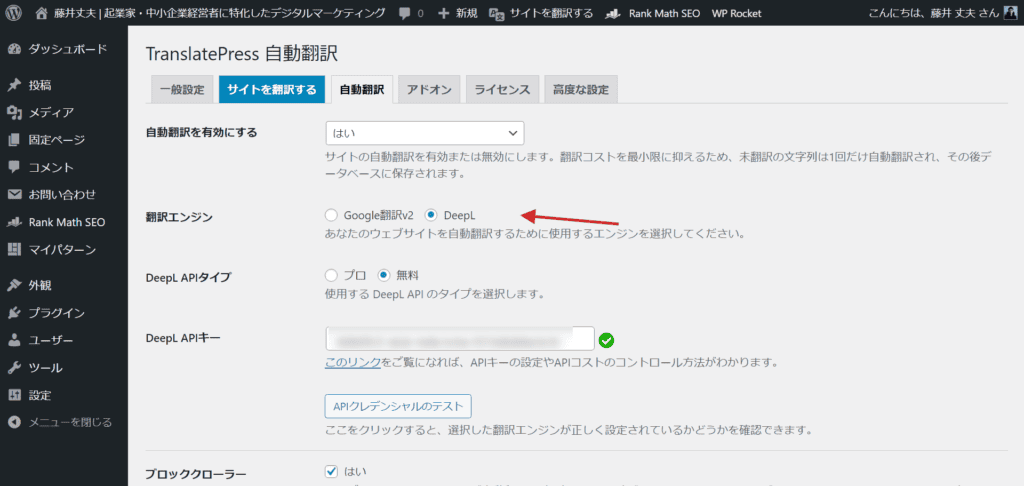
I also reviewed a variety of translation WordPress plugins. WPML, Polylang, etc. I also considered GTranslate and Weglot.
As a result, if you want to translate a large number of blog posts with high quality,TranslatePress is the most cost-effectiveI decided.
I will explain why.
(1) Free version of DeepL API key can also be used
First, TranslatePress can automatically translate without any problems with the free version of the DeepL API. Therefore, you do not necessarily need to use a paid API key.
There is a blog post that says, "When you use the free DeepL API, it will be displayed as 'DeepL is being translated' on the translated page".In fact, this kind of notation does not appear.
This blog also uses TranslatePress and uses the free version of the DeepL API key to translate, but there is no such notation.
If you are interested, please take a look at the automatic translation of this blog.
(2) Once translated, the translation is kept
I have received the following questions in the past.

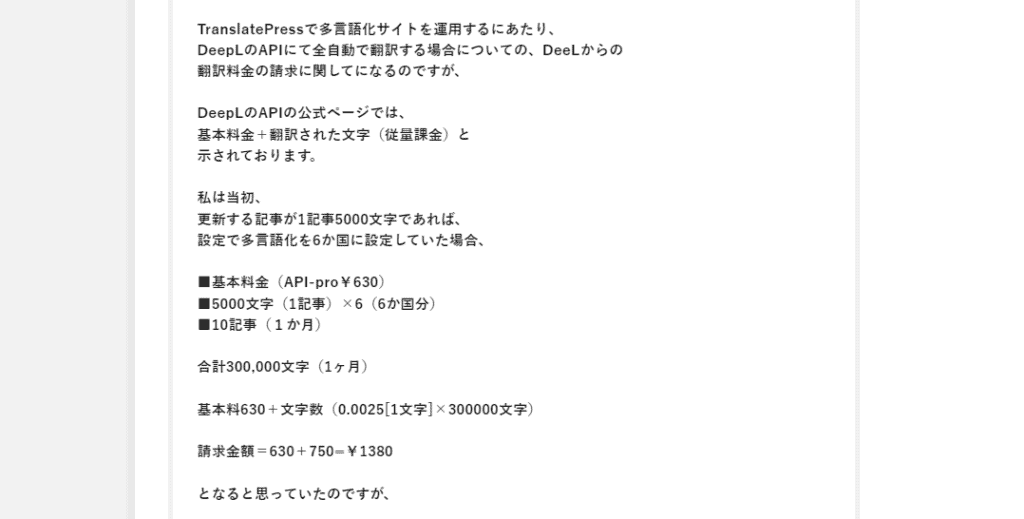
See below for the content of the comment on the image above.
I have a question about the pricing of TranslatePress's DeepL API. When translating 300,000 characters into 6 languages per month, I thought that the bill would be 1,380 yen when I combined the basic fee and the pay-as-you-go billing based on the number of characters. However, if the translation is done every time a visitor visits a page, we realized that the cost can be prohibitive for a site with a lot of visits. Assuming that 1,000 people visit a day, the translation cost is calculated to incur 5,000,000 characters. Is this calculation correct?
I replied:
TranslatePress's DeepL API allows you to use theYou can set a limit on the number of translated characters per day.is. This prevents the risk of high fees.
You can also easily see how many characters you have used, and you can set translation limits for both TranslatePress and DeepL, so you don't have to worry about overspending.
Even if there are many visits to the site,Once a page is translated, the translation is keptTherefore, even if the same page is revisited, it will not be re-translated.
Therefore, even if the number of visits is high, the number of translations will not increase, and the cost will not be enormous.
If you're unsure, you can try the DeepL API for free.
You can translate up to 500,000 characters per month for free. If the free tier is not enough, you can also switch to a paid plan.
We recommend that you start by using the free plan to keep track of your daily translation volume.
Requires a Business plan or higher
There is one caveat.
To use DeepL's automatic translation with TranslatePress, you need an add-on.
DeepL's automatic translation is not available with the free TranslatePress.You must subscribe to the Business plan or higher.

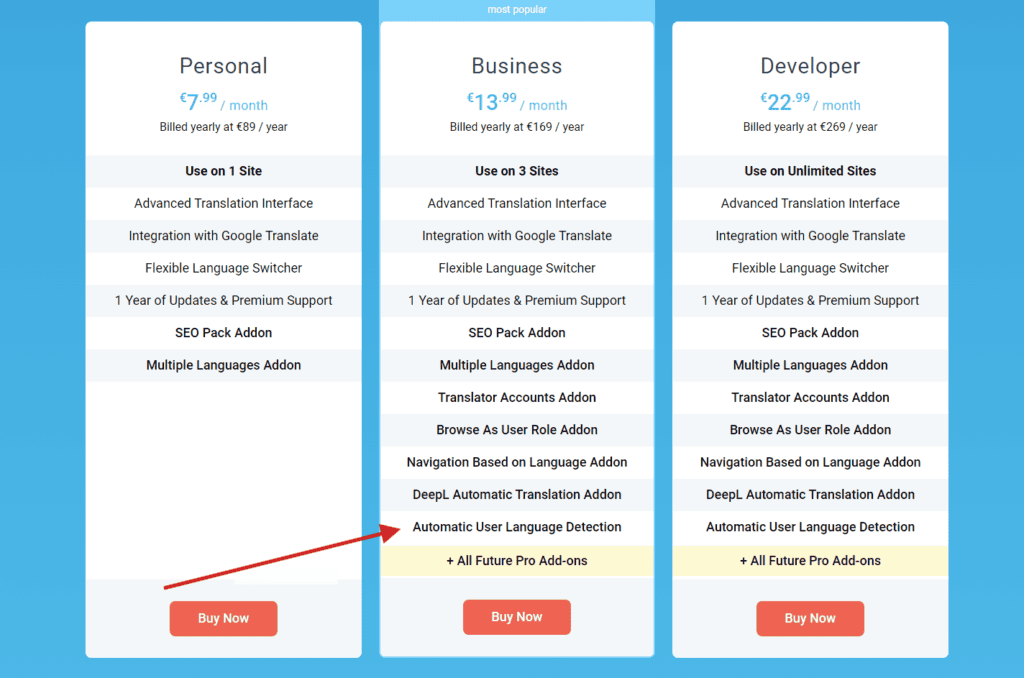
Note: DeepL automatic translation is not available on the Personal plan.
If you are considering TranslatePress, be sure to subscribe to the Business plan or higher.
I have also had the experience of failure in the past.
How to Enable DeepL Automatic Translation in TranslatePress
I explained it in the video above. I will also explain it in the text.
First, install the two plugins for TranslatePress.
- TranslatePress – Multilingual (Free Version)
- TranslatePress – Business (Paid Version)
Once activated, go to the WordPress dashboard > Settings > TranslatePress > Addon.

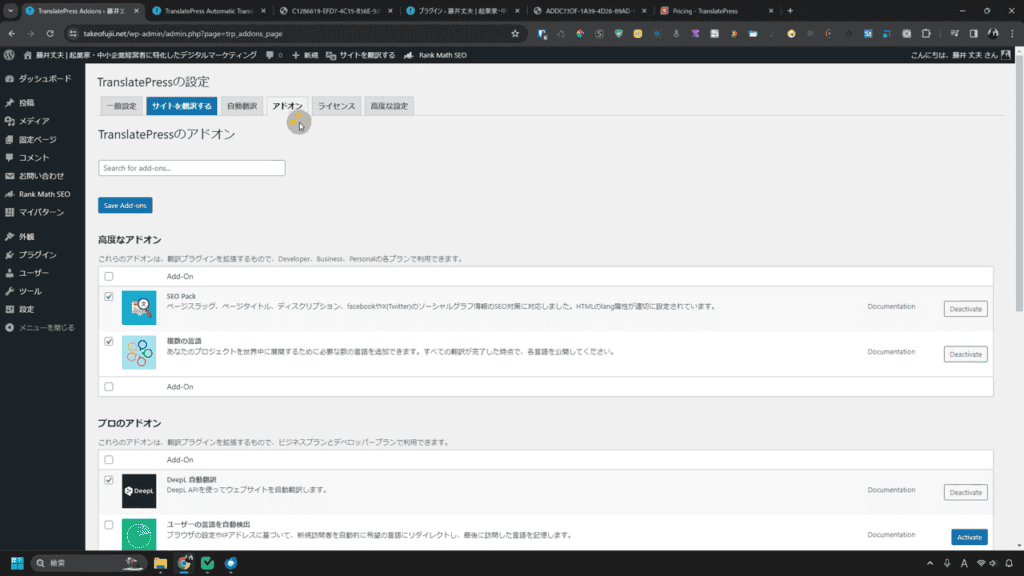
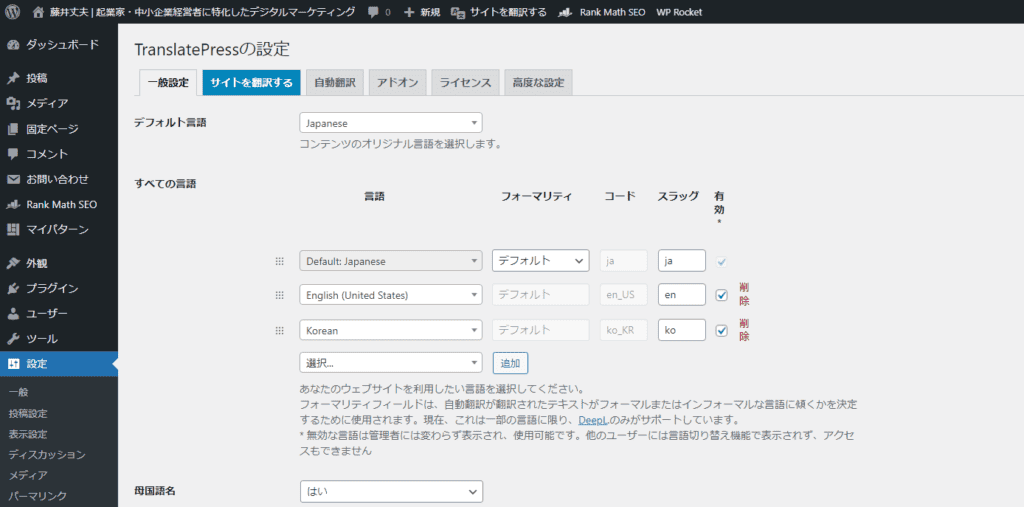
The screenshot image above is in Japanese because I am translating TranslatePress into Japanese.
How to TranslatePress in Japanese
Download the Japanese translating file of TranslatePress here.
*This Japanese translation file was translated by myself. Therefore, I skip translating some parts that are not important to me. Please forgive me.
When you apply this Japanese-language file, most of TranslatePress will be translated into Japanese as shown in the image below.

If you don't know how to use the Japanese file,Is this request form?Please send it with "I don't know how to use TranslatePress's Japanese file".
In that case, we will explain it in a video or blog. Please feel free to send us your request.
Enable DeepL Automatic Translation
To get started, go to TranslatePress settings > Addon.
"DeepL Automatic Translation" is displayed. Please activate it.

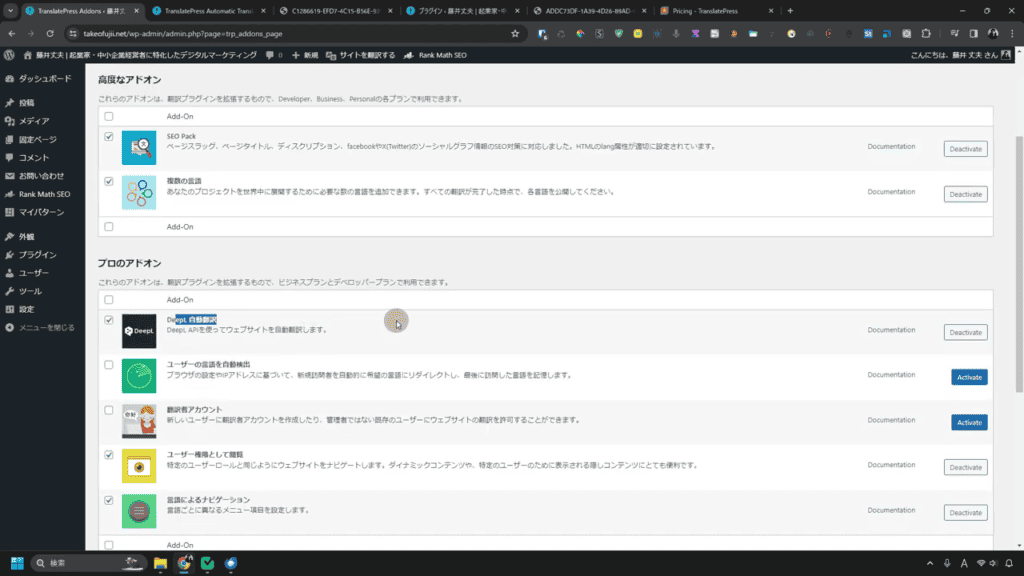
English By setting this setting, the page will be automatically translated in DeepL.
After activation, go to "Automatic translation" from the tab.

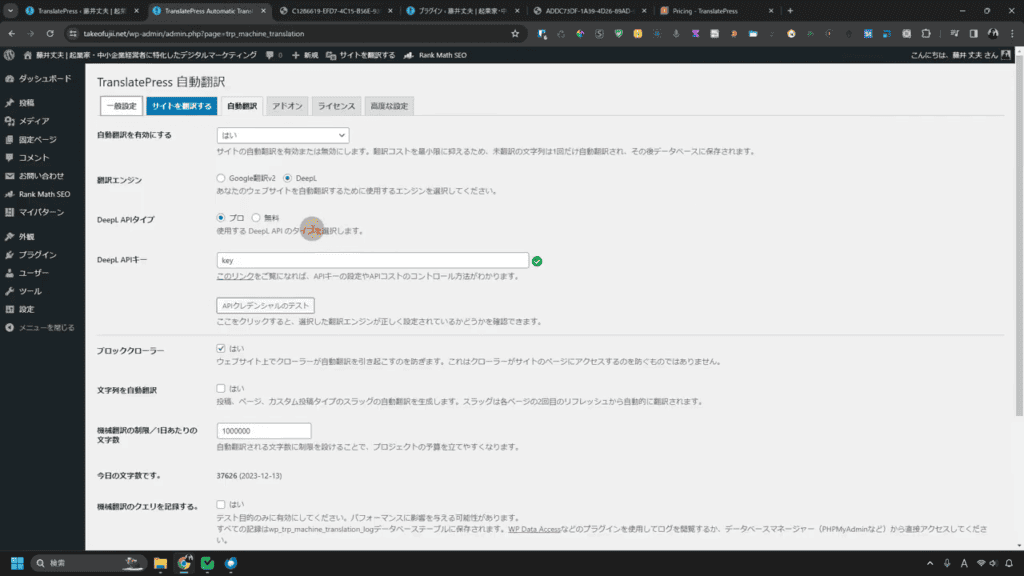
- Enable automatic translation: Yes
- Translation Engine: Choose DeepL
- DeepL API Type: Select "Free" for Free API
- DeepL API Key: Check and enter on the official DeepL website
- - Block Crawler: Yes
- Automatically translate strings: Any (I didn't set me)
- Machine translation limit/Number of characters per day: *
- Log machine translation queries. : I don't set.
*Limit the number of characters that can be automatically translated per day. Prevent overuse and abuse of Deepl's API. Be sure to set it up.
After setting these settings, click the "Save Changes" button.
Translate your pages with TranslatePress's DeepL automatic translation
Enable DeepL translation, then open the page you want to translate on your WordPress site.
In my case, I have a button to switch between each language in the header menu of my blog▼


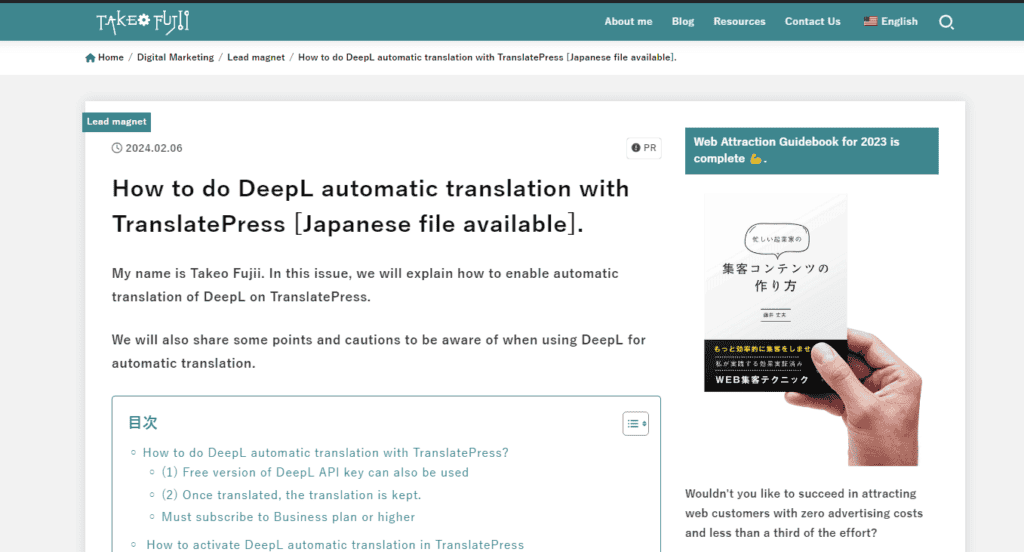
The original language of my blog is Japanese. If you want to automatically translate into English, select "English".
The page you are currently viewing will be automatically translated into English by DeepL.

Are TranslatePress auto-translated pages indexed?
It is a supplement. Will TranslatePress's auto-translated pages be indexed in Google search results?
I will explain in my case.


Now,About 80 pages are indexed.
My blog post is about 119 articles. If you consider that 80 of them are indexed, it is acceptable.
I'm indexing new articles without any problems. Low-quality articles written in the past are not indexed even when translated into English.
As a result, if there is a certain level of quality, it will index even pages automatically translated by DeepL in search results.
Why don't auto-translated pages appear in Google search results?
Sometimes, pages automatically translated by TranslatePress don't appear in Google search results.
- The reason for this is not noticed because it has just been translated
- Poor translation quality (poor quality content)
This is the case when it is judged. The former will be solved by time,The latter requires countermeasures.
In my case, shortly after installing TranslatePress, it didn't appear in Google search results.
At that time, I actually indexed about 5 pages.
However,It was indexed in about a month.
Are the automatically translated pages of low quality? 【SEO】
There is no such thing as "an auto-translated page does not appear in Google search results".
Whether an auto-translated page appears in Google search results or not depends on theIt depends on the quality of the page and the value of the content.
As an exception, there is a way to force it to appear in search results with a black hat, but in principle, it is cheaper to create content seriously with the quality of the content in mind.
Google places great importance on providing useful information to users, and if the quality of automatic translations is poor, it may not appear in search results.
However, there is no such thing as "automatic translation → low-quality → not showing up in search results".
If it's informative content, Google willAutomatic translation also displays articles in search results.
Automatic translation is only an auxiliary tool, and if the original content is of high quality, it will not affect the search results.
There are many examples of other bloggers, including me, where overseas blog posts are automatically translated and displayed in Google search results.
This is part of Google's efforts to also support multilingual content and provide useful information to users.
[Summary] DeepL Automatic Translation with TranslatePress
In this article, we explained how to use DeepL's automatic translation in TranslatePress.
You can use DeepL Translate to translate your WordPress site cheaply and with high quality.

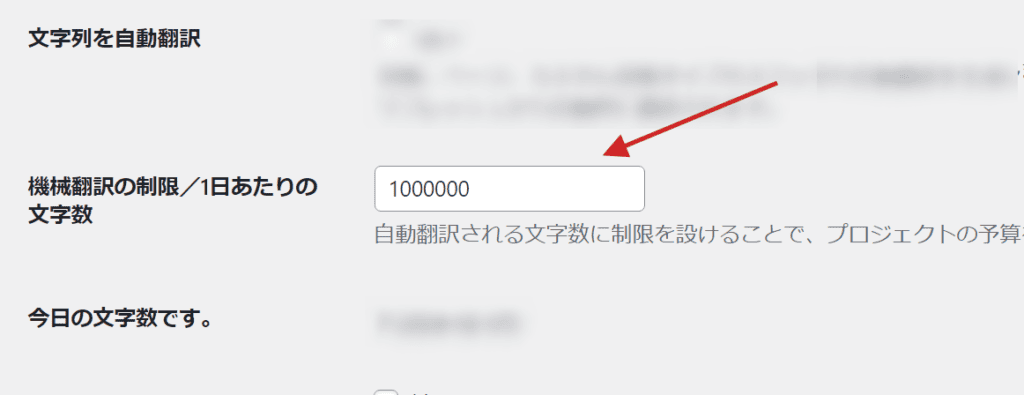
To prevent overuse, be sure to set the number of characters that can be translated per day.
For more information, see the article below on how to use TranslatePress.







![How to Use the AI Voice Memo Tool "AudioPen" [2024 Latest Review]](https://sp-ao.shortpixel.ai/client/to_webp,q_lossy,ret_img,w_250,h_140/https://takeofujii.net/wp-content/uploads/2024/02/audiopen-review-250x140.png "How to Use the AI Voice Memo Tool \"AudioPen\" [2024 Latest Review]")









![WP Rocket Pricing Plans Explained! How to get it cheaply? [Latest in 2024]](https://sp-ao.shortpixel.ai/client/to_webp,q_lossy,ret_img,w_485,h_273/https://takeofujii.net/wp-content/uploads/2024/02/How-to-buy-wprocket-485x273.png "WP Rocket Pricing Plans Explained! How to get it cheaply? [Latest in 2024]")

![How to use Genesis Framework and discount sale information [2024]](https://sp-ao.shortpixel.ai/client/to_webp,q_lossy,ret_img,w_485,h_273/https://takeofujii.net/wp-content/uploads/2022/11/genesis-framework-485x273.png "How to use Genesis Framework and discount sale information [2024]")






Please note that if you add or rewrite the content of the original page, it will be automatically translated again.