


With the automation tool "TaskMagic", you can automate any task on your browser.
Learn about the add-ons provided by this TaskMagic.
"What is the Cloud function?
Is Browser VPN cheap?
We have received many questions about add-ons. Well this timeI will explain the add-ons of TaskMagic.
What are TaskMagic add-ons?


Learn about TaskMagic add-ons.
Briefly explained"Functions sold separately"is.
If you compare add-ons to games...
It will be easy to understand if you imagine a game. In the game, there are powerful weapons and new items sold separately. This is a feature sold separately that can be used in the game.


Of course, these weapons and items are not absolutely necessary.
However, by efficiently purchasing new items with these strong weapons,You can conquer the game more efficiently and have more fun.
This is exactly what add-ons are like.
The same goes for add-ons for TaskMagic. Add-ons are sold separately from TaskMagic's main tools.
Of course, it's not required, but add-ons allow you to automate a variety of things.
Types of add-ons for TaskMagic
There are currently three add-ons on sale.
- Webhooks and Apps
- Remote Buttons (cloud)
- Browser VPN
We will explain each of them.
Webhooks and Apps Add-ons
The Webhooks and Apps Add-on is one of the powerful add-ons offered by TaskMagic.


Zapier andPabbly ConnectYou will be able to launch automation from external apps such as Google sheet.
Webhooks are also available. When a specific event occurs, it can be automated.
Can Webhooks and Apps help with automation?
Simply put, webhooks are like "mailboxes" for sending data from external apps to TaskMagic automation.
You can use the data you receive to automate with TaskMagic.
In terms of simple usage,
- Post a new article in WordPress
- Automatically send data from WordPress to TaskMagic
- TaskMagic receives data
- TaskMagic automatically launches and promotes new articles on social media
You can also create automations like this. This means that when an action is performed in another app, it is possible for TaskMagic automation to start on its own.
More features of Webhooks and Apps


The data must be in JSON format, and TaskMagic will automatically process this data and make it dynamically available within the automation.
A practical example of this feature is
- Real-time data integration with other apps
- Event-driven automation (launches automation when a specific event occurs in an external app)
This allows you to link with other apps and start automation in real time.
It is possible to create powerful and unique automations.
Webhooks and Apps Pricing


It costs $19 per month.
At first glance, you may have the impression that this add-on looks difficult. It's a surprisingly practical add-on.
Remote Buttons (cloud) add-on

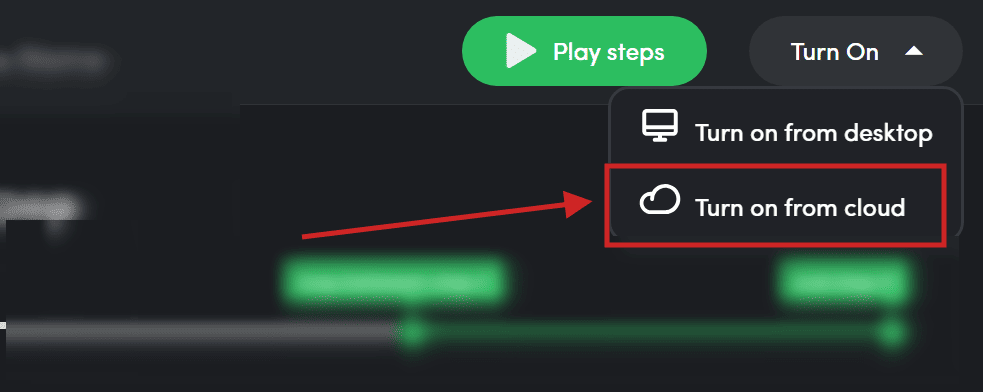
With the Remote Buttons (cloud) add-on, you can manage and run task automation remotely.
Let's say your computer is turned off. Even in that case, it is possible to continue automating tasks with TaskMagic in the cloud.
Why is Remote Buttons (cloud) useful for automation?
To put it simply, the Remote Buttons (cloud) feature is a very useful add-on that allows you to automatically keep important tasks done while you're asleep or in a distant location.
- You can start it even when you're out and about from your smartphone (Trigger)
- Can run automatically in the cloud based on specific trigger settings
For example, let's say you want to do a specific data collection task while you're sleeping at night.
Normally, to automate these tasks, you need to turn on your computer and run it.
However, with Remote Buttons (cloud), these tasks can be performed automatically in the cloud.
Whether you're on the go or sleeping, you can automatically perform tasks when certain conditions are met.
It's a great add-on for busy entrepreneurs and those who want to automate their routine tasks.
Pricing for Remote Buttons (cloud)
Explain the pricing plans for TaskMagic's cloud add-ons.


It is usually $29 per month. You can do 12 hours of remote automation per month.
This cloud add-on is currently also available with a one-time purchase plan.

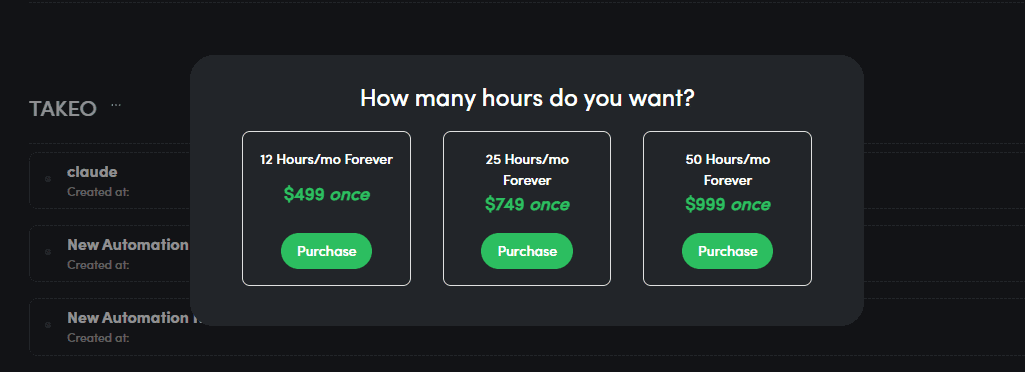
You can purchase Remote Buttons (Cloud) by paying a single fee from this page.
The prices for the one-time purchase plan are as follows.
| Plan | Price | Content Provided |
|---|---|---|
| 12 hours/month | $499 (one-time payment) | 12 hours/month (permanently) 10,000 API Tasks Control cloud usage per workspace |
| 25 hours/month | $749 (one-time payment) | 25 hours/month (permanently) 50,000 API Tasks Control cloud usage per workspace |
| 50 hours/month | $999 (one-time payment) | 50 hours/month (permanently) 100,000 API Tasks Control cloud usage per workspace |
The plan offered is priced at $499, and there are various other pricing plans available.
Browser VPN Add-on

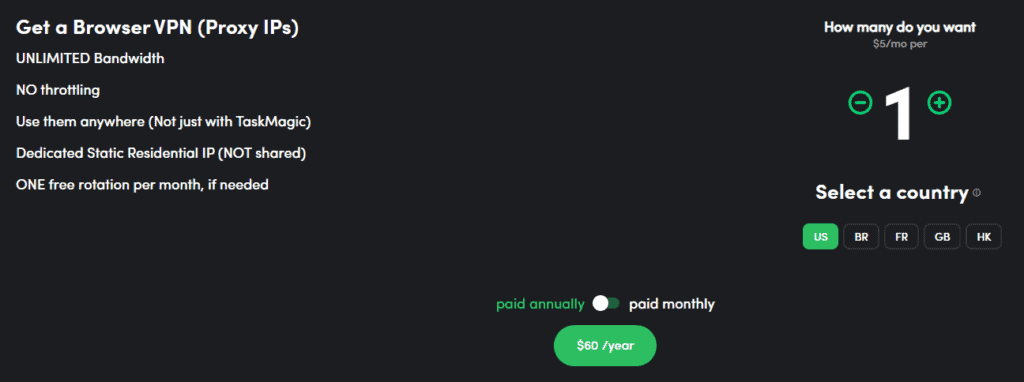
Learn about the Browser VPN feature. To put it simply,
- I don't want to be tracked on the Internet, I want to automate anonymously
- I want to automate a geo-restricted site
This is a recommended add-on for people like this.
Why is Browser VPN useful for automation?
When we use the Internet, our computers and smartphones have a special number called an "IP address".
Through this number, it communicates with other computers and servers.
However, this IP address can show us our general location and internet behavior.
This is where the Browser VPN feature comes in.
Browser VPN is an additional add-on that allows you to hide your real IP address online and use a different one.
You will be able to automate safely on the plaza while protecting your privacy.
Even if a particular site prohibits access from Japan, you can still use a VPN to bypass that restriction by using an IP address from a different country.
Browser VPN Details
Let's explain the functionality of the Browser VPN feature provided by TaskMagic.
Unlimited Bandwidth:
No restrictions on downloading or uploading data. You can use it to worry about restrictions
Residential IP


It uses an IP address assigned by a common household, making it reliable and easier to bypass access restrictions.
The IPs you can choose from are the following countries:
- US: United States
- BR: Brazil
- FR: France
- GB: United Kingdom (United Kingdom; short for Great Britain)
- HK: Hong Kong
With increased anonymity and security, you can also worry about automation such as scraping.
TaskMagic's Browser VPN feature is definitely a worthwhile add-on for privacy-conscious users.
Browser VPN feature pricing
The Browser VPN feature is charged for
- Monthly Plan ($9/month)
- Yearly Plan ($60/month)
These two are available.
We are currently in a special promotion period. So, you can use the annual plan for $5 per month
You can also buy as many IP addresses as you want and use them to automate your clients' and customers' sites.
Summary: Do I Need Add-ons for TaskMagic?
TaskMagic add-ons "Webhooks and Apps", "Remote Buttons (cloud)", "Browser VPN"
Whether these are necessary. In conclusion, automation is possible without the use of add-ons.
"How far do you want to automate" Please judge based on this one point.
Sure, having these add-ons will expand your automation.
- Webhooks and Appsis a powerful add-on that allows you to launch automations from other apps and events. This add-on can be very useful if you want to work with other apps to perform automation.
- Remote Buttons (cloud)is an add-on that allows you to start automation on the go with your smartphone, and even when you are sleeping, you can schedule automation based on certain conditions.
- Browser VPNis a very useful add-on for those who want to automate by bypassing geo-restrictions while maintaining anonymity online. It is especially recommended for users who value privacy.
These add-ons can enhance TaskMagic's basic automation capabilities.
If there are many requests, I will make a video explaining how to use these add-ons▼
Currently, there are still few users of TaskMagic in Japan, so I don't think there is a demand for add-on explanations...
If you are interested, please give it a try.












Latest Comments