



Hello, this is Fujii. This is a summary of how to resolve bugs and glitches that occur in the automation app TaskMagic.
If you read these articles and they don't go away, let us know in the comments below this article.
This information summarizes bugs that occur as of November 1, 2023 and how to resolve them. Depending on the version you are using, it may already be resolved.
- 1 What is TaskMagic? Why is there a bug
- 2 (1) Chromium Browser startup problem
- 3 (2) The automation window keeps opening.
- 4 (3) Problems with automation not running normally
- 5 (4) Unable to add automation work
- 6 What if I encounter a bug or glitch in TaskMagic?
- 7 TaskMagic: Summary of how to fix bugs and glitches
What is TaskMagic? Why is there a bug
TaskMagic is an AI automation app that allows you to efficiently automate routine and repetitive tasks on your daily tasks.
For more information, please see this article.


We have received comments from many managers and marketers that "we were able to automate all the troublesome manual tasks" and "I'm glad I purchased it."
TaskMagic is constantly adding new features.
On the other hand, when new features are added,It creates some bugs and glitches.To be honest, this is quite stressful.
In this article, we'll take a straightforward look at the main known bugs and glitches in TaskMagic and how to fix them.
It also explains how to report bugs and glitches and how to resolve them through developer-community collaboration.
I have a bug, but is TaskMagic okay?
For those who bought it with high expectations, there will be times when they regret buying it, saying, "Eh, TaskMagic is having problems, is this okay?"
To be honest, the bug is noticeable compared to other RPA and automation apps."I wonder if I bought it and failed."I thought at first.
In fact, at first, I even said, "You don't need to buy this."
So I understand how you feel.
However, bugs and glitches are being fixed more and more.
TaskMagic continues to evolve
If you regret buying TaskMagic, watch the video below.
This video was first posted on TaskMagic founder Jeremy Redman's YouTube channel.
The earliest TaskMagic was unthinkably difficult to use today. Please compare it with the current TaskMagic.
In the past year, the functions have obviously been updatedYou can see that.
Thus, TaskMagic continues to evolve one after another.
We have received reports of bugs and glitches, but the TaskMagic development team is actively working to resolve the issue based on feedback.
Current bugs and bugs will also be fixed.
However, I will tell you how to solve the current bugs.
(1) Chromium Browser startup problem
Issue details: An issue has been reported when using TaskMagic, the automation window (Chromium Browser) does not launch after clicking "capture steps".

The cause is that you have an outdated version of Chromium installed.
The solution is to update your Chromium version.
Specifically, the solution is to first go to the user area of the computer,「. chromium-browser-snapshots" folder.

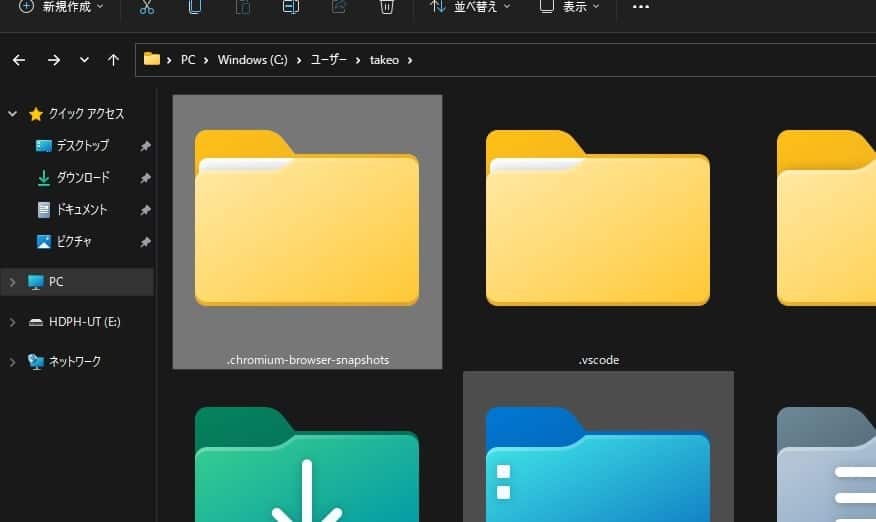
After deleting the folder in it, exit TaskMagic once.
After that, reboot and the new version of Chromium will be automatically installed, which will eliminate the problem.
(2) The automation window keeps opening.
There have also been reports of issues with TaskMagic that unnecessary windows keep opening.

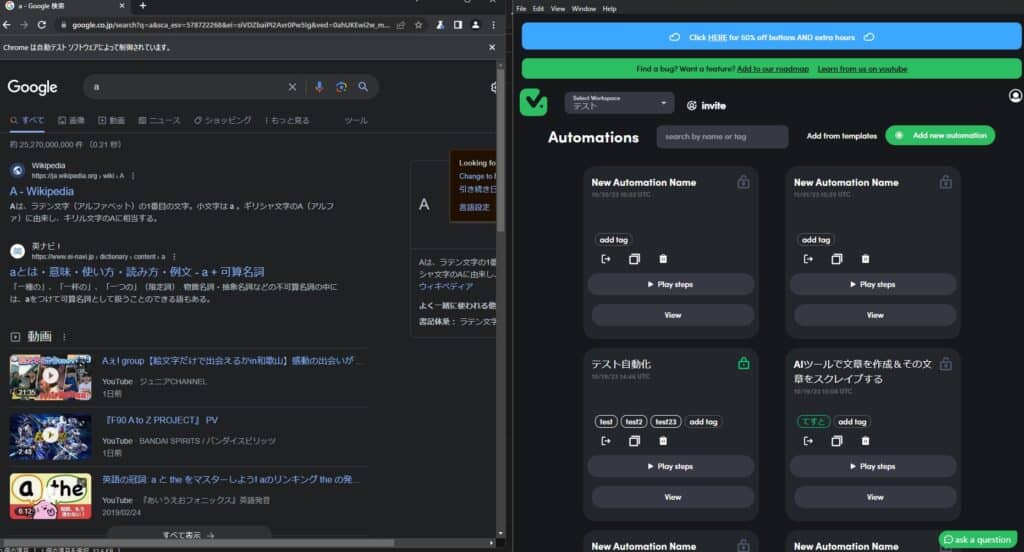
Please see the image above. It's a little hard to understand, but the automation is already over on the TaskMagic screen on the right.
Nevertheless, in the left window, TaskMagic automation continues to start.
In this way, even though TaskMagic settings or automations have finished starting, the window may continue to rise.
It seems that people who run TaskMagic on Windows, in particular, are encountering this problem.
Causes and solutions
This issue occurs because the correct termination is not made.
The solution is toOpen the Task Manager and force the extra TaskMagic to close.

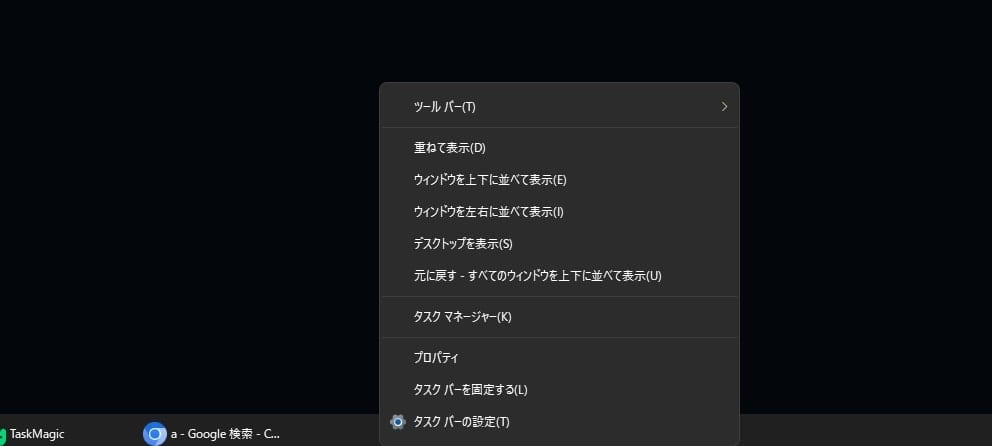
First, right-click on the taskbar.
Then click on Task Manager.

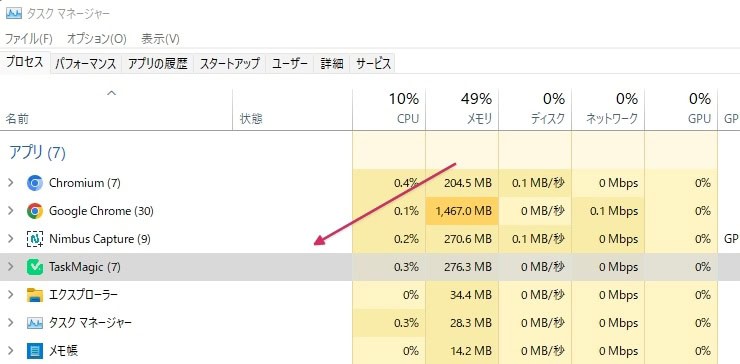
Right-click on "TaskMagic" in the app to end the task.
This will end all TaskMagic.
Try restarting TaskMagic afterwards.
This method is also recommended by the TaskMagic official. Also, it seems that this bug fix is currently in progress, so let's wait.
It's also one of the bugs that you encounter and feel stressed, so I expect it to be fixed early on.
(3) Problems with automation not running normally
Sometimes scraping or creating click-through automations for certain elements doesn't work well.
Why does that happen? Watch the video below.
This is because you haven't been able to specify the elements properly.
The advantage of TaskMagic's automation is that it is intuitive to set up, but if you specify the wrong elements, clicks and scrapes will not perform well.
(4) Unable to add automation work

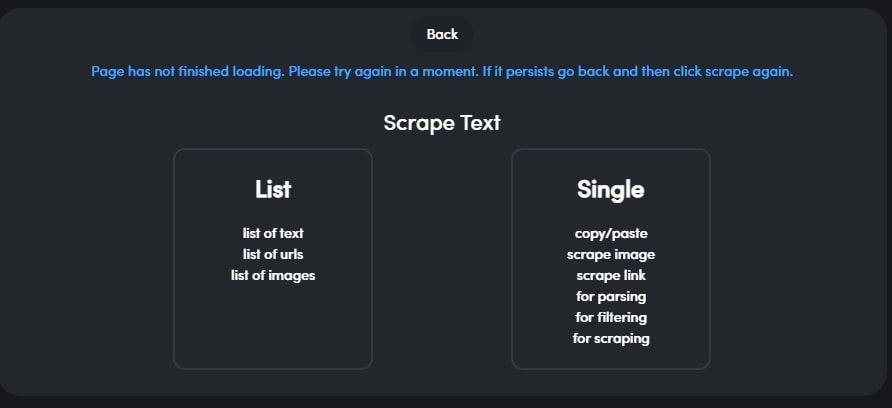
If you are setting up an automation in TaskMagic and try to add a new step, you may encounter this notation and cannot add it.
“Page has not finished loading. Please try again in a moment. If it persists go back and then click scrape again.”
(The page hasn't finished loading yet.) Please try again. If it still persists, go back and click "Scrape" again. )
This is caused by an attempt to add a new step before the page finishes loading.
To solve it,Add a new step after the page is fully loadedis.
If you are already seeing this display, you can try exiting TaskMagic once and restarting it after a while.
What if I encounter a bug or glitch in TaskMagic?
Bugs and glitches in TaskMagic are being fixed sequentially. However, there may be bugs that the development team is not aware of.
Let the TaskMagic development team know about the presence of bugs and glitches.Simple bugs are fixed quickly.
How to report a bug or glitch in TaskMagic
Reporting a bug in TaskMagic is easy.
TaskMagic bug report pageYou can post from

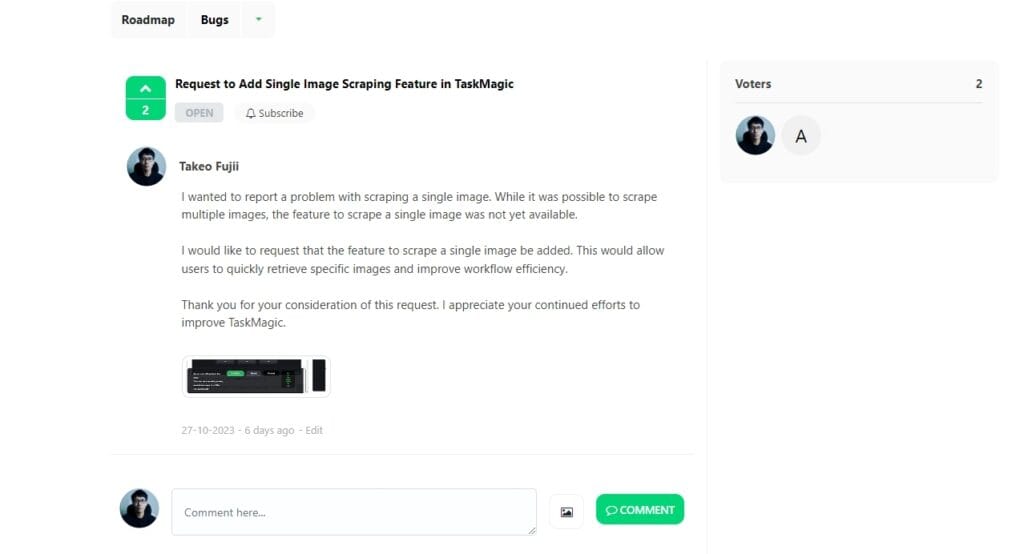
Anyone can post by simply registering their email address and name.
orYouTube video of Jeremy, founder of TaskMagicWrite a comment on the

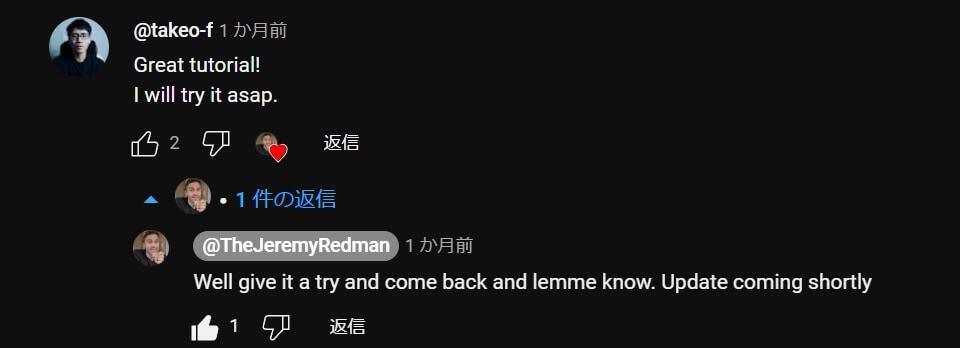
Jeremy replies to almost every YouTube comment. Amazing right.
We are open to questions and requests, so please ask questions if they are simple.
If you say, "But I'm not good at writing messages in English,"With DeepL translation, you can write English that conveys a certain amount of English.
By the way, Jeremy seems to have a child this year. There is also childcare, and there may be some delays in replying.
In that case, we recommend that you write to the TaskMagic bug report page.
When a fix is released, you can update the app to eliminate bugs and glitches.
TaskMagic: Summary of how to fix bugs and glitches
I myself have used many automation apps, RPA. Here are my impressions when I first used TaskMagic.
I was quite distrustful. I had no intention of introducing it.
… However, three months later, I am still using TaskMagic every day.
The TaskMagic development team is actively addressing reported bugs and glitches. It's a huge improvement since I first used TaskMagic.
In the first place, one year ago, the level of perfection was not as high as it is now.


It has been greatly improved and added features to this day.
Jeremy, the founder of TaskMagic, is also aware of the current bugs and is fixing them one by one.
From next year onwards, more functions will be added, and automation will be created more freely.
P.S. We are currently working on a website that explains how to use TaskMagic.


I will publish the article after it is completed to a certain extent. We also plan to create a place for TaskMagic users to share information if there are many requests.











I am always indebted to you. I'm not sure where is the right place to ask, but any advice would be appreciated.
I was troublesome to manage my password when registering ChatGPT, so I registered with a so-called social login using my Google account.
And this time I'm trying to operate ChatGPT with TaskMagic, but I'm a little reluctant to give my Google account password to the Chromium browser. There is no item related to canceling social login on the ChatGPT side (including OpenAI's site), and even if you log out and change your password, you can only log in to social login. I remember that Katteb used to be able to cancel social login and change it to log in with email address and password, but can't ChatGPT do that? If you know anything, please let me know.
It is not an essential problem because you only need to prepare a new email address, recreate your account, and change the billing settings (no charge for existing accounts and billing for new accounts), but it is a little uncomfortable because there are multiple email addresses to use.
In a hurry, I plan to avoid social logins on newly registered services (especially those that are possible for TaskMagic). What is your policy on social login? Please let me know if you like.
Sorry for the question that is a bit off the hook with TaskMagic while you're busy.
Thank you for your question. I just made a video about this▼
https://www.youtube.com/watch?v=D3chiYcj-HE
This method ensures that you don't directly enter your login information on ChatGPT or other sites.
I would be very happy if you found this video helpful.
I cut it out in the video, but there is no doubt that cookies are also important information.
That said, it's much more secure than sending your Googel account login details directly to TaskMagic. (It's also nice to be able to skip all the login steps.)
There are various extensions that can retrieve cookies, but in this video, we have introduced the following extensions.
https://chrome.google.com/webstore/detail/cookie-editor/hlkenndednhfkekhgcdicdfddnkalmdm
Probably the safest thing to do is to create your own extension of this kind.
However, not all extensions are dangerous, so check reviews and update dates before using them.
Also, if you have any questions at any time, please feel free to ask 💪 us
Thank you very much for your very quick advice.
Mr. Fujii, I am late in replying.
Thank you for your answer and video. I want to choose a reliable extension in this way.
However, it is not 100% secure, so in the future, we will try not to use social login as much as possible for what is included in the automation, and we will create and use individual accounts that will not cause serious injury even if it is leaked.
That security awareness is wonderful.
I myself believe that no app can be guaranteed to be safe.
This is not limited to TaskMagic, but also no matter how well-known the app is.
If you have any questions about TaskMagic, please feel free to contact 💪 us