


Hello, Fujii, I'm strong.
"How did you create the top page of your site?"
That's what I'm asked. The homepage of my website is free to design the layout and design. The pages on my website, including the top page, are freely designed for pages.
How do you create this customized layout or design on WordPress?
So this time, I am usingWordPress Page Builder BrizyI will introduce you.
This page builder is intuitive for beginners to navigate and create engaging pages. Each page designed for my website was created using this Brizy.
I encourage web marketers and entrepreneurs who are building websites with WordPress to take a look at using this WordPress page builder, Brizy.
By the time you finish reading this article, you will definitely beTry Brizy at least onceYou will think.
What is WordPress Page Builder Brizy?


Brizy is a simple explanation:WordPress plugins that allow you to design pages freelyis.
No matter what WordPress theme you use, you can freely create page layouts and designs without being tied to the design of that theme.
Brizy claims to be a "next-generation page builder" that allows you to create highly designed pages with drag and drop, so even beginners with no difficult knowledge can operate intuitively.
Brizy is a relatively new WordPress page builder that was just released in April 2018, but it is developed by the same company as ThemeFuse.
Brizy is a team with a proven track record from 2009 to the present.
Powerful functions and features of Brizy
The characteristics of this Brizy are:
Even without specialized knowledge, anyone can easily create freely designed pages on WordPress.That's Brizy.
However, there are other WordPress page builders around the world besides Brizy in the same way. How is Brizy different from popular page builders like Elementor and Divi?
Let's take a look at the main features implemented in Brizy.
High-Quality Landing Page Templates

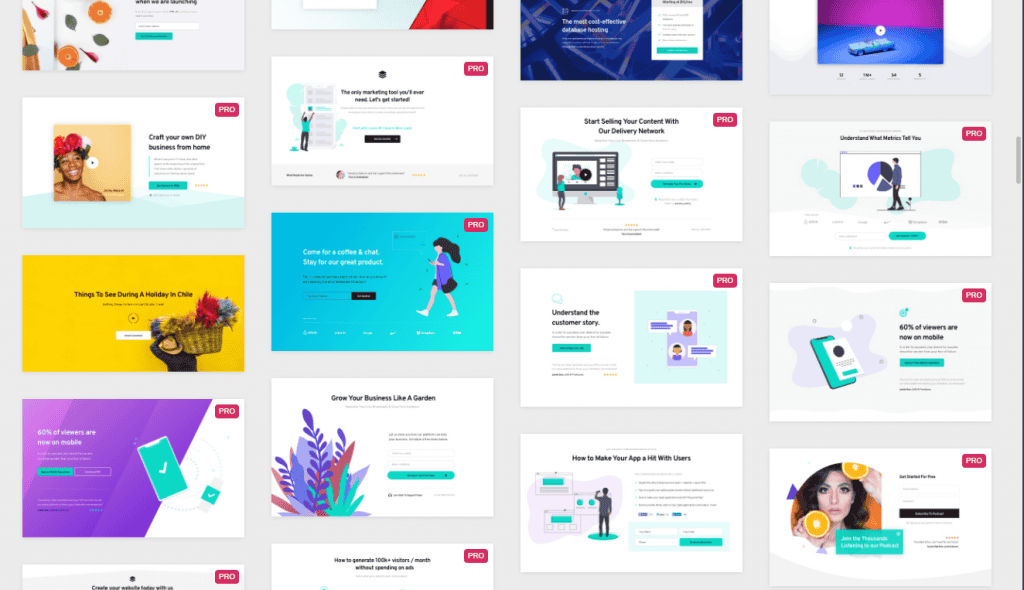
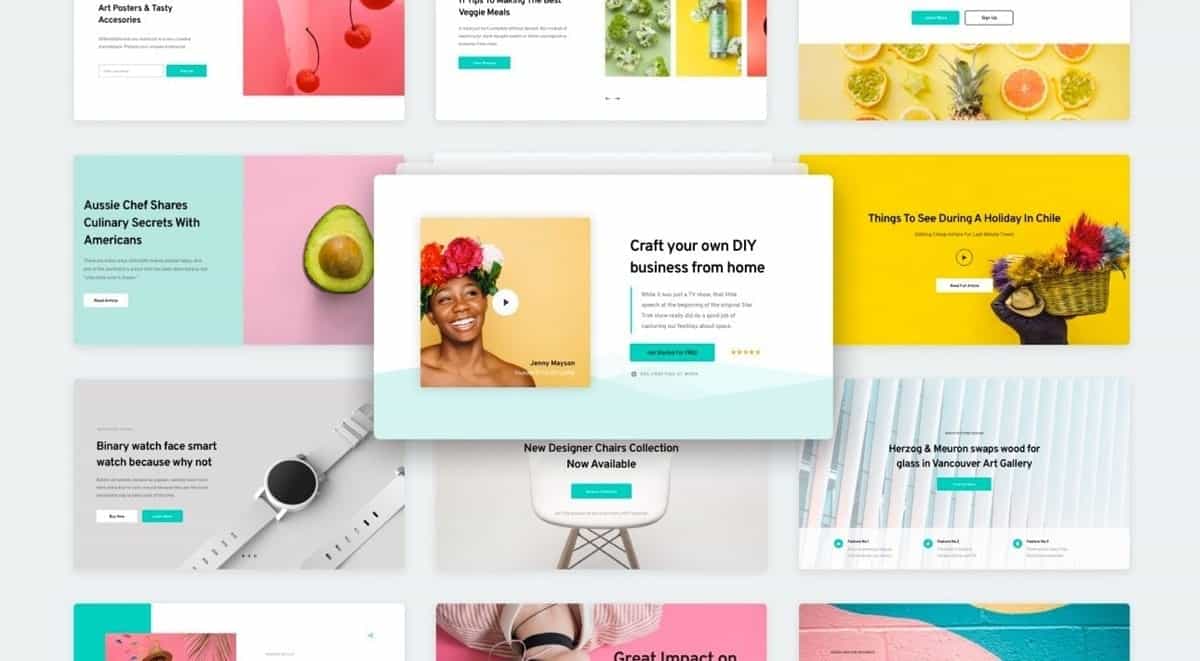
You don't have to create a design from scratch. Brizy has a wide selection of high-quality, great-looking templates.
You can import the template into your page with just a click. Without the stress of deciding on a design from scratch, you can create a page that looks like it was done by a pro in just a few seconds.
Even if you create a page using a template, you can freely customize all elements such as text, images, and colors on the page, so even if you use the same template, the design will not be overlapped with others.
Even if you are not confident in your design, you can use a template.
Customizable blocks

In addition to templates, Brizy also offers a number of useful blocks.
You can select a block and drag and drop it to add a new block to your page.
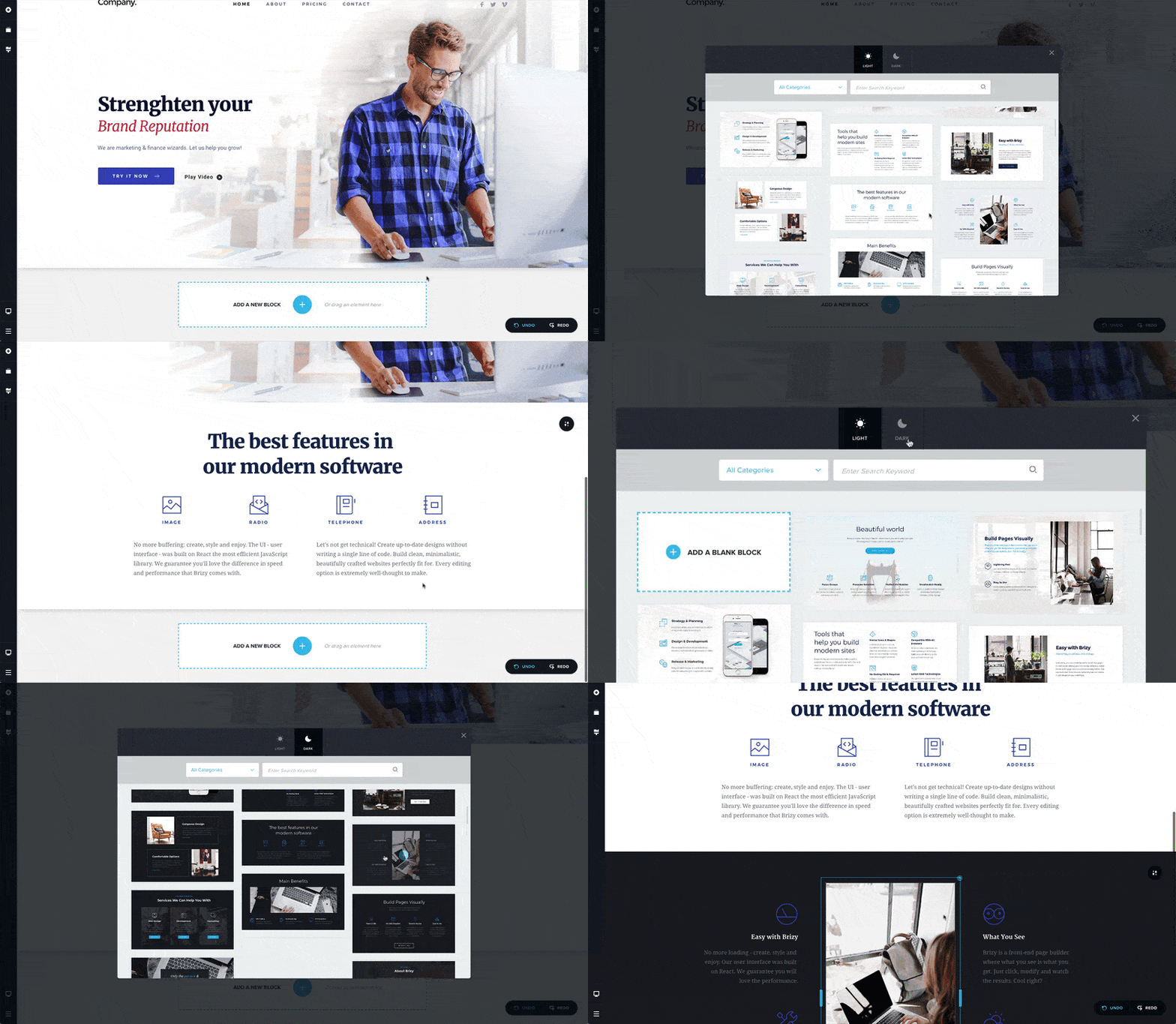
Using blocks can dramatically reduce the effort and stress of creating designs.
By the way, this block can be switched between two versions with one touch: Light (light) and Dark (dark), so you can match the atmosphere of the landing page you want to create.
Rich in strong parts elements
In addition, if you want to customize the page in detail, you can freely add parts (parts).
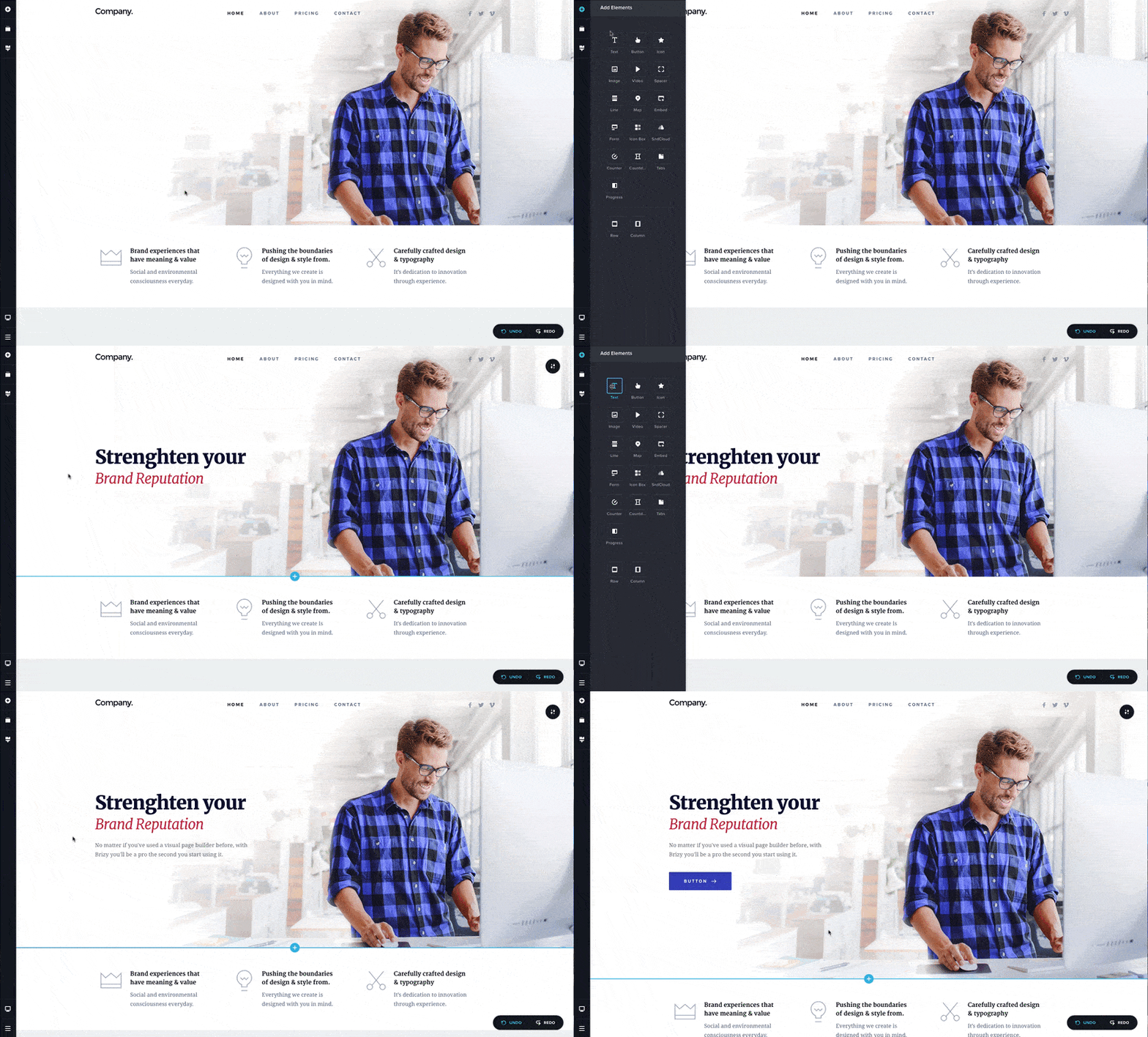
This way, you can freely place text, images, videos, and other powerful parts to create your own landing page.
Bulk change of color scheme & design
You can also customize elements on your page together with a single click.
For example
- I want to unify the size of all fonts on the page to the same size.
- I want to change the color of both headings and fonts at once.
- I want all fonts on the page to be in the Ming Dynasty style.
In such cases, it is difficult to change each letter and color by hand. However, with Brizy, you can change the text and colors on the page all at once with a single click.
This means you don't have to spend time manually changing the color or size of each one over time.
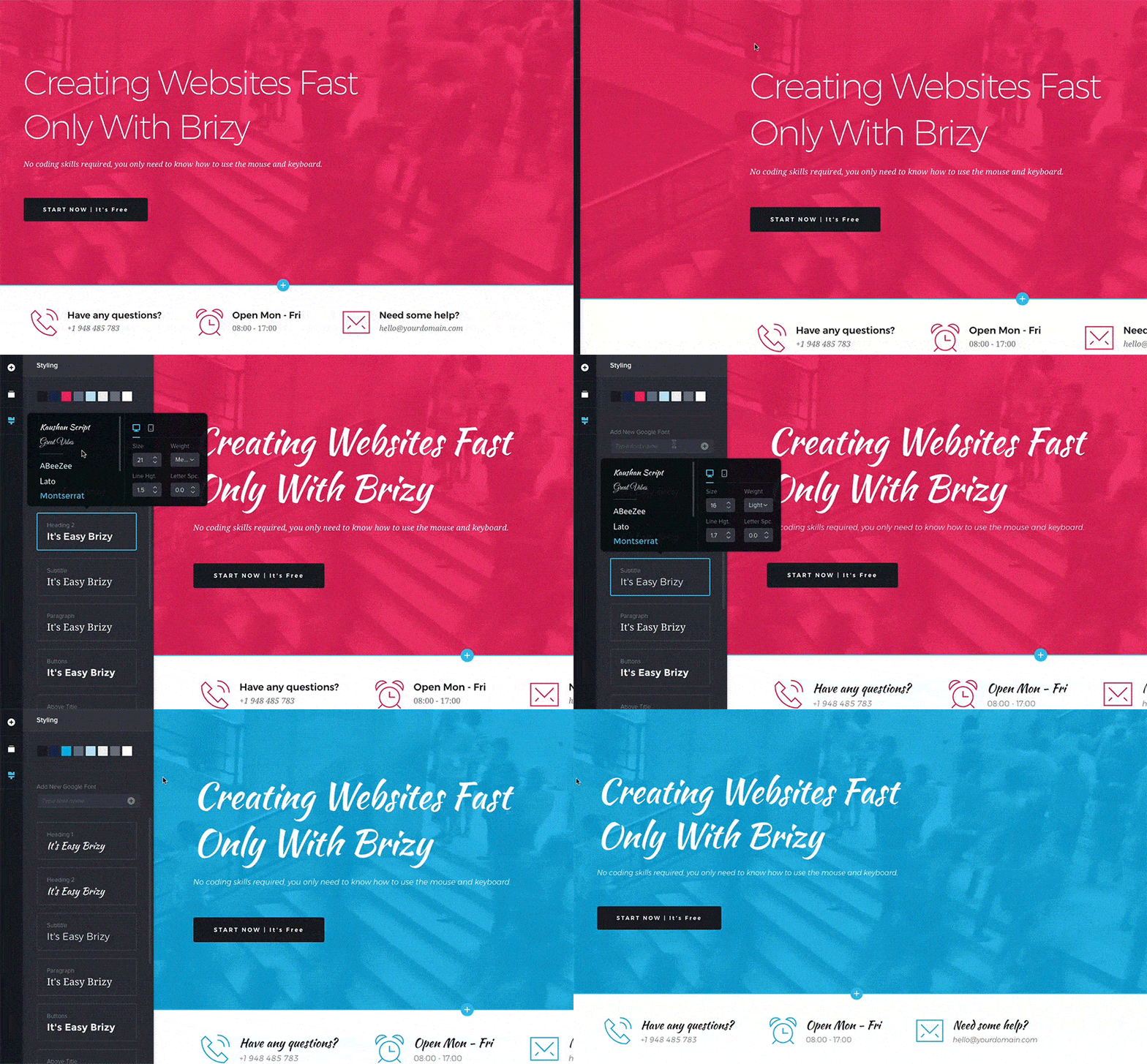
You can change everything in bulk. This is efficient.
Add fonts freely
Brizy gives you the freedom to add any font you want.
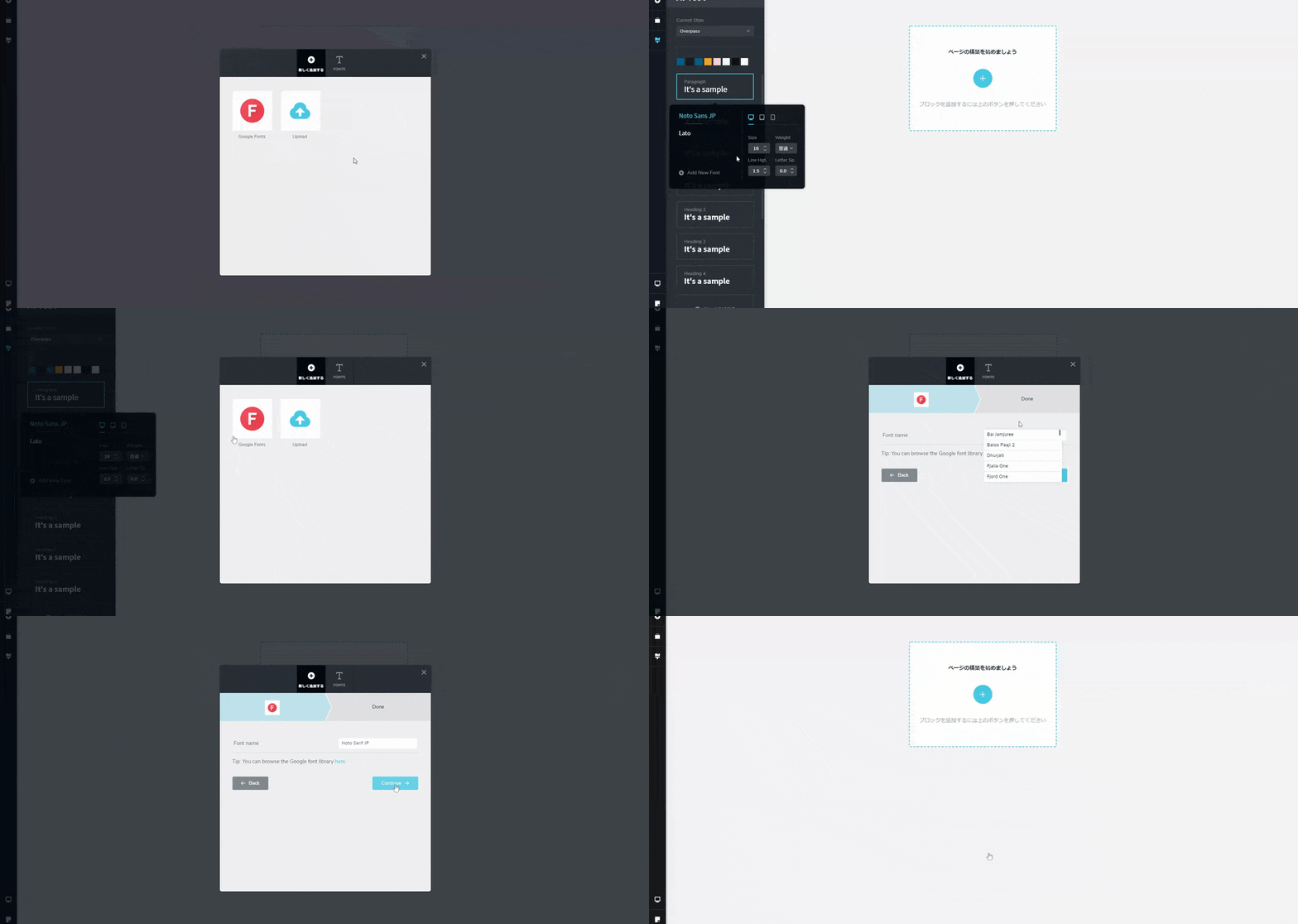
There are two ways to add fonts.
One is to choose from Google Fonts and import it, or the second way is to upload the font yourself from your computer. From these two, you can freely change the font on the page in any way you like.
By changing the font, you will be able to create pages more closely to your brand.
Switch and adjust designs for each device
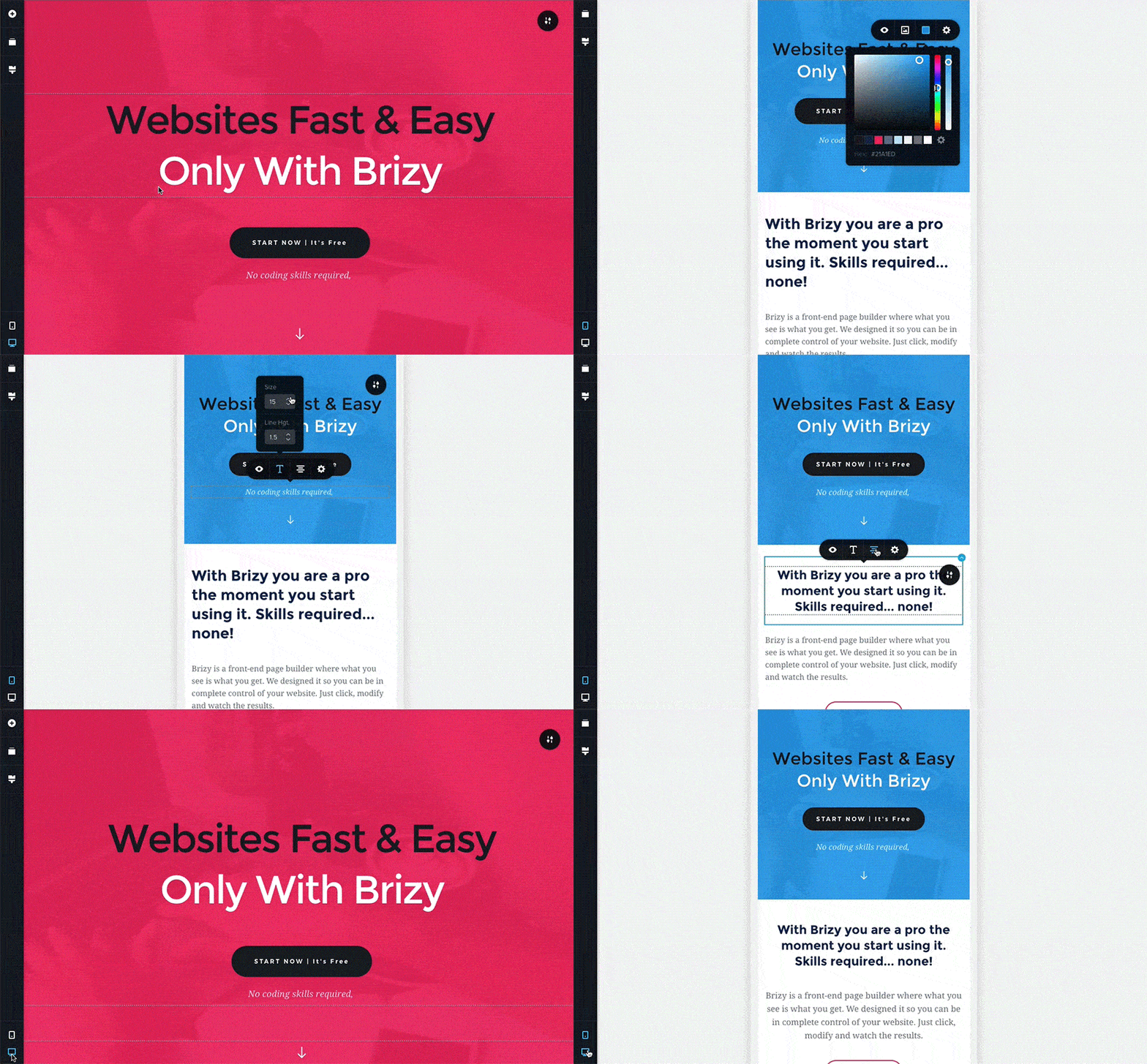
Also, when creating a landing page, you must have "responsive support"
As you know, in this day and age, websites are viewed on smartphones. Your web page will not always be displayed on your computer.
How the page is displayed on a smartphone or tablet is very important in attracting customers on the web.
In particular, you should be careful not to display the layout of the page when viewed on a tablet, or the size of the text on the page is too small and difficult to read when viewed on a smartphone.
Therefore, make sure that the pages you create can be displayed on all computers, smartphones, and tablets without any problems.
To put it simply, the display on a computer is easy to see! But it's hard to see the display on your smartphone. In that case, people who are browsing your page from their smartphones will lose the desire to look at the page.
However, with Brizy, you can freely design your design according to the screen size of your computer, smartphone, tablet, or device. In other words, by using Brizy, your page will be compatible with all your devices, including computers, smartphones, and tablets.
As a result, visitors from all terminals can read the page without stress, so you will succeed in attracting customers on the web.
Popup builder features
Brizy also has marketing features to generate leads. You can use Brizy to display popups on your page.
Please see here.

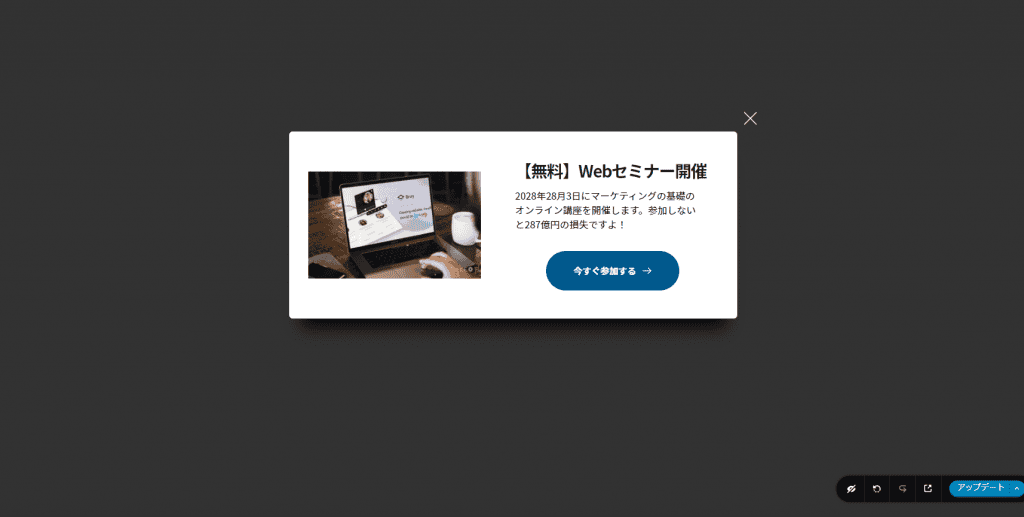
A pop-up that appears on the page. This pop-up feature is also implemented in Brizy.
This pop-up can also be customized freely. You are not bound by the width of your design.
- Pop-ups appear when the page is about to close
- Show pop-ups only on specific pages
- You can freely choose which pop-ups to display on each page
You can also set how your pop-ups are displayed however you want, so you don't need expensive pop-up tools with one Brizy.
Page display speed is super fast
You may have experience using WordPress page builders like Elementor.
When you use a WordPress page builder to create pages, you may end up with good design but slow down to display.
In fact, if your page is slow, your conversion rate will decrease, which will have a significant impact on your sales. We know that if a site takes more than 3 seconds from click to display, nearly half of users will leave.
Slow page display speed can cause stress to visitors and reduce usability.
The WordPress page builder "Brizy" is also a good display speed. The page display speed is super fast. Please see below.

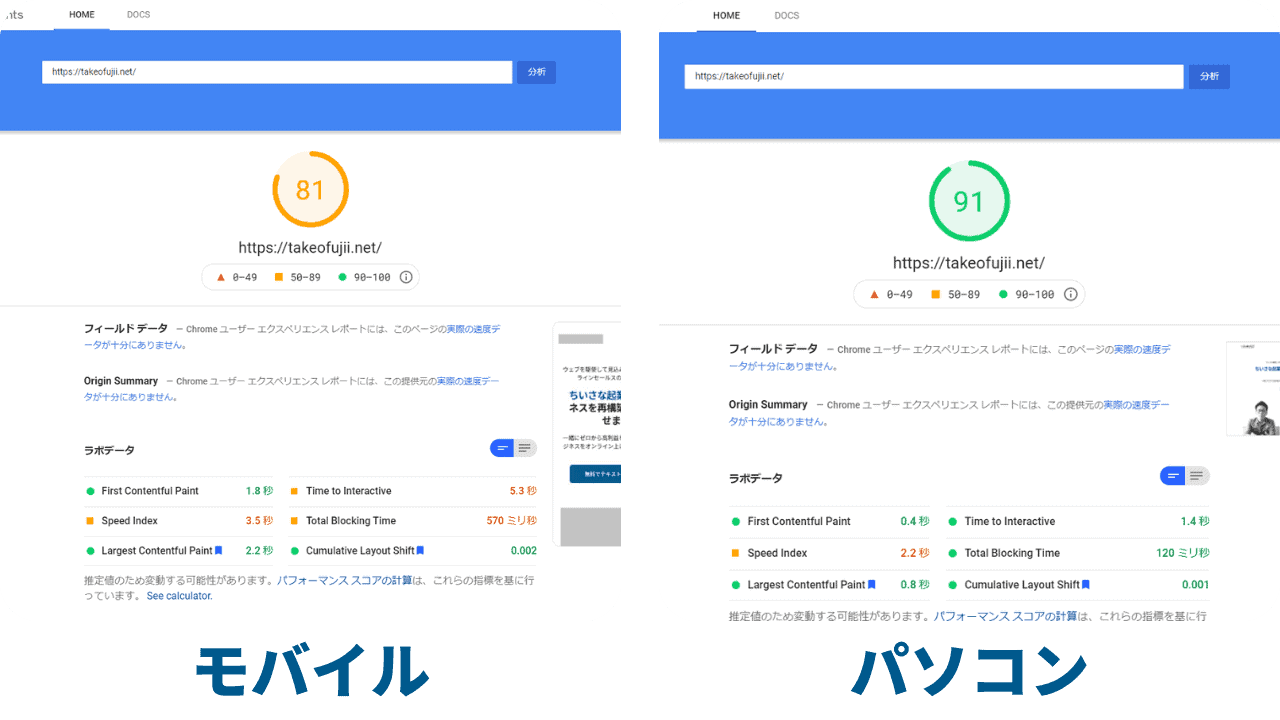
This speed test was conducted with Google Speed Insights. The display speed of the landing page created with Brizy is 81 points on mobile and 91 points on computer.
With Brizy, you can create a landing page that expresses your brand and is super efficient with beautifully designed templates.
Not only do they have a lot of features, but the page display speed is also fast, so you won't stress your users.
Here is an explanation video of me actually using Brizy.
[Commentary] How to Use Brizy in Action & Reviews
As you can see in my Brizy explainer video, you can freely create a crisp landing page on WordPress without any stress at all. You don't have to worry about how to create a great-looking landing page on a low budget.
With Brizy, you can create a landing page even with zero knowledge, so you don't have to spend 150,000 yen or 200,000 yen on LP production. Also, you will no longer have to struggle to create a landing page that is difficult to set up but has a poor design.
I will also list the disadvantages (disadvantages) of Brizy that cannot be ignored.
Disadvantages (cons) of Brizy
The disadvantages are as follows.
- No IE support
- Free plan has many limitations
We will explain in more detail the disadvantages of both of these.
No IE support
The biggest disadvantage is that Brizy doesn't support Internet Explorer.
So IE users should not be able to see the top page of my site. Pages created with Brizy cannot be displayed in IE.
Because IE will be shutting down soon.

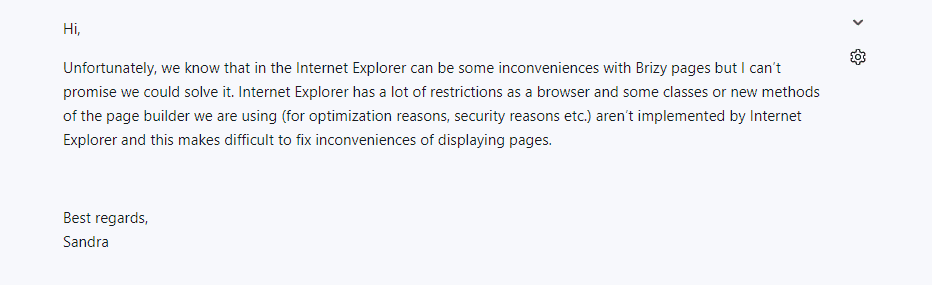
There are already few IE users, and since it is a browser with security problems, the developer does not plan to respond to Brizy.
It will appear fine in other browsers.
Free plan has many limitations
Brizy is also available in a free (FREE) version. It's good enough to get an idea of how it's actually usable, but the number of blocks and templates is small.
With the paid version of Brizy PRO, all blocks are released. In the free version, only basic blocks.
These two points are the disadvantages of Brizy.
Brizy VS Elementor
Let's compare Brizy with Elementor, another leading page builder. Elementor is a WordPress page builder with a lot of users worldwide.
First, we have prepared a simple comparison table.
| Brizy | Elementor | |
|---|---|---|
| 1 year fee | $49 / 3 sites | $99 / 3 sites |
| One-time purchase plan | 〇 | × |
| Popularity | 〇 | ◎ |
| Templates | 〇 | 〇 |
| Pop-up feature | 〇 | 〇 |
| Contact Form Function | 〇 | 〇 |
| Custom CSS | 〇 | 〇 |
| Responsive | 〇 | 〇 |
| Rich icons | 〇 | 〇 |
| Add fonts | 〇 | 〇 |
As you can see from the table above, both Elementor and Brizy have the necessary features.
However, it is "usability" that you cannot judge × in detail. Watch the video below.
How about this? Different people have different impressions, but I felt that Brizy was more intuitive. Let's also take a closer look at the prices.
Brizy Pricing & Pricing Plans
Now, let's explain each of Brizy's pricing plans in an easy-to-understand manner. First, Brizy has two pricing structures:
- Yearly
- Lifetime
Yearly pays every year. There are three plans available. Please see the image below.

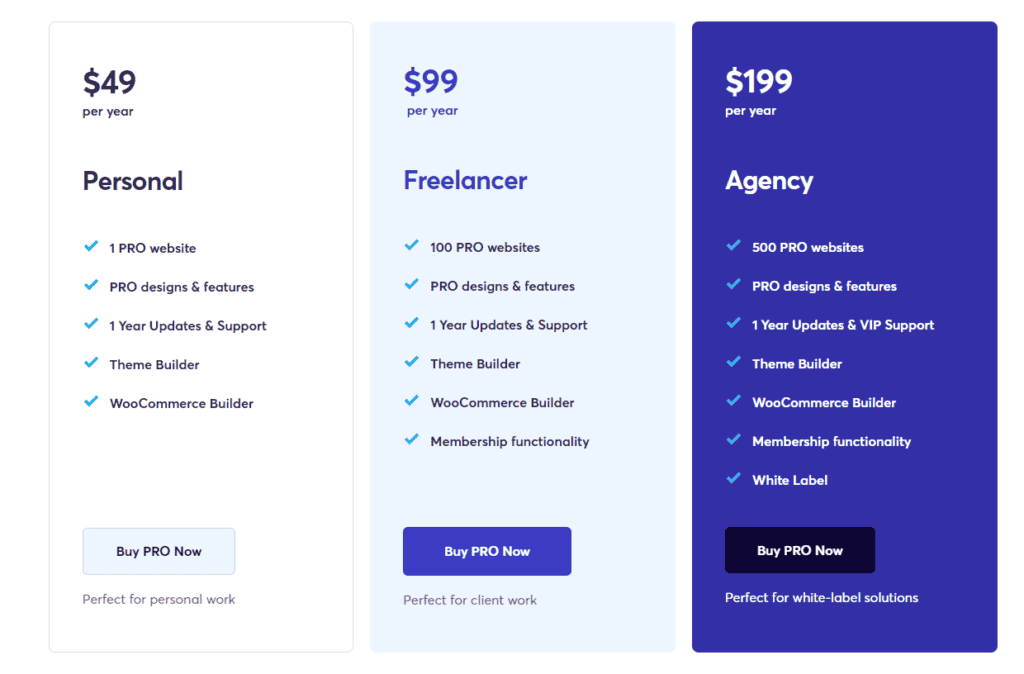
Since the price is displayed in US dollars, you may be confused and think, "Eh, how do I pay?" This will be explained later with a video. Don't worry.
The Personal plan costs $49 per year. In Japan yen, it is about 5,500 yen. You can only install Brizy PRO on one WordPress site.
The Freelancer plan costs $99 per year. It is about 11,000 yen in Japan yen. You can install Brizy PRO on 100 WordPress sites.
The Agency plan costs $199 per year. It is about 22,500 yen in Japan yen. You can install Brizy PRO on 500 WordPress sites. Also, with this plan,White Label Featurescan be used. We will also explain this White Label function later. It's a great feature.
And for those who find it troublesome to pay every year, Lifetime is available.

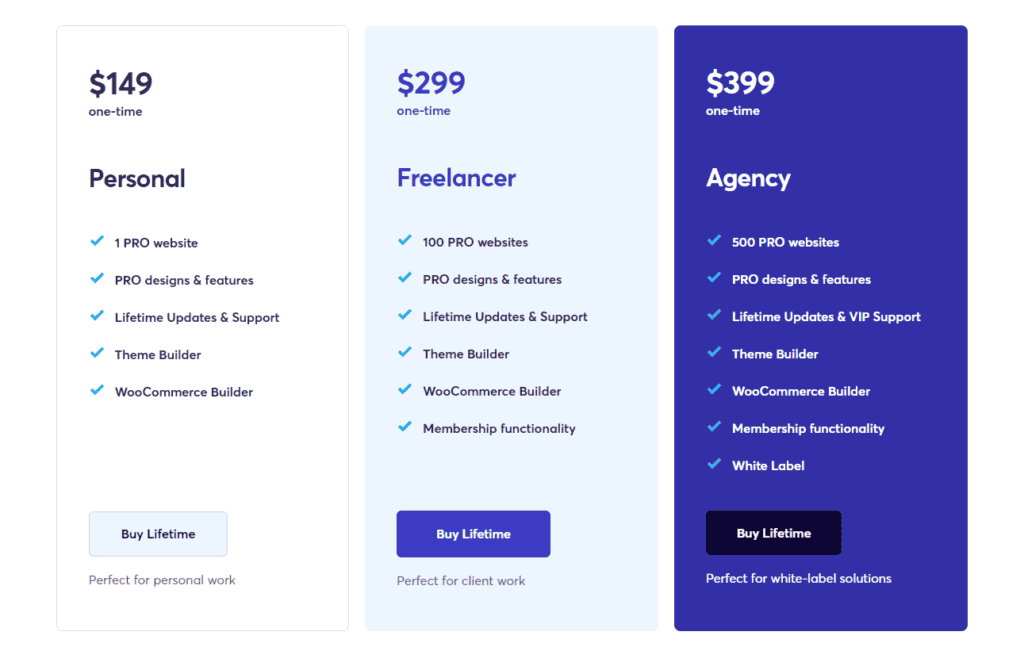
Lifetime is a "one-time purchase". What you meanPay once and you don't have to pay in the future.
- The Personal plan is $149 (about 17,000 yen in Japan yen)
- The Freelancer plan is $299 (about 34,000 yen in Japan)
- The Agency plan is $399 (about 45,000 yen in Japan yen)
The advantage of lifetime is that once you pay once, you don't have to pay in the future.
For example, if you pay once for the Personal plan ($149), you can use Brizy PRO's Personal plan at no additional cost in the future.
Of course, you will also receive updates in the future and new features in the future.
What you meanIn the long run, lifetime is more profitable.is.
Oh, and I will also explain the White Label function included in the Agency plan. This is a recommended feature for those who work on a homepage system.
What is the White Label feature?
White Label means replacing the product name with your own brand. I will explain it in an easy-to-understand manner.
Let's say you want to install Brizy PRO on your customer's website.
This usually appears in the customer's WordPress dashboard, as shown in the image below.

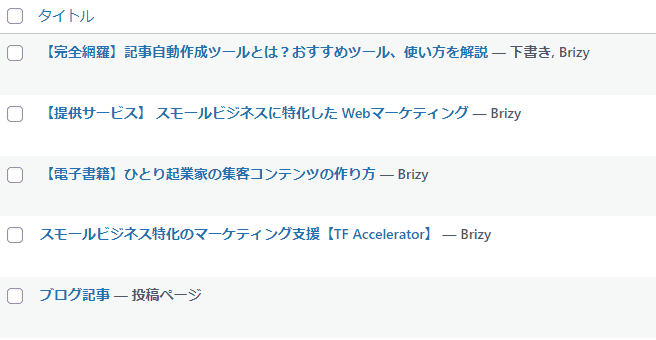
The brand name "Brizy" is displayed on the page you created with Brizy. However, with the WhiteLabel feature,


In this way, it is replaced by your own brand name, not the brand name Brizy.
By using this feature, customers will see your brand name instead of Brizy. This is a great feature for selling your own services.
How to choose a Brizy pricing plan
At firstFor bloggers and individual website operators, the Personal plan is sufficientis. No further plans are required.
And for those who work on the website system, we recommend the Agency plan. You can install Brizy PRO on up to 500 sites.
This means that you can install Brizy PRO on the homepage of up to 500 customers.
Each time, you can receive a fee for website production. It also has a White Label function, so you can start your own website production business as your own brand.
The Agency plan may seem expensive, but it is the most attractive plan for homepage work.
The Freelancer plan is not very attractive.I didn't dare to mention it. In addition to being able to install up to 100 sites, there is no White Label feature, so it is not attractive.
If you want to sign up for the Freelancer plan, we strongly recommend that you add a little money and sign up for the Agency plan.
How to buy Brizy
For those who are thinking of buying Brizy.
- USD? I don't have it. I want to pay in Japan yen
- It's scary to buy on overseas sites
- I can't read English
I don't have to worry about a single thing. You can buy it safely from Japan lol. I explained it in the video below, so if you are unsure, please do so.
Brizy can be purchased safely from within Japan. Credit card payments are also secure. By the way, I also purchased Brizy with a credit card payment and its safety has been verified.
Oh, and some people may be worried about purchasing on overseas sites. But this is also not a problem.
It also offers a full 30-day money-back guarantee.
Brizy's 30-day money-back guarantee


Brizy has30-day money-back guaranteeis available.
Request a "refund" within 30 days of purchasing Brizy and you will receive a swift refund.
When asking for a refund, "Huh? Why is Brizy refunding? Shall we? Why?" I don't get asked persistently lol.
If you're wondering about Brizy's lifetime plan, buy it now.
If you miss this offer that is about to end, you will regret it later.
Q&A about Brizy
These are frequently asked questions and answers from Brizy. If you don't see anything you want to know in this list of questions, feel free to write your question in the comments below. Normally, we confirm within 12 hours.
*I have a hobby of staying at a hotel for a few days as a distraction from work. In that case, please allow us to send you a reply.
Who would recommend Brizy?
No knowledge of web design, no knowledge of coding. Still, I want to create a landing page that produces results for my business.
I recommend it to such entrepreneurs.
In particular, the landing page is also the "face of the business". In other words, if your landing page is poorly designed, customers will lick it.
If it's just the design, it's fine. You can even lick the products and services handled on the landing page. If that happens, the product will not be sold on that landing page.
It damages branding and sales drop to the point where you can't even look at it.
There are many entrepreneurs who suffer because of creating such a miserable landing page. It is natural that spending advertising money on landing pages will not produce results. Because it's being licked.
Brizy is truly the next generation of page builders. You don't have to pay a professional high fee to produce an LP.
You can create a landing page that your rivals admire and wonder, "How are you making it?" so that "you" can imagine it for yourself.
Can Brizy be used in Japan?
Yes, you can use it. I actually installed and used Brizy on this blog.
Brizy also allows you to use Google Fonts freely.


In other words, you can create a landing page using Japanese fonts in Brizy.
In addition, Brizy PRO also allows you to use custom fonts. You can also add your favorite Japanese font to Brizy and use it, so you can strengthen your branding.
What will Brizy do in the future?
I only pay for tools I trust. I don't want to pay for useless tools that I can't use anytime soon.
The Brizy development team is a veteran who has been in business for over 12 years since 2009. That's why I'm reassured that Brizy's future is bright.
Brizy is constantly fixing and improving to create a "robust page builder".
Brizy will add a wealth of new features in the future. Brizy is a powerful page builder that is not yet well known in Japan because it is an English-speaking tool, but it cannot be ignored.
The lifetime plan will end soon. Be sure to get it before it ends.
Conclusion: My Brizy Review Summary
Brizyis definitely a next-generation WordPress page builder that we can recommend.

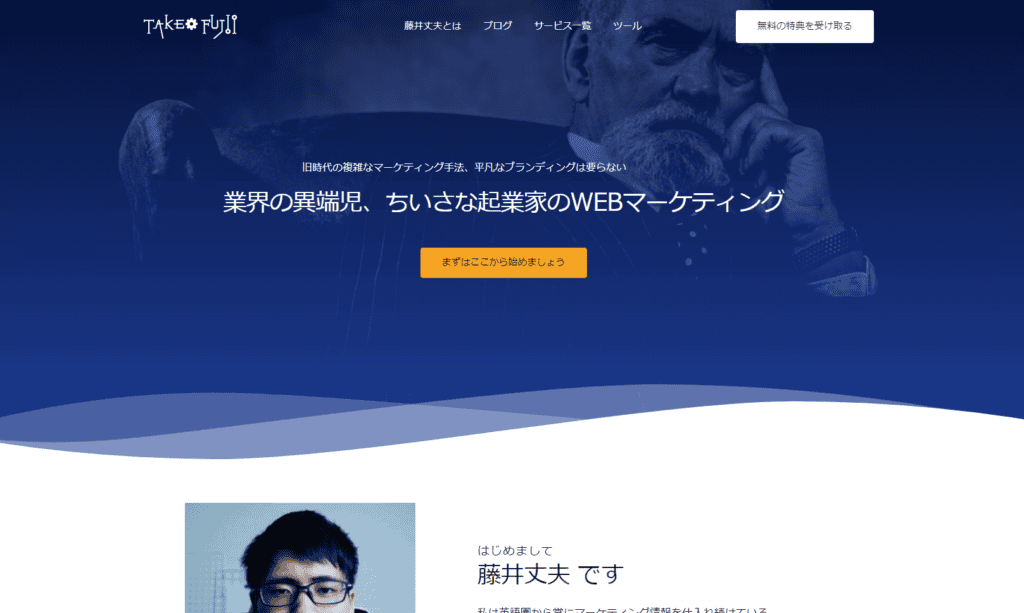
This site you are viewing also uses Brizy PRO.
I don't have the expertise to make websites, and I can't code.
That's how IWe are able to create customized, high-quality pages all thanks to Brizyis.
By using Brizy, even beginners can make it very easily and crisply without feeling stressed even a nanometer.
There are many beautiful WordPress themes sold in Japan at the same price. However, even with these WordPress themes, you can't create a completely differentiated website.
Brizy is the best page builder that allows you to freely create designs that express your worldview without being tied to a WordPress theme.
If you are in doubt, be sure to buy it. I also recommend it with confidence as a single buyer.
Repeat one more time. All Brizy plans include:30-day full money-back guaranteeThere is. Surely, you will not get a refund. I'm sure you'll be satisfied.
However, if you are not satisfied with using it, even if it is 100 million yuan, you can get a full refund.
The most disappointing thing is "What should I do... I wonder if I should buy it," but it is a tragedy that it is sold out.
I hope that as of this article, there is still a Lifetime plan. I'm sorry if it's sold out.
Please do it as soon as possible.




















Nice to meet you, Mr. Fujii.
Brizy is what I'm interested in.
However, there is not much Japanese site that introduces Brizy, so I consulted with him.
I'm sorry for all the questions even though it's my first time meeting you.
If you look at the official page, it says this.
(I translated it into Japanese because I am not good at English.)
——
*Explanation of the one-time purchase type
$299 / once
FOR UNLIMITED SITES
All about the STUDIO plan
White label (what is this?) )
Lifetime updates and support
One-time payment
Free access to Brizy Cloud Studio
Access to the BrizyCloud platform
2 years of unlimited hosting (learn more)
——
I am hesitating to buy because I don't know the following.
・STUDIO plan is when used as a plugin in Wordpress,
Can you think?
What is Brizy CloudStudio?
Do you mean a CMS that doesn't use wordpress like Jindo?
・STUDIO plan is a one-time purchase.
Does that mean CloudStudio is only for 2 years?
I read the detailed screen, but to be honest, I couldn't understand Japanese just now.
I'm sorry if I wrote about these somewhere.
After that, every time I visit the official page, the security software displays a warning message, which is also a bit of a concern.
(Isn't it a suspicious site?) And... )
I would appreciate any advice.
Best regards.
Mr. Kato
Nice to meet you. This is Fujii.
Thank you for your comment. No problem.
Rather, Brizy is my go-to tool, so let me answer your questions to convey the appeal.
Answer in order.
———————————–
Q,What is the STUDIO plan?
Can you think?
———————————–
Let's start with the differences between the Personal plan and the Studio plan.
However, there is only one difference.
Personal plan: You can install up to 3 websites on WordPress.
Studio plan; You can install it on unlimited WordPress.
That's the only difference.
In short...
If Mr. Kato is a job in creating a website,
The Studio plan is better.
It can be installed on unlimited sites, so
Whether it's 100 or 1,000 people,
You can install Brizy PRO from any site.
———————————–
Q,What is Brizy CloudStudio?
Do you mean a CMS that doesn't use wordpress like Jindo?
———————————–
You are right.
Brizy Cloud is OK if you imagine Jindo or Wix.
When you buy Brizy, you get two.
- Brizy WordPress Plugin
・Brizy Cloud
These are the two.
This is complicated, isn't it?
Essentially, Brizy is a plugin that you install and use on WordPress.
However, Brizy Cloud comes with it as a bonus.
You can imagine it that way.
———————————–
Q,STUDIO plan is a one-time purchase.
Does that mean CloudStudio is only for 2 years?
———————————–
Think of the Studio plan as an annual plan.
It will be updated and supported for one year.
In other words, if you continue to use the latest version of the Studio plan,
After one year, you will have to pay $99 a year for another time.
If it doesn't, then Brizy's WordPress plugin won't be updated.
You will also lose access to Brizy Cloud.
The Lifetime plan is a one-time purchase.
And it will continue to be updated for a long time to come.
This means that you don't need to renew your annual plan by paying once.
You can continue to use Brizy PRO for a lifetime at no additional cost.
However, Brizy Cloud is only available for two years.
(Brizy Cloud is said to be 2 years because it costs to maintain servers, etc.)
———————————–
After that, every time I visit the official page, the security software displays a warning message, which is also a bit of a concern.
(Isn't it a suspicious site?) And... )
———————————–
This is safe and okay.
Please see the image below.
https://hi.switchy.io/5UYi
This is Brizy's Facebook group.
There are currently 9,811 people participating. I am one of them.
In this group,
Brizy updates are shared from time to time.
https://hi.switchy.io/5UYl
"I added this feature to Brizy on August 5th."
"I fixed a bug in Brizy."
Such announcements are often made.
If Mr. Kato uses strict security software,
It may be judged that overseas sites & payment = suspicious.
This is speculation.
I have also been using Brizy for over a year.
At present, I have never felt anxious about safety.
It's been quite a long article.
I hope it will be a material for consideration. It's a good tool, so I hope you will use it.
If you have any additional questions, please feel free to ask in the form of replying to the comments.
See you.
You can certainly see your expertise in the article you write.
The world hopes for even more passionate writers such as you who are not afraid to say
how they believe. Always go after your heart.
Thanks for the great replay! I am really glad you love it. Please feel free to reach out to me if you have any questions. 🙂
Hello.
Thank you for the careful explanation.
I was using elementer,
No matter how many times you change your domain, you will get an error.
I was looking for an alternative plugin.
So, I would like to ask you a little bit...
When creating a page in Brizy...
In elementor,
Elementor Campus and Full Width
Can it be set up like this?
Apart from the default of the theme in the first place
A page without unnecessary links like LP
If you want to make it, you don't know how to operate it.
I'm still tinkering with it a little
There are many parts that I don't understand.
However, I think it is a tool that can be intuitively done to some extent.
We are also considering a paid version.
Thank you for your guidance.
Mr. Nagasawa
You are right.
It works in the same way as Elementor.
You want to make an LP that doesn't have a top menu or footer menu.
The steps to create a page are the same as in Elementor.
"After changing the template to "Brizy Template",
Click "Edit With Brizy" to start creating your page.
Please see the image below.
https://takeofujii.net/wp-content/uploads/2022/01/takeo-brizy-edit.png
If you continue to have any questions, please feel free to ask.
Mr. Fujii
Thank you for your response.
Ah I see. I understood.
So, I would like to ask you a little more.
When posting a blog post
The lower part of the body is fixed every time.
I would like to include a template.
This boilerplate template is
As a function or shortcode to create
Is there a way to save it?
When I played around with it, the paid version was better
I feel like I can do a lot of things.
Best regards.
Mr. Nagasawa
Thank you for your reply.
By the way, if you want to list a fixed template at the bottom of the article,
For example, is it the following image?
Image
The template shown in the image above is displayed in the WordPress theme function.
There is a function to automatically display the template on the entire page created with Brizy.
It seems that there is still no function to automatically display boilerplate templates for articles and pages that are not created in Brizy.
If you want Mr. Nagasawa to automatically display a template in your blog post,
Rather than reading it with Brizy, we recommend using a plugin like the one below.
WordPress Calls to Action
Thank you very much.
I understand.
Its like yoou read my mind! You seem to know so much about this, like
you wrote the book in it or something. I think that youu can do with some pics to drive the
message home a little bit, bbut other than that, this iis wnderful blog.
A fantastic read. I will certainly be back.
Hello, I feel like I've come to understand a lot.
So, I would like to ask you a little more...
When inserting long sentences in text
What do you do with the "Read More" button and settings?
This is Fujii. Thank you for your comments.
If you want it to be displayed on the page, you may be closer to the "Read more" button if you use the accordion function as shown in the video below.
https://youtu.be/FxOxv03tpLM
However, the above method is not the display method that Mr. Nagasawa imagines...
By the way, how would you like to display the "Continue" button?
If you have a specific image, you may be able to make a suggestion.
Mr. Fujii
Thank you very much.
It's an accordion, isn't it? It's close, certainly.
For example, when writing a long sentence to some extent
If you can put "Read more" in the first minute,
When displayed on other pages, the preamble
I think it's okay because it won't be displayed...
Thank you for your reply.
After receiving the comments, I checked to actually display it.
You can automatically display the "Read more" button in the blog post list list.
https://takeofujii.net/brizy-read-more-btn.jpg
Looking at this feature,
"You may be able to include Mr. Nagasawa's desired "Read more"."
I thought...
Unfortunately, I was unable to implement the method of inserting "Read more" as Mr. Nagasawa wanted.
I'm sorry I can't help.
Also, if you learn anything while using Brizy, we will let you know in the comments or by email.
Nice to meet you. My name is Utah, a beginner at Brizy.
I'm trying to change from Elementor to Brizy, and I'm touching the free version of Brizy.
I want to create a homepage with posting functionality in Brizy, does it have the ability to put WordPress tags?
Thank you for your response!
Yuta
Thank you for your comment. This is Fujii.
If you want the tag to appear on the page, you can.
Check out the video below.
https://jumpshare.com/v/unhRCqHNdV8FoVCe4Jlq
You can insert categories and tags within your page.
If you type #cat in the text element, the category will be displayed,
#tagと入力すると, you will see the tags.
I think it can probably be done in the free version.
Please try it once.
Thank you for your reply. This is Utah.
I understand that tags and categories can be displayed. Thank you very much.
So I have one question.
Just like creating a popular WordPress template to automatically display your latest posts,
Does Brizy have a feature that automatically shows the latest posts?
I also have three questions.
(1) The PRO version of the "post" gadget that appears on the "+" mark of Brizy? Block? is
Can I display it with WordPress Posts?
(2) I'm thinking of purchasing the paid PRO version of Brizy from now on.
I'm not sure whether to put in the Freelancer plan or the Agency plan.
The reason is that when I changed my mind to the Agency plan after changing my mind to the Agency plan,
I'm worried about whether I can transfer the created page to the page I create with the Agency plan.
Of course, the same goes for whether you can transfer the pages you created in the free version to the Freelancer plan.
(3) When there is a WordPress update, the probability that Brizy will be affected by a bug or other level is
Is it more than "Elementer"? Or is it less? Fujii's sensitivity is fine.
Please tell me.
Thank you for your response.
Yuta
Thank you for your reply. Answer.
This is a long post, but please forgive me.
1)
What are the functions that automatically display the latest articles in the pages created with Brizy?
https://www.youtube.com/watch?v=YDxiIMTQ-k0
I think the Q&A below will probably be helpful for functions that are close to the state that Yuta wants.
https://support.brizy.io/hc/en-us/community/posts/360072791391-How-to-Create-a-Blog-Page-with-All-Recent-Post-
If not, please let us know.
2)
What is the "Posts" block?
https://takeofujii.net/wp-content/uploads/2022/09/korekana.png
This post will be displayed in a tight coordination. Please see below.
https://takeofujii.net/wp-content/uploads/2022/09/dwdw.png
*In the image above, the featured image is not included in the post, so it is hidden.
You can also display featured images.
You can also customize the display of your post list.
https://takeofujii.net/wp-content/uploads/2022/09/regregre.png
I'm sorry for messing with it easily,
You can also add shadows and change the display size of featured images as shown above.
I would be happy if it could be helpful.
3)
Pages created in Brizy can be carried over.
Both the Freelancer plan and the Agency plan have in common that you can use the paid PRO version of the design block.
Therefore, even if you change the page created with Brizy on the Freelancer plan to the Agency plan.
The page will not become unviewable. It will appear as it is.
You can also switch to the paid version and take over the pages created in the free version.
Don't worry.
4)
I've tried using some page builder plugins,
Compared to Elementor, the sense of stability is lower.
I have a Brizy Facebook group,
If there is a bug or bug during the update in the FB group,
Users may report that "this problem has occurred...".
(Personally, I have never felt any major problems such as the layout collapsing)
However, glitches are fixed in a few hours to a few days.
And in case of emergency, Brizy's support is fast and attentive.
I also just emailed Brizy's support about a week ago, and the response was clear and prompt.
Some page builder WordPress plugins include:
There are many cases where development stops.
Minor page builders in particular tend to do this.
*Even in Japan, a plugin called Dangan Page Builder was my recommendation.
Development has been stopped for about a year.
For them,
Brizy is constantly being updated,
Some bugs will be fixed soon.
I have been using it for nearly two years and have never felt any concerns about the development team.
It's been a long time, but
I would be happy if it could be helpful as one person's opinion.
Mr. Fujii
Thank you for your very polite response.
I also understood that the latest posts will be displayed automatically.
The questions about the introduction of Brizy have been resolved, and I have been introducing Brizy pro since yesterday and trying out various functions.
I will continue to refer to Mr. Fujii's blog.
If you have any questions, thank you.
Yuta
I'm very happy that it seems to have been helpful.
Yes. If you have any questions about Brizy in the future,
Feel free to write in the comments.
Thank you very much.
Have a nice day.
Nice to meet you.
I'm a Wordpress beginner, but
Recently, I introduced Brizy Pro from the free version of Brizy and am learning on Brizy's official Youtube to get used to it.
This is very easy to use for me compared to Elementer. I am impressed.
So I have two questions for Mr. Fujii.
The first is the "login" element in Brizy.
I started to understand this mechanism roughly, but I didn't know the pre-setting of ID and PW...
Do you set it up with the 5 types of user settings and permissions on the WordPress side?
I also found out the display permission in the membership settings for each summary block, but this is the only one that makes no sense.
I can't understand it even if I watch some tutorial videos on the official Youtube.
The second option is to purchase Brizy's $199 per year Agency and add it to the fixed page of your WordPress admin.
It was said that it could be displayed with the original name, but even in the source display on the homepage after publication
Will the original name be reflected?
This site is made by Brizy, and I guessed that this agency is a function of this agency if you want to hide it on purpose.
If Mr. Fujii's explanation is difficult here, I can respond by email or online.
Thank you.
This is Fujii. Thank you for your question.
①
Regarding the elements of Brizy,
Learn how to preset your ID and password.
First of all, it is a good idea to make it a user registration type.
Please see the image below.
https://takeofujii.net/wp-content/uploads/2022/11/register-login.png
WordPress admin > settings > checking General > membership.
Anyone can register as a user of Saiyan's site.
*If you only want them to view, please set the default permission to "Subscriber".
https://takeofujii.net/wp-content/uploads/2022/11/register.png
And the page that Saiyan wants to show only to those who have registered as users is
If you specify "Logged (or subscriber)" in Brizy's settings and publish,
You can only see the page by registered users.
https://takeofujii.net/wp-content/uploads/2022/11/brizy-non-member.png
2
Regarding the White Label function of the Agency plan,
As you said, this feature wants to hide from your clients that you're building a site with Brizy
I think it's a feature for web creators.
https://takeofujii.net/wp-content/uploads/2022/11/brizy-Source-code.png
However, as mentioned above, if you look at the source code, you can see that it is made in Brizy.
Although there are plans to improve this feature in the future,
Currently, it seems to be a function that rewrites the WordPress plugin name and description.
https://takeofujii.net/wp-content/uploads/2022/11/wordpress-gisou.png
I hope it will be helpful. Please try it once.
Thank you for your quick guidance.
Thank you for your accurate answer.
I'll try it right away.
Mr. Fujii
Happy New Year.
I've gotten used to BrizyPro a lot, but I've got some questions, so I have a question.
In Brizy in the WordPress admin screen, there are stories,popups,
I don't really understand the function of the next "Templates". So I have three questions.
(1st question)
I've made "Templates" once, but when I guess the function of "Templates"...
(1) Templates is a page that displays common categories together, and is in a separate area from the fixed page.
Pages excluded from sitemap? Is that the perception?
(2) Is it recognized as a category search page rather than a random word search by the viewer?
Is it a production that draws in two columns and selects one of the categories listed on the left to display the page created with Templates on the right? (Brizy's Help page layout?) )
(Second question)
The "Templates" element appeared with a different icon from the icon that appears in the element of a normal fixed page, and I also discovered an icon that can be automatically linked. I didn't steal everything, but it's an elemental icon that appears outside of the fixed page, which can be effectively used in this situation! Please introduce it if you have one.
(Third question)
As a way to summarize using BrizyPro,
I don't know if it is better to summarize it in "custom taxonomy" or "category". I guessed that categories could be combined into the menu structure and had a higher level of cooperation.
If you know the tutorial URL, please let me know in English.
Best regards.
Saiyan
Happy New Year. This is Fujii.
First, I explained templates in a video.
https://youtu.be/hoY5iG7ZXIM
Brizy Templates. Once set, it is a function that allows you to redesign various pages at once. Brizy not only creates landing pages, but also allows you to customize everything from WordPress posts and pages to categories and archive pages.
For even more understandable instructions, please see the tutorial video on the official channel here.
https://youtu.be/lkiSk6IE7tA
I'm sorry if I misunderstood the second question.
Now, regarding the third question, I think it would be easier to use to summarize it by category.
Of course, you can create pages organized by categories, tags, or custom taxonomies, but I often come across situations where I personally find custom taxonomies not easy to use, so I recommend creating pages organized by categories.
Mr. Fujii
Nice to meet you.
I would like to express my great gratitude for your prompt response and for taking the trouble to create a video and even explain it. Excuse me, but I thought it was probably because they thought it would be difficult to explain in words... It's the best way to send it!
I think that the video explaining Templates in Japanese is probably the first time that Mr. Fujii sent it in Japan!
I watched Mr. Fujii's Youtube video twice and understood my misunderstanding.
I thought that Templates was an INDEX summary page creation of categories and tags without SEO settings.
No, it's the other way around...
Templates = It meant "unified layout design".
I assumed that Templates depended on the post page. Post page, category, tag, any
It's a way for a fixed page to depend on Templates. So it's no surprise that Templates doesn't have SEO settings.
I was confused when I saw it the first time, so I finally understood it when I watched it again.
Templates can help you improve efficiency when creating the same layout page.
However, Brizy can be created too quickly, so I duplicate the page I normally created on a fixed page with WP.
Because you can edit quickly with Brizy, Templates is not more about page creation, but about existing posts created in the past and
This may be a great feature when updating all layout images in custom posts.
I still have other questions, but I will talk to you when I get stuck while trying it out with Brizy.
Thank you very much.
Saiyan
Thank you for watching the video right away.
The Templates function was quite difficult to explain, but
I'm glad it seemed to be helpful to the Saiyans.
I haven't been able to check out the new features either, so
Check out the new features added to Brizy this year.
We hope to deliver more useful content for Saiyans.
We look forward to hearing from you at any time.
See you.
I always watch Mr. Fujii's YouTube.
This is my first question.
― About Katteb's relationship with brizy
If you paste an article generated with katteb (AI writing tool) recommended by Mr. Fujii into brizy's "text block", it will become just a text copy, and the hyperlink of the katteb article will not work on the brizy side.
- Pasting articles into regular blocks that are not edited in Brizy is fine
Pasting "katteb articles" into normal "posts" or "word documents" that are not edited in Brizy does not cause any of these problems. The "Katteb article hyperlink" is also working fine on the Brizy side of the copy.
I would appreciate it if you could tell me about the solution.
Thank you.
Correct and add questions and resubmit them.
————————————-
I always watch Mr. Fujii's YouTube.
This is my first question.
―About Katteb's relationship with Brizy|
If you paste an article generated with Katteb (AI Writing Tool) recommended by Mr. Fujii into Brizy's "text block", it will be just a text copy, and the hyperlink of the katteb article is not working on Brizy's side.
― Pasting articles into regular blocks that you don't edit in Brizy is fine |
Pasting "katteb articles" into normal "posts" or "word documents" that are not edited in Brizy does not cause any of these problems. The "hyperlink to katteb article" is also working fine on the Brizy side of the copying destination.
―Types of Brirzy blocks |
I looked up the types of blocks in Brizy, but I can't find any of them other than "text blocks". (Pasting articles generated by katteb into the "word document" was not a problem at all - the "hyperlink" also worked.)
This issue is only occurring when pasting to posts edited by Brizy.
I would appreciate it if you could tell me about the solution.
Thank you.
——————————-
The tool you are using is
(1) wordpress6.2
(2) Twenty Twenty Three (Theme)
(3) Brizy pro
——————————-
is. Thank you.
Please note that all plugins other than Brizy have been temporarily disabled and checked for verification. (The problem still occurs)
morning
Thank you very much for your detailed explanation of the issue between Katteb and Brizy.
I had a good understanding of the problems I was facing.
The hyperlink in the article is not working in Brizy's "text block",
I also conducted a survey in a similar environment. We have created a new video, please check it out at the following URL:
https://youtu.be/FqCcrs1ql1E
As a result of trying it all out, it is not an interference from plugins or themes, so
I think it can only be solved by sending a request (or support) to Brizy.
I feel distressed that it does not lead to a fundamental problem solution,
If you have any other questions, please don't hesitate to let us know.
I will do my best.
Thank you for your continued support.
Thank you for your prompt reply.
We would also like to thank you again for creating a detailed explanation video.
For more information, please contact Brizy and katteb directly for a solution.
I would like to explore it.
Thank you very much.
Thank you for your continued support.
Mr. Takeshi Fujii
I always watch valuable videos (katteb, brizy) and use them as references.
I am grateful.
———————————————————-
We would appreciate it if you could tell us about the following questions about Brizy.
Thank you.
(Question content)
When creating a page in Brizy, the following problems occur:
(1) Immediately after finishing the draft and "publishing" (updating), the file will disappear (hide) from the page list. (It is displayed without any problems at the draft stage, but is hidden immediately after publishing (updating). )
(2) However, the link from the post screen to the fixed page (the file) remains valid, and the file is displayed without any problems. (I think the "publish" process is affecting the display of the file.) )
(Working Environment)
Windows 11 (WordPress 6.2.2, Theme: twenty twenty-three, Brizy pro)
I would appreciate it if you could tell me about the above questions.
Best regards.
morningjp
This is Fujii. Thank you for your question.
We have also replied to your inquiry,
It may be in the spam folder, so
Please check once.
Now, to summarize the content of the question,
・When published, the page will be hidden from the list of pages.
・On the website, the link to the fixed page is valid and displayed without any problems.
Is that understanding?
If I misunderstood, I would appreciate it if you could point it out.
One possible is plugin interference.
Doesn't work well with other WordPress plugins
You may be experiencing this issue.
After disabling the other WordPress plugins you currently use once,
Please try to see if you have the same problem with only Brizy enabled.
Also, if possible, to check the page,
If you send us a link to the WordPress site you're experiencing issues with,
You can make more accurate judgments.
Thank you very much.
Mr. Takeshi Fujii
Thank you very much for your reply.
——————————————————-
When I performed the "mutual interference check of plug-ins" that you pointed out, all the problems were resolved.
(What was done)
I disabled all the plug-ins once (completely reset), and then activated them while checking for "mutual interference of plug-ins" individually.
(Execution Result)
Even if all the plug-ins were activated, no mutual interference could be confirmed, but all problems with the question content were resolved by executing the process (completely resetting the plug-in).
I believe that a complete reset (doing what Mr. Fujii pointed out) led to this solution.
Thank you very much. Thank you again.
Thank you for your continued support.
morningjp
This is Fujii.
The problem was solved and I was relieved.
If there is anything I can do to help in the future,
Feel free to ask any questions at any time.
Thank you very much.
Thank 💪 you for your continued support
Mr. Fujii
Good evening.
I use Brizy in Wordpress and I would like to know how to increase page display speed with Brizy.
I've heard that plugin-type builders have a problem with display speed, and display speed is also Google's SEO evaluation criterion, so I would like to know how I can increase my display speed with Brizy. I feel that it will be faster if I worry about the size of the posted image and delete the cache after editing. Thank you.
Mr. Fujii
Sorry for the continuation of the previous question.
Is there a way to make BrizyCloud faster than Brizy for Wordpress?
Mr. Mou
This is Fujii. We have prepared a video answering your question.
Watch the video below. You can also see how they actually improved page speed.
https://www.youtube.com/watch?v=xXD8R1uZFWg
If you want to speed it up further, you can use a cache plug-in or
Organize your installed WordPress themes and plugins,
By changing from your current server to a server with better performance, etc.
I think you can aim for over 90 points on mobile.
Please try it
Mr. Fujii
Thank you very much for making a video and even explaining it!
I learned a lot! I think I feel very confident because I am using Brizy in WordPress now.
If you have any questions, let me ask you any questions. Thanks!
Mr. Mou
This is Fujii. Thank you for checking this out immediately.
> I feel very confident because I'm using Brizy in WordPress now.
I'm happy to hear you say that.
Also, if you have any questions at any time, please feel free to ask any questions.
I 💪 will definitely answer as far as I can understand
Mr. Fujii
If you use Brizy in WordPress, please let me know if there is a caching plugin that you are using to improve page speed.
Mr. Mou
I think it will probably be the answer you want,
I'm not that particular about cache plugins.
This is because I have been using Shin Rental Server for the past few years.
This rental server has a decent range of cache functions, so
I haven't had any caching-grade plugins on my WordPress site in the past few years.
However, when I used to use a cache plug-in before,
I used "WP Rocket" as my main use.
It is a fairly well-known plugin.
There are many caching plugins on the market, but I personally think it's better to use one that has a certain level of recognition.
From what I have experienced in the past,
I installed and used a minor WordPress speedup plugin.
(This is not a caching plugin, but a plugin that can compress CSS and JS.)
It is still a plugin that cannot be found in Japan.
What happened while using this plugin was:
One day, my WordPress site suddenly stopped showing up.
This is a problem caused by interference with other WordPress plugins.
If it is a famous plugin, if you look it up on Google, you will find many solutions.
I remember having a hard time with the minor plugins I was using because there was almost no information.
In the end, I solved it by removing the plugin.
In fact, these plugins are prone to interfering with each other.
Therefore, even if it is a standard, we recommend a cache-based plugin that has a certain level of popularity.