



Hello, Fujii, I'm strong. UnusuallyDomestic WordPress page buildersI would like to introduce you. Its name is "Dangan Page Builder".
I am a β user of the Dangan page builder since before it was officially released. I have been using it since the very beginning.
What can I do with Dangan Page Builder? I will explain the specific and detailed details.
In this article, we will talk about the back side of the Dangan page builder, which has not been discussed in other review articles, as well as the disadvantages and ease of use.
- 1 What is Dangan Page Builder?
- 2 How can I use the Dangan page builder?
- 3 Why Dangan Page Builder?
- 4 Features of Dangan page builder that I personally like
- 5 Amazing features and benefits of Dangan page builder
- 6 Can I use the Dangan page builder for beginners?
- 7 How to Use Dangan Page Builder Effectively
- 8 Advantages of Dangan Page Builder
- 9 Disadvantages of Dangan Page Builder
- 10 Dangan Page Builder vs. Other Tools
- 11 Dangan Page Builder Pricing
- 12 About the Dangan Page Builder Money-Back Guarantee
- 13 【Conclusion】My Dangan Page Builder Review Summary
What is Dangan Page Builder?


Dangan Page Builder is an LP (landing page) builder that can be used on WordPress developed by Takumichi Nakajima.
Simply put, even an amateur can easily create an LP (landing page) by using this tool.
This is more evidence than theory. See the sample I actually made with the Dangan page builder.

Click image to enlarge.
Due to screen constraints, it is not possible to upload it in full size. Click on the image (tap on it on your phone) to view it in full size. Please take a look.
You can make such an LP in "just 5 minutes". Yes, it's true. In fact, the sample LP above doesn't even take 5 minutes to make.
How can I use the Dangan page builder?
Dangan page builder
- Product sales page
- Seminar Recruitment Page
- Email Newsletter Registration Page
This is useful when creating LPs (landing pages) in WordPress.
You can intuitively control and drag and drop to create LPs like combining puzzles.
No design sense, no coding knowledge is no problem. You can create an LP that produces results just by simply combining them.
… It is natural that you cannot have a concrete image. So I will explain it in detail from here.
Why Dangan Page Builder?
Why I bother to cover and explain the Dangan page builder so far.
That's because I'm a big user of the Dangan page builder and a fan of developer Takumichi Nakajima's tools.
Please see below.



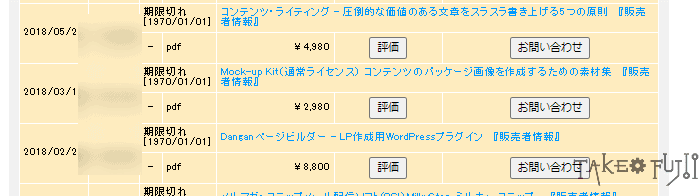
This is a group of products sold by Mr. Nakajima. Right. I have purchased his products again. I don't list them here, but I have purchased a few more.
The reason why I buy up the tools and products he creates is"Trust"is.
The products and tools he makes are only extremely good. We don't sell a single tool like industrial waste. That's why I trust and continue to buy the products he makes.
The Dangan page builder is also a great tool. That's why I want you to use it. I think so.
Who should recommend Dangan page builder for?
Let's say it clearly. People who need this tool
- Solo entrepreneur (solo player)
- Small business owner
- Digital Content Sellers
- Web Marketer
- Online Tutor
- Seminar Lecturer
- Bloggers, Affiliates
is. I recommend it with confidence to those who watch my blog on a daily basis.
Who can't recommend Dangan page builder
On the other hand, some people may not recommend the Dangan page builder. That is
- Those who have outstanding "LP production skills"
- Who doesn't like WordPress
- Business owners who already have a large business
If even one of these applies, it is not necessary. Please pass.
Features of Dangan page builder that I personally like
First of all, I like that Dangan page builder has all the necessary parts.

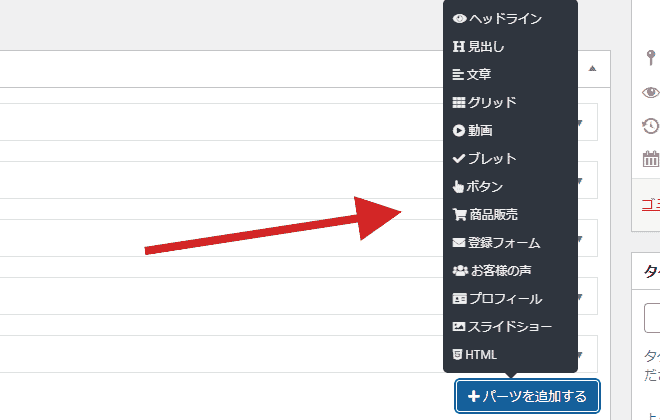
It has a fairly carefully selected and essential design parts.
By adding this design part, you can create an LP (landing page).
Below is how I actually use the Dangan page builder to create an LP. As you can see, you can easily make LPs without hesitation.
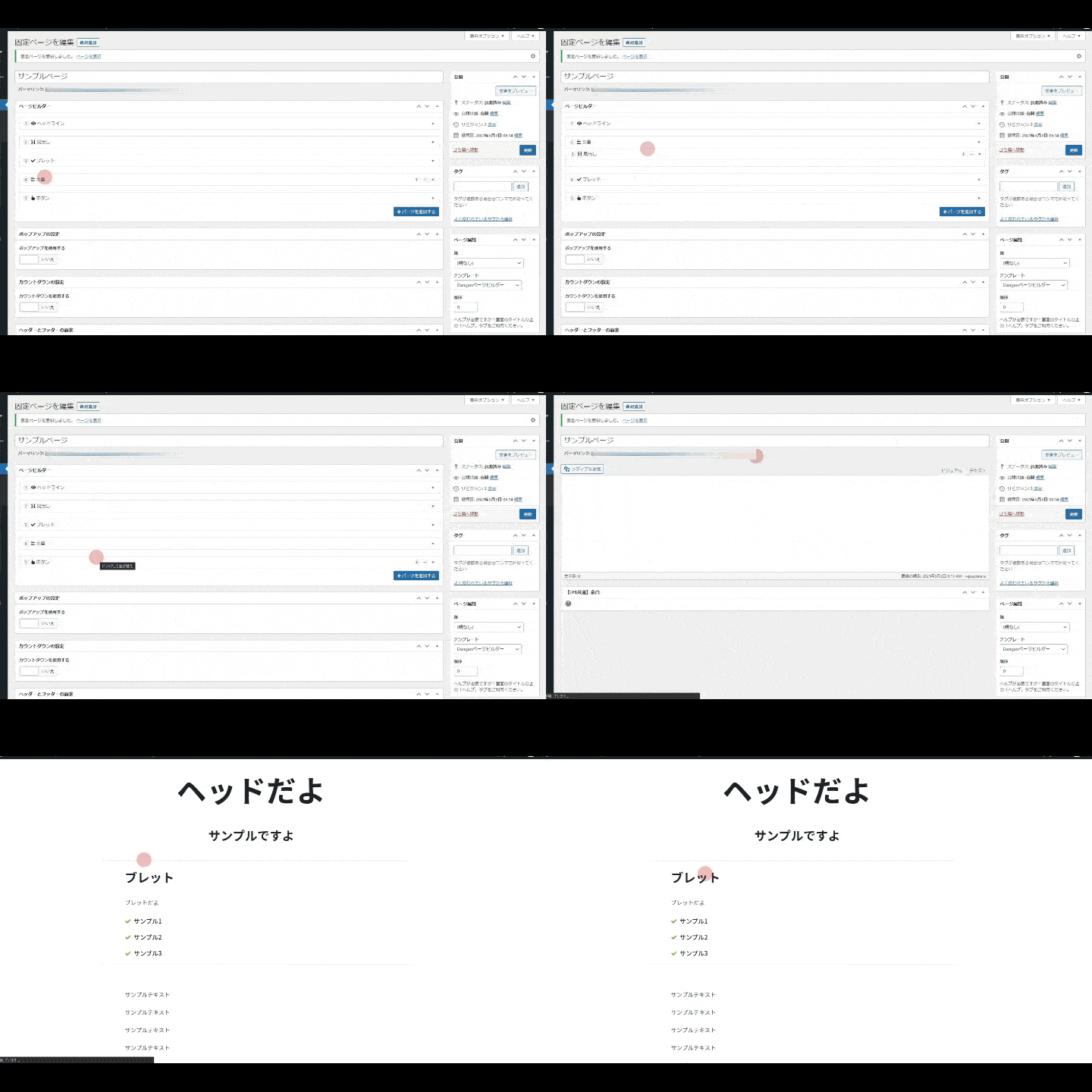
In this way, you can switch parts intuitively by dragging and dropping.
Also, when you want to change the height of the parts at the stage of making an LP, you can easily change the height.

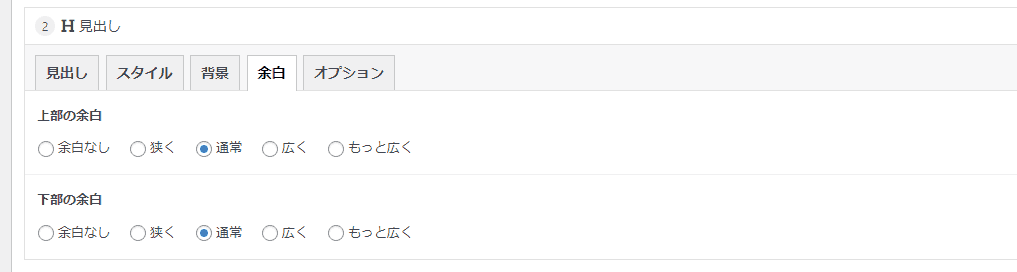
- No margins
- Narrow
- Usually
- Widely
- More widely
In this way, the height can be easily changed.
Amazing features and benefits of Dangan page builder
The Dangan page builder also has some interesting features.
Once set, you can "pop up" banners and newsletter registration forms. Please see below.

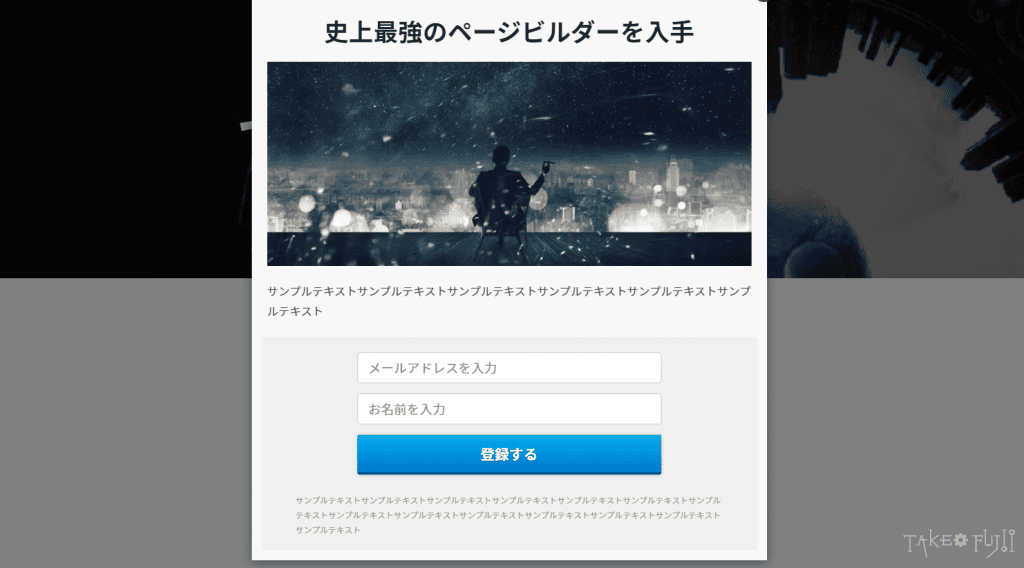
You can also display a "countdown timer" on the LP.


These features can increase the closing rate of LPs.
Can I use the Dangan page builder for beginners?
Yes. Rather, it is recommended for beginners who want to make LPs easily. For those who want to make their own elaborate LPs, we recommend other page builders.
- Not confident in design sense
- No specialized knowledge of making LPs
- I want to make an LP with high design in less time
The Dangan page builder has a great design of parts. Just combine the parts to create a single LP.
How to Use Dangan Page Builder Effectively
It's a good idea to keep in mind how to make a basic LP.
By using a combination of the (basic) sales writing template × the Dangan page builder, you can create an LP that produces results.
- Problem
- Affinity
- Solution
- Offer
- Narrowing down
- Action
It is a simple sales writing mold (new PASONA law). You can easily make LPs by inserting them in a fill-in-the-blank format.
Even with the Dangan page builder alone, you can create a great-looking LP. However, to increase the closing rate, the first step is to create an LP by applying it to the basic sales mold.
In order to create an effective LP, be sure to use a sales writing mold.
In particular, Dangan page builder is attractive for its "ease of use". You can quickly create highly designed LPs with zero knowledge.
Small business entrepreneurs and managers can "save time" by combining the "sales writing type" and the Dangan page builder to create LPs.
Please take advantage of it.
Advantages of Dangan Page Builder
Here's a quick summary of the benefits of Dangan page builder.
- Extremely high design
- All the necessary functions are available
- Intuitive use without manual
- Overwhelming time savings
- Not influenced by the theme
- Pop-up display is included
- Countdown timer can be used
- Easily tinkering with CSS
These are the benefits.
Disadvantages of Dangan Page Builder
It's a great WordPress page builder. However, there are two points that cannot be overlooked when using it.
- Not compatible with Gutenberg
- No new features added
These two are major and fatal disadvantages.

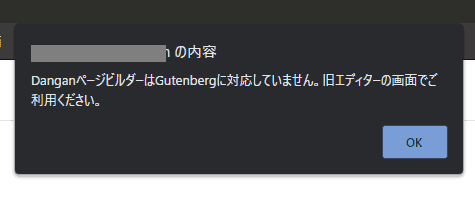
The warning above is a popup that appears when using the Dangan page builder in the new WordPress editor "Gutenberg".
As you can see,The Dangan page builder does not support Gutenberg.
Since using the Dangan page builder as a β user, there has been no support for the new editor, Gutenberg.
If you want to use the Dangan page builder in your current WordPress, you'll need to install a separate plugin called Classic Editor (free).

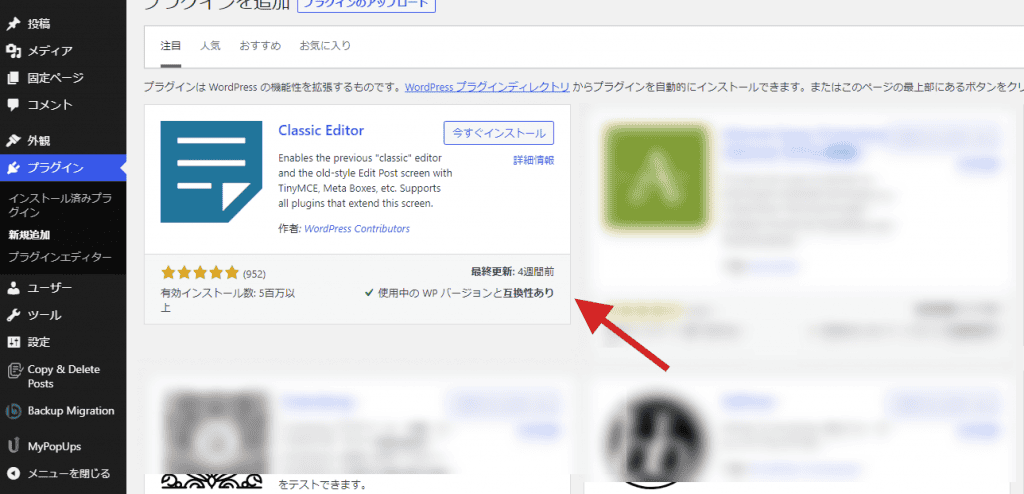
This plugin allows you to use the old editor screen instead of Gutenberg in current WordPress.
I also like WordPress as an old editor, but it is also true that Gutenberg has already become the standard in the era. It's also true that I am hesitant to include the Classic Editor just to use the Dangan page builder.
This is a big disadvantage.
Dangan Page Builder vs. Other Tools
I've used WordPress page builders all over the world.
- Elementor
- Visual composer
- Beaver Builder
- Divi
- Oxygen page builder
- Thrive architect
- Page builder by siteorigin
- Brizy
I haven't listed it here, but it covers even minor page builders that even English-speaking marketers don't know.
Let's compare this famous page builder with Dangan page builder.
Dangan Page Builder VS Colorful
These two are often compared. Both are popular with small business entrepreneurs and business owners.
Colorful and Dangan page builder, the difference between the two. That is
- Dangan Page Builder: WordPress Plugin
- Colorful: WordPress Theme
It is a decisive and fatal difference. Colorful is not a plugin, unlike the Dangan page builder. WordPress themes.
This means that if you want to create an LP with Colorful, you need to install Colorful and install a dedicated WordPress to create an LP. It's not easy to use.
In the case of the Dangan page builder, it is a plugin, so you can install and use it directly on your current WordPress server. You don't need to install a dedicated WordPress server to create a separate LP.
Both are very similar in design. There is no big difference. The functions included are similar.
However, is it a plugin or a theme? This is a very big difference.To sum it up in my personal opinion, Dangan page builder is easier to use.
For a more detailed comparison article, please see below.
>>Which is better, Dangan page builder or Colorful? The answer is...
Dangan Page Builder VS Elementor
Let's compare it with Elementor.Elementor is a world-famous WordPress page builderis. It has also been used a lot in Japan in recent years.
The crucial difference between Elementor and Dangan page builder is "scalability."
Simply put, Elementor has a wide range of LPs (landing pages) that can be created.
On the other hand, the LP that can be made is generally decided, but Dangan Page Builder is a simple and easy way to create LPs with high design.
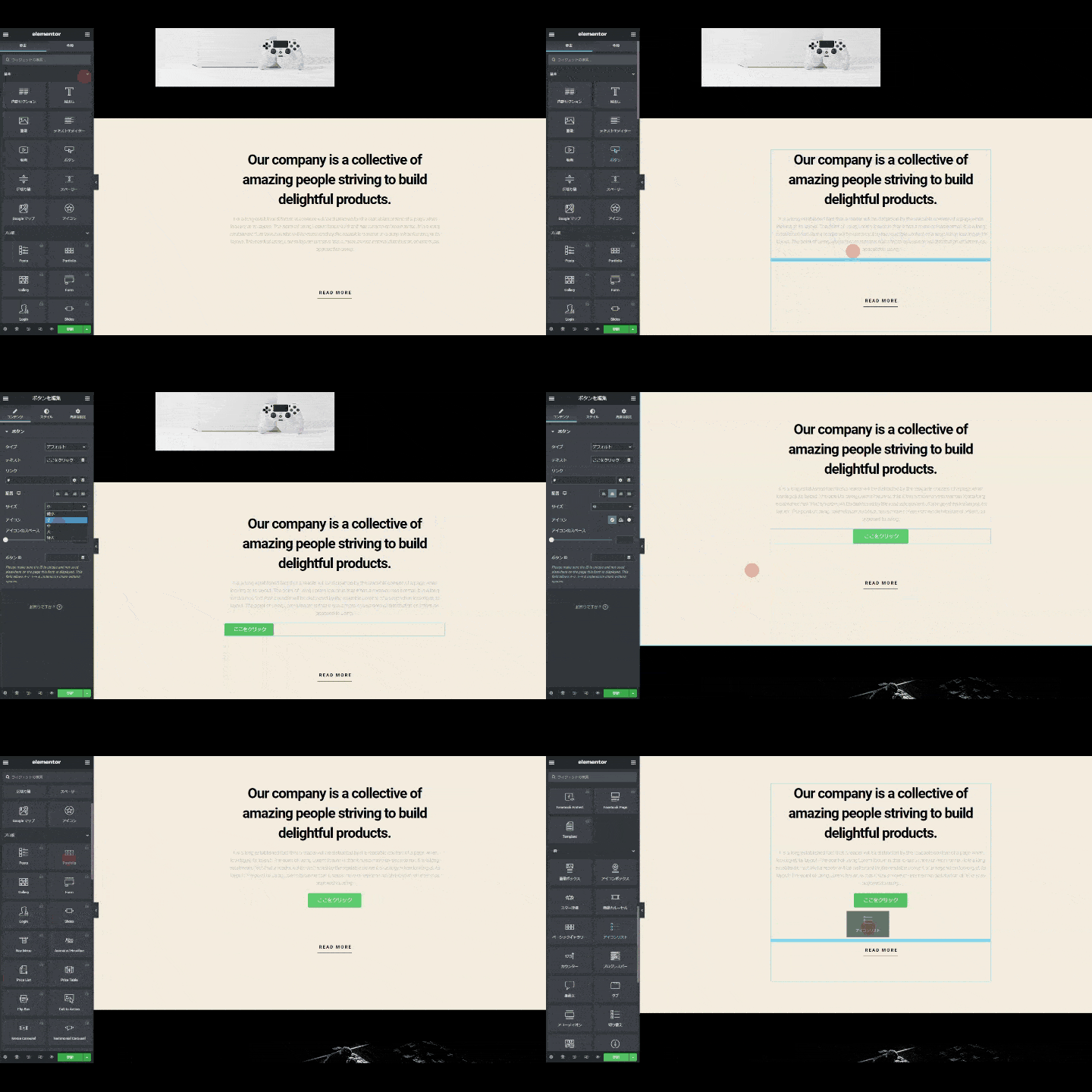
Here are some differences: First, Elementor opens its own page editor screen when you create a page.
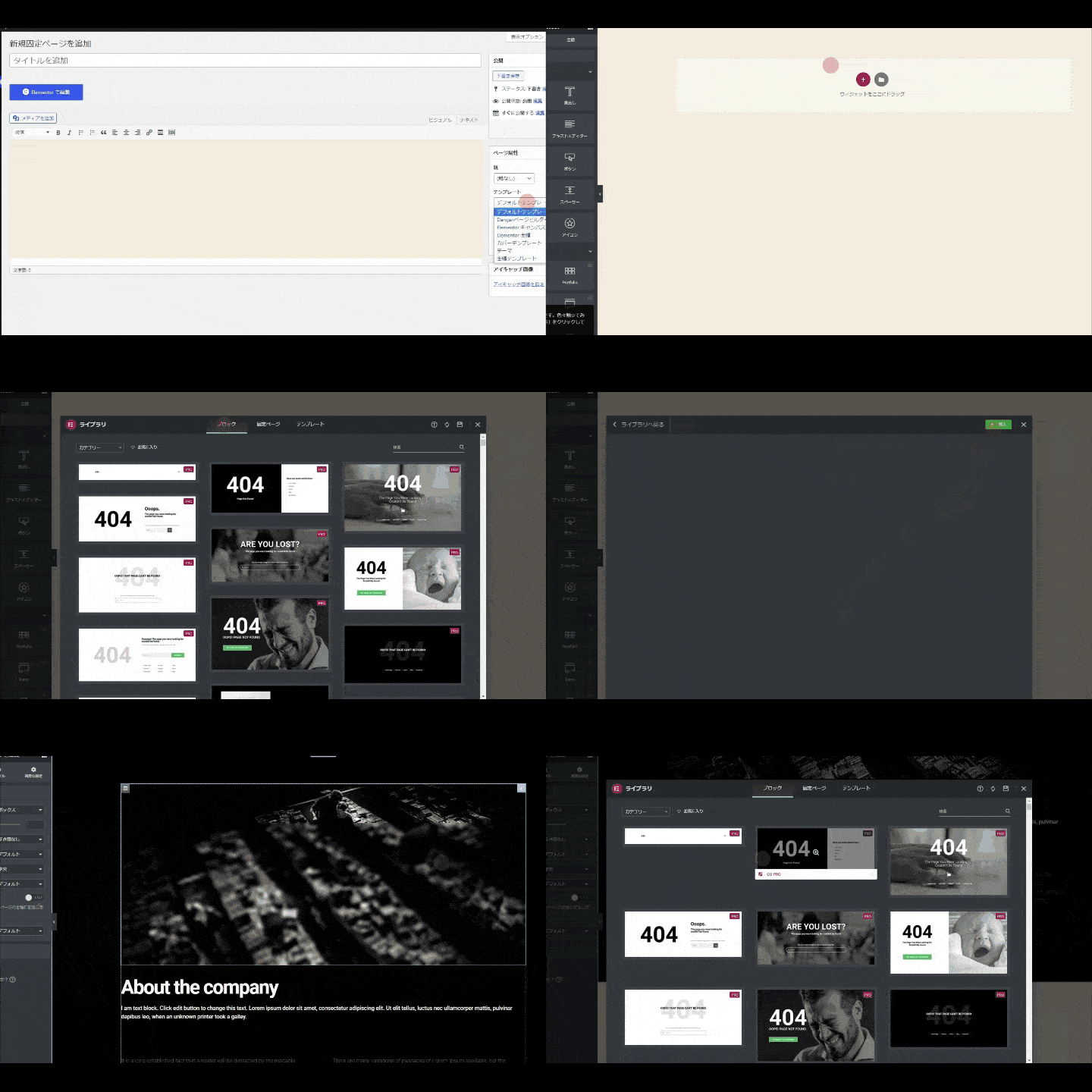
You can choose from a variety of templates on this editor screen to create a page, or you can create a page by placing elements one by one.
Elementor also offers a large number of widgets. By adding this widget, you can create a page with a more customized design and functionality.
Even in the free version, you can use 29 basic widgets.
Describes the Dangan page builder. The Dangan page builder does not support the new WordPress editor Gutenberg. Only the old editor screen is supported.
This is a big difference. If you look at the difference so far, it will be "Dangan page builder is too disappointing".
So, let's continue to compare it with other page builders, Brizy.
Dangan Page Builder VS Brizy
The WordPress page builder I currently use for this blog isBrizyis. I don't have the Dangan page builder installed on this blog.
This is because Brizy is overwhelming in terms of performance and functionality as a WordPress page builder, and Brizy is many notches higher in terms of page builder ratings.
The weakness of the Dangan page builder is that
- Not compatible with the Gutenberg editor
- Unable to display menu bar on LP
- Infrequent updates
Therefore, readers who regularly read this blog recommend Brizy. I explain it in the article below.
>> [Article] WordPress page builder Brizy usage and complete guide
… That said, I also love Dangan page builder.The reason is "ease of use".
Brizy is perfect if you want to create a quick and well-designed LP (landing page).
On the other hand, although it is less applicable, it is a Dangan page builder that is different in terms of ease of use. The Dangan page builder is packed with carefully selected features for LP production.
If you're a beginner or not confident in your design skills, we recommend Dangan page builder.
We compared the three page builders with the Dangan page builder. The Dangan page builder has fewer features and less customizability. It can't be helped if you compare it to Elementor or Brizy.
The strength of the Dangan page builder is its ease of use, not its abundance of features.If you want to create an LP (landing page) that sells easily, use Dangan Page Builderis recommended.
Dangan Page Builder Pricing
The current price is 12,800 yen (tax included).
Expensive or cheap? … It's cheap. It's a buy.
Basically, WordPress page builders are paid annually.
For example, the paid version of Elementor costs $49 per year (about 5,300 yen per year in Japan yen) even on the cheapest plan. Not only Elementor, but other page builders also pay annually.
Moreover, Elementor has the cheapest 49 per year plan, and you can install up to 3 sites.
On the other hand, Dangan page builder is a one-time payment and you can use it at no additional cost until you die. And you can install it unlimitedly. There is also no limit to the number of installations.
To put it bluntly, it's a breakthrough. Entrepreneurs and managers who are doing small businesses should buy now.
About the Dangan Page Builder Money-Back Guarantee
There are no returns or refunds.
If there is a problem and there is a manual, if it still doesn't work, you can contact support.
If you want a feature in the Dangan page builder, there is a dedicated request form for users.

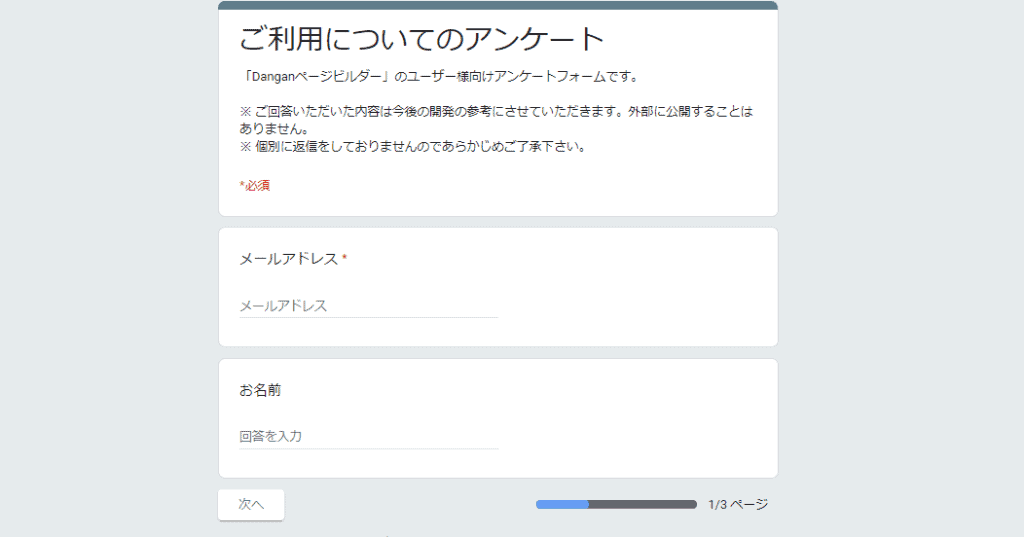
They will not grant all your requests. However, the developer, Mr. Nakamichi, is always watching.
We can't give you a refund or return it, but if the Dangan page builder is flawed, you can rest assured when it comes to support. It leads to a solution.
What will happen to Dangan Page Builder in the future?
Let's be honest.There is little hope that the Dangan page builder will add new features in the future.
In other words, it is already complete. Please think that it will not become new or more advanced in the future.
The basis for this is myself. I've been using the Dangan page builder since the β version before it was officially released. In other words, I've been using the Dangan page builder since the very beginning.
While some features have been added in between, they have never added the innovative features that page builders like Elementor and Brizy have.
Also, the Dangan page builder is not compatible with Gutenberg. Therefore, you will need to install the Classic Editor separately. This is inconvenient, but I don't think I will deal with it.
【Conclusion】My Dangan Page Builder Review Summary


Honest impression. I have a few complaints. I think there is room for improvement in the details.
However, the ease of use of the WordPress page builder alone is by far number one.
I've used page builders around the world for several years, and I assure you。Dangan Page Builder is easy to use.
The complaint is that it only supports the old editor. Still, the reason why I recommend Dangan page builder is because of its ease of use.
Even without a manual, you can have a great-looking LP (landing page) in just a few minutes.
Should I use Dangan page builder? My thoughts are...
Should you make an LP with Dangan page builder? The answer is simple.
If you are a beginner and want to make an LP that sells easily, "Dangan Page Builder"
If you want to make an LP that is more functional and inferior to professionals, "Brizy" is the way to go.
This comparison may make it seem that the Dangan page builder is inferior. Not really. You should choose according to your needs.
If you choose based on the number of features and design, you should choose another page builder.
If you value ease of use and simplicity, Dangan Page Builder is the way to go.I will.
If you want to know more about the features and functions, please click the button below.
Among the WordPress page builders in Japan, we confidently recommend Dangan page builder.
See you soon.




















Latest Comments