


Hello, Fujii, I'm strong. We will explain "Image compression to speed up WordPress display speed".
By reading this article, you can improve your site's display speed and create a website that greatly reduces the stress of page loading.
There is no charge for it. *We will also introduce paid options, but you are free to use them or not.
First, let's explain what image compression is.
- 1 What is image compression?
- 2 Why make your website appear faster?
- 3 Does image compression change page display speed?
- 4 How to "Image Compression" to Improve Site Display Speed
- 5 Steps to Ultra-Effective Image Compression with ShortPixel
- 6 Enter your API key in ShortPixel
- 7 How to set up "ShortPixel" to accelerate display speed
- 8 Improve display speed with ShortPixel's "Advanced"
- 9 Conclusion: Improve Display Speed with Image Compression
What is image compression?
Why do you need to compress image files in your WordPress website?
The reason is simple. This is because image compression can reduce the amount of data.Reducing data volume without compromising image qualityYou can do it.
If you try to display an image with a large file size as it is, it will take a long time to load. However, if you can reduce the amount of data, you can greatly improve the speed at which pages load.
Image compression is a very effective way to speed up the display speed.
So why do you need to speed up your website?
Why make your website appear faster?


StatisticsAccording to , 40% of users give up on reading the page and leave when the web page loads for more than 3 seconds.
In other words, even if the content is of good quality,Slow pages are a pain for visitorsIt means.
Have you ever been frustrated when you surf the Internet and the page doesn't appear easily?
Pages taking longer to load can cause stress for visitors.
Page display speed is related to Google's SEO measures
In addition,Page loading speed is crucial from Google's SEO perspectiveis.
Google's algorithm update "Speed Update" introduced in 2018 explains how the speed of a site's display may be related to changes in search results rankings.
Slow page display speed is also a disadvantage for SEO.
How can I quickly improve the display speed of my WordPress website?
To efficiently and stress-free maximum speedImage compressionis.
Does image compression change page display speed?
It will change. It is not a "theoretical theory", but actually changes the display speed of the page.
Please see the case study on this site. This is the page speed before image compression.


We measured the speed of mobile viewing with PageSpeed Insights, which is provided by Google. The result is the image above.

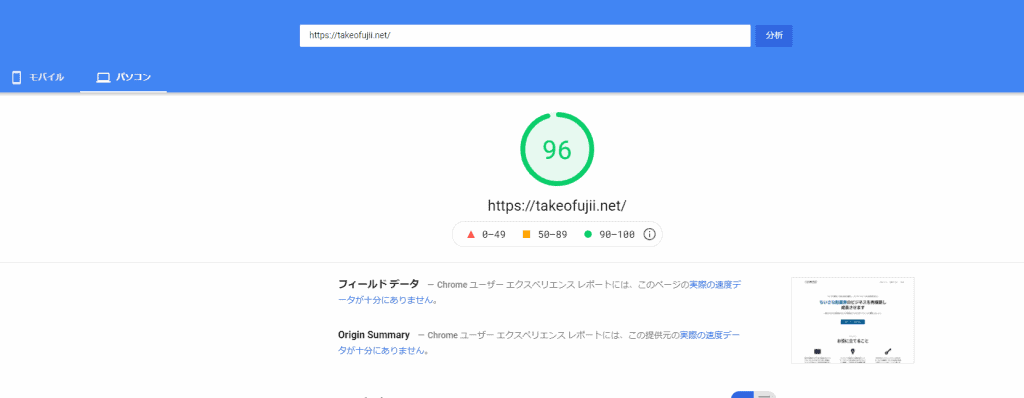
The display display has a score of 96 without any problems. However, you can clearly see that the page speed is slow in mobile viewing.
Page speed after image compression
So, how did it change after image compression?


90 points on mobile.

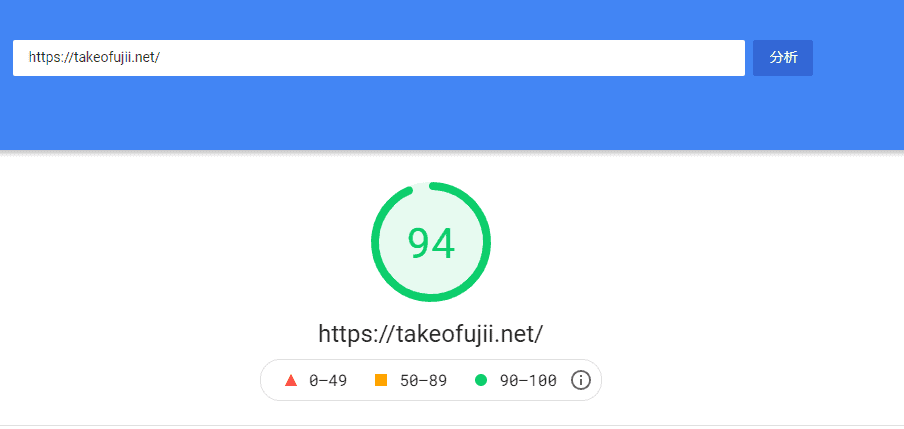
It is also 94 points on the display display. We've dramatically improved it, especially when it comes to mobile display.
The above result is just image compression. We are not doing anything else to speed up the display speed of the website.
If you want to fundamentally improve the display speed of your WordPress site, then you should also read the article below.
>> [Latest] Causes of slow WordPress display speed and how to make it super fast in 15 minutes
Now, we will explain in detail the "image compression method" that greatly improves the site display speed.
How to "Image Compression" to Improve Site Display Speed
Let's dive into how to compress images on your WordPress website.
This time, we are going to talk about free WordPress plugins for image compression.ShortPixelI use it.
I've used a number of image compression plugins, but I finally settled on ShortPixel.
I also wrote a specific review article. Please go below.
This section explains how to use and configure ShortPixel.
If you are aiming for the same page display speed as me, please copy it and install it as it is.
However, depending on your website settings, you may experience problems. It's your own responsibility. Take a backup just in case. Backups are described in the settings.
Here, I will further compress the image and write down the steps and flow to speed up the display speed of the site. I will explain each with specific points.
If you read this article to the end and have a part that asks, "What do you mean here?", please feel free to write it in the comment section at the bottom of the blog. Answer.
Now let's go into the specific procedures and steps.
Steps to Ultra-Effective Image Compression with ShortPixel
The first thing you need to do is install ShortPixel from your WordPress dashboard.

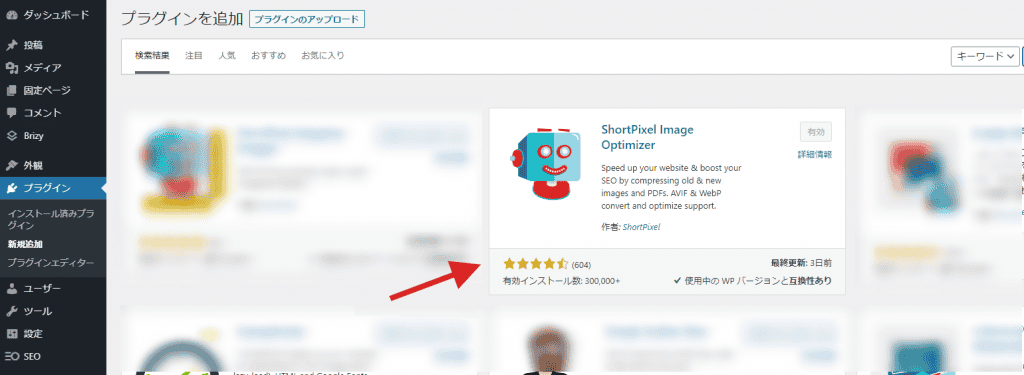
Please also activate it after installation.
Next, get the API key you need to activate ShortPixel. It's free and easy to get, so get it quickly.
How to get an API key for ShortPixel
FirstThis official pageaccess.


Click on the red button that says "FREE SIGN UP".


Enter your email address. After that, check the confirmation field below and click on the button that says "SIGN UP".

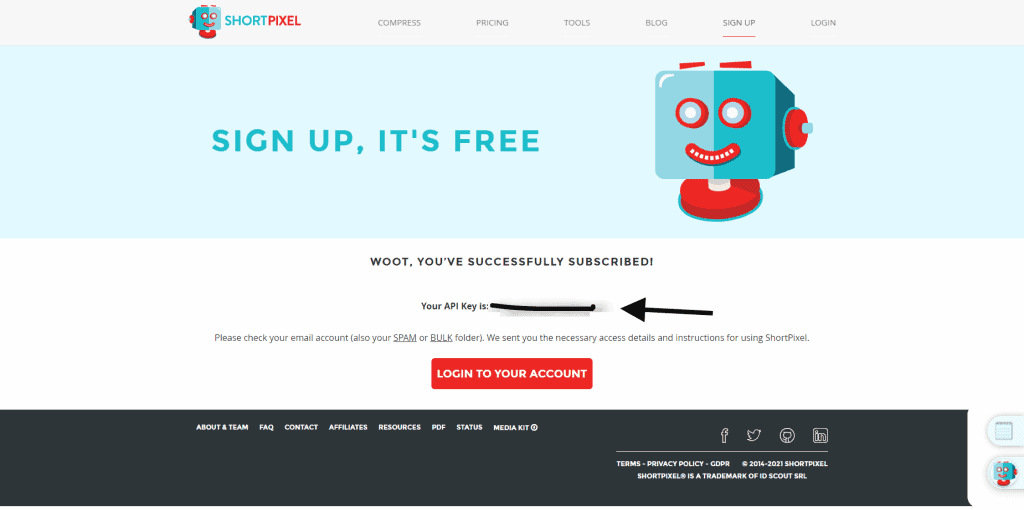
Yes. That's it. You should see your ShortPixel API key.
If you accidentally close the page here, it's okay. You have received an API key to the email address you entered earlier. Please check it out.
The API key obtained here will be used in the ShortPixel configuration. Copy your API key.
Enter your API key in ShortPixel

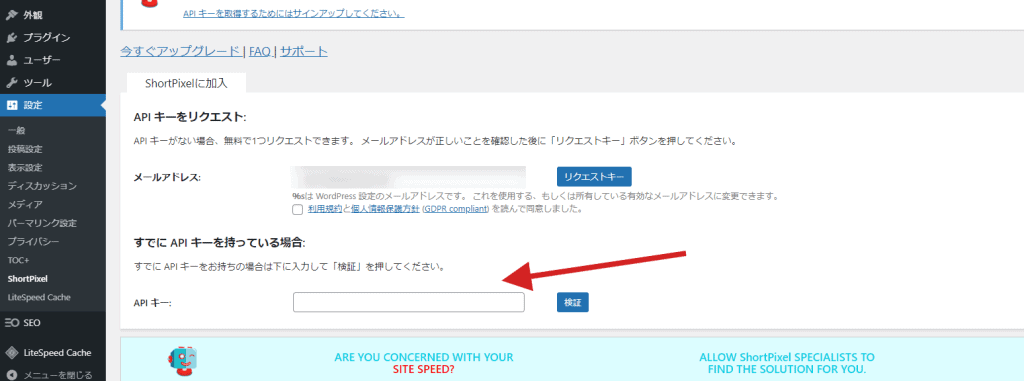
From your WordPress admin, go to Settings → ShortPixel and you will see a page where you can enter your API key.
There is an item called "If you already have an API key". Enter the API key you just obtained. This will complete the authentication of your ShortPixel's API key.
By verifying your API key, you can use ShortPixel to compress 100 images per month.
Now, here is the main setting.
To dramatically improve the display speed of your WordPress website, you need to set up a speed-focused setting. Here's how to set up image compression with ShrotPixel to get the most speed.
How to set up "ShortPixel" to accelerate display speed
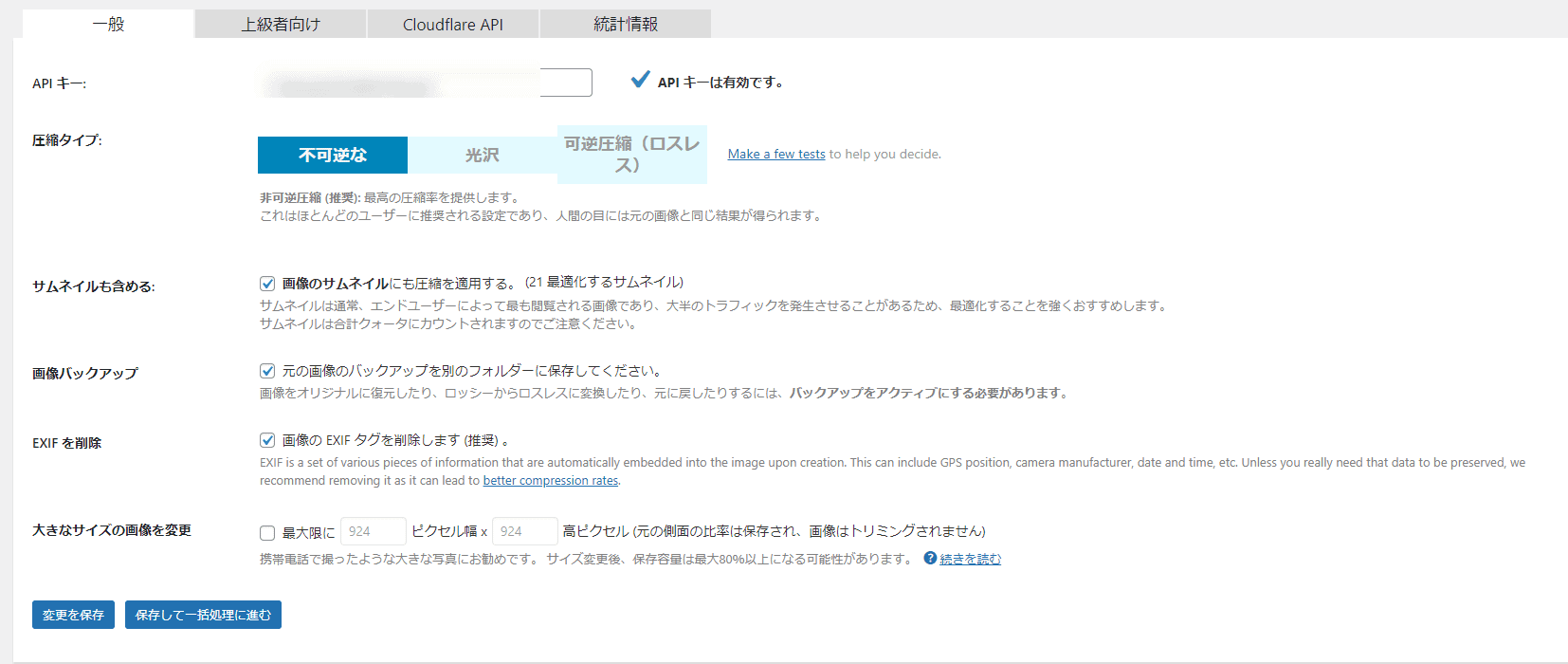
This setting is important for improving display speed. I will explain each item. First, I will upload the settings.
- Compression Type:Irreversible (Lossy)
- Thumbnails include:Check it out
- Image Backup:Check it out
- Remove EXIF:Check it out
- Change large size images:Width 1,200× Height 675
I will make a supplement. Be sure to read it.
First, the compression type specifies "Lossy", which can compress images the most. Although it is super compressed, there is not much difference in image quality that can be seen with the naked eye.
Also check the thumbnail. Since it is displayed a lot of times, it is recommended to compress the thumbnail as well.
Image backup is a preference. However, as a result of image compression, I have taken a backup for insurance purposes in case I want to do it again.
And I also enter the item to change the large size image. This is where the setting is a concern. To be honest, if you want to use your blog, you can use the above size settings.
*If you are creating a portfolio site, please do not include this size designation.
This is a setting to improve the display speed by compressing the image to the extreme limit so that the image quality does not deteriorate.
Next, move on to "Advanced settings".
Improve display speed with ShortPixel's "Advanced"
You can customize the "Advanced" setting to further improve the display speed.


Select "For Advanced" next to the General tab.
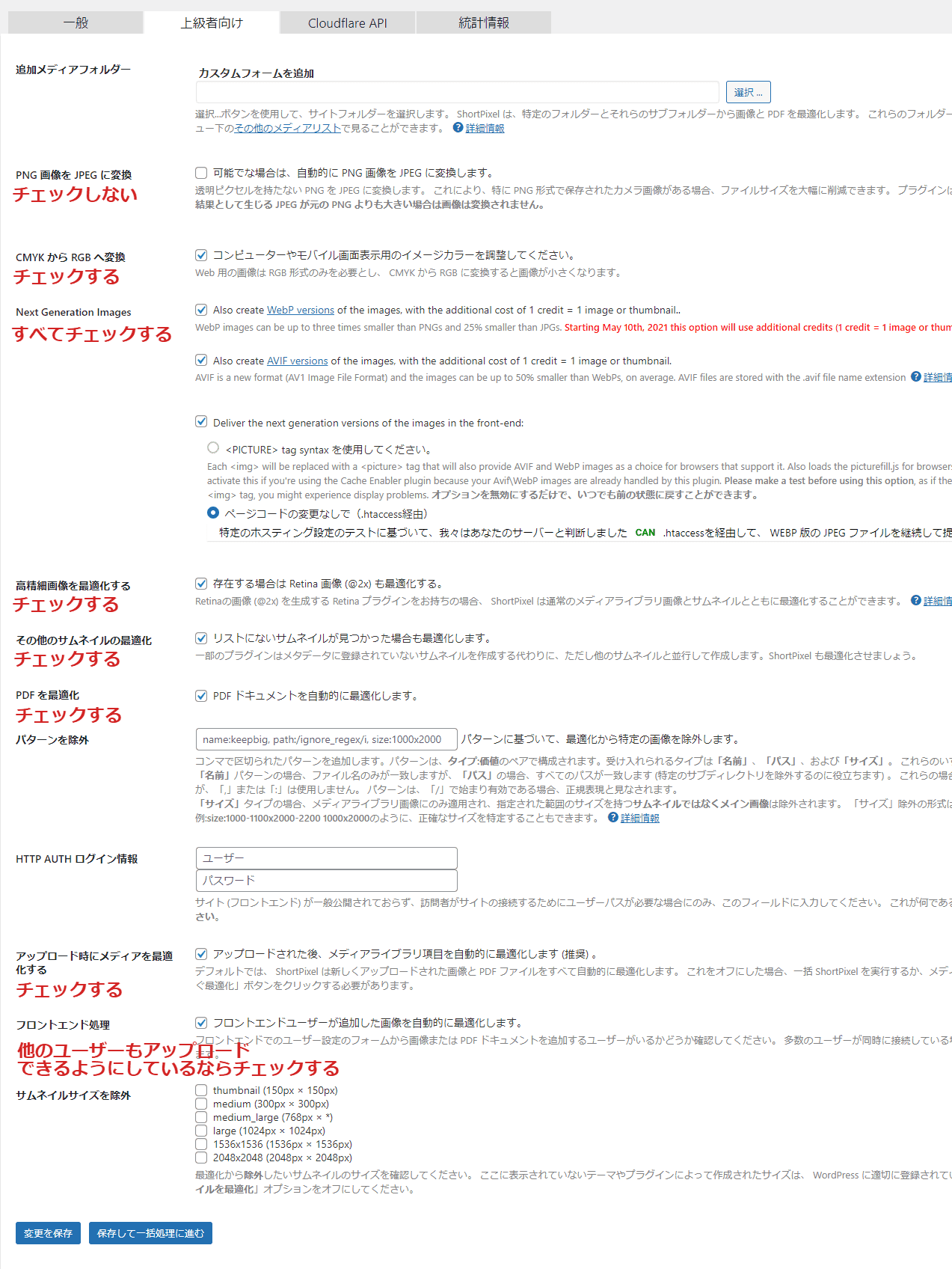
- Convert PNG Images to JPEG: Unchecked
- CMYK to RGB Conversion: Check It Out
- Next Generation Images: Check it all
- Without page code changes (via .htaccess): Check
- Optimizing High-Definition Images: Check
- Other thumbnail optimizations: check
- Optimize PDF: Check
- Optimize media on upload: check
- Front-end processing: check
I will add here as well. Since it is only for advanced users, the idea here comes to individual sites.
I didn't check "Convert PNG image to JPEG". The reason is the result of considering the risk of losing transparency in the PNG format. However, JPEG is more likely to make your images lighter than PNG. The image quality deteriorates somewhat, but...
However, if your website is not the type to be attractive mainly with images, you can check this box. The image quality is normal, as light as possible, and if you want an image that can be seen reasonably, you can check it.
I check "Optimize PDF", but if you don't work with PDF files, you can remove it. The same goes for front-end processing, remove it if you don't need it.
Now all you have to do is compress the image with ShortPixel.
Conclusion: Improve Display Speed with Image Compression
In this article, we explained how you can use ShortPixel to dramatically improve the display speed of your WordPress website.
Please set the "Advanced User" setting in accordance with the purpose of your website. *The basic setting alone will speed up enough. Please don't forget to back it up.
If you want to know more about what you can do with ShortPixel, check out my detailed review article.
Also, if you have any questions about using it, please feel free to write it in the comments section below this article. We reply within an average of 12 hours.
See you.





















Latest Comments