


Fujii: Takashi. This time it's my favorite automation tool「ZeroWork」It is an introduction.
Recently, there has been an AI boom, and many IT entrepreneurs are paying attention. AI services such as ChatGPT and Claude work instead of humans, but is AI really improving work efficiency?
… Imagine. What if you could fully automate 90% of your daily routines...?
What if you could automate all the tasks that cannot be streamlined with ChatGPT?
You don't have to work alone in front of a computer screen while stressing. Automate it all.ZeroWork is a powerful automation tool that can replace youis.
What is ZeroWork?


ZeroWorkis a tool that allows you to automate browser operations. Even beginners with no technical knowledge can automate everyday tasks.
One year ago, I started using this tool with zero knowledge. At first, I was confused. At that time, there was only an English explanatory manual.
I am currently automating many of my daily tasks with ZeroWork.
There are really very few entrepreneurs in Japan who know about ZeroWork.
With this tool, your daily tasks will automatically end while you are reading while you drink coffee.You can automate all the work that other competitors are doing manually.
Features of ZeroWork
Here's a quick summary of the features of ZeroWork:
- Ultra-low-code: No programming knowledge required. Create automations intuitively.
- Scheduling: Automate tasks at a fixed time every day.
- Automate everything: Automate data extraction from the site, input, click, copy, and paste
Recommended for people like this
- I spend my time on my daily routine
- Stressed by repeating the same task
- I want to improve work efficiency at a level that I can feel
Busy entrepreneurs, business owners, and marketers are short on time. Because the scope of work is too wide. Customer attraction, sales, customer support, product design, accounting... And so on.
Hire someone and it will be solved. However, the cost of hiring people, training and adjustment are not free.
Those tasksYou can just throw it at ZeroWork.
It will do the heavy lifting for you 24 hours a day, 365 days a year. You don't have to pay a salary, you don't complain, and they do your job perfectly.
Basic Usage of ZeroWork
Getting started with ZeroWork is very easy. When I first got my hands on it, there was no Japanese manual for ZeroWork yet.
However, I have now explained how to use ZeroWork in Japanese.
This shows that anyone can create automation without any technical knowledge. I explained it to "super" beginners.
You don't need dozens of hours of study. Just watch the video above to master the basic usage.
Below, we will explain the basic usage of ZeroWork step by step.
1. Login
First, if you don't have ZeroWork, make a purchase first.
[Limited time] A whopping 84% off the regular price, and you can get ZeroWork with a "one-time purchase". You only need to pay 12,000 yen (converted to Japan yen) once. No additional costs.Click here for detailsPlease check the
Once you've created your account, go to the ZeroWork website. Enter your registered email address and password to log in.
2. Review the dashboard
Once logged in, you will see the dashboard.

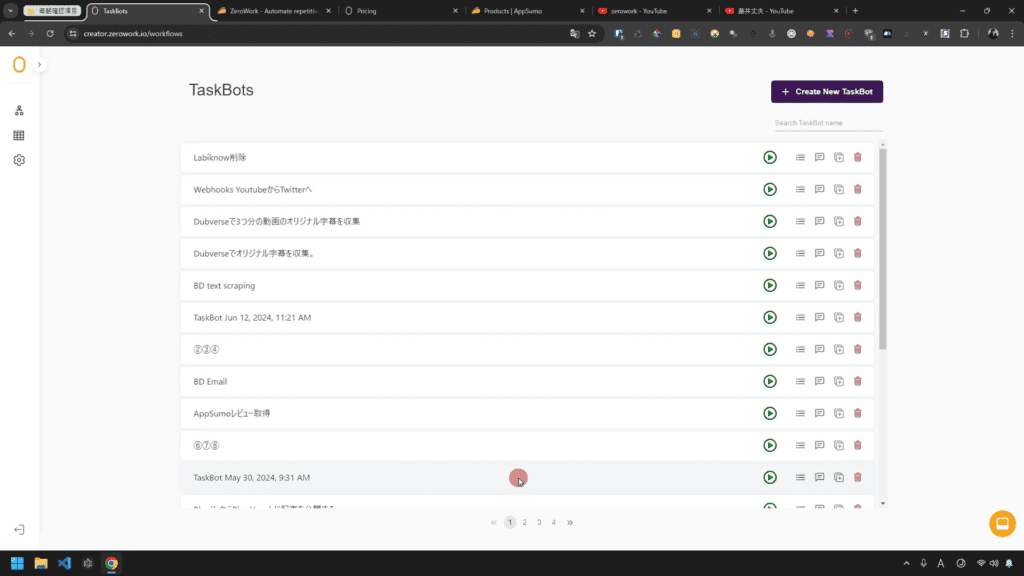
Here, you can manage your own automations and create new ones. The intuitive interface makes it safe even for first-timers.
3. Create a task bot
Now, let's actually create automation.
Step 1: Create a new task bot
Click Create New TaskBot in the top right corner of the dashboard to create a Task Bot for your new automation.

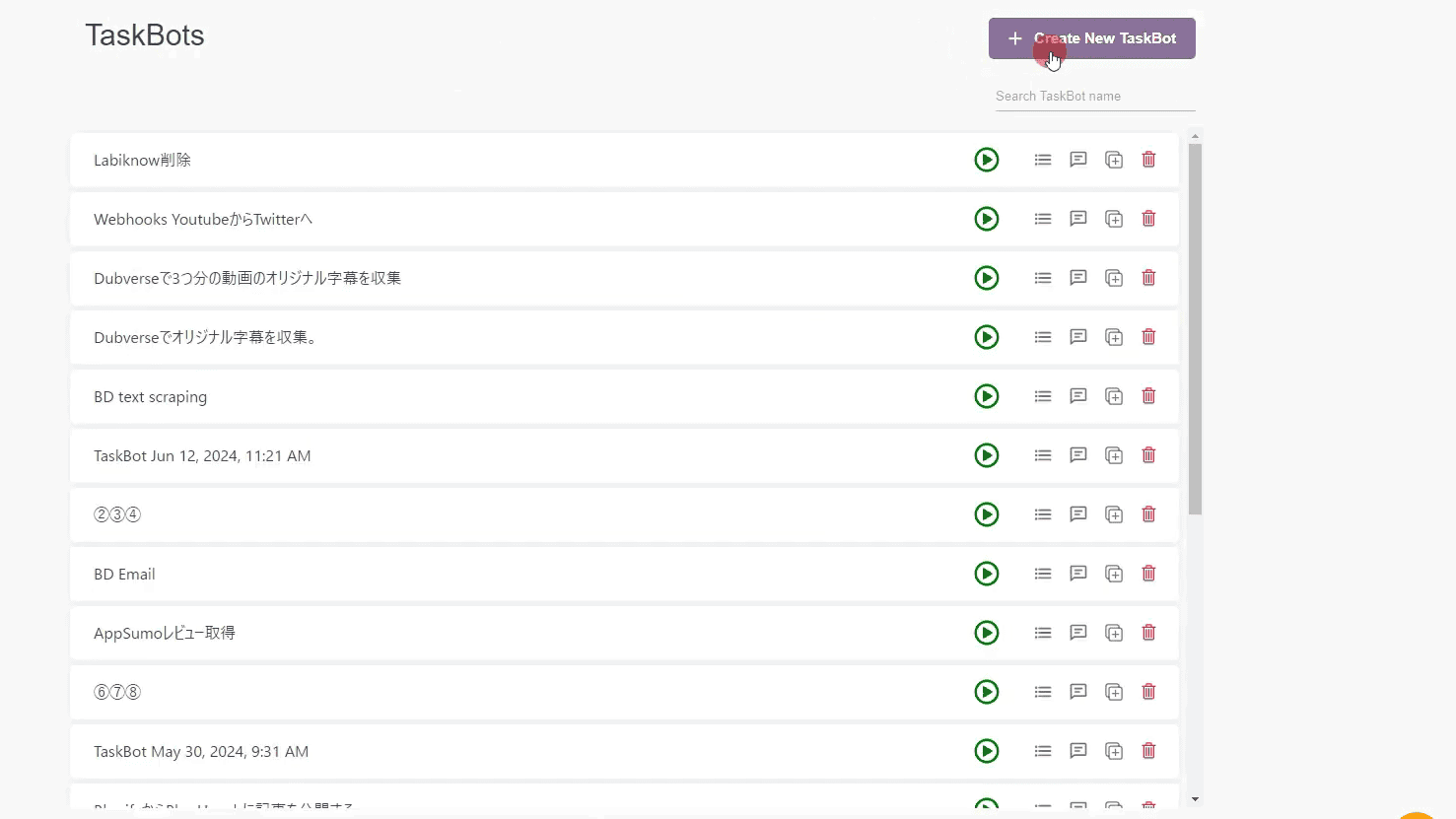
You can give your task bot a name that is easy for you to understand.
Step 2: Add Actions
Creating automation is easy.

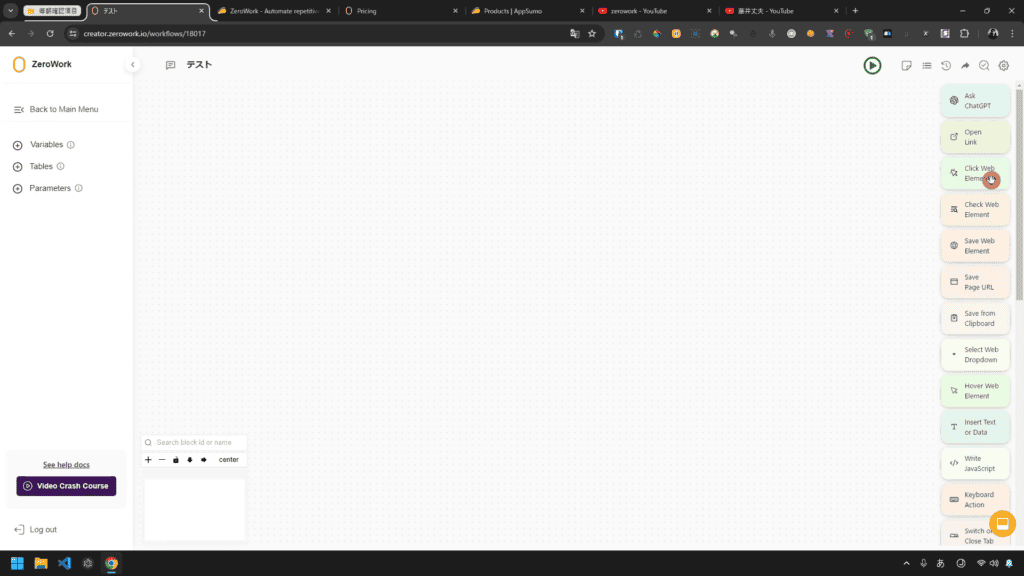
From the actions in the right sidebar, drag and drop the actions you want (e.g., open a link, type text, click, etc.).

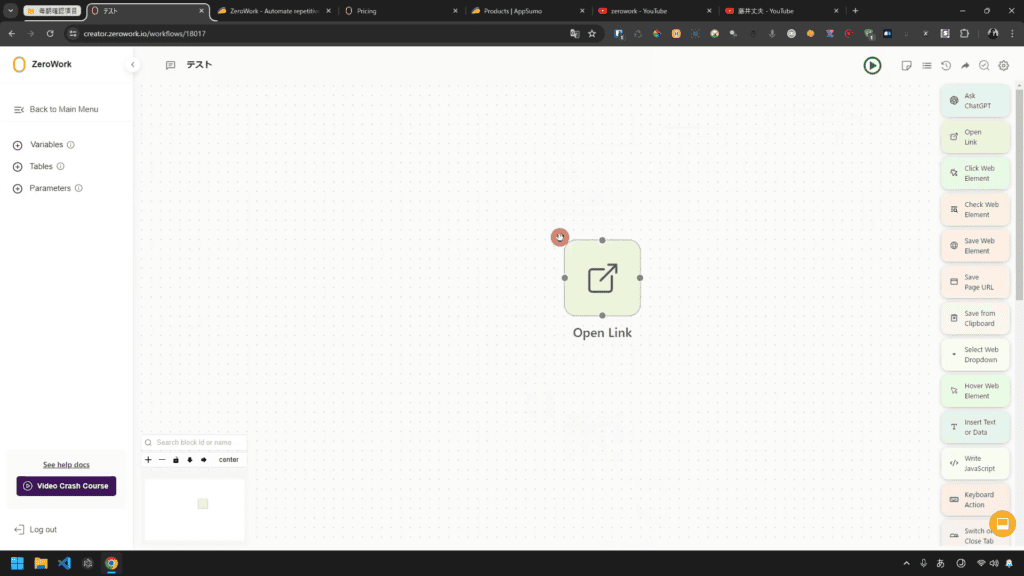
All that's left is to connect in the order you want to automate.
Step 3: Adjust Settings
Configure detailed settings for each automation action.

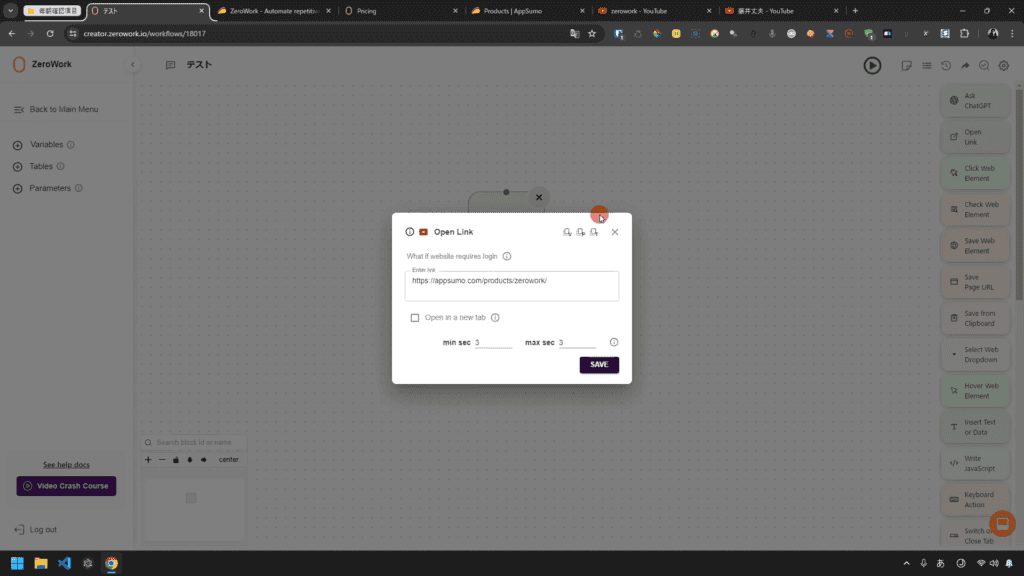
For example, set how many seconds to wait after opening a link and where to click.
4. Test and save the task bot
Run the automation task bot you created to see if it works correctly.

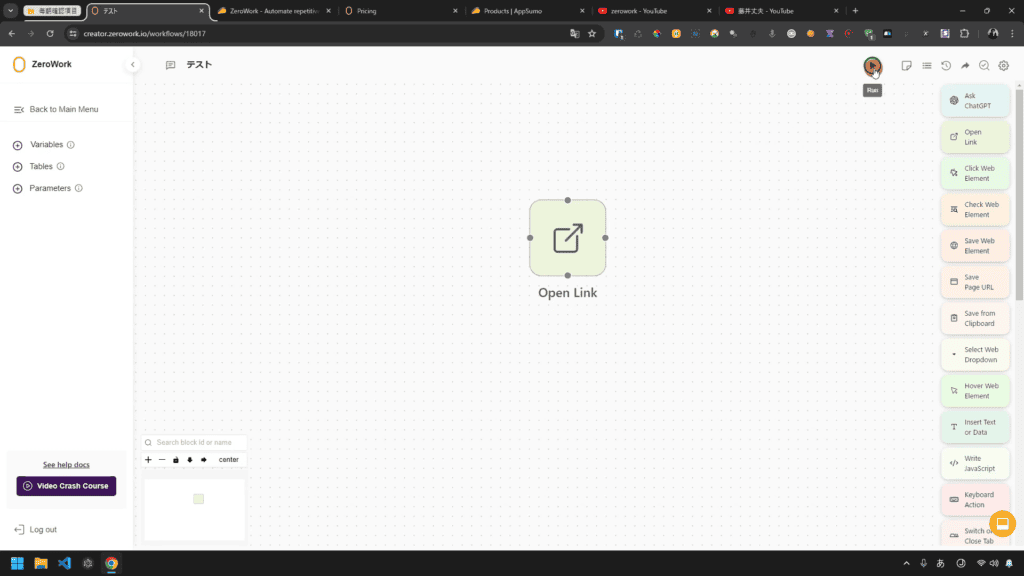
Press the play button in the upper right corner to start the automation you created.
By the way, the task bot created on this screen is automatically saved, so there is no need to save it manually.
5. Scheduling
By the way, if you want to do it regularly, such as "organize your email inbox every Monday", you can automate it by setting a schedule.
You can set it freely every day, every hour, every 5 minutes, etc.
Examples of how to use it
For example, if you want to create a task bot that fetches and stores the latest news from a specific website every day, the steps are as follows:
- Open Link: Set the URL of the news site.
- Extract text: Extract by specifying the news headline or text.
- Save data: Save the extracted data to a spreadsheet, etc.
- Scheduling: Scheduled to run every morning at 8 o'clock.
In this way, you can use ZeroWork to automate your daily tasks and improve efficiency.
This simple automation should take less than 3 minutes to create.
Features of ZeroWork
ZeroWork is multifunctional. You can automate a variety of tasks. Here's a closer look at the key features of ZeroWork:
1. Data Scraping

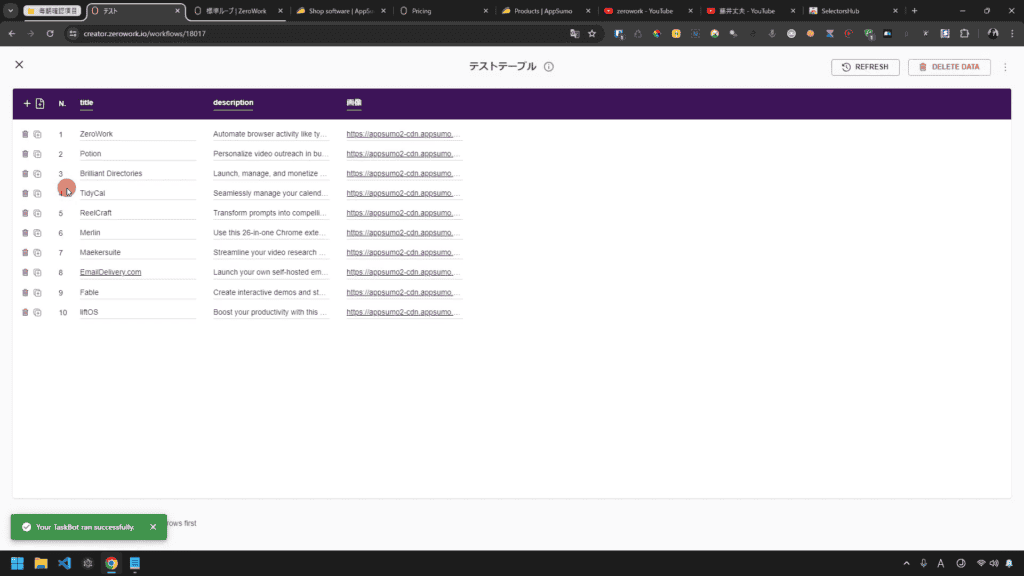
ZeroWork has the ability to automatically extract data from your site. You no longer need to manually collect data from within your site. For instance
- Google Maps: Extract store information and reviews.
- LinkedIn: Collect profile information and company data.
- Amazon: Get product information and prices.
You can easily do these things.
2. Autofill and Operation
ZeroWork can automate actions on the browser, such as typing text in the input area of a page or clicking buttons.
- Entering Text: Automate sentence input
- Click Actions: Automatically click on specific buttons and links
- Keystrokes: Automate the Enter and Delete buttons.
In particular, I would like to emphasize that human manipulation
You can automate anything from clicking, typing, saving data, copying and pasting from one site to another, and more.
It really depends on the idea.
Some ZeroWork users can assemble 200~300 blocks to almost automate daily tasks, or automate simple tasks with only 5~8 blocks.
Below is the automation I created over the course of two hours.

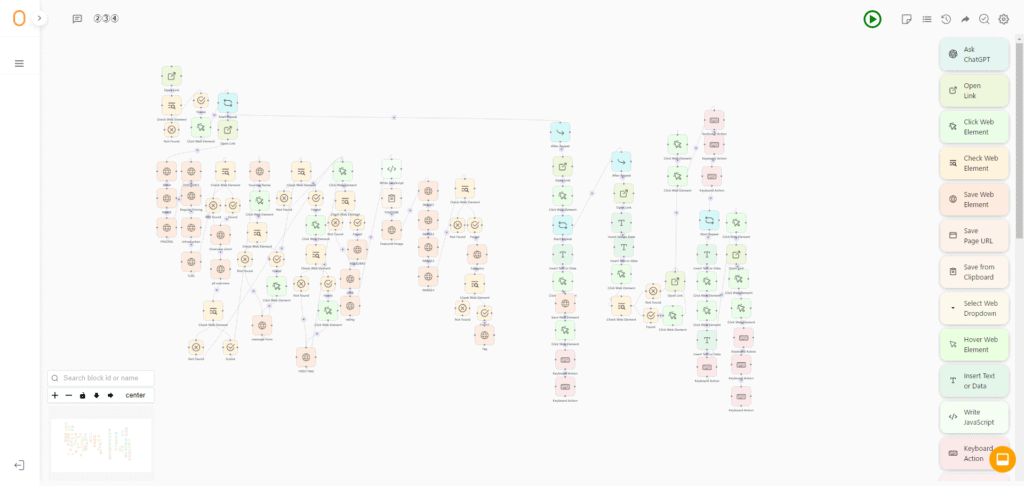
Such complex automations can be created "without limits".
3. Scheduling

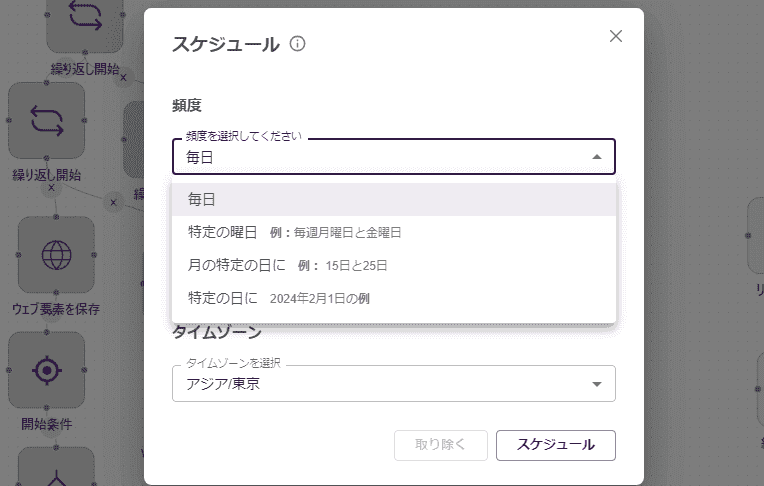
You can schedule task bot runs to run automation tasks on a regular basis. You can set it up as follows:
- Run every day: Runs at a specified time each day.
- Run every hour: Runs every specified hour.
- Every 5 minutes: to run repeatedly at short intervals.
4. AI Integration (OpenAI API available!) )
ZeroWork also works with ChatGPT (OpenAI API) to easily create AI-powered automations.

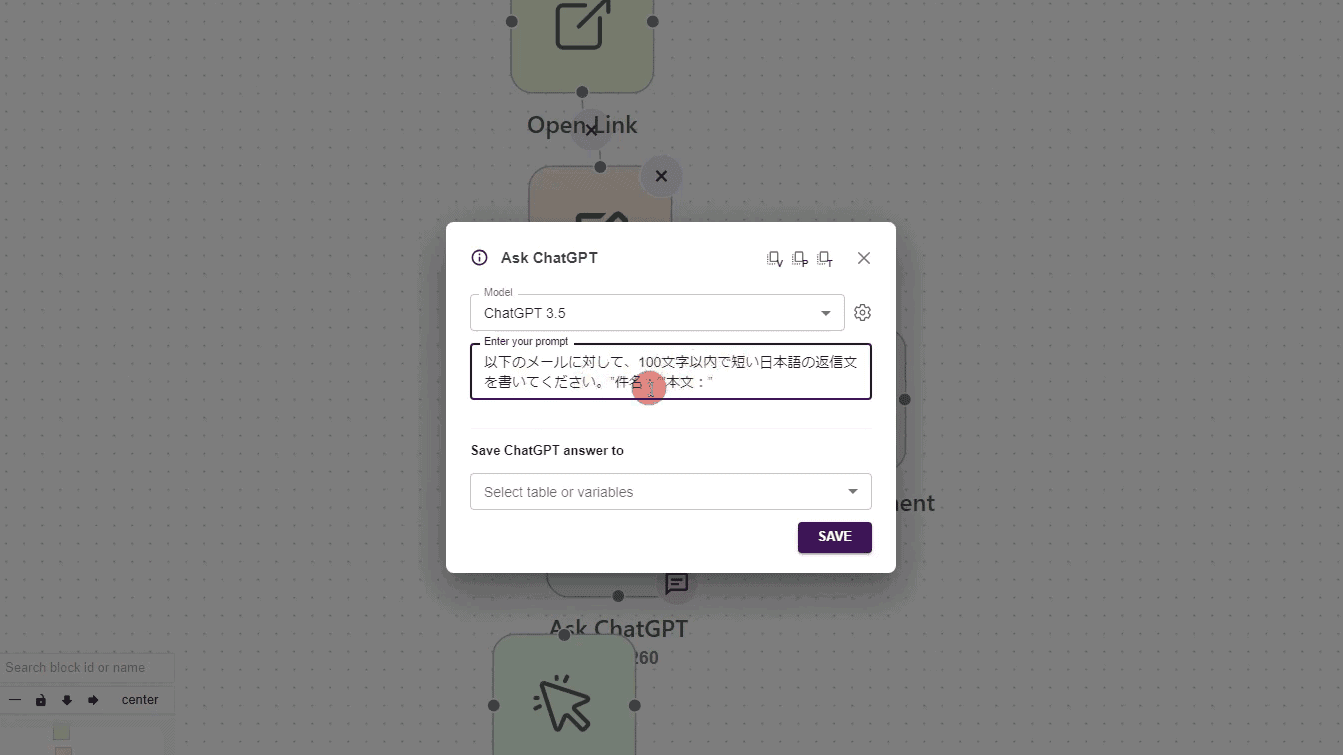
- Content Generation: Automatically generate blog posts and comments
- Email Autoresponders: Reply to incoming emails on your behalf
- Direct Message Automation: Send personalized messages to the other person on SNS
For example, it is also possible to automate writing in this way.
5. Integration function

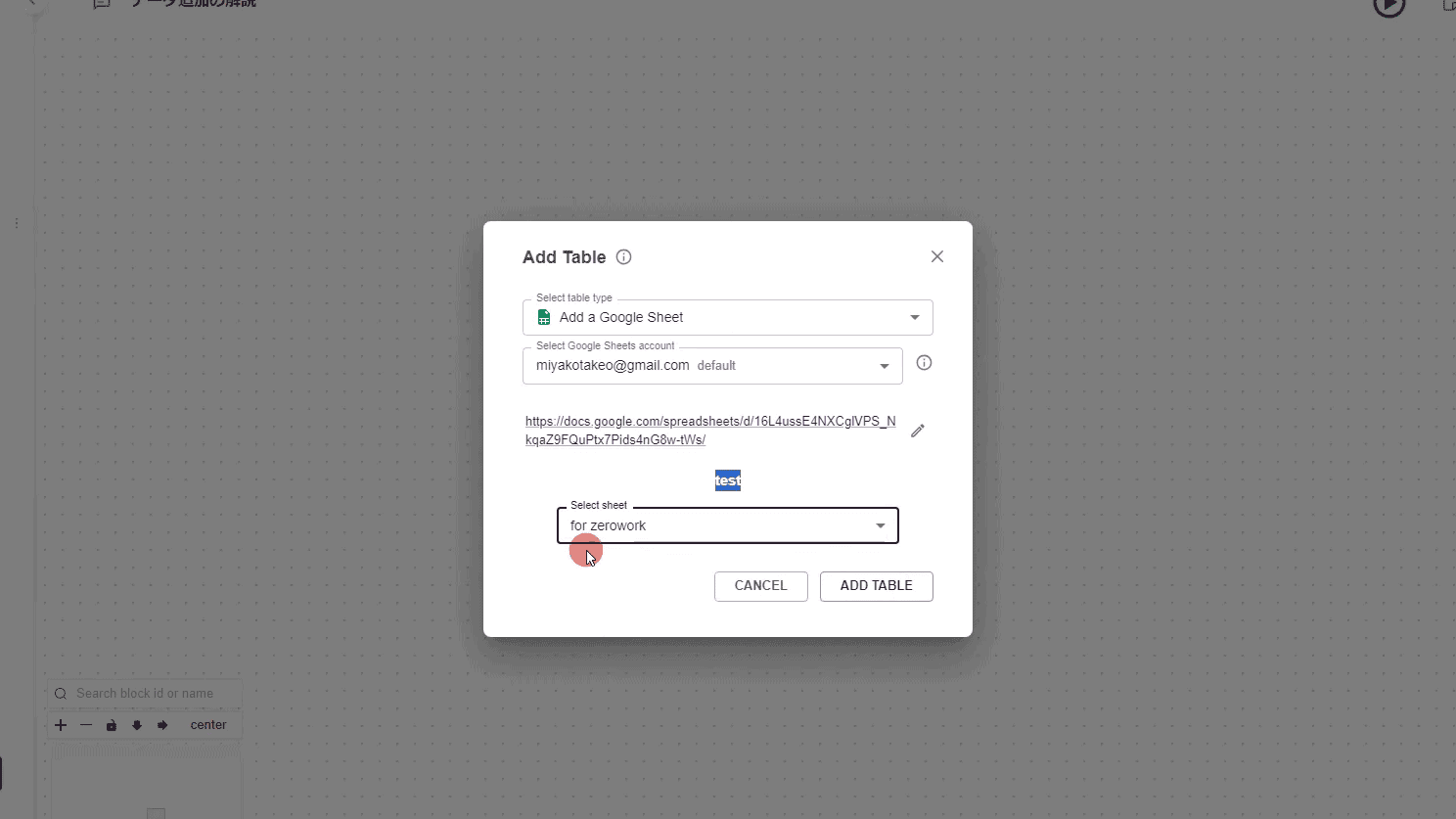
ZeroWork can work with other tools and services. This allows for even more extensive automation.
- API Integration: Integrate with external APIs to acquire and transmit data.
- Google Sheets: Save or read data in a spreadsheet.
- Webhooks: Receive triggers from other applications to run automations.
This is a bit applied. Even if you don't have access to this feature, you can automate most of the work.
By the way, Google Sheets integration was explained in the supplementary video below.
This integration is quite helpful, so you should definitely try it out with ZeroWork.
Examples of how to use it
For example, if you want to create a task to monitor the price changes of Amazon products, combine the following features:
- Data Scraping: Get prices from Amazon product pages.
- Scheduling: Perform a price check at a certain time every day.
- Data storage: Save the obtained price data in Google Sheets.
- Notification function: Notify us by email if the price changes.
In this way, by combining the various functions of ZeroWork, various tasks can be automated and efficient.
Benefits of ZeroWork
In fact, it is an incredible merit girl tool. Here are some points that I think are particularly important.
1. No programming knowledge required
ZeroWork is a low-code tool. In other words, you need a little knowledge.
But don't worry. It doesn't matter if you don't have any programming or technical knowledge.
Sounds difficult? No, if you watch my explanation videoYou can easily create automation.
Can't you use it because it's English? ZeroWork is intuitive to use. It can also be used with English proficiency at the level of the first year of junior high school.
Don't have a single automation tool? Then you should definitely get ZeroWork.
2. Time-saving
"I get a lot of comments and emails every day, so just replying to them will take up 30 minutes of the morning."
This is a consultation that was actually received from me. I recommended ZeroWork to this person. He is a male manager in his 60s who cannot read English and has no programming experience.
They just watch my basic explanation video and create a system with ZeroWork to automatically reply to comments and emails.
What do you think happened as a result?
Automate all blog comments and email replies.When you wake up in the morning, just turn on your computer and start ZeroWork.
He was able to create a system that could save precious 30 minutes in the morning.
Just by creating one system like this, you can protect your precious time.
3. Efficient Data Collection
It can automatically collect the information you need from a specific site. This is the so-called scraping.

If you instruct the staff to "collect data from this site", they may do it, but if you concentrate data manually, mistakes will definitely occur.
You will find data that you forgot to collect or duplicate data. And it takes time.
But these tasks can also be automated with ZeroWork.
4. Schedule Available
In ZeroWork, you can set up a schedule to automatically run tasks on a regular basis. You can perform tasks daily, hourly, weekly, monthly, or even every few minutes.
5. Collaboration with AI
ZeroWork can work with AI such as ChatGPT. This allows for a higher degree of automation, such as posting auto-generated content or responding to chats.
Summary of benefits
- Easy to use: No code and anyone can use it
- Time-saving: Save time with automation
- Data collection: Efficiently gather information
- Scheduling: Capable of performing regular tasks
- AI Collaboration: More automation possible
With ZeroWork, you will be able to perform your daily tasks efficiently. There is no reason not to use it.
There are books such as "How to dramatically increase productivity", but such things do not make actual work more efficient. Ideas can be obtained. However, automating on-site operations increases productivity.
More than any know-how or book, ZeroWork is a powerful assistant that will help you.
Disadvantages of ZeroWork
So far, we've raved about ZeroWork. It has many advantages. Please use it.
Of course, there are also disadvantages. Let me tell you so that you don't end up saying, "I bought it, but I can't use it as much as I want."
1. Difficulty with initial setup
First, ZeroWork is intuitive. Once you get used to it, you can easily create automation.
However, if you are using it for the first time, you may be confused by the settings. It's the same with everything.
However,Try to use it seriously for just one week.Every day, my autonomic nervous system goes crazy, and even if I work exhausted, I don't get the results I want... This is common to most entrepreneurs.
I understand your harsh days. So did I.
Still, take your time and use it for a week. If you can automate your daily tasks, you will be more free now.
2. Advanced features
Just learning the basics can automate any task.
However, creating complex automations may not be enough for the basics. There are almost none.
ZeroWork also has advanced features. These features make automation even more powerful.
However, advanced features will take more time to learn. So,First of all, I want you to learn only the basic usage.
3. Support in English
ZeroWork support is excellent. Support is available in Facebook groups and Discord. However, when you have a problem, you need to consult in English.
Even if you consult in Japanese, "I can't automate this task," most of the people in this group speak English. You won't get the answers you want.
As a complete digression, Diana Rees, the founder of ZeroWork, speaks eight languages.
… So, you need English for basic support. However, you don't need to use these supports to create automation.
If there is a request, I will put out a video explaining how to use ZeroWork.
Currently, there are few users, so we only put out basic videos. However, as the number of users increases, we will actively enhance ZeroWork's explanation videos and support.
Please share this page with other entrepreneurial friends.

I would be happy if the number of ZeroWork users increased.
4. Cost Concerns
ZeroWork usually costs $40 per month. About 6,000 yen/month in Japan yen.
It's not that expensive. However, if you are a small business or just starting a business, you will be a little hesitant.
Now,It is on sale for a limited time with up to 84% off one-time purchases.
… It's not something that you can sell forever even though it's a common limited time. It should be sold out in one or two months.
60-day money-back guarantee
Please take this opportunity to get it.
Comparison with Other Automation Tools
You may know. I've also introduced another automation tool called TaskMagic. If you are interested, please also see below.


ZeroWork and TaskMagic are both excellent browser automation tools.
Each of them has its own characteristics, advantages and disadvantages. I use both, and I will compare them specifically.
Features of TaskMagic
Strengths
- Beginner-friendly: TaskMagic has an intuitive UI and easy operation, making it easy for beginners to design automations. The flow of automation can be visually assembled, so it is very easy to use.
- Presence of a community: TaskMagic has a large number of users and an active community. We have an environment where it is easy to receive support when you are in trouble.
Cons
TaskMagic has a lot of reported bugs. I have also encountered bugs many times.
Of course, bugs are being fixed one after another. The TaskMagic development team is enthusiastic.
However, sometimes the automation doesn't work well due to lag. This bug is so much so that some people chose Zero Work over TaskMagic.
Features of ZeroWork
Strengths
- Fewer bugs: ZeroWork has very few fatal bugs. It is a reliable tool because it can be expected to operate stably.
- Powerful automation capabilities: With a little ingenuity, you can achieve very powerful automation. In particular, taking advantage of free extensions can expand your automation horizons.
Cons
The downside is that it's not as intuitive as TaskMagic.
Try it for a week before beginners can get up to grips with ZeroWork. I have prepared an explanation video. It is about an hour with supplementary videos.
Watch this 1-hour video to learn. This may be the only disadvantage.
Which one should you choose?
TaskMagic is especially recommended for beginners. With intuitive controls, you can start automating right away.
SimplyPersonally, I would recommend ZeroWork.is. ZeroWork is fewer bugs and can be highly automated with a little ingenuity.
How does ZeroWork rate?
Even AppSumo, where overseas tool geek big brothers gather with harsh evaluations, has an average of 4.96/5 scales.

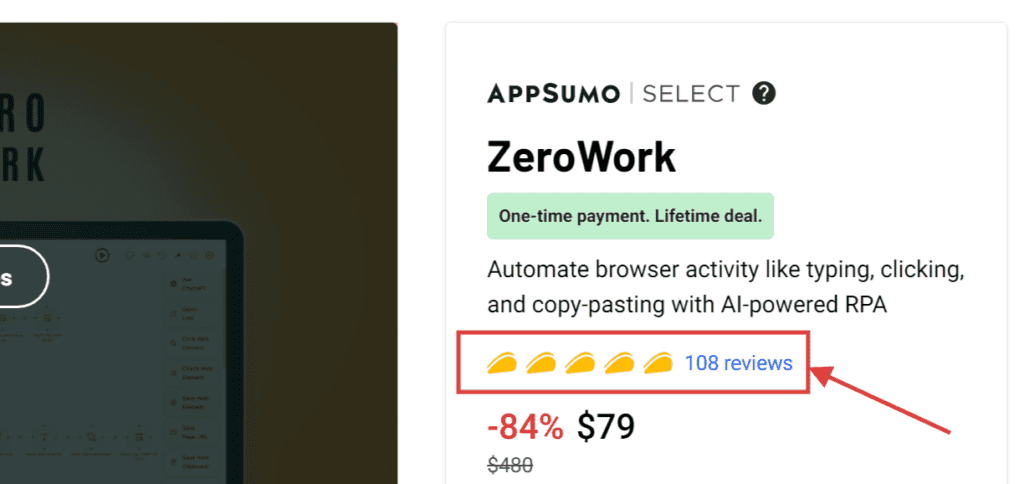
With a total of 108 ratings, this automation tool has received overwhelmingly high ratings so far.
In fact, it is highly rated by my blog readers.
Everyone who has purchased ZeroWork via our blog is satisfied as far as I can hear. I have never seen anyone who regrets buying it.
I myself purchased the top plan. Do you regret buying it? Not at all. It would be a waste not to buy it.
If you don't have money,It's worth buying even if you work part-time for two days.
Summary: The only thing that doesn't fail in productivity and efficiency is ZeroWork
I highly recommend it to solo entrepreneurs.
At first, you may remember. For the first three days, please input how to use ZeroWork. I would like you to study for one week if possible.
Check out my ZeroWork explainer video. It only takes about an hour.
If soYou can mostly automate your daily web tasks within one month.
This automation tool will revolutionize the efficiency of your business in the future. If you find it interesting, start with that interest.
I don't mean to disappoint you.
You may be grateful to me for buying, but you will not lose money by buying.
It also offers a 60-day money-back guarantee. Even if you can't use it well, you can get a refund.
Finally.For a limited time.This special offer ends soon.
AppSumo's campaign period is about 60 days. It has been a while since the start of sales, so it will be sold out soon.
If you're in doubt, I'll push you hard. If you want to buy weird tools and materials, buy ZeroWork.









![Explanation of how to use Scalenut and how to automatically create articles with AI [User reviews]](https://sp-ao.shortpixel.ai/client/to_webp,q_lossy,ret_img,w_485,h_273/https://takeofujii.net/wp-content/uploads/2021/10/scalenut.jpg "Explanation of how to use Scalenut and how to automatically create articles with AI [User reviews]")


Get ZeroWork now 84% off its regular price! The one-time purchase price is only 15,000 yen(Japan Yen Equivalent)So, there is no additional cost at all. Don't miss out on this great opportunity, for more informationFrom this linkPlease check it out.