


To you as a marketer and entrepreneur. We can finally introduce the next generation of email marketing in this article.
- Email deliverability is too low
- Even if you send an email, it is almost never opened
- Failing to recover ad spend
- I want to implement marketing automation
- I want to improve my email closing rate
- You want to build strong relationships with your prospects
If you have any of these concerns, read this article to the end.
The common sense of email marketing is no longer outdated and even valid.
In this article, we will introduceNext-generation email delivery system Encharge is. We will explain the amazing functions and basic usage in an easy-to-understand manner.
Encharge is not the only one here to explain. We will also explain email marketing tactics in modern times, where it is said that "e-mail magazines are dead".
If you are worried about the email delivery system, please use it.
- 1 What is Encharge?
- 2 Encharge features, benefits
- 2.1 Basic Email Delivery
- 2.2 Create intuitive delivery flows
- 2.3 A/B testing
- 2.4 User segments
- 2.5 Personalization - Be friends with your customers
- 2.6 Sending receipts and payment completion emails
- 2.7 Integrations with apps like Hubspot, Zapier, Facebook, and more
- 2.8 Pros of Encharge
- 2.9 Disadvantages of Encharge
- 3 Encharge Pricing & Pricing Plans
- 4 Q&A about Encharge
- 5 【Conclusion】My Encharge Review Summary
What is Encharge?

Encharge is an email marketing tool that allows you to track user behavior on your website and automatically send emails based on your interests.
Until now, old email marketing tools were the norm with simple functions such as sending newsletters and step-by-step emails. However, even if you just send an e-mail magazine, it will not be opened or read.
Encharge can track the behavior of each user and implement email marketing according to that target. This mechanism will help you get more potential customers and increase your conversion rate.
In other words, the previous email distribution system is a method that hits the number of "just send it to a lot of people and make sales from a few percent of them".
Encharge is a way to steadily build relationships with users on the other side of the screen, "automate natural email marketing according to each person's interests and behaviors to produce results."
Encharge features, benefits
Now, let's list the features of Encharge one by one.
Basic Email Delivery
First of all, it is the basic email delivery function.
If you say, "It's an email delivery system, it's natural that it has a function that allows you to send emails," but Encharge's email delivery function has several features.
First, we have Sendgrid to increase our reach. The important thing in an email delivery system is the "delivery rate". Even in the worst-case scenario of not receiving a delivered email, Encharge is here to help.
In addition, the deliverability rate is constantly monitored to ensure that the email deliverability rate does not decrease. This helps you maintain higher email open and click-through rates than other email delivery systems.
Create intuitive delivery flows
Encharge allows you to intuitively assemble your email marketing. You can create a delivery order for emails by dragging and dropping.
Just by looking at it, you can see in what order and how often emails are sent to your subscribers.
The reason why "email marketing is difficult" is because of the "complexity" of assembly. With Encharge, it's simple. It makes it simple to build complex email marketing, so you can do it without stress.
A/B testing
Encharge also has A/B testing, a feature that is essential for web marketing.
A/B testing makes it easy to experiment with multiple email variations.
The number of opens and clicks over a period of time automatically determines which email type is the most successful. This feature allows you to automatically determine the best email for you.
User segments
The reason why Encharge is called the "next generation" is because of its ability to segment users.
You can group users by accessing pages, email activity, and more.
In addition, by segmenting from the user's contact information and profile information, you can implement more refined email marketing.
Let's give an easy-to-understand example. For example, you can cut the segment "People who have visited the product's pricing page more than 5 times" and send an automated email.
This alone should make web marketers excited about the powerful segmentation feature.
Personalization - Be friends with your customers
One of the highlights of Encharge. That's personalization.
This feature allows you to easily customize the emails you send to the whole body to make them look personal.
While a typical email delivery system can only personalize by automatically inserting the name of the subscriber you want to receive in your email, Encharge offers even more powerful personalization features.
You can create and send emails that are more personalized based on their interests, interests, and behaviors.
This powerful personalization makes your prospects feel like they've received a personal email directly from you.
Sending receipts and payment completion emails
Encharge also allows you to send transactional emails. Transactional emails are emails that are automatically sent when an event occurs.
For example, when an online course sells, send an order completion email or receipt email. Or, when the hotel reservation is completed, a reservation confirmation email is automatically sent. It refers to emails for confirmation and notification in this way.
Normally, to send transactional emails, you need to have a dedicated email delivery system. But with Encharge, you don't need it.
Encharge allows you to deliver transactional emails.
Integrations with apps like Hubspot, Zapier, Facebook, and more
Encharge can be integrated with apps and tools in other industries. Of course, typical apps such as Zapier, Webhook, and Hubspot. It can also be linked with a wide range of other apps.
When combined with third-party apps, it can instantly change the breadth and depth of your marketing.
For example, in my case, I use Optinly to capture leads, and then send the lead information directly to Encharge to connect it to email marketing.
The number of apps integrated with Encharge will continue to increase. You can expect even more fulfillment. If I find a good integration, I'll share it again.
Pros of Encharge
The benefits of using Encharge include:
- Great-looking email templates
- Drag-and-drop email marketing
- Easy-to-use user interface
- Implement complex automation with simple operations
- Unlimited email delivery
- Attentive and responsive support system
- Website User Tracking
- Powerful segmentation capabilities
- App integrations like Hubspot, Zapier, Facebook, and more
- A/B testing capabilities
- Analyze email delivery results
- WordPress Integration
- Affordable Prices
On the other hand, we will also summarize the disadvantages of Encharge.
Disadvantages of Encharge
The following two points.
- Landing Page (LP) Features
- Because it's English, I'm scared at first
I will explain each one by one.
First, Encharge doesn't have a landing page (LP) feature yet. You can't create email opt-in pages or squeeze pages. I think this feature will be added in the future, but not at the moment.
Other email delivery systems like Mailchimp and Convertkit have landing page features.
Because it's English, I'm scared at first
Encharge Pricing & Pricing Plans
| Number of subscribers | Growth | Premium |
|---|---|---|
| 0 – 2,000 | $49 | $59 |
| 2,001 – 5,000 | $99 | $119 |
| 5,001 – 10,000 | $179 | $199 |
| 10,001 – 15,000 | $249 | $299 |
| 15,001 – 20,000 | $299 | $359 |
| 20,000 – 25,000 | $349 | $419 |
| 25,000 – 30,000 | $389 | $479 |
| 30,000 – 40,000 | $449 | $549 |
| 40,000 – 50,000 | $499 | $599 |
| 50,000 – 70,000 | $599 | $699 |
| 70,000 – 100,000 | $799 | $949 |
| 100,000 – 150,000 | $999 | $1,199 |
Encharge offers two plans: Growth and Premium.
Both plans offer unlimited email delivery, delivery flows, team members, and email validation. The difference between these two plans is that Premium includes the following features:
- Integration with Segment(https://segment.com/)
- Integration with Salesforce (https://www.salesforce.com/)
- Segments based on events
- Transactional Mail function
14-day free trial of Encharge
"Suddenly signing a contract..."
All right. You can try Encharge for free for 14 days. During this period, try Encharge first to make a decision.
FirstEncharge official pagefrom the Get-Started.


Click the button to jump to the registration page for a free 14-day experience. Please see the image below.


- Email address
- Password
- Name
- Phone Number
- Company website URL
and click Create Account. Your registration is now complete. You can try Encharge for free for 14 days.
Encharge Payment Methods
Here's a brief explanation of payment methods. If you have any questions after reading, please feel free to ask in the comment section at the bottom of the blog.
First, Encharge can be paid with credit/debit cards.


Enter the payer's information, such as address, name, and phone number.

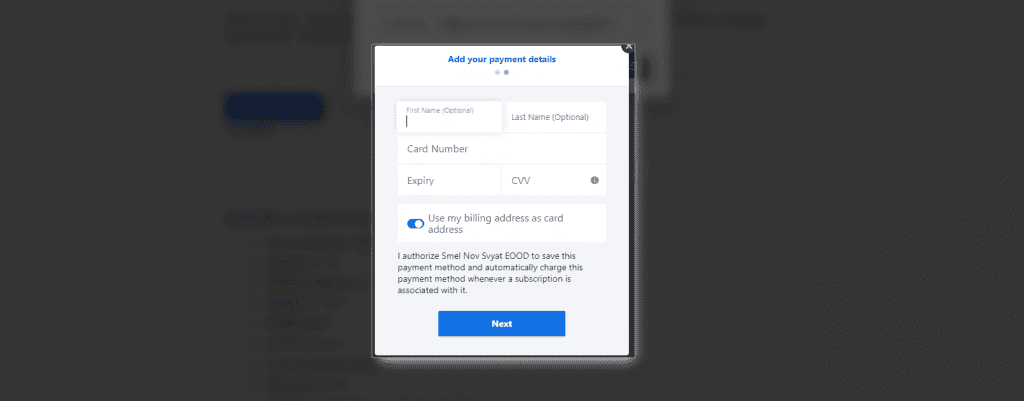
Then enter your card number. Check for mistakes, click the button, and the payment will be completed.
It's such a simple flow.
Q&A about Encharge
We have compiled questions and answers about the email delivery system Encharge.
We will add Q&A if needed in the future.
Who is Encharge recommended?
- SaaS Founder
- Startups
- Small Business Owners
- Entrepreneur
- Marketers
- Website Operators
- People who want to build relationships with potential customers
If any of these apply to you, it is recommended.
In particular, Encharge is an email delivery system designed with the goal of building relationships with users. Therefore, it can be recommended for startups and entrepreneurs who want to build relationships in the future.
Can Encharge be used in Japan?
Yes. The management screen is in English, but emails can be sent in Japanese.
The tracking function also works without any problems on the Japanese website.
If there is a problem, contacting support will lead to a quick solution.
Is there a discount for annual plans?
Yes, you get a 20% discount if you pay annually. It is recommended if you are serious about email marketing.
Can I use Encharge to send cold emails?
Not allowed. You can only send emails if you have permission from the user to send emails.
Therefore, sending emails to strangers is prohibited. You can only send emails to customers and users who have permission to send emails.
【Conclusion】My Encharge Review Summary
Encharge is definitely the best email marketing tool for entrepreneurs, marketers.
The email you send saying, "You've made a masterpiece," is not brutally treated as spam, and it is not even read, let alone not opened.
Put an end to email marketing that you don't even know who you're sending it to or if it's working.
All you need is to track the interests, interests, and behaviors of the person on the other side of the screen you are sending an email to. And it's about converting prospects into customers.
I used Encharge and was convinced. This is the key to opening up a new era of email marketing.
Let's say it clearly. Even if there are email delivery systems that are cheaper than Encharge, they don't have the features of Encharge.
If you choose an email delivery system because of its low price, you will definitely lose money. Let your business implement the next generation of email marketing on the cutting edge. It's worth it.
Whether you're a small business entrepreneur, a small company owner, or a large organization, Encharge will be the best and best option.
Now, I would like to thank you for reading this long review of mine, and I would like to tell you the good news.
P.S. Experience all features for free for 14 days
Encharge offers a 14-day free trial. May I? It's free. And 14 days.
In other words, you can actually try out the amazing features I wrote about in this article for free.
"But you have to enter a credit card for a free trial."
"It looks like billing will start all of a sudden."
No, you don't need to enter a credit card. And yet, you can use all of Encharge's features for free for 14 days.
Please try using it first. Take your business to the next level. Change the game.












![How to Use the AI Voice Memo Tool "AudioPen" [2024 Latest Review]](https://sp-ao.shortpixel.ai/client/to_webp,q_lossy,ret_img,w_485,h_273/https://takeofujii.net/wp-content/uploads/2024/02/audiopen-review-485x273.png "How to Use the AI Voice Memo Tool \"AudioPen\" [2024 Latest Review]")




Latest Comments