



According to W3Tech, approximately 63.4% of the top 10 million websites on the World Wide Web are written in English. This is followed by Russian (7.1%), Turkish (3.9%) and Spanish (3.7%).
In other words, 36.6% of Internet users search in languages other than English-speaking countries. If you haven't made your site multilingual yet, you're missing out on a lot of your customer base.
This is why you should make your site multilingual. By making your site multilingual, you attract visitors from all over the world who are interested in your products.
With TranslatePress, which we will discuss in this article, you can easily create a multilingual website.
So, as a real user of TranslatePress, I'll explain how to use it and set it up.
We will also honestly explain the differences from WPML and Polylang, which are famous WordPress multilingual plugins.
- 1 What is TranslatePress?
- 2 How to use TranslatePress
- 3 TranslatePress Features
- 4 TranslatePress Pricing Plans
- 5 Frequently Asked Questions
- 5.1 Is TranslatePress good for multilingual website creation?
- 5.2 Is TranslatePress free?
- 5.3 Which plan do you recommend?
- 5.4 Does TranslatePress slow down your site?
- 5.5 Is there a monthly plan?
- 5.6 What happens if I don't renew my annual plan?
- 5.7 Tell us about support
- 5.8 Can I Use It on Any WordPress Site
- 6 [Multilingualization] For those who are considering TranslatePress
What is TranslatePress?

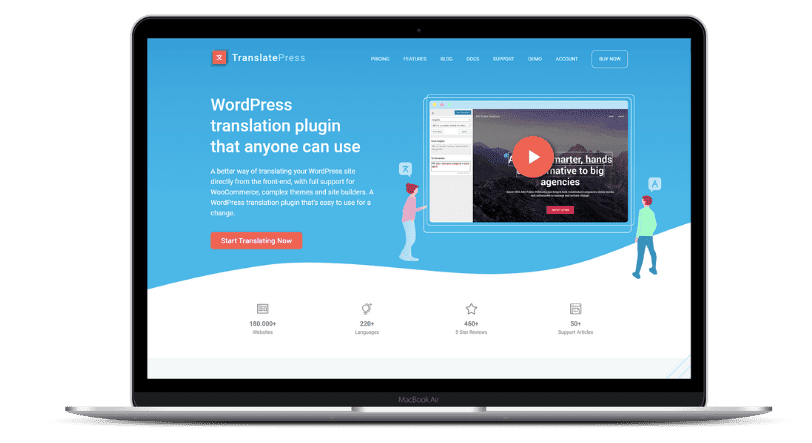
TranslatePress is a powerful plugin for making your WordPress site multilingual.
With this plugin, you can translate your website into various languages to create a multilingual website.
Benefits of creating a multilingual website with TranslatePress
The benefit of making your site multilingual is that you can get a lot of traffic from other countries and regions. Your site will attract customers from all over the world.
I'll give you an example. The default language of our site is Japanese. On top of that, we use TranslatePress to support English and German.
Please see the top right corner of the site.

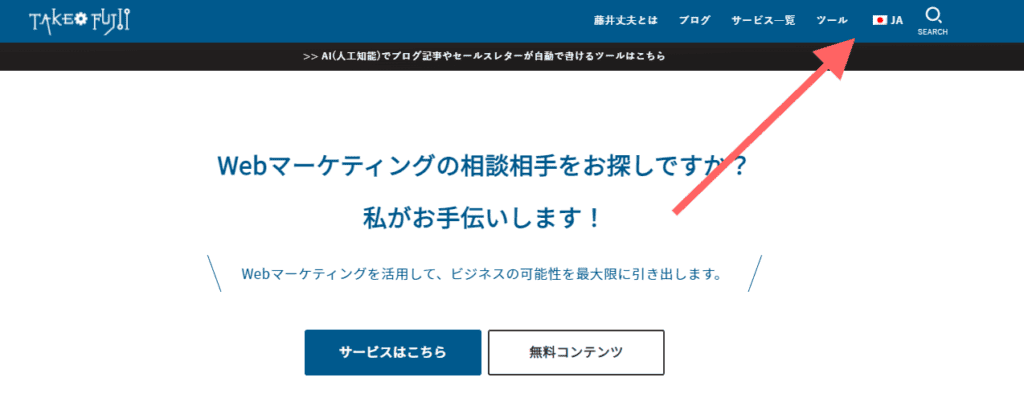
You can see the national flag lined up in the menu items. When you switch this flag to English, the content of the page will automatically switch from Japanese to English

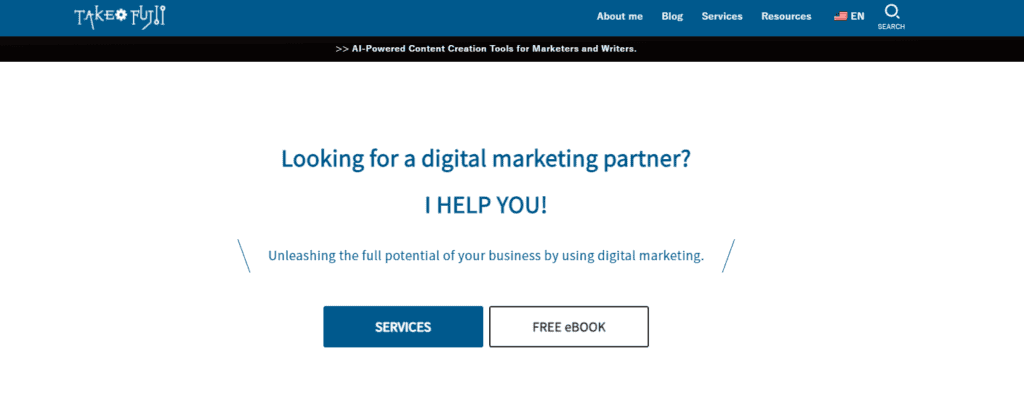
You can easily multilingualize your site in this way. Even a small personal site like this site can gain access from all over the world.
See actually my Google Analytics region summary.


35% of my site's visitors come from the United States. There are fewer sessions in Japan.
Even if your site is getting fewer visits now, you may be able to get PV from all over the world by using TranslatePress to make your site multilingual
We also used TranslatePress to translate the site. Thanks to this, we have gained a lot of visitors from English-speaking countries
On top of that, some of the products I am actually introducing are selling through this site.


Since I started using TranslatePress, I have been able to sell products that I had never closed before.
How to use TranslatePress
Next, I will explain how to use TranslatePress. We will illustrate everything from installation to configuration.
Install TranslatePress
The "How to install TranslatePress" explained in this article is the procedure of the paid version.
If you have subscribed to TranslatePress but don't know how to install it, please refer to it.
If you are using the free version, then the process is the same as installing a regular WordPress plugin. If you search for plugins, you will find the free version of TranslatePress. You can use it by installing and activating it as is.
First, if you have a paid TranslatePress plan, download the plugin and license from TranslatePress's My Page.


The license is used after installing the plugin, so please keep it safe
Next, log in to your WordPress admin and go from 'Plugins' to 'Add New.' Then upload the plugin.


Install and activate TranslatePress.
Next, we will explain how to set it up. That said, it's pretty easy to set up. Let's set it up quickly.
Settings from the WordPress admin
When you go to the TranslatePress settings screen, you will find an item called "Default Language".


In this section, choose the language of your WordPress website. For example, in the case of this site, it is in Japanese.
Next, choose the language you want to add to your website. Select a new language from the "All Languages" section and add it.


Don't forget to save your settings, right?
Translate content on your site
Now, let's actually use TranslatePress to translate content on your website.
Once you have opened a page on your website, click on 'Translate Page' in the WordPress admin bar.


You will then see a section on the left for translation.


Translating content is simple. Click on the sentence or word you want to translate.
Then you can do the translation in the left section.
Once you've done the translation, click "Save Translate".
When you save it, a language switcher will appear on the page, where you can switch the language to change the displayed language. It's very simple, isn't it?
By the way, I don't use the default language switcher because I don't like the way it looks, but instead I put the language switcher in the menu bar of the site. I will explain how to set this up later.
Automatically translate content
If you don't want to translate manually, we recommend automatic translation.
Paid version of TranslatePress(Business plan or higher)Then comes an add-on for automatic translation.
You can use this add-on to automatically translate your WordPress website.
By the way, 90% of the content on this site is also automatically translated. We have posted more than 60 articles on our site, so it is very tedious to manually translate all of them. It takes time and effort. That's why we have automatically translated all articles.
Using automatic translation is simple.
First, go to the TranslatePress settings screen as before.
Then click on "Automatic Translation". Enable automatic translation here.


This will display the settings for automatic translation
You can choose between two translation services: Google Translate and DeepL. We use DeepL to automatically translate our site.
You will need to enter your DeepL API key.
By the way, DeepL is free and can automatically translate up to 500,000 characters per month. The quality of the translations is also high, so we recommend DeepL Translate.
Enter your API key and save it. That's it!
To do automatic translation, you can switch the language within the page you want to translate and all the content on the page will be automatically translated.
I think it's a little difficult to understand, so please see the video below
Even long pages can be translated fully automatically by simply loading them. It's very convenient, isn't it?
By the way, if you are not satisfied with the results of the automatic translation, you can also correct it manually.
So far, we have explained the basic settings of TranslatePress and how to use it. It's very simple, isn't it? If you have any questions about the settings, you can ask them in the comments below this article. Answer.
TranslatePress Features
From here, we will introduce the features of TranslatePress.
Automatic translation function
*This feature requires a Business plan or a Developer plan.
The most notable feature is automatic translation. You can use Google Translate or DeepL Translate to automatically translate all of your site's content.
Google Translate is also not expensive, but I use DeepL, which has high translation accuracy, to translate my site.
To translate DeepL, you will need an API key.


Rest assured that you will get your API key for free. By the way, with a DeepL API key, you can translate 500,000 characters per month for free. For a small site, free is enough.
If you want to translate more than 500,000 characters per month, you can also pay for it. Even then, the monthly fee is very cheap.


I translated an additional 2 million characters in one month, but the fee was 5,630 yen. Cheap.
By the way, if you use DeepL to automatically translate, the settings screen will show how many characters you have translated.


You can limit the number of characters you can translate per day, so you won't be charged an unexpected amount.
Note: You can manually modify the auto-translated content later.
Manual translation
You can also manually translate the content on the page. Simply select the word you want to translate and click on it.

![How to use TranslatePress and complete guide [2024 latest version]](https://sp-ao.shortpixel.ai/client/to_webp,q_lossy,ret_img,w_992,h_553/https://takeofujii.net/wp-content/uploads/2022/01/translatepress-panel-translate.png "How to use TranslatePress and complete guide [2024 latest version]")
A section for translation appears on the left. Manual translation is possible within this section.
In this section, you can freely translate article titles, meta descriptions, URL slugs, and more.
Automatic redirects
The automatic redirect feature allows visitors to be automatically redirected to your site for the first time based on their browser language or IP address
For example, this site is written in Japanese, but if you access this site from the United States, you will be automatically redirected to a page written in English.
Alternatively, if you are from Germany, you will be automatically redirected to a German page when you visit this site.
I don't use this feature because it's compatible with Googlebot and it's easy to cause problems. It's convenient.
Wide range of languages
TranslatePress is currently available in 221 languages.
Adding languages to your site is easy. First, set the default language for your site from the settings screen.
In the case of this site, it is set to Japanese.
Then, select a language and add it. In this way, you can create a multilingual website with very simple operations.
Language Switcher
TranslatePress also has a switch feature to switch between languages.
I think it's faster to see the real thing, so please see the image below.


You can automatically display a "language switcher" to freely switch languages on the page.
I don't use it because I don't want to have a language switcher in the page.
Instead, we have a language switcher displayed in the menu bar. Please see below.
It's easy to get the language switch to appear in the menu bar.
First, go to the "WordPress admin screen"> "Outer ring"> "Menu". Then you will see an item called Language Switcher.


Now add the language switcher to the menu bar. Save and you're done.
This way, you'll see a language switcher in the menu bar within your site.
If you're not sure how to set it up, check out my explanation video.
You can set it up quickly in about 1 minute. Please give it a try.
Exclude words and sentences that you don't want to translate
One of my favorite features in TranslatePress is "Exclude strings". This feature removes words and strings that you don't want to translate from automatic translation when auto-translating.
For example, words for goods and services don't need to be translated. If you translate it, Google may judge it as a different word.
Even on my site, I exclude service names from automatic translation.


In fact, this feature is quite useful.
Translator Account
Let's say you want to outsource translations for your WordPress website.
But it's scary to give a third party WordPress admin privileges. I am worried that the content on the site will be deleted or misused without permission.
As a feature of TranslatePress, you can have a "translator account". This feature allows you to invite users to translate content on your site while keeping your site secure.
Even if you have an external translator translate for you, you can protect your important content and privacy information.
Quick and generous support
Since I started using TranslatePress, I have only had one major problem. Access to this site has dropped sharply.
That's where I contacted TranslatePress support
Then I received an email with an easy-to-understand solution. In just 30 minutes.

![How to use TranslatePress and complete guide [2024 latest version]](https://sp-ao.shortpixel.ai/client/to_webp,q_lossy,ret_img,w_621,h_376/https://takeofujii.net/wp-content/uploads/2022/01/translatepress-support.png "How to use TranslatePress and complete guide [2024 latest version]")
I sent the email at 9:37. At 10:09, I received a reply from support. It's amazing, isn't it?
As you can see, TranslatePress's support response is incredibly fast and specific.
All the problems were solved with just one empty reply when I inquired and my site access was restored
Nowadays, people from all over the world come to read my blog
SEO Features TranslatePress comes with add-ons to make your SEO efforts more effective
TranslatePress Pricing Plans
TranslatePress also has a free version, but the free version lacks essential features for multilingual sites.
If you're looking to launch a full-fledged multilingual website with WordPress, we recommend a paid plan.

I also wanted to create a full-fledged multilingual site where people from all over the world gathered, so I chose a paid plan.
See the image below for TranslatePress pricing plans.


- Personal Plan
- Business Plan
- Developer Plan
Three plans are offered. The cheapest plan is the Personal plan. It costs 79 euros per year.
This plan is cheaper, but it doesn't have all the features you need to create a multilingual website.
Therefore, I have a contract for the Business plan.
If you want to make your WordPress site multilingual, then we recommend the Business plan.
Why Choose a Business Plan?
Because the Business and Developer plans allow you to use DeepL's automatic translation function.
With this automatic translation feature, you can automatically translate your website's language in DeepL. DeepL is also the world's most natural translation service. It translates your site's content to the utmost fidelity.
Manual translation is difficult. That's why I use the Business plan, which allows me to use DeepL's automatic translation.
When you want to make your WordPress site multilingual, we recommend the Business plan for the essential SEO and automatic translation features.
If you only have a few pages on your site, the Personal plan will suffice. If you only have a few pages, it's easy to translate them manually.
Is TranslatePress expensive?
I have considered many options for making my WordPress site multilingual.
- Polylang
- Gtranslate
- Weglot
- WPML
We considered various multilingual tools. We have explained this in a YouTube video in the past, so if you are interested, please watch the video below.
After consideration, I chose TranslatePress because it was the cheapest overall.
The Business plan of TranslatePress that I have contracted is 139 euros/year. Converted to Japan yen, it is approximately 17,800 yen/year.


By the way, the fees for other site translation services are as follows.
- Weglot Pro 490 euros/year
- Polylang Pro 198 euros/year
- WPML Multilingual CMS $99/year
- Gtranslate Business $299.90/year
I have listed the plans that are as close as possible to TranslatePress's Business plan (139 euros/year).
WPML is the cheapest of these. However, automatic translation with DeepL will cost you extra money.


If you try to translate the entire site's content, you'll be charged a ridiculous amount of money...
TranslatePress allows you to automatically translate 500,000 characters per month for free with DeepL. This means that you can automatically translate content on your site at no additional cost.
As a result, I decided that TranslatePress's Business plan was the most affordable. It's the cheapest in total.
It costs 139 euros per year, but about 11 euros (about 1,200 yen) per month. For this amount, if you can make your entire site multilingual and get visitors from all over the world, it's very cheap.
You can automatically translate 500,000 characters every month for free, so you can easily create a multilingual website.
You can pay with PayPal!
By the way, TranslatePress accepts credit card and PayPal payments.
I also pay with PayPal.

![How to use TranslatePress and complete guide [2024 latest version]](https://sp-ao.shortpixel.ai/client/to_webp,q_lossy,ret_img,w_1024,h_413/https://takeofujii.net/wp-content/uploads/2022/01/translatepress-paypal-1024x413.png "How to use TranslatePress and complete guide [2024 latest version]")
You can purchase from Japan with confidence.
TranslatePress also has a 15-day money-back guarantee.
Even if you encounter a problem while using it, you can contact support and they will solve it immediately. Therefore, I don't think we will refund you, but if you can't do anything about it, you will get a full refund within 15 days.
Frequently Asked Questions
We have compiled some frequently asked questions about TranslatePress.
If you are unsure about other multilingual tools, please consider them
Is TranslatePress good for multilingual website creation?
There are several options for making WordPress multilingual. I was also worried about how to make my WordPress site multilingual. As a result, we ended up with TranslatePress.
There are three reasons.
- DeepL can automatically translate entire pages
- Multilingual SEO support
- Page speed does not increase
On top of that, the price is reasonable. Cheap. It supports multiple languages at no additional cost.
Like other multilingual tools, you don't have to pay extra for adding a single language to your site. Overall, TranslatePress is very affordable.
I recommend it with confidence.
Is TranslatePress free?
TranslatePress is free to install and use. But I use the paid version. Because the features of the free version are quite limited.
Here are the features you can use with the free TranslatePress
- Translate entire pages
- Dynamic string support
- Image translation
- Automatic translation (separate from translation using DeepL's API key)
- WooCommerce Ready
- Language switcher
- Free Support
If you have a small personal blog, the free version is sufficient.
However, if you want to make your site multilingual in earnest, the paid version is essential. Free TranslatePress doesn't come with multilingual SEO features. It also does not come with DeepL translation.
To make your site multilingual, we recommend the paid version.
Which plan do you recommend?
We recommend the Business plan. The reason is that you can use the DeepL automatic translation add-on from the Business plan. Deepl Auto Translate is a must for efficiently translating your website's content.
It also comes with a dedicated add-on to automatically redirect the browser. If you want to translate your WordPress site with high accuracy and make it fully multilingual, we recommend the Business plan.
I myself have a Business plan and translate this site.

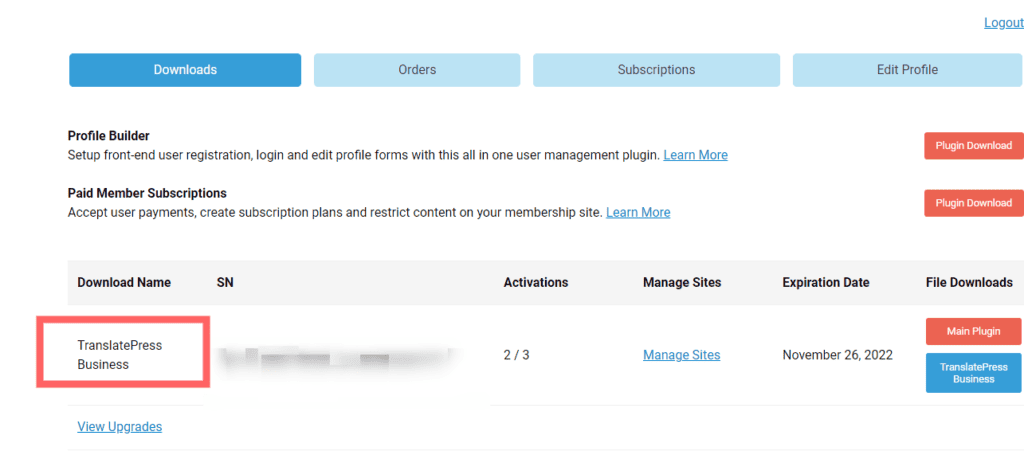
The cheapest Personal plan comes with an SEO pack add-on, but it doesn't come with DeepL's automatic translation add-on. Therefore, you have to translate it manually.
If you want to create a multilingual website, we recommend the Business plan.
Does TranslatePress slow down your site?
When considering SEO measures, site display speed is a very important point.
If your site is slow, it will cause stress to your visitors and increase your bounce rate. Slow page speeds also lower Google ratings.
Therefore, you may feel anxious that if you add TranslatePress, the display speed of your site will slow down.
Don't worry. Putting TranslatePress on will not slow down your site's display speed.
I will show you a practical example. My site's display speed is as follows:


Putting TranslatePress in this way won't slow down your site's display speed.
In fact, even on our site with TranslatePress, articles are indexed without any problems. It won't negatively impact your SEO efforts


The translated English version of the article is also well indexed by Google.
Is there a monthly plan?
No, there is none. TranslatePress only has an annual plan.
By the way, you can pay for TranslatePress with PayPal.


What happens if I don't renew my annual plan?
You don't need to renew your annual plan to continue using TranslatePress.
However, if you do not renew, you will not receive the update after one year.
Rest assured, your saved translations won't disappear.
Tell us about support
TranslatePress support is via email.
Normally, you will get an email reply within 24 hours. Except on holidays.
The support is very polite and will give you specific solutions.
In my case, I received a reply within 30 minutes of sending an email to support. It's fast anyway.
That said, TranslatePress is basically easy to set up without support, so you won't have any problems.
Can I Use It on Any WordPress Site
Yes, TranslatePress is compatible with any WordPress website.
In addition to personal blogs and websites, it can also be used on corporate websites and e-commerce sites.
By the way, it also supports WooCommerce. Therefore, it is a multilingual plugin recommended for those who want to sell their products worldwide.
If you are considering TranslatePress and want to know more, write in the comments below this article. This site is also multilingual with TranslatePress, so as one of the actual users, I can give specific answers. Please feel free to ask questions.
[Multilingualization] For those who are considering TranslatePress
As you can see from the length of this article, I am very happy with TranslatePress.
If you are trying to manually make your WordPress site multilingual, it will not be enough time and effort. However, with TranslatePress's DeepL auto-translation add-on, you can automatically translate your website and make it multilingual in just a few seconds.
The quality of DeepL translations is also high, so it is possible to translate naturally. Therefore, it is possible to achieve a multilingual site that is also evaluated by Google.
In fact, the site you are reading is also successfully indexed by Google searches around the world. This is proof that the quality of the articles translated by DeepL is evaluated.
There are several ways to translate your WordPress site. Among them, I recommend TranslatePress the most.
Customer support is generous, and you can use it intuitively without reading the manual.
On top of that, TranslatePress has a 15-day money-back guarantee.


If you are not satisfied, there is no need to worry because there is a money-back guarantee.
We will also explain in detail how to use TranslatePress on this site. If there is a response...
Finally, a word from me. Making your website multilingual is an opportunity.
If you are reading this article, you are a very information-sensitive person, so I think you have already realized it. By being multilingual, your website will attract visitors from all over the world.
More than 35% of our visitors come from the United States.
TranslatePress is the best plugin to make your WordPress site multilingual. As an actual user, I recommend it with confidence.
If you have any further questions about TranslatePress, please leave a comment in this article.
Normally, I will reply directly within 12 hours.








![WP Rocket Pricing Plans Explained! How to get it cheaply? [Latest in 2024]](https://sp-ao.shortpixel.ai/client/to_webp,q_lossy,ret_img,w_485,h_273/https://takeofujii.net/wp-content/uploads/2024/02/How-to-buy-wprocket-485x273.png "WP Rocket Pricing Plans Explained! How to get it cheaply? [Latest in 2024]")











Nice to meet you
I tried and tried TranslatePress. This site was helpful.
However, after receiving an unfair charge, PayPal intervenes to communicate with the seller.
15-day trial period 100% money-back guarantee, I was deceived by the words that there is no risk.
To try the automatic translation function, DeepL, it was mandatory to enter a payment method. This is where the mistake lies.
You must not enter a payment method.
After 2 hours of testing after introducing and registering the required information, I noticed that I did not return to the Japanese page from the English page. No matter how many times I changed the settings, it became the same phenomenon. I couldn't use it.
If you cancel after 2 hours, the bill has already been made at that time.
It's not a debit after 15 days. It's unjust.
PayPal has closed that it was legitimate, but it is moving again with an appeal.
The content here is not correct about money, which is the most important matter.
I hope you will deal with it so that no other victims are released.
Mr. Yoshida
Nice to meet you. First of all, thank you for contacting me.
The words that it was helpful are encouraging.
However, I am also worried when I hear that we are currently in a difficult situation.
I hope I can respond to the extent that I can answer.
First, we will clarify the cause.
Mr. Yoshida is now in trouble because he is being billed without permission.
Is it DeepL? Or is it from TranslatePress?
Which service did you charge unfairly?
■If you are charged a fee on DeepL without permission
DeepL can translate up to 500,000 characters per month for free.
If you don't upgrade, you won't start billing.
https://www.deepl.com/pro-api?cta=header-pro-api
Mr. Yoshida, did you upgrade to DEEPL API PRO?
If you are charged by DeepL without permission, it is unfair.
Please contact DeepL.
■If you are charged a fee without permission by TranslatePress
If Mr. Yoshida is making fraudulent claims to TranslatePress without permission,
Let me ask you one question. Is the site you applied for the following official site?
https://translatepress.com/
TranslatePress offers a 15-day money-back guarantee,
Free TrialThere is none.
TranslatePress offers a 15-day money-back guarantee.
However, if you want to make a refund, you must do so before you appeal on PayPal
You need to contact TranslatePress support.
I hope the problem is resolved.
*About TranslatePress bugs
I also checked this problem on this site.
However, I was unable to reproduce this issue.
This is my guess,
- Compatibility with WordPress plugins and themes
- Server environment problems
・Misconfiguration
It is thought that one of these is occurring.
We recommend contacting TranslatePress support for this as well.
Hi, let's say you are hosting a Japanese site on X-server, and you want to translate all the Japanese sites you host into Spanish using Translatepress. Do you know if the translated Spanish translation article will or will not be stored on the X server?
I use Translatepress to translate, but I'm worried that Today's character count is counted every day even though I haven't posted an article.
Hi CZ!
TranslatePress translated word data is stored in a database (DB).
When you answer the question, the Spanish translation will be stored on CZ's site database on the X server. So, even if your TranslatePress subscription expires, your translations will be retained.
Best regards,
Thank you for your reply.
I see, Translatepress HP's DB was referring to the hosting server. I thought it was stored on TP's server.
Yes.
Please see the following page for details.
https://wordpress.org/support/topic/access-translate-press-database/
Even if you delete the translated string, you can do it with phpMyAdmin in the X server.
I was wondering if it was stored in TP's server, but it doesn't seem to be the case.
Hello. Nice to meet you.
I have been using GTranslate until now, but the recent depreciation of the yen has made it unbearable in terms of cost, and there are many mistranslations, so I was looking for a service that could use DeepL, and I came across this article.
On the same day I found it, I suddenly signed up for a TranslatePress business plan and encountered a phenomenon where I couldn't go back to the Japanese that Mr. Yoshida wrote in the comment above, but it seemed that it didn't work because I just disabled the GTranslate plugin, so I uninstalled it and it was fixed. (It must be 💦 a big misunderstanding that it was unfairly charged.)
There was also a phenomenon where manual translation turned completely white, but this was also fixed by disabling Flying Scripts due to plugin interference. It may be just my environment, but I hope it will be helpful for those who have experienced the same phenomenon.
It seems that it will still need to be adjusted in detail, but so far it is comfortable to use.
Thank you for introducing TranslatePress.
It was very helpful.
Shin Kamima
This is Fujii. Thank you for your comment.
I am very happy that this is a reference. TranslatePress is easy to use once you get used to it.
It's also nice to be able to integrate with DeepL.
I also saw Shin Kamima's blog.
Each information of the dam is organized and summarized,
It's just the perfect content for multilingualism.
As a complete digression, this article was interesting.
https://dampedia.com/damlog/a_story_that_made_friends_with_syrian_beauties_on_facebook.html
I will continue to support you.
Nice to meet you.
Thank you for the very helpful article.
I really wanted to make my site multilingual as well.
Let me ask you a question.
1. Does TranslatePress have a translation function that is not DeepL?
I have a strong desire to translate with DeepL, but my site has a lot of content, and I am concerned that it will cost a lot of money to translate everything.
I was wondering if TranslatePress could translate alone.
2. Can I use the free version of DeepL to have only one copy translated by DeepL?
For the reason of question 1 above, I would like to use it to have only 500,000 words translated.
After using DeepL, we thought about whether we could translate content that does not fit in 500,000 words with TranslatePress's translation function. (If the answer to question 1 is Yes, it is assumed.) )
We apologize for your busy schedule, but we would appreciate it if you could answer.
I visited from Youtube, and there are many introductions of tools that are not available to the general public, which is very helpful. Thank you very much.
Before Black Friday, we will use it as a reference when choosing the tools to buy.
This is Fujii. Thank you for your comment.
I will 😎 answer one by one
1.
There are two types of automatic translation in TranslatePress.
①DeepL
②Google Cloud Translation v2
If you have a lot of content like Mr. Thomson,
We recommend using Google Translation in (2) for automatic translation.
The quality of translations is lower than that of DeepL, but the price is overwhelmingly good.
*Of course, even if the quality of translation is declining, the quality is increasing year by year.
See below for prices.
https://cloud.google.com/translate/pricing
Or you can do it manually without using either.
However, Mr. Thomson has a lot of content, so
Manual translation is not recommended.
Need to translate accurately
We recommend manual translation of only important pages.
2.
As for how to use the free version of DeepL to have only one copy translated by DeepL, there was an article that was scheduled to be translated, so I tried translating it.
https://www.youtube.com/watch?v=QQBhkwnekds
You can also translate just one page like this.
Please give it a try. It's 💪 convenient
If you have any questions, please contact us.
Thank you for your confirmation.
Thank you for your very polite answer.
I have also seen other content, but it is very educational.
You can only do one copy with DeepL!
I would love to give it a try.
Let me ask one additional question to the price.
In your answer,
We recommend using Google Translation in >(2) for automatic translation.
> the quality of translations is lower than DeepL, but the price is by far better.
There is.
When I checked the amount, the first 500,000 characters for both services were free, and after that,
DeepL: 2500 yen/1 million characters
Google: $20 per million characters
There was a description.
Due to the depreciation of the yen, Google seems to be more expensive in terms of prices, but am I checking the wrong place?
We apologize for your busy schedule, but we would appreciate it if you could answer.
Best regards.
Oh, I made a mistake. I'm very sorry.
It's true that the yen is weak, so Google Translation is more expensive.
As you pointed out.
It depends on how much content Mr. Thomson translates,
If you're translating a lot of content, either method will cost you a fair amount of money.
Mr. Fujii: Hello, nice to meet you.
Thank you for the very easy to understand article!
Actually, I would like to ask you about two points.
First of all, about automatic redirects, it is said that "problems are likely to occur due to compatibility with Googlebot", but is there a good way to automatically match the user's language and display it?
Also, for example, if I share an article with a Spaniard in a URL, is there a way to include information in the URL that I want them to display in Spanish?
Should you consider other than TranslatePress when considering such uses?
Any advice would be appreciated!
H.C.
This is Fujii. Thank you for your question.
I was using the Redirect Directly option (an automatic redirect feature based on the language of the site visitor's browser).
If you are using the Google Chrome browser in Japanese, it will automatically add to the Japanese article,
If you are using it in English, it will automatically be added to the English article,
In this way, it is a function that can be branched by browser language.
However, this method caused a problem, so I removed this function.
After that, I didn't use the automatic redirect feature.
However, I found out later,
How to avoid bugs with Googlebot compatibilityIt seems that there is also.
https://translatepress.com/docs/addons/automatic-user-language-detection/
The heading "Pop-up and Hello Bar" on the above page explains as follows.
"Using the Redirect Directly option can cause problems with Google's indexing, so
To fix this problem, we recommend trying one of the pop-up features (optional)."
I think this pop-up function is suitable for H.C.'s use.
What is the pop-up feature?
At firstThis imagePlease see.
The pop-up feature is when the Automatic User Language Detection add-on detects that a site visitor is using a different language.
You can notify your visitors and ask them if they want to read the page in another language detected.
This feature seems to avoid glitches and problems.
2) Also, for example, when I share an article with a Spaniard in a URL, is there a way to include information in the URL that I want them to display in Spanish?
Next, we will answer this question.
When sharing an article URL with a Spaniard,
To display a page translated into Spanish, click
You can indicate it with the "article URL".
Please see the image below.
https://takeofujii.net/wp-content/uploads/2023/04/language-switch-example.png
As shown in the image above, German pages have the language code "de" attached to the URL.
If you translate it into Spanish, the language code will be "es" in the URL.
So, for example, let's say Mr. H.C. writes an article.
https://example.com/example
The above URL is the Japanese article.
If you translate it into Spanish,
https://example.com/es/example
It comes to. When sharing with Spaniards,
https://example.com/es/exampleのURLをシェアすれば、強制的にスペイン語の記事を表示させられます。
I'm sorry for the long post.
I hope this helps.
If you have any additional questions, please feel free to ask.
Mr. Fujii
Thank you for your very quick and very clear answer.
Based on the information I received from Mr. Fujii, I would like to use the automatic redirect function.
I also had a good understanding of the URL.
There were few articles about translatepress, so Mr. Fujii's article, which has been explained in detail so far, was of great help.
Thank you very much.
H.C.
Thank you for your comment reply.
TranslatePress also has a 15-day money-back guarantee, so
In the unlikely event that the automatic redirect that H.C. wants does not work, please rest assured.
I am very happy that this article was helpful.
We will strive to provide even more accurate and detailed information in the future.
Thank you very much. It was encouraging.
Mr. Fujii,
Thank you for the very useful information.
In operating a multilingual site with TranslatePress,
For fully automatic translation with DeepL's API,
Regarding the billing of translation fees,
On the official page of DeepL's API,
Basic fee + translated text (pay-as-you-go) and
It is shown.
I initially said,
If the article to be updated is 5000 characters per article,
If you set multilingualism to 6 countries in your settings,
■Basic fee (API-pro ¥630)
■5000 characters (1 article) ×6 (6 countries)
■10 articles (1 month)
300,000 characters total (1 month)
Basic fee: 630 + number of characters (0.0025 [1 character]× 300,000 characters)
Billed amount = 630 + 750 = ¥1380
I thought it would be,
While researching various things, I came up with the following feeling,
==============================
When a user visits a page,
◎ In the case of automatic API translation = when the user visits and the page is translated
◎ In the case of a manual switcher = when the user switches with the switcher
==============================
If the above
The pricing when a user visits the page and is translated
I have set up automatic API translation,
When it comes to sites with a large number of visits,
I thought that a huge fee would be charged.
If 1,000 people visit one page in one day
If it's automatic API translation,
Even if you simply calculate it, it will be on one page,
5000 characters× 1000 users (1000 translations) = 5,000,000 characters
Therefore,
If you see many pages,
Even a small privately run site has a ridiculous fee.
I'm worried that I'm going to get it.
Mr. Fujii's fee mechanism for this DeepL is
If you know, I would appreciate it if you could tell me.
The rest
If possible, multilingual sites don't cost much money
If there is a good way to operate it, I would appreciate it if you could tell me as well.
Mr. Crystal
This is Fujii. We will explain the pricing of TranslatePress's DeepL API.
First of all, please rest assured that if you use the API after properly configuring it,You won't incur exorbitant fees.
Because TranslatePressIt is possible to limit the number of translated characters per day.
Please see the image below.
https://takeofujii.net/wp-content/uploads/2023/09/deepl-limit-setting.jpg
By setting this, you can set a limit of "translate up to 100,000 characters per day, no more than that".
Therefore, it is possible to prevent exorbitant API fees of tens of thousands or hundreds of thousands of yen per day.
You can also find "Today's characters count" under the field where you can set that limit.
This represents the number of characters translated in DeepL on that day.
This means you can easily see how much you're using the API.
So you don't have to worry about overspending.
In addition, for DeepL API (Pro),
You can also set translation limits on the DeepL side.
See the image below
https://takeofujii.net/wp-content/uploads/2023/09/deepl-API-limit-easy.png
In other words, both the TranslatePress and DeepL sides can set the "character limit to be translated", so
There is no need to worry about overspending. Don't worry.
> I have set up automatic API translation,
> when it comes to sites with a large number of visits,
> I thought that a huge fee would be charged.
I will also answer this question.
I think you are very worried,
Even if 1,000 people visit a page in a day, such a thing will not happen.
This is because once a page is translated in DeepL, it will remain in that state.
Therefore, even if the second person or later accesses it, the translation will start again. There is none.
This means that even if 1,000 people visit the same page in a day, it will only be translated once.
You may still be worried.
Try the DeepL API for free.
The DeepL API can translate 500,000 characters per month for free.
https://takeofujii.net/wp-content/uploads/2023/09/deepl-api-free.png
*If 500,000 characters are not enough, you can subscribe to the paid plan of DeepL API.
In other words, it's best to try it for free and see how long it actually translates in a day.
———————————————
By the way, about a good way to operate a multilingual site that doesn't cost much money,
If you use a slightly more advanced method, you can operate without spending any money at all.
With the advent of ChatGPT in 2023, this method is now possible.
However, this is a bit technical,
Personally, I think it is better to use TranslatePress.
Because, as mentioned above,
The Deepl API is free to translate 500,000 characters per month.
For a small site, this is enough for translation.
Also, this is a sideways topic,
At first
・Japanese
・English
We recommend translating your site in only these two languages.
It's my personal failure...
I myself have translated one site into many languages, including Russian, German, French, Chinese, and Korean.
However, many of the site's visitors only used Japanese and English.
I remember that other languages were not used much.
Therefore, please try to support only Japanese and English first.
In this case, it consumes less API and doesn't fail like I did.
If you determine that there is a demand for other languages,
I think it would be nice to add other languages and take a look.
I hope this answer is helpful.
If you continue to have any questions, please 💪 feel free to ask us
Mr. Fujii
Nice to meet you.
Excuse me for the new comment!
I received a very polite response,
I am very grateful.
I understood the content of DeepL's translation.
I was relieved that this relieved my anxiety.
Measures to deal with small amount management
I will tell you in detail and use it as a reference.
…………………………………………………………
Even though it is a free consultation, please research so carefully,
On the contrary, I feel sorry.
There is still a lot to do about overseas marketing.
There are few people who send out so carefully, so
I feel that Mr. Fujii's information dissemination will be valuable in the future.
Also, if there is anything, I will consult with you.
Thank you very much.
…………………………………………………………
In the future, Mr. Fujii
If you start paid consultations related to overseas marketing.
At that time, on this website or YouTube link
I would be happy if you could open a window.
I will continue to support you.
Mr. Crystal
Hello, this is Fujii.
Thank you for your quick confirmation.
I am very happy that my anxiety has been resolved.
And I was aware of the matter of paid consultation.
I will definitely start when my current job settles down.
Thank you for your suggestion.
If you have any questions, please 💪 feel free to contact us.
Mr. Fujii
Thank you for your good work
Thank you very much for the other day.
In addition again
I have a question I would like to ask,
In "TranslatePress",
It's a translation item related to SEO,
When it comes to the paid version,
■SEO Pack Add-on
I think you can use this,
The minimum parts related to SEO that should be translated are
◎Title of each page
◎ Description of each page
◎Slug on each post page
◎Slug for each fixed page
◎Category Slug
◎ Tag Slug
◎ Ait tag of the painter
Is it okay to cover these parts?
The rest
In the official guide of "TranslatePress",
★ Multilingual Site Map
About this,
=================
TranslatePress extends the sitemap functionality added by the SEO plugin to automatically create a multilingual sitemap with all the translated content.
Multilingual sitemap support is available on the most popular SEO plugins.
・Yoast SEO
・Rank Math
・SEOPress
・All in One SEO Pack
・Squirrly SEO
=================
There was a description above,
In this sense,
Any of the SEO plugins on the list above will do, so get one
Once downloaded and activated,
Automatically create sitemaps for each language,
Is it correct to recognize that it will send that data to Google?
From the SEO plugins on the list above,
If you have any recommendations, I would appreciate it if you could let me know as well.
Listed above,
■SEO Pack Add-on
■Multilingual site map
If you take these two measures,
The rest is Google,
Multilingual pages for each country
Will it be indexed?
Mr. Crystal
I am always indebted to you. This is Fujii.
Thank you for your question.
・Parts that should be translated for SEO
・Recommended SEO plugins
・How to use a multilingual sitemap
I will answer these three questions.
———————————————
What to translate for SEO
———————————————
The SEO Pack Add-on is one of the paid options.
First, let's talk about the SEO aspects that should be translated:
Basically, there should be no problem by translating those passages that you have presented.
Proper translation and optimization will help you rank search engines in each language.
———————————————
Recommended SEO Plugins
———————————————
My recommendation is Rank Math. In addition to being translated into Japanese and easy to use,
Even the free version works well.
Best of all, it's an SEO plugin that I use myself.
(Also used on this site)
I use most of the famous SEO plugins,
Squirrly SEO is not yet available in Japanese, so
I think you can avoid using it.
———————————————
How to use a multilingual sitemap
———————————————
By using the SEO plugins you mentioned, you can automatically generate a multilingual sitemap with translated content.
It increases the chances that content in each language will be properly indexed by search engines like Google.
There is a reason why I vaguely expressed that "the possibility increases".
This is because just creating a multilingual sitemap may not be indexed.
>> Is it correct to recognize that it will send that data to Google?
We recommend that you submit your multilingual sitemap to Google's search console.
By submitting a sitemap to Google Search Console,
Google will be able to crawl Crystal's WordPress site more easily,
New and updated pages will appear in search results quickly.
Even with these measures, the speed and order of the index depends on Google's algorithm.
However, with a well-implemented multilingual sitemap and SEO measures,
The likelihood of being displayed in search engines in each country increases.
If you use Rank Math and TranslatePress's SEO Pack Add-on,
I think it will display without any problems at all.
I'm currently in the consideration stage, but I'm also considering an SEO service to promote indexing that will make your page appear on search engines in a few days.
(Also, we have not decided on a fee, and we are not able to provide information because we do not have a service operation system in place.)
If it does not appear in search engines even after taking the necessary measures,
I would like you to contact us once.
If you have any additional questions, please 💪 feel free to ask.
Mr. Fujii
nice to meet you
Thank you for your answer.
■SEO Pack Add-on
This is the translation and the impact on SEO
I understood.
■Multilingual site map
Please tell me the recommended plug-in,
I am grateful.
Even if the sitemap is also created automatically,
It is better to manually send it to Google in the search console
That's a good thing.
I understand.
If
I put it into practice and the index situation is bad.
If anything inconveniences happen,
In that case, we will consult with you as it is okay to pay a fee.
As an aside,
I'm talking about multilingual sites, so
There are many questions on "TranslatePress",
Mr. Fujii has various other software and
Because we are publishing information about overseas marketing.
If you have any concerns about other software or information, etc.,
In that article
I may comment again, but
Thank you again at that time.
If a consultation desk is opened separately,
I will talk to you from there.
Thank you for your continued support.
Mr. Crystal
Thank you for checking it out soon.
Please feel free to contact 💪 us at any time.
Thank you for your continued support.
When I was thinking about making a news site multilingual, I saw Mr. Fujii's Youtube and thought that Translatepress would be a good fit, so I would like to introduce it soon. I am grateful for the very useful information. I would appreciate it if you could teach me about the following.
I don't know much about it, and I think it may have already been answered, but I don't know that either.
[Present]
・News site management (news articles/daily posts, columns/irregular posts, etc.)
・Current number of characters (645,300) *Count on the right (https://wordcount.weglot.com/)
・Post an average of articles (500~1500 characters at most) every day
・Introduction of YoestSEO Premium (I don't know much about the specifications)
・X Server
【Hope】
・I want to automatically translate all current articles.
・Languages include English and 1-2 languages (Asian countries)
・Translation uses the Deepl API
[Question]
Q: What do you think Translete business thinks is reasonable?
Q: Is Deepl free, should I play with PRO?
*Considering the current article translation, I thought it was PRO, but after the introduction, it will be less than 500,000 characters per month.
*Is it okay to use the free version by translating as far as possible (new articles first) as much as possible in the current article?
Q: If you notice anything, I would appreciate any advice.
Thank you very much.
I was using TranslatePress, and at first it was possible to translate automatically, but for some reason, after about a month, the part that says "at the beginning of the blog" is translated at the beginning, but the text does not respond at all. I'm going to try to remove the plugin from the beginning again and start from scratch, but I think it's better
Fujii: Takashi.
Thank you for your questions about TranslatePress's automatic translation.
As a single user, I think I can help you with TranslatePress.
From the symptoms you have informed, deleting and reinstalling plugins is not always the solution.
Translation glitches can be caused by a variety of things, such as conflicts with WordPress themes or other plugins.
There is one thing I would like you to confirm.
Automatic translation is
・Google Translation
・DeepL
Which one?
If you use the free version of DeepL, you can translate up to 500,000 characters per month for free.
If this number of characters is exceeded, no translation will be performed.
You will need to use the additional paid DeepL API.
Many blog posts
Word count of many blog posts
Many translations
Number of languages to be translated
If there are too many of these, it can exceed 500,000 characters.
Please check it once.
Does TranslatePress automatically translate every time I access it?
If so, if the site has a high number of visits,
There is a concern that there are more than 500,000 characters per month.
Thank you for your question.
Once you auto-translate, the translation status is maintained.
In other words, no matter how many accesses come, it is not translated dozens or hundreds of times every time.
There is no risk of unexpected automatic translations.
You can understand this in detail by checking the comments below
https://takeofujii.net/translatepress/#comment-276
You can also set up TranslatePress to limit the number of characters you can translate per day.
We hope you can rest assured. If you continue to have any questions, please feel free to contact us