


Hello, this is Fujii. Welcome to AppSumo!
AppSumo gives you affordable access to overseas marketing tools. For those who don't know, this is an overseas marketplace that you should definitely use.
However, some people may be worried about buying on overseas sites or anxiety.
So, on this page,Frequently asked questions about AppSumoI summarized it.
On this page, we have answers to a variety of frequently asked questions about AppSumo, so be sure to take a look!
If you don't know about AppSumo, you can first check out the article below.

You don't need to read all the items. Please read the contents of the table of contents.
- 1 About the product
- 1.1 What is a Lifetime Deal?
- 1.2 What is Stacking?
- 1.3 How do I stack?
- 1.4 Code & Redemption Instructions
- 1.5 How to check the features and conditions included in the product
- 1.6 Notes on asking questions and reviews on AppSumo
- 1.7 Product Support
- 1.8 Expiration date to redeem the product
- 1.9 If the product you want is no longer available
- 1.10 Can I resell the purchased product?
- 1.11 【Important】If you have a product problem after purchasing
- 2 What is Licence?
- 3 About account management
- 4 About payment methods
- 5 How to get a refund
- 6 About AppSumo Plus
- 7 About AppSumo Credits
- 8 About Coupons
About the product
What is a Lifetime Deal?
What is a "lifetime deal"? It's an unfamiliar word, isn't it?
So, what does "lifetime deal" actually mean?
When you purchase Lifetime products on AppSumo,You only need to pay once for that tool to get itIt is.
Also, unless the company goes bankrupt,You can continue to use the tool permanently at no additional cost.
I will explain it in an easy-to-understand manner. 👇 Please see.
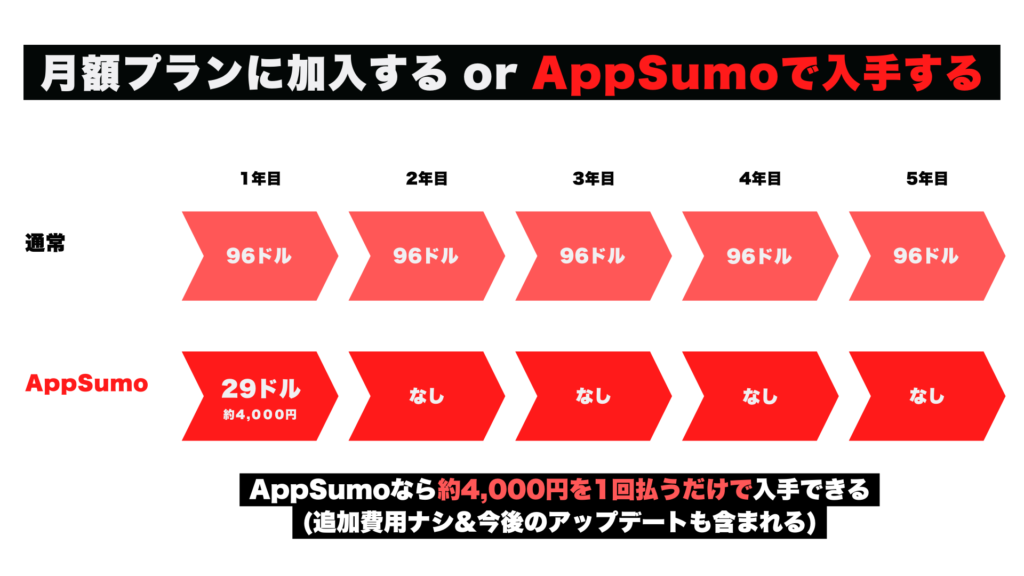
For example, if you sign up for a tool that costs $96 per year, it will cost you $480 over five years. In Japan yen, it is about 66,000 yen. Quite a price.
However, AppSumo sells for $29 for a lifetime (one-time purchase plan). A tool that normally costs $96 per year or 66,000 yen for 5 years can be obtained by paying only $29 (4,000 yen in Japan yen).


There is no additional cost either.
However, no one can guarantee that the product will last forever. In rare cases, the developer of the tool purchased through AppSumo may be acquired or go bankrupt.
In the first three years of its inception, an estimated 92% of SaaS companies fail, regardless of growth or funding. Because the software industry is constantly changing and evolving.
The evolution of AI technology is a true example.
However, among the thousands of software tools launched by AppSumo,Only about 4% of businesses are out of business.
They always strive to choose products that will last in the long run. The best way is to try the product you purchased before the refund deadline. Please buy and try it first.
What is Stacking?


We will explain what the word "Stacking" is commonly seen on AppSumo.StackingIt is easy to understand if you imagine it.
Purchase multiple codes for the same product to upgrade to a higher plan or get additional featuresYou can.
Some products allow this stacking.
How do I stack?
Buy code. You can buy only one code to try out at first, and then stack more codes to get additional features later.


You can also stack multiple codes from the beginning to make purchases.
Purchased codes can be redeemed from the "Products" page of your AppSumo account. Specific instructions and redemption links are provided under Redemption instructions within the Actions dropdown menu.
For security reasons, all orders have a "quantity limit". For example, if you want to buy a lot of codes, you can useIn some cases, you may need to split the purchase into two purchases.For example, to avoid the restriction that you can only purchase up to 9 codes in a single purchase, you can purchase 9 codes at the beginning and then purchase one more code.
Note: Stacking is mainly applied to code-based products.
Code & Redemption Instructions
Do you know what to do after buying the best AppSumo deals?
First, check your purchase on the Products page of your AppSumo account.
Here's a breakdown of the steps:
- Go to AppSumo.
- Select Account from the top of the navigation bar.
- Click on the Product tab (or visit the following pages):https://appsumo.com/account/products/)。
- From the Select menu that appears for each product, select Redeem for code-based products or Redemption info for Licence products. Here you will see the instructions to redeem your purchase. Redeem according to the instructions.


The redemption itself is carried out on the site of the provider of the product.
How to check the features and conditions included in the product
I bought the software on AppSumo, but what features and conditions are included? … We will explain what features are included and how to check the conditions.
First of all, on AppSumo, you can check your past AppSumo purchase history on the "Products" page.
Here are the steps on how to check:
- Go to AppSumo.
- Select Account from the navigation bar at the top of the page.
- Click the tile called Products.
- From the menu called "Select" on the right side of the product, select "Product page".
You can see the features and conditions included in this Product page.


Note: Occasionally, at the request of partners, old deal pages may be removed from the public. If you don't see the old deals page, please contact support@appsumo.com. We can provide you with the trading information you need at any time!
Notes on asking questions and reviews on AppSumo
AppSumo allows you to ask questions to product sellers and review purchased products.


Here are some points to keep in mind when reviewing and asking questions.
There are not such strict rules. There is no problem as long as you follow this at least.
Precautions for asking questions
- Ask questions in English
- Ask questions as clearly as possible
- Check other people's questions for the same question
- Don't attack or harass others
- Don't post affiliate links in questions
If you follow these items, you should be able to ask questions on AppSumo and get answers from sellers without any problems.
Even if you are not good at English, you can communicate by using ChatGPT and various translation services, so please take advantage of it.
Notes for reviewing
- Write a review in English (helpful for others)
- Try the product before reviewing
- Include feedback that is as helpful to others as possible
- If you have any problems with your belongings or need assistance, contact the seller directly
- Observe good manners (prohibition of swearing/swearing/harassment/hate speech)
- Don't post affiliate links
- Don't impersonate AppSumo staff, partners, etc.
Any questions or reviews that violate these will be disapproved. Questions and reviews will not be posted, so be sure to follow the above precautions.
There are no particularly complicated rules. As long as you protect it, there is no problem.
Product Support
Here's what to do if you buy something on AppSumo but encounter some problems.
If you encounter any problems with the product, please contact the vendor that provides the product for assistance.
You can find the seller's contact information from the Products page of your AppSumo account. Check out the steps below.
First, select "Products" from your profile next to the menu bar on your AppSumo site.


Next, find the product that needs help. From the Actions menu on the right side of the product, select Redeem/Activate/Redemption info.


When you open the page, you will see "Need Help?" The seller's contact information is listed in the field. Additionally, support materials are provided to help you resolve the issue.


If you have contacted the seller but are unable to contact them, or if you encounter an issue that does not resolve the issue after contacting the seller, please contact support@appsumo.com.
This email address is AppSumo's official support email. Please contact us in English.
Expiration date to redeem the product
Once you have purchased an item on AppSumo, there are steps to redeem it next. Please note thatExpiration date to redeemis set.


After purchasing, you must redeem the code for the product.
The products themselves purchased on AppSumo are available for unlimited use. However, the coupons you redeem have an expiration date.
Even if you don't plan to use the product yet,We recommend redeeming and activating the code as soon as you make a purchase.
If the product you want is no longer available


Products that you are considering purchasing on AppSumo are often sold out. Unfortunately, there is a high possibility that you will never be able to get a product that has been discontinued.
If you're lucky, it could be resold again at events like Black Friday.
So, I'm going to talk about tips on how to avoid having to worry about the end of the product you want on AppSumo.
If you can't decide, buy it
Basically, I am also saving-oriented. You will not buy unnecessary products. Also, if you are reading this article, we will not sell products that you do not need.
However, it is not limited to AppSumo.
If you can't decide to buy it, "What should I do with this...",We recommend taking the plunge and purchasing.This is because AppSumo has a 60-day money-back guarantee.
Also, as explained above, you will never be able to get it at the same price again after the sale ends.
Therefore, if you are in doubt, we recommend purchasing it. Many products are less than 10,000 yen in Japan yen. Even if you fail at worst, it won't be such a big shock.
Check which products are about to end
This pageYou can check the information of each product just before the end of sales.
I sometimes notice that this product is already sold out. Therefore, if there are any products you are considering purchasing regularly, we recommend that you check them.
Well, again,Discontinued items are usually not returned.It is unlikely to be resold. Therefore, if you feel that you need it, we recommend that you purchase it without hesitation.
If you have any concerns or questions when purchasing, please do not hesitate to ask me questions.
Can I resell the purchased product?
At firstWe do not recommend reselling AppSumo products.
I see cases where they are mainly resold in Facebook groups. However, first of all, reselling AppSumo products is a violation of the Terms of Service.
If a customer is confirmed to resell or repurchase the product,There is a risk of your account being permanently deactivated.AppSumo official has made it clear about this matter.
There is also a risk of buying resale products
There is also a risk of buying resale products. Typically, the resale of AppSumo products is done through PayPal or WISE.But safety is not guaranteed.There is also no 60-day money-back guarantee.
I have seen anything that has caused purchase problems in the past. Some people were also considered to have fraudulently transferred their accounts after purchase, and their accounts using the tool were frozen.
You should definitely stop.
【Important】If you have a product problem after purchasing
The following is the "Purchase Protection Policy" set forth by AppSumo. In case of any trouble, please see below.
| Examples of problems that occur | For AppSumo Plus Members | For regular customers |
|---|---|---|
| The item is no longer available within the refund period (usually 60 days from the date of purchase) | Full refund with original payment method | Full refund with original payment method |
| Within 12 months of the date of purchaseAppSumo Select Productsis no longer available | Provide a credit worth 100% of the purchase price.Learn more about AppSumo credits here. You also have the option to migrate to a similar tool. However, you can also receive credits. | Provide a credit worth 50% of the purchase price. Learn more about AppSumo credits here. You also have the option to migrate to a similar tool. However, you can also receive credits. |
| Within 12 months of the date of purchaseNon-AppSumo Select Productsis no longer available | We do not offer refunds or credits at this time. AppSumo is committed to improving the screening of all products listed on the marketplace and providing additional protections for non-AppSumo Select products. | We do not offer refunds or credits at this time. AppSumo is committed to improving the screening of all products listed on the marketplace and providing additional protections for non-AppSumo Select products. |
| Functions have been reduced after sales end. | AppSumo has a clause for this, and we will consult with the product provider to enforce this clause. We can't guarantee the outcome, but if this issue arises, we will act as an intermediary to resolve it. | AppSumo has a clause for this, and we will consult with the product provider to enforce this clause. We can't guarantee the outcome, but if this issue arises, we will act as an intermediary to resolve it. |
| Reduced features in monthly plans | AppSumo investigates to see if this is due to sound business decisions or to unfairly limit the functionality included in the contract to Sumo-ling. | AppSumo investigates to see if this is due to sound business decisions or to unfairly limit the functionality included in the contract to Sumo-ling. |
| Lifetime Deal Does Not Provide Feature Upgrades | The partner's promotional terms state that you will receive features and updates associated with the plan you purchased. | The partner's promotional terms state that you will receive features and updates associated with the plan you purchased. |
| Product Name Change | Under the terms of the partner, even if the plan name is changed, AppSumo will provide the most similar plan at its sole discretion. | Under the terms of the partner, even if the plan name is changed, AppSumo will provide the most similar plan at its sole discretion. |
| If the product is acquired | The Partner Agreement stipulates that in the event of an acquisition, the acquirer must respect the lifetime license and otherwise refund the buyer. | The Partner Agreement stipulates that in the event of an acquisition, the acquirer must respect the lifetime license and otherwise refund the buyer. |
What is Licence?
What is a license?
Until now, AppSumo sold products in the form of "Code".


However, now products are sold in the form of a new "license".
The difference with code is that licenses do not need to be stacked (stacked).
… Unfamiliar words such as chords and stacking may appear.
To explain it in an easy-to-understand way、、、
It's now easier than ever to make purchases on AppSumo and freely upgrade/downgrade your pricing plansIt means.
You can see the word "license" or the notation "License Tier X" in the price list on AppSumo's product page.
Where is my license located in my account?
All products purchased on AppSumo are present on the Products page.
In the top left corner of the page, under the header that says "Products", there is a handy search bar.


This search bar makes it easy to find the products you bought.
Additionally, when looking for license information, you can click on the drop-down menu labeled "Actions" to the right of the purchased product to perform various actions.
- Redeem your purchase (Redemption info)
- Change plan
- Transfer product
- View Product page
- Refund
- View Invoice
- Leave a review
In this「Change plan」to check the contents of the purchased license.
How do I activate my license?
I purchased a product on AppSumo, but I don't know how to actually redeem it.
For such people,How to activate a purchased license on AppSumoI will explain.
By following these steps, you can activate your license and access the tools you purchased:
- Go to the Products page in your AppSumo account
- From the "Action" menu next to the product, select "Redemption info"
- Click "Activate Now" to register a new account and activate the product
- Your account will be created and you can use your products
How do I log in to the product I redeemed my license for?
Once you have activated the license, you are done。 No additional action is required within your AppSumo account.Now you are free to use the software you purchased.
To access your purchase, log in to the website of the purchased software using the email address you used to activate it.
"Huh? How should I log in to the software I purchased?"
If you forgot how to log in, go to Products in your AppSumo account and select Redemption info from the Actions menu.
From there, click the yellow "Go to product" button to automatically go to the site and log in.



If you don't know the procedure, please feel free to ask me.
Differences in features between licenses
Each product sold on AppSumo has different features and conditions depending on the plan.
Please see the image below.
This is a blog post writing AI tool currently available on AppSumo. Each pricing plan is listed. It was a little difficult to see the image, so I tried to make it a tabular format.
| License Tier 1 | License Tier 2 | License Tier 3 |
|---|---|---|
| $19 | $69 | $139 |
| All the features mentioned above 10,000 words per month 1 team member × | All the features mentioned above 30,000 words per month 3 team members × Connect to up to 3 sites WordPress Plugins | All the features mentioned above 80,000 words per month Team × 6 Connect to up to 6 sites WordPress Plugins |
If you look at the price alone, license Tier 1 is the cheapest.
However, Tier 2 and Tier 3Features are quite limited compared to higher plansYou can confirm that.
If you want to generate more features and more characters, you need to upgrade to a higher plan.
What is a license upgrade/downgrade?


Until now, AppSumo was sold in the form of "Code". To use higher-level features, you had to buy as many additional codes as you needed and stack them.
However, AppSumo is currently sold in the form of a license. Unlike code, licenses don't need to be stacked.
For licenses, you can freely upgrade/downgrade licenses from the "Change plan" in your account after purchase.
Steps to actually upgrade/downgrade
To upgrade/downgrade a license's plan, first make sure your license is activated. Then follow the steps below.
- Go to the Products page of your AppSumo account
- Select "Change plan" from the "Actions" menu on the right side of the product
- Check your current plan and click the "Select Tier #" button to see upgrade/downgrade options
- Select the plan you want and click the "Next: Payment" button.
- Next, enter your preferred payment method and click on the 'Next: Review plan' button.
- See your current plan, your newly selected plan, and the total amount of your upgrade/downgrade.
- Click the "Confirm change" button to finalize the upgrade/downgrade
In practice, there are no such complicated steps. You can easily upgrade/downgrade your license.
About account management
Change your password
Changing your AppSumo account password can increase your security and safety.
As I write this article, I myself change my account password once every six months.
There are no particularly difficult procedures. You can reset your password in simple steps. To reset your current account password, click on the link below.
ttps://appsumo.com/accounts/password/reset/
If you are already logged in to your AppSumo account and want to change your password, go to your account's "Profile" page and click the "Reset Password" button.
Change your email address
We will show you how to change the email address registered with AppSumo and update the email address you use as your main one. Follow the steps below:
- In the menu bar, click on the blue profile icon in the top right corner (next to the cart)
- Select "Email settings" from the menu
- There, you will see the option to add a new email address to your account. Alternatively, you can select the option "Make Primary" to set your current email address as your primary email address.
Please note that each email address can only be associated with one valid AppSumo account.
This means that if you have multiple AppSumo accounts, you cannot add the email address you use with the other accounts.
Email Settings Management/Email Cancellation
You can manage your email delivery preferences or unsubscribe by following these steps:
- Click the "Manage Preferences" link at the bottom of the email.
- On the Manage Preferences page, you'll see the option to change your AppSumo email preferences. You can only receive emails that you can't miss.
If you want to unsubscribe, follow these steps:
- Click the "unsubscribe" link at the bottom of the email.
- If you want to sign up for AppSumo emails, you can re-register at any time.
Change your username


To make your AppSumo account more attractive, follow these steps to customize your username, profile picture, and company information.
- Click on the blue profile icon in the top right corner of the menu
- Select "Profile" from the drop-down menu
- Change your username
- Click the 'Save' button.
You can now change your username.
Change your profile picture


You can change your profile picture, username, and company information from the Profile page of your AppSumo account by following these steps:
- Click on the blue profile icon in the top right corner of the menu
- Select "Profile" from the drop-down menu
- Upload your profile picture
- Click the "Save" button to update the photo
In this way, you can useYou can easily change your profile picture.
Attractive photos and usernames can go a long way in communicating with other users and improving their impression. Please give it a try.
Merge your accounts
Did you create two accounts by mistake? You want to merge those two accounts into one. It's confusing to have two accounts.
ButUnfortunately, it is not possible to merge accounts at this time.Even if you have multiple accounts, it is not possible to migrate your data.
Delete your account
Deactivating your AppSumo account can be daunting, but if you need to do so, please contact us at support@appsumo.com. We are here to help.
Subject: Account Deactivation Request
Hello AppSumo Support,
I would like to request the deactivation of my AppSumo account associated with the email address.
Thank you for your attention to this matter.
Best regards,
[Name]
About payment methods
Payment Methods
Maybe you are worried about "Can I pay safely from Japan?" or "I don't have an overseas credit card."
But don't worry.You can pay from Japan without any problems at all.
AppSumo offers a variety of payment methods.

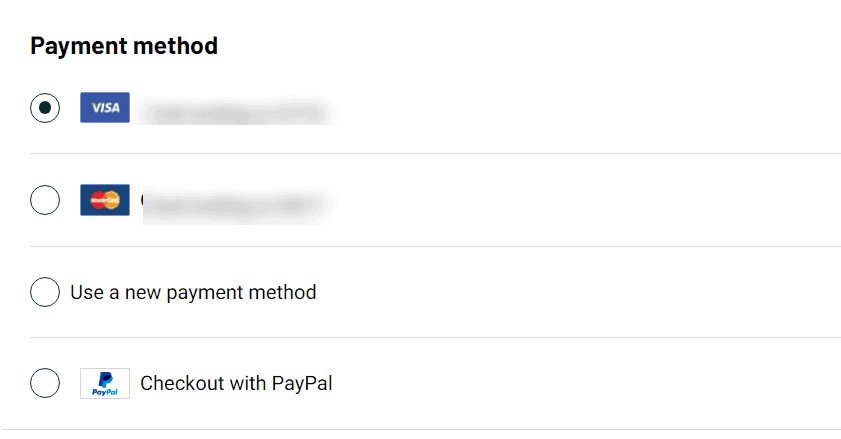
- Debit/Credit Card (Visa, Mastercard, American Express, Discover)
- Google Pay and Apple Pay (where they are available)
- PayPal
- Klarna (where available)
- AppSumo Credits
If you are afraid to use a credit card on AppSumo, you can pay with PayPal.
PayPal is widely used all over the world and can be used safely in Japan. The company has strict security measures and focuses on protecting personal information, and as of 2020, it has more than 190 million users. In addition, it is an extremely reliable online payment service that has been adopted in more than 200 countries and regions.
Change your payment information
You can easily add and update payment methods in your AppSumo account.
Here's how to manage your payment methods:
- In your AppSumo account,Account overviewGo to.
- Select the Payment tile.
- You can add the payment method you want to save to your account, choose the default payment method, or delete the card you no longer use.
Note: Debit/credit card refunds will be refunded to the card used for the original payment. Changing your payment method in your account doesn't change the payment method for items you've purchased in the past.
Is it safe to use a credit card on AppSumo?
At AppSumo, we prioritize your security. We do not store your credit card number, so you can use it with peace of mind.
The information held by AppSumo isOnly tokens tied to a reliable online payment provider (Stripe)is. This will automatically complement the payment information displayed on the Payment tile.
At AppSumo, we also take the protection of your personal information seriously. The services they offer are protected with the latest security measures. Your important information will not be leaked to third parties.
AppSumo is a safe site. Don't worry. I use it myself.


Purchase history
You can view the receipt of the purchased product from the "Products" page of your AppSumo account.


Here are the details of the procedure:
- Click on the blue profile icon in the top right corner of the menu
- Select "Products" from the menu
- To view your receipt, click the View purchase history link at the top of the page
The location is a little confusing. If you don't understand, please see the image below.


You can freely download your receipt from this page.
You can also view and download individual product receipts by selecting View Invoice from the Actions dropdown menu.
How to get a refund
AppSumo has a lot of amazing products lined up. However, there may be some products that you were not satisfied with. It offers a 60-day money-back guarantee.
So I will explain how to process a refund. You can follow the steps below to receive a refund on AppSumo.
- Go to the Products page of your AppSumo account
- Select "Refund" from the "Action" menu that appears next to the item you want to refund.
- Click the "Initiate refund" button.
- Select the reason for the refund and click the 'Continue' button.
- Select the refund method (if applicable) and click the "Confirm and initiate refund" button to complete the refund process.
Please note that all refunds are final. Once the refund process for the purchased item is completed, access to the product will be immediately suspended, and if the product is removed from AppSumo, you will not be able to purchase it again.
Here are some things to keep in mind:
First, if the refund period has expired or if the target tool is non-refundable, you will not be able to get a refund as shown in the image below. It will be gray in color.


AppSumo's built-in fraud prevention system may temporarily disable automatic refunds in some cases. In that case, please contact AppSumo support individually.
support@appsumo.com You can send an email to the recipient explaining the situation in English and you can get your refund without any problems.
Reminders about refunds
AppSumo has60-day money-back guaranteeexists. For those who are worried about purchasing on an overseas site for the first time, the 60-day money-back guarantee is very reassuring.
By the way, products purchased through AppSumo can be fully refunded for any reason within the period. There are no fees or amounts deducted upon refund. Rest assured, you'll receive a full refund of your purchase.
One thing to note is that some products may not have a 60-day money-back guarantee. Check in advance if there is a money-back guarantee on the product page.

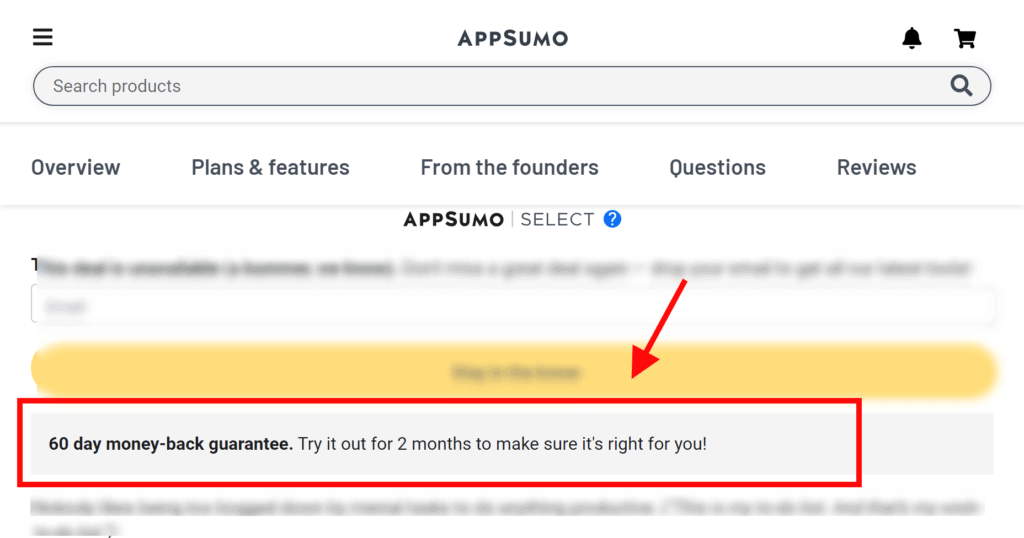
If you have this notation, it means that you have a 60-day money-back guarantee.
Once the money-back guarantee period ends, you will not be able to get a refund after that. Please note.
Can I get a refund for the membership service "AppSumo Plus"?
Please understand that membership services are non-refundable.
So if you pay $99 per year, subscribe to AppSumo Plus, and cancel midway, you won't get your participation fee back.
You can cancel your membership service at any time, so please rest assured that this is the case.
How do I confirm my refund?
Here's how to check if you've received a refund:
Go to the Products page of your AppSumo account.
Then use the "Filter" dropdown menu in the upper right corner and select "Refunded".


If you see a product in this list, you have been refunded.
How long does it take to get a refund?
AppSumo processes refunds promptly, but depending on your payment method, it may take some time for the refund to reflect in your account.
If you paid with PayPal
If you paid with PayPal, you should receive a refund notification email immediately. You can also check it in your PayPal account.
If you paid by credit card
If you pay by debit/credit card, it may take 5-10 business days (Monday to Friday, excluding public holidays) for processing on the bank's side.
However, if you refund the product within 24 hours of purchase, it will be treated as canceled purchase. In that case, it may disappear from the statement.
If you paid with AppSumo Credits
If you paid using AppSumo credit, it will be returned to your AppSumo account immediately upon refund!

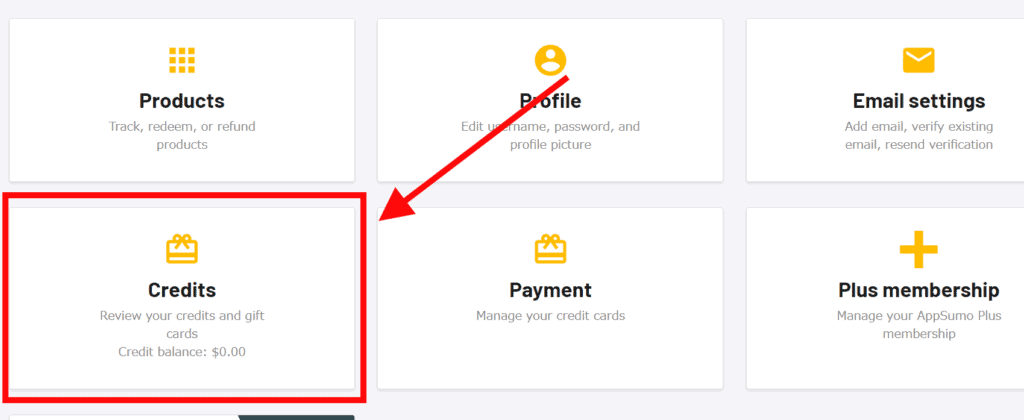
You can easily check your credit balance in the "Credits" tab and use it again for your next purchase.
Can I cancel my refund?
AppSumo offers a full refund when you return the item. In addition, the utilization of the tool will also end. This means that you will no longer be able to use the tool you refunded.
After making a refund again, you may regret the refund, saying, "I think I'll buy it again...". If it is on sale, you can buy it again.
However, products that are no longer available cannot be repurchasedPlease be careful.
In order not to regret refunding, we recommend that you consider whether you should really refund the money before making a decision.
Can I get a refund with AppSumo Credit?
Even if you purchase using AppSumo credits, you still have a money-back guarantee (1 ASC = 1 USD).
However, not all products are fully refundable.
If you have any questions about AppSumo Credit refunds or eligibility criteria, please contact support@appsumo.com.
How to download a receipt
You can easily check your receipt from the Products page of your AppSumo account.
You'll see a detailed list of receipts for all your purchases (which can be a long list).
You can check the receipt for each product by selecting "View invoice" from the "Action" menu for each line item.
How to change your address or company information


If you want to set your company name, address, etc. on your receipt individually, go to the "Profile" page. You can freely set it here.
About AppSumo Plus
AppSumo Plus is a membership service that offers the following benefits:
- Save 10% Every AppSumo Purchase
- Exclusive Events for Plus Members
- Access to a top-secret community
- The right to use AppSumo original products for free
There are many other benefits! I wrote an article that explains AppSumo Plus in detail. Please see the link below.


Note: AppSumo Plus is a subscription service that renews annually. You can pay by debit/credit card (Visa, Mastercard, AMEX, Discover). PayPal is not accepted.
How to use AppSumo Plus 10% discount
When you shop as an AppSumo Plus member, you will receiveAutomatically get a 10% discount on your purchase!
It is the same as the normal purchase process. Rest assured, you will automatically receive a discount from the product price.
In addition, this benefit can only be used while you are a Plus member. After cancellation, the 10% discount will no longer be applied.
Can I get a refund for AppSumo Plus?
Once you use the rewards, AppSumo Plus is non-refundable. However, you can cancel at any time. If you cancel your subscription, you will not be charged from the next fiscal year.
How do I cancel or cancel AppSumo Plus?
You can cancel or cancel your membership by going to "Plus Membership" in your AppSumo account.
- Change your payment method
- Unsubscribe from AppSumo Plus
It is possible.
included:
How to join AppSumo Plus?
You can complete the application procedure for AppSumo Plus from this page. You can also use Japan's credit and debit cards without any problems.
About AppSumo Credits
AppSumo credits are currencies that can only be used on AppSumois. It can be applied to most AppSumo purchases. And the best part is that it doesn't have an expiration date.
The AppSumo credit exchange rate is 1 ASC = 1 USD, so you won't get confused when buying products.
How to check your AppSumo credit balance
You can easily check your AppSumo credit balance by following these steps:
- Go to the Account overview.
- From "Credits", you can check your AppSumo credit balance.
- You can also click on "Credits" to check your balance in more detail.
Notes on AppSumo Credits
- Some products (conference tickets, books, and other items) only accept cash. Therefore, AppSumo credits cannot be used.
- AppSumo Credits cannot be shared with others or transferred to another account
- Appsumo Credit cannot be exchanged for cash.
About Coupons
Is there a minimum amount that can be used for coupons?
Coupon applies to purchases over $25.


You must also be logged in with a specific AppSumo account to receive coupon offers. The coupon associated with that account is automatically applied at the time of purchase.
Can I share a coupon with my friends?
principles,Coupon is only for your AppSumo accountis.
Please note that you cannot transfer coupons to other accounts or to other AppSumo accounts you own.
To use a coupon, follow these steps:
- Visit the official AppSumo website.
- Enter your account name and password to log in.
- Add products to your cart and proceed to the purchase screen.
- Make sure the coupon is applied correctly on the purchase screen.
- Buy now and get a great deal.
Can I use a coupon more than once?
Each coupon received is for one-time use.
Add all the tools you want to your cart before you complete your purchase and buy them in bulk. Even if you later say, "I want to use a discount coupon for that tool!"
You will receive a 10% discount coupon for your first purchase. This is a special coupon for the first time only. Therefore, if you have a number of tools you want when purchasing a referral, we recommend that you add them to your shopping cart without hesitation and purchase them all at once.
Can I use a coupon to upgrade my license?
At this time, coupons cannot be used to upgrade licenses. However, you can use coupons when you buy new products on AppSumo.
What happens if I refund a tool I bought with a discount coupon?
Discount coupons are non-refundable. If you took advantage of the discount when purchasing the tool, you will receive a refund of the full amount you paid when you return it.
However, it does not get back the amount of the discount.
Also, you can only use the coupon once, so if you get a refund, you can't use the same coupon again.
Can I save coupons for the future?
Coupons are available for a limited time. It cannot be used in conjunction with other promotions, but please make effective use of the coupon and enjoy shopping at a great price!
The coupon is strictly set and cannot be extended or reissued after expiration. Therefore, please be sure to use it by the date listed. Don't miss out!
By the way: AppSumo VIP members "AppSumo Plus" members have the benefit of "always getting a 10% discount on purchase". You can combine this 10% discount with a coupon! For detailsAbout AppSumo Plus Benefits。












![How to use Pretty Links and discount sale information [2024]](https://sp-ao.shortpixel.ai/client/to_webp,q_lossy,ret_img,w_485,h_273/https://takeofujii.net/wp-content/uploads/2022/11/pretty-links-485x273.png "How to use Pretty Links and discount sale information [2024]")

![AI writing tool "Rytr" review and explanation of how to use it [2024]](https://sp-ao.shortpixel.ai/client/to_webp,q_lossy,ret_img,w_485,h_273/https://takeofujii.net/wp-content/uploads/2021/12/wefewfewf-485x273.png "AI writing tool \"Rytr\" review and explanation of how to use it [2024]")


Either way, there is a money-back guarantee, so your purchase is 100% protected. Don't worry.