


This is Fujii. In this article, we will explain how to use your own API key in Afforai.
I got a question on YouTube.


It says "Bring Your Own Key via OpenRouter (GPT4, Claude, Sonnet, Gemini, etc)", but I don't know how to set it up. I would appreciate it if you could explain.
No BYOK configuration is required for normal use of Afforai. If you want to set it up yourself, please read below.
In this article, we will first explain BYOK. And
- How to set up safely
- How to manage costs so you don't go bankrupt by using too much API
- How to customize AI models in Afforai
I will explain in order.
What is Bring Your Own Key (BYOK)?
First, take the initials of Bring Your Own KeyBYOKis.
Afforai's chat feature is unlimited.
*There is a fair use policy, so if you use it in a way that destroys the service, you may be banned.
But what if you want to use an AI model that isn't supported by Afforai?
That's what BYOK is. Use your own API key,That's what it means.
You can use it using an encrypted OpenRouter API key (don't worry, the API key won't be visible to Afforai's operators).
Explanation of payment from OpenRouter registration
At firstOpenRouterI use it. To put it simply, it is a platform where you can use various AI models. Think of it as a place where you can access and run a variety of AI models, both free and paid.
To use BYOK with Afforai, we will use this OpenRouter.
If you don't have an OpenRouter account, read on. If you know that, please skip it at once.
How to create an OpenRouter account [How to register]
FirstOfficial websiteGo to. It's in English, but if you follow these steps, you can easily create an account for free▼
First, press the "SIgn In" button from the top page.


A login form will appear. There is a Sign up link below. Push it.


Here comes the form below.


- Email address
- Password
Feel free to set these two options. Once configured, press the button.
This will send you a confirmation email.


If you check your email inbox, you will receive a confirmation email from OpenRouter.
If you haven't received it, it's in your spam folder. I don't think that's the case, but please check it out.
Press the button in the email you received. Your registration is now complete.


How to pay for OpenRouter [Stripe can be used]
Here are the following OpenRouter payment methods:
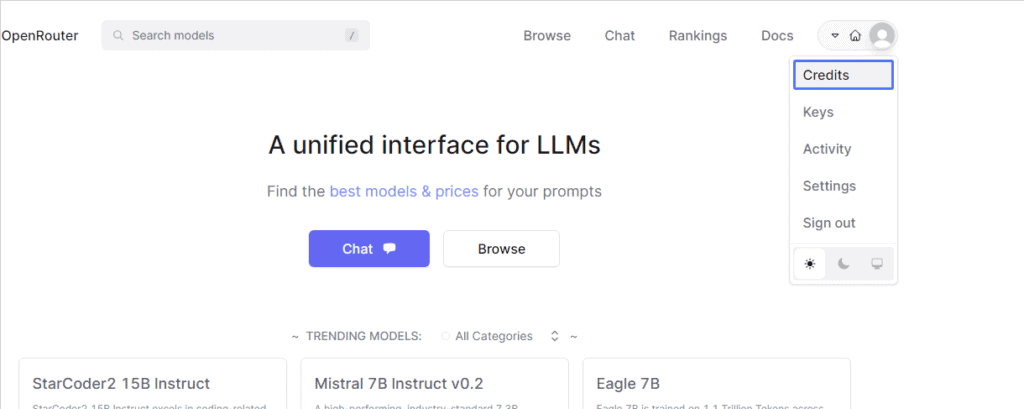
Press "Credits" from the menu in the upper right corner.

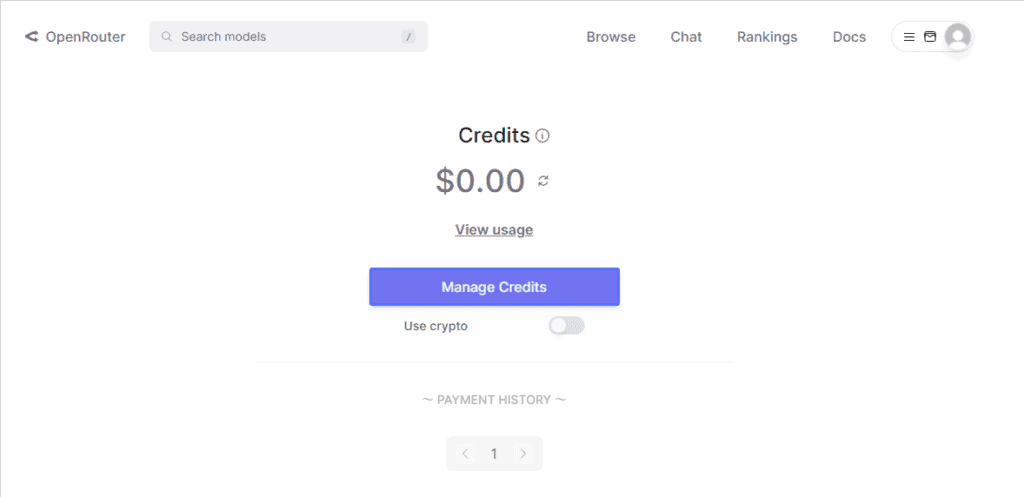
Go to the Credits page. Press "Manage Credits".

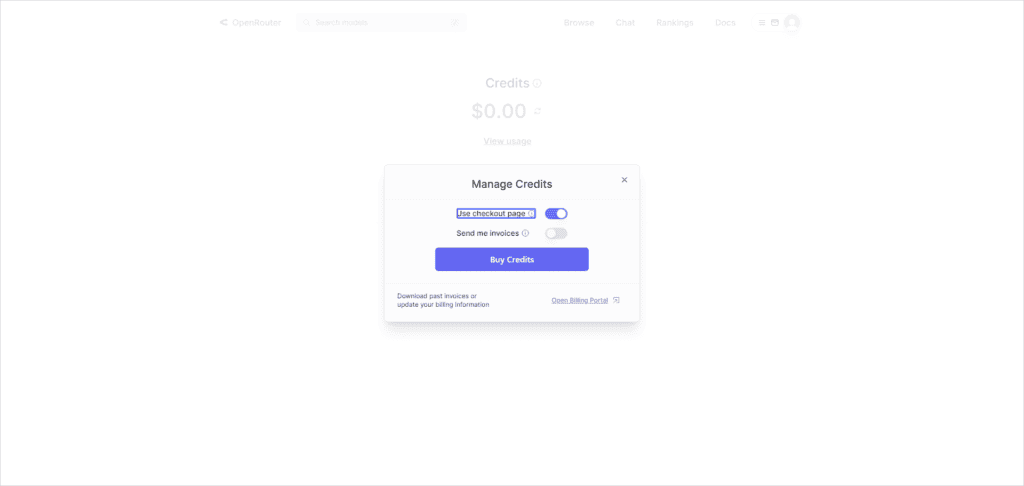
If you want to receive a receipt, check "Send me invoices" which opens here.
Press "Use checkout page" to make a payment on the payment page.

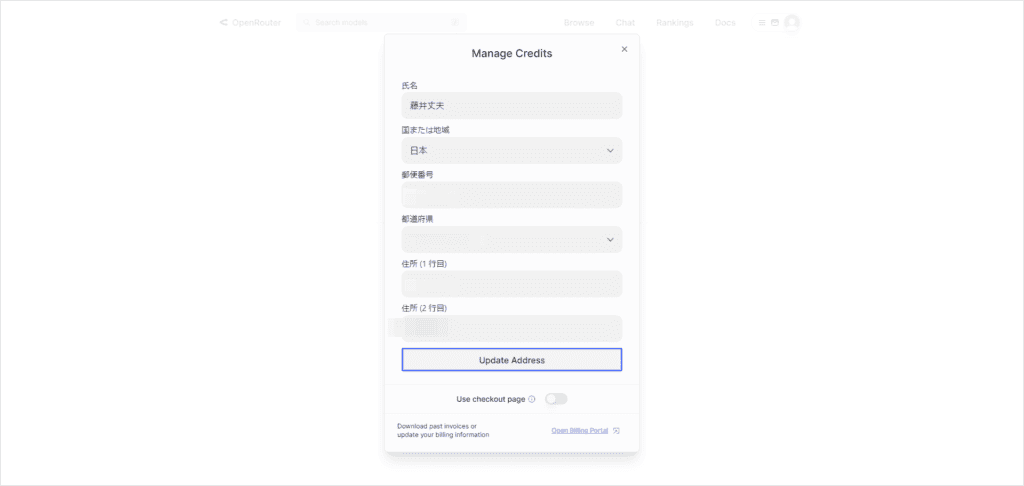
You will need to enter your personal information. This area can be entered in Japanese, so I will omit the explanation.

If you have saved your credit card in Stripe, you will immediately see the payment options below.
If you check the "Use checkout page", you can pay on the Stripe payment page.


You can pay with Stripe as follows: It is also safe for those who are worried about using credit cards on overseas sites.


Managing OpenRouter Keys
To manage your API keys, press Keys from the top right of the OpenRouter dashboard.


You can manage each key setting and set billing limits. Check the settings carefully to prevent overuse.


Press Manege to set the Credit limit as shown in the image below. It is optional, but we recommend setting it.
If you set it here, once the credits ($USD) you consume with this API key reach this amount, you will not be able to use it further.


If you want to use it unlimitedly, you don't need to enter anything.
You can also monitor API usage from Activity.


You have complete control over key usage.
In the OpenRouter settings, you can freely select the AI model.


Again, you don't need to configure OpenRouter at all to use it normally with Afforai. You don't need to set up BYOK.
This is an option for those who are not satisfied with Afforai's default AI model.
How to set up BYOK in Afforai
First, open the Afforai chat.


Press the AI model settings under "Custom" in the menu.


Now press the "Connect to Open Router" button.


Go to the OpenRouter page. Press Authorize here.


Once you do so, you will automatically be taken back to Afforai.


Things to keep in mind when using BYOK with Afforai
- When you use BYOK with Afforai, you incur API costs from your OpenRouter account.
- We recommend that you set a spending limit to keep your spending down.Important
Needless to say, using BYOK incurs API costs. You can avoid overspending by keeping limits.
It's just that OpenRouter is not my service. Therefore, I am not responsible for any of the settings and usage. Please do so at your own risk.
How to customize BYOK on Afforai


Once you have connected your OpenRouter key, you will see the settings to customize OpenRouter in Afforai.
BYOK Mode
This is an option to configure how the OpenRouter key is used. The following options are offered:
- Disabled: The key remains connected to Afforai but is not used.
- Afforai Pick: It uses the same model as Afforai's system.
- Custom: Allows users to select their own models.
- OpenRouter’s Default: The model is selected through the OpenRouter UI. This option is not recommended because you cannot select different models for different operations.
Multimodal Model
This model uses images to answer questions (used for file annotation).
Query Model
This model is responsible for answering questions (used when querying).
JSON Model
This model is responsible for generating JSON objects for intermediate processing.
Tips for setting up BYOK with Afforai
Afforai can use your own API key. This is an option that regular users don't need, but by connecting their API keys in BYOK, you can use AI models that are not normally available in Afforai.
Some advice before setting it up. Below is some advice from Afforai.
- Start by choosing Afforai and understand how to use the keys.
- If you want to choose your own model, we recommend changing only the Query Model and leaving the rest as GPT-3.5.
- If you want to customize it significantly, choose the cheapest option for each model and gradually increase the performance of the model to find the best value for money.
Note: We strongly recommend that you choose a model with at least 16,000 tokens in the context window. This helps maintain AI performance.
If you choose a model with less than 16,000 tokens, the AI's output quality may be reduced and citations may not be generated.
If you use BYOK on Afforai, we hope you find it helpful.



















Latest Comments