


Corporate training and employee education take time, money, and effort.
However, there are many issues with training, such as "you can quickly forget the content", "students do not concentrate", and "it is difficult to manage progress".
The solution to such problems is an LMS (learning management system) for in-house training.
Among them, we will introduce this time.「Konstantly」
With this tool, even beginners with zero knowledge can easily create training content for other team members to learn online.
Automatically manage student progress Because you can,Perfect for small business owners and sole proprietors。
Limited Time: A special offer is currently underway where you can get Konstantly with up to 87% off with a one-time purchase. The price will increase in a few days.Check Now
In this article, we will explain in detail the features, usage, pricing plans, pros and cons of Konstantly.
- 1 What is Konstantly? Innovative tools to streamline internal training
- 2 Konstantly Features and Strengths
- 3 How to use Konstantly (step-by-step explanation)
- 4 Pricing Plans and Great One-Time Purchase Options
- 5 Conclusion: Konstantly is recommended for these people!
- 6 Conclusion: Konstantly is perfect for those who want to start training easily!
- 7 Frequently Asked Questions (FAQs)
What is Konstantly? Innovative tools to streamline internal training

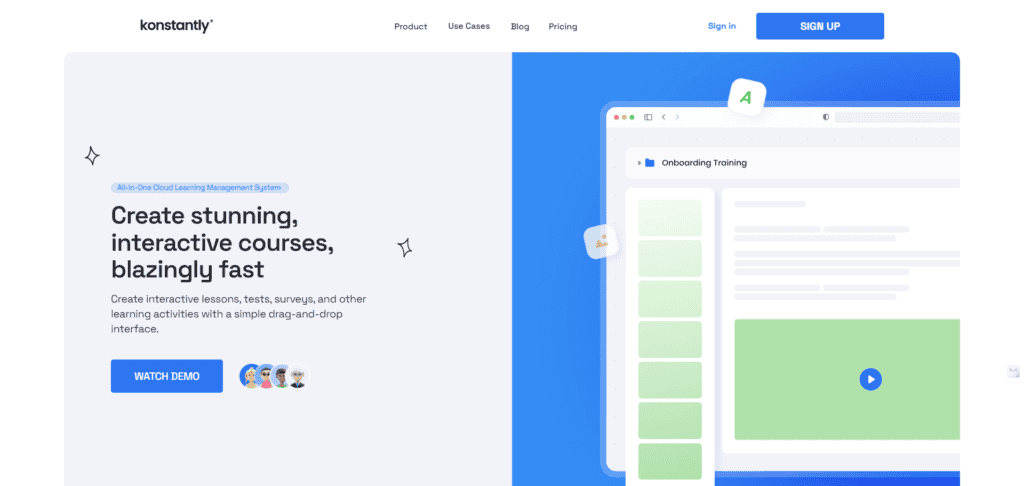
How is it different from traditional training tools?
Speaking of corporate training, seminars with lecturers and the introduction of e-learning were common. But have you ever felt the following challenges?
- Seminar → Employees are fiddling with their smartphones and are not concentrating
- eLearning → Don't Get Bored
- Progress management → All manual and heavy burden on the manager
"Konstantly" was developed to solve these problems.
This tool isIntuitive operation and automatic managementIt is a revolutionary in-house training platform that combines
We have prepared a video explaining how to use Konstantly▼
What kind of company is it suitable for?
Konstantly is especially recommended for companies and businesses that:
✅ Small businesses and sole proprietors with small teams
→ Perfect for companies that cannot afford to spend time or money on employee training
✅ Companies that want to maximize the effectiveness of training
→ Combine videos and quizzes to keep students entertained.
✅ Companies that want to streamline progress management
→ Learner learning status is automatically recorded for easy management
In particular, it is the best tool for companies that want to improve their learning effectiveness without spending too much time on training.
Konstantly Features and Strengths
Let's check out how to use Konstantly.
First of all, this is the biggest strength▼
It's Japanese support, so don't worry! Easy to set up
Actually, Konstantly supports Japanese.
Most of the overseas LMS (learning management systems) are mainly in English and do not support Japanese
However, KonstantlyAll interfaces are JapaneseAnyone can use it smoothly.

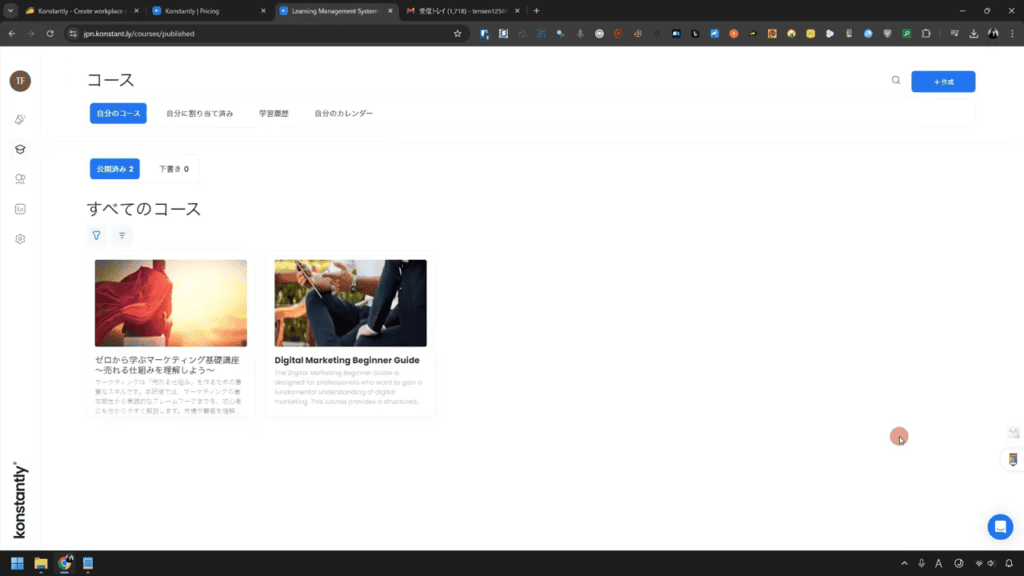
I had the opportunity to chat with the founder of Konstantly last Thursday as I write this article.
At that time, I asked, "Can you speak Japanese?"
I was able to translate it into Japanese in a few days.
He and his team work exceptionally quickly.
Therefore, if you change the language settings when you log in for the first time,New students can also be used in the Japanese environment from the beginning.is.

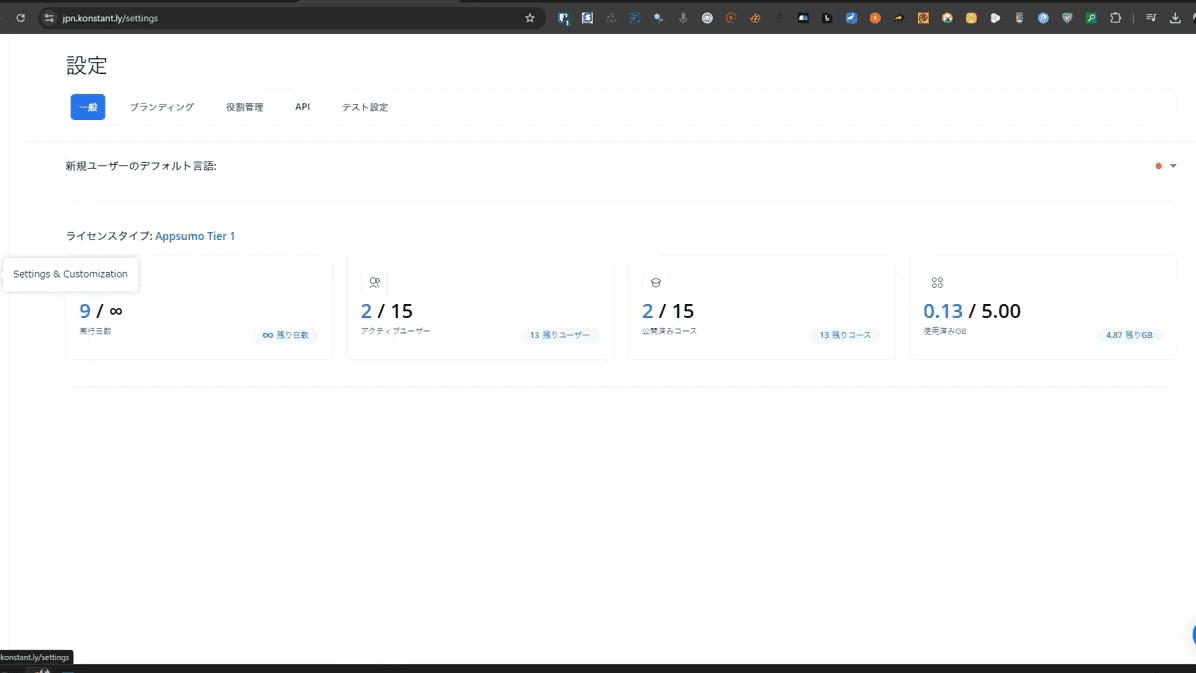
It's easy to set up. Just set the "Default language for new users" to Japanese in the settings.
This allows teams that are worried about English to use it with confidence.
Intuitive operation with drag and drop! Easy for anyone to use
Many training tools are complex to set up and difficult to master. But with KonstantlyCreate training content with just intuitive controls.
Especially useful is thatDrag and drop functionalityis.
First, the overall curriculum design can be intuitively created by dragging and dropping on a white canvas.

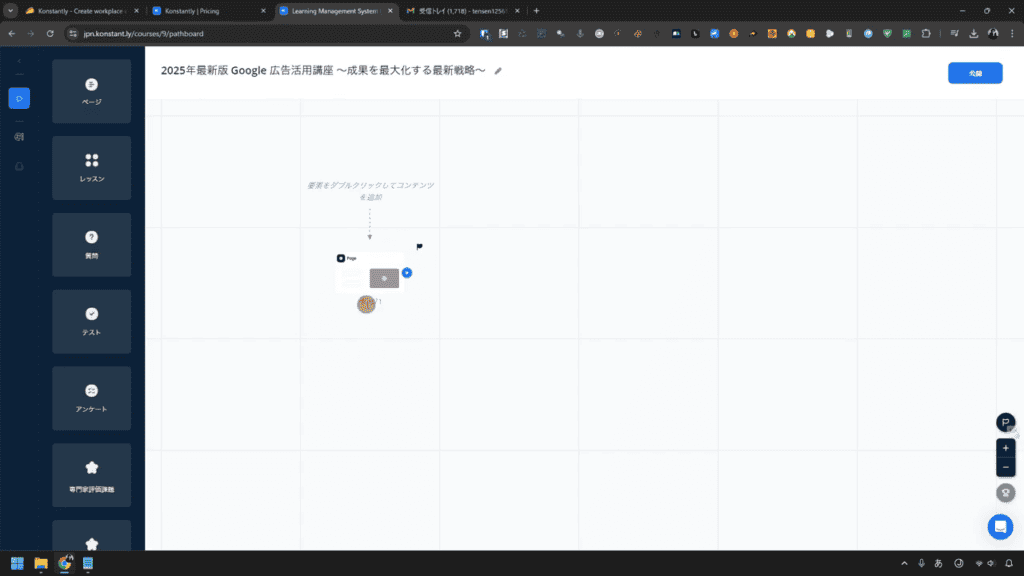
Just select an element from the left side menu and place it inside the canvas, as shown in the image above.
You can also easily create each learning page.
Double-click the element you placed on the canvas.
This will allow you to create a learning page.

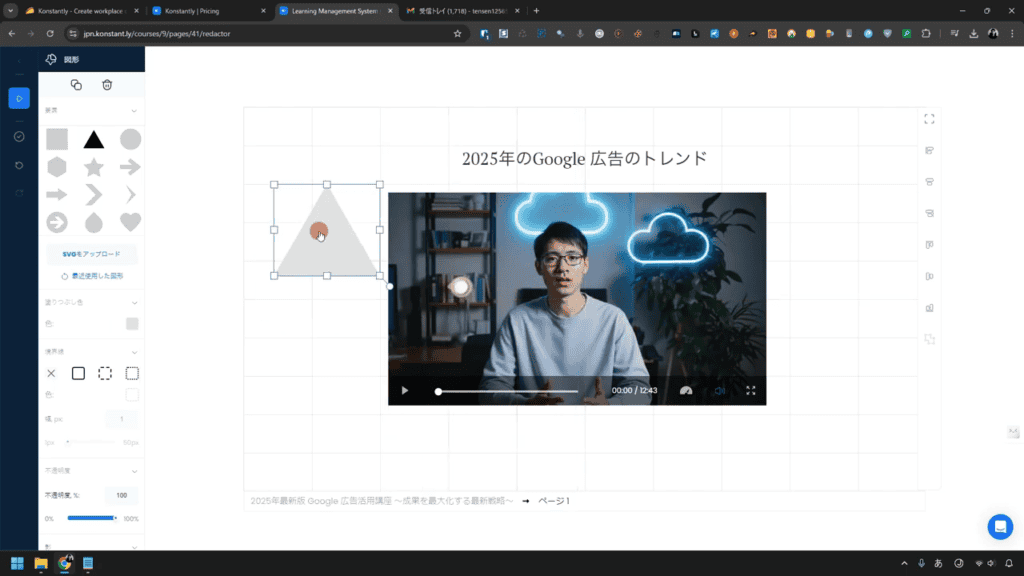
You can easily create courses by simply placing text, videos, quizzes, etc. wherever you want. Specifically, you can freely combine the following elements:
- Text(Add description and headline)
- Video(Support for embedding self-made videos and YouTube)
- Shapes
- iframe
You can set these. Even if you don't have specialized knowledge, you can create an effective training course in a short time.
Automatic progress management allows for hassle-free operation
When running a training, do you ever feel that it is difficult to check the progress of the participants? With Konstantly, you can save yourself a lot of time.
This tool allows you to useLearner progress is automatically recorded and can be checked in real timeis.
To track your learner's progress, select Users & Groups from the left sidebar in the dashboard.

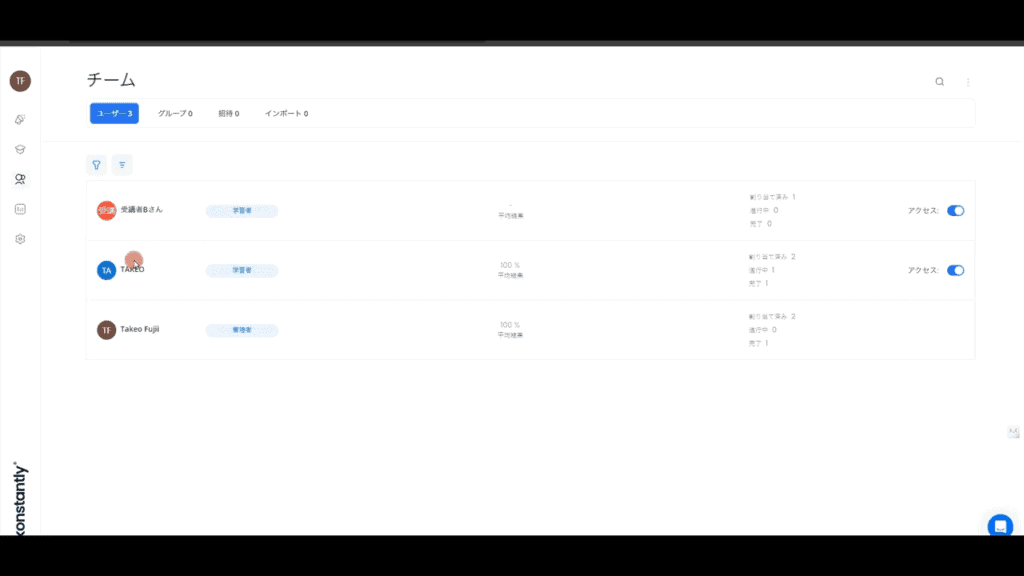
Once you do so, you will see the team members. Click on the member's name to check the progress of each member's course.


You can easily check the attendance status of the member visually.
- Dashboard to see progress at a glance
- Automatic reminder notifications for incomplete students
- The status of quiz responses is also recorded, and you can check the retention of learning.
A major strength is that you can firmly check the results, rather than "just conducting training".
How to use Konstantly (step-by-step explanation)
Konstantly is a tool that makes it easy for anyone to create training courses and manage their students. Here we will explain the basic usage in 5 steps.
(1) Log in and configure basic settings
First, go to the official website of Konstantly and create an account. After logging in, go to your dashboard.
- Change language settings to Japanese(English may be available by default)
- Registering Administrator Information(Name and email address settings)
- Enter basic information for your organization(Setting company name and logo)
Now you are ready to create your training course.
(2) Create a new course (cover image, title, description)

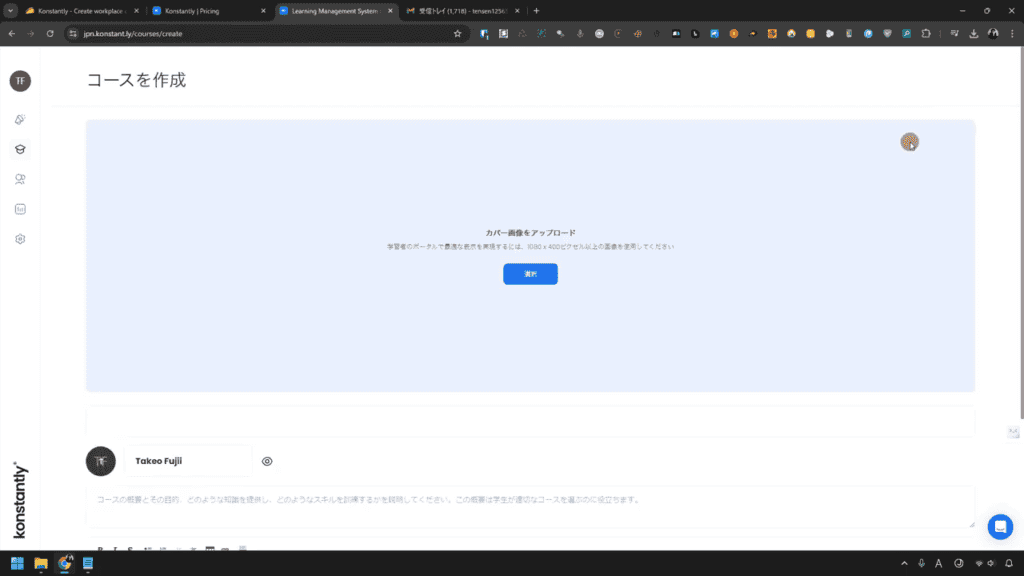
- Once you've decided on the content of your training, create a course.
- Click the Create button in the top right corner of the dashboard.
- Select Create Course
- Upload your cover image(Recommended size 1080×400px)
- Enter a course title and description
Setting a cover image makes it easier to visually understand the content of the training.

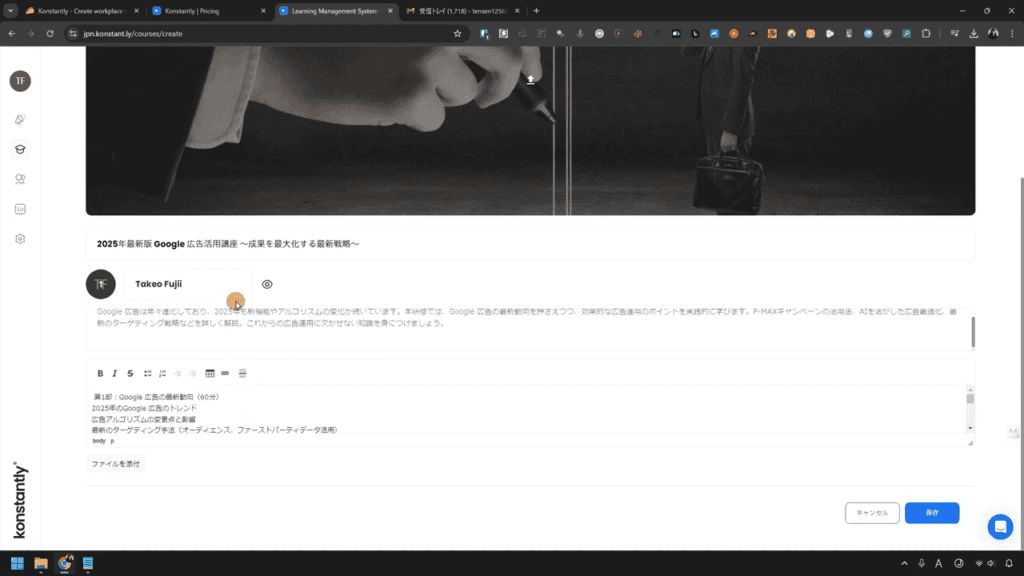
(3) Create a curriculum (how to add videos and quizzes)
Create a framework for your course. It is not difficult because it is fully Japanese supported.
Please see the image below.

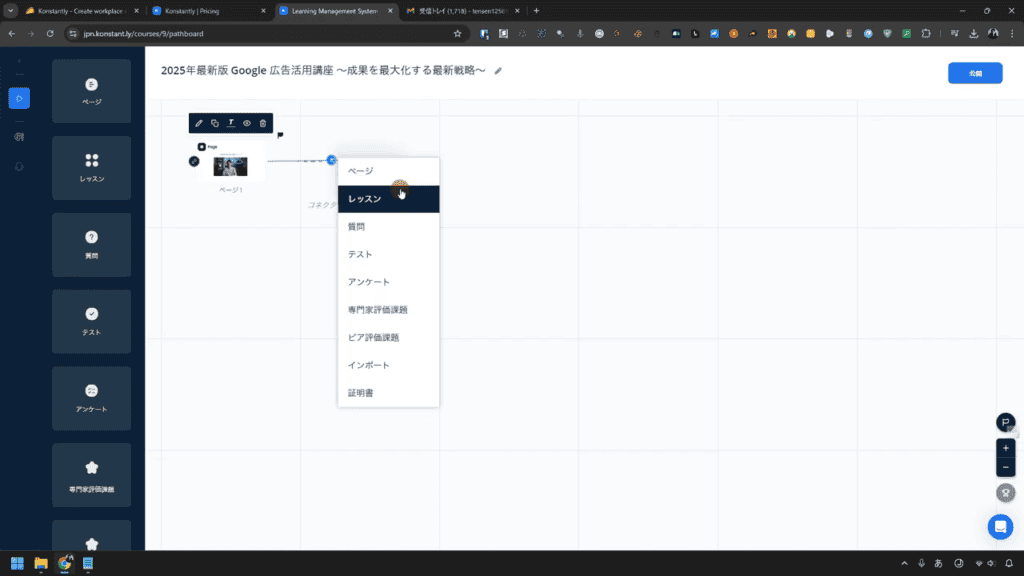
In this way, you can easily design the overall framework for members to take the course.
Questionnaires, quizzes, and tests can also be set up freely.
Then add the actual learning content.
- Upload your video(or insert YouTube link)
- Create a quiz(Selective, sorting, descriptive, etc.)
- Add text content(Posting of explanations and materials)
These elements areDrag and dropIt can be freely placed with.


You can easily assemble your curriculum.
(4) Invite students to manage the team
Once the course is complete, invite students to start training.


- Open the Users & Groups menu on the left
- Click the Add User button
- Enter your email address and send an invitation email
- Group participants as needed
Assign courses to each team to help you learn more smoothly.
(5) Check the progress of the participants and improve the training
As the training progresses, you can check the progress of each student.
- List your attendance status on the dashboard
- Send reminders to incomplete students
- Check quiz results and analyze learning retention
Which students are stumbling where?and improve the course content as needed.
Pricing Plans and Great One-Time Purchase Options
Currently, Konstantly is a regularSubscription PlansApart from that,One-time purchase plan for a limited timeIt is provided.
Here, we will explain the differences between each plan and which one you should choose.
Regular subscription plan (recurring billing)

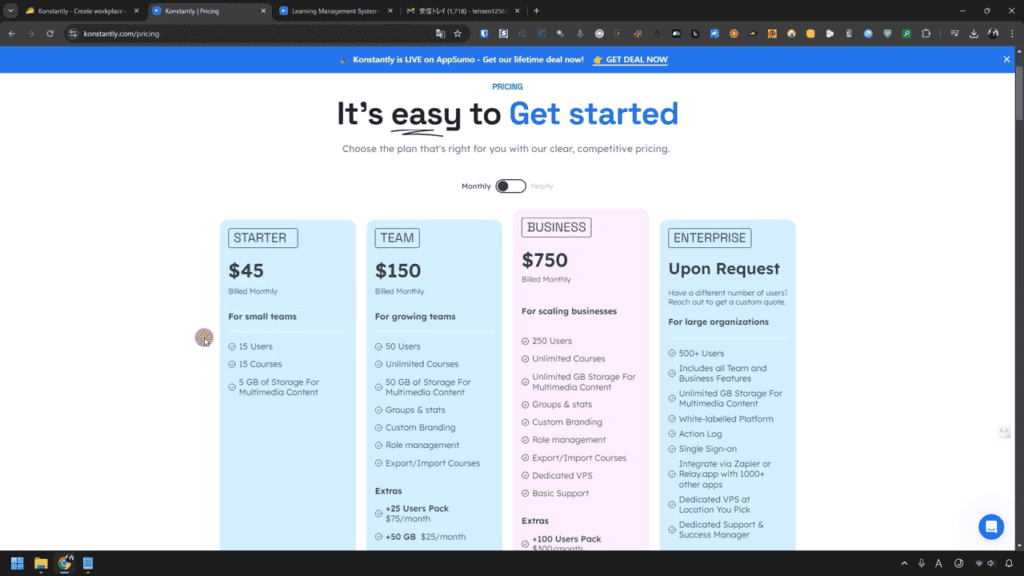
Konstantly's regular plan isMonthly or yearly subscription formatIt has become.
✅ Pros
- Upgrade or downgrade as needed
- Flexibility to change storage capacity and number of students
❌ Disadvantages
- Monthly costs are incurred, so it will be expensive in the long run.
- Sometimes overspec for small teams
Limited time only! One-time purchase plan (AppSumo exclusive offer)

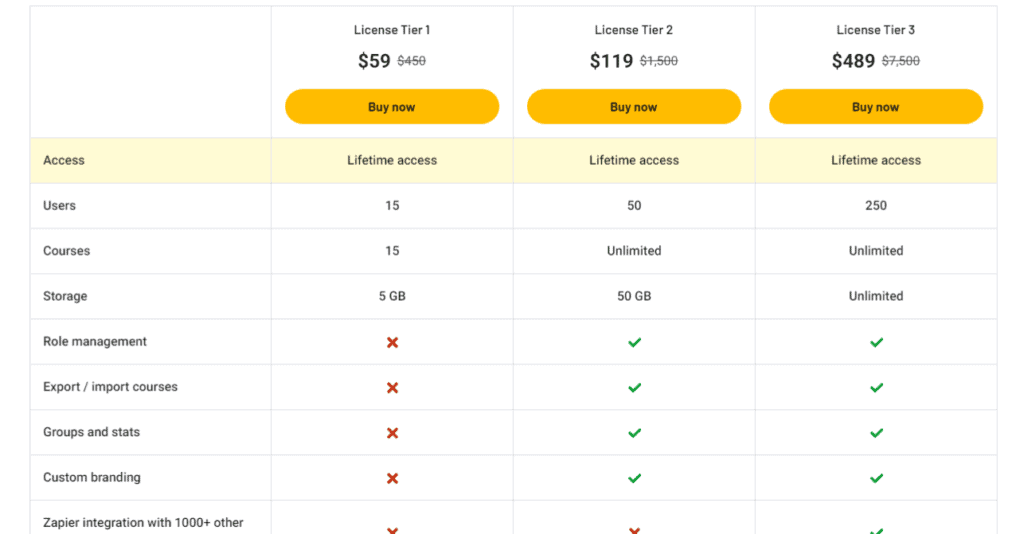
Now,AppSumo offers a one-time purchase plan for KonstantlyIt has been.
✅ Pay once and use it forever at no additional cost!
| Plan | Price (one-time purchase) | How many users can be invited | Storage Capacity | Number of courses that can be created |
|---|
| Tier 1 | $59 (about 8,700 yen) | Up to 15 people | 5GB | Up to 15 courses |
| Tier 2 | $119 (about 17,600 yen) | Up to 50 people | 50GB | Unlimited |
| Tier 3 | $489 (about 73,500 yen) | Up to 250 people | Unlimited | Unlimited |
- One paymentCan be used all the timeTherefore, it is the most cost-effective in the long run
- No subscription requiredSo you don't have to worry about recurring billing
- Backed by a 60-day money-back guaranteeYou can try it with confidence
Which one should you choose? Recommended plans by purpose
Please refer to the following criteria to determine which plan to choose.
| Recommended for people like this | Which plan to choose |
|---|---|
| I want to conduct training in a small team (15 people or less) | License Tier 1 |
| I want to manage a team of 15~50 people | License Tier 2 |
| I want to use it by a large company or organization | License Tier 3 |
Especially if you run a small team,Tier 1 of the one-time purchase plan is the most cost-effective optionIt comes to.
Conclusion: Konstantly is recommended for these people!
KonstantlyCompanies and teams that want to streamline their internal trainingIt is a tool that has great benefits for . In particular, it can be recommended for people who:
✅ Small teams and small business owners
- I want to improve the skills of my employees, but I can't spend time or money on it.
- I want to improve the quality of training without hassle.
- Automate progress management,I want to reduce the burden of operation
The one-time purchase plan (Tier 1: $59) is ideal for teams of up to 15 peopleis.
✅ Freelancer and sole proprietor (sole proprietor)
- I want to provide online courses and training content for my clients.
- Instructors and consultants who want to develop corporate training services
- We operate with a small team, but we want to structure the training
One-time purchase plan (Tier 2: $119) allows you to invite up to 50 peopleTherefore, it can also be used as a learning environment for clients.
✅ Companies that want to introduce e-learning but want to keep costs down
- Major LMS (learning management systems) are expensive and have high hurdles to implement.
- Paying a monthly subscription fee for training is difficult
- I want a tool that can be used for a long time with a single payment
With Konstantly,You can choose a one-time purchase plan that can be used forever without monthly billing.Therefore, it is cost-effective.
Maybe it's not suitable for people like this?
Konstantly has many benefits, butIt may not be suitable for people who:
❌ A large company wants to manage a large number of students
➡ This is a plan with up to 250 people (Tier 3), so if you are larger than that, you should consider another LMS
❌ Emphasis on Collaboration with External Tools
➡ Since there is little API integration, it is not suitable if you want to integrate with existing systems.
❌ I want to create an online school for external parties.
➡ KonstaltyFor in-house trainingIt is not suitable for large-scale online school operations.
Conclusion: Konstantly is perfect for those who want to start training easily!
If you want to structure your training without difficult operations or increase learning retention while keeping costs down, Konstantly is the perfect tool for you.
EspeciallyIf you have a small team or a small business, we recommend introducing it with a one-time purchase plan!
60-day money-back guarantee
NowDiscounted price for a limited time at AppSumoIt can be purchased at, so we recommend checking it out as soon as possible.
Frequently Asked Questions (FAQs)
Q1. Does Konstantly have a free plan?
No, Konstantly does not currently have a free plan. However, when you buy on AppSumo,60-day money-back guaranteeTherefore, you can try the one-time purchase plan before deciding.
Q2. How many students can I invite?
One-time purchase plan15 players in Tier 1, 50 players in Tier 2, 250 players in Tier 3You can invite them to. If you want to manage more students, consider the Enterprise plan for subscriptions.
Q3. How is it different from other LMS (learning management systems)?
KonstantlyIntuitive operation and Japanese supportIt is characteristic.
In addition, a special one-time offer is currently available for a limited time.
Most LMSs have a monthly subscription, so Konstantly is more cost-effective in the long run.
Q4. Is there a money-back guarantee after purchase?
Yes60-day money-back guaranteeThere is. If it doesn't meet your expectations, you can rest assured.
Q5. Is Japanese support available?
Yes, KonstantlyAll interfaces are JapaneseI do. However, since support is basically in English, we recommend using a translation tool when making inquiries.





![How to Use the AI Voice Memo Tool "AudioPen" [2024 Latest Review]](https://sp-ao.shortpixel.ai/client/to_webp,q_lossy,ret_img,w_485,h_273/https://takeofujii.net/wp-content/uploads/2024/02/audiopen-review-485x273.png "How to Use the AI Voice Memo Tool \"AudioPen\" [2024 Latest Review]")

![AI writing tool "Rytr" review and explanation of how to use it [2024]](https://sp-ao.shortpixel.ai/client/to_webp,q_lossy,ret_img,w_485,h_273/https://takeofujii.net/wp-content/uploads/2021/12/wefewfewf-485x273.png "AI writing tool \"Rytr\" review and explanation of how to use it [2024]")

![Brain.fm Reputation | Impressions of actually using it [Coupon available]](https://sp-ao.shortpixel.ai/client/to_webp,q_lossy,ret_img,w_485,h_273/https://takeofujii.net/wp-content/uploads/2021/11/brainfm-review.png "Brain.fm Reputation | Impressions of actually using it [Coupon available]")



I was able to translate it into Japanese. I'll implement it tomorrow