


Do you have any of these problems? That's why we would like to introduce the automation tool "TaskMagic".
I'm actually using it.How to use and function TaskMagicI will explain.

That's RPA, isn't it? It seems difficult...
Don't worry. After reading this article, you'll want to use automation tools right now.
Please take your time to take a look. I won't let you regret it.
TaskMagic is on sale at a special price. A plan worth about 90,000 yen* is available for a limited time at 87% off and one-time purchase. You don't have to pay a monthly subscription fee. Pay only once.>> special offer here
*The value notation on the sales page is $588 (approximately 92,247 yen) converted to dollar-yen
- 1 What is TaskMagic?
- 2 How to use TaskMagic
- 3 (1) Record the tasks you want to automate
- 4 (2) Edit the automation
- 5 (3) Activate automation
- 6 Examples of automation with TaskMagic
- 7 TaskMagic Pricing Plans
- 8 Disadvantages of TaskMagic
- 9 TaskMagic FAQs
- 10 Summary: TaskMagic is cheaper and easier to use than other RPAs
What is TaskMagic?


TaskMagic is a tool that allows you to automate all your routine tasks.
- Data Entry
- Copy and paste work
- Research work
- Repeating the same work
- Follow and unfollow on social media
You can automate all kinds of other tasks. It's commonly known as RPA.
RPA (Robotic Process Automation) is a technology in which computers automatically perform some tasks like humans. For example, automating tasks like collecting the same data and creating reports every day frees up humans to focus on more important tasks. It increases efficiency, productivity, and saves time.
Hmm, it seems kind of difficult... If you think so, TaskMagic is recommended.
Right now, TaskMagic is on sale at a special price of 87% off for a limited time. Soon to be discontinued. Hurry up▼
Because TaskMagic is easy to use.
TaskMagic is easy to use
Other RPAs are difficult to implement and actually use.
First of all, there is the issue of cost. Try actually doing a Google search. There are many RPA that have an initial cost of 300,000 yen and a monthly usage fee of 50,000 yen. Even if it's cheap, it's 10,000 yen a month.
How to use RPAIt costs a lot of money.
Therefore, it is difficult for businesses and entrepreneurs who run small businesses to get their hands on it.
Moreover, even if it is actually implemented, it is often impossible to use it properly unless the user understands Xpath and CSS selectors.
In contrastTaskMagic is cheap and easy to use.There are only three steps.
- Record the work you want to automate
- Edit an automation
- Launch
That's all. Moreover, even if you don't have any programming knowledge, you can automate tasks with TaskMagic without any problems.
That being said, it's actually difficult, isn't it?
I can understand how you feel. Let's actually explain how to use TaskMagic.
How to use TaskMagic
We have explained how to use TaskMagic in this video.
If you watch the video, you will understand how easy it is.
I try to make it as easy to understand as possible, but there may be parts where you may think, "Eh, what does this mean?" In that case, please feel free to ask. We will support you until you understand.
I will also illustrate the content of the video above. This automation can be easily set up in just 60 seconds. However, if you look at the explanation below, "There are too many settings! You may feel that.

It looks difficult, but please read it with the image of easy.
(1) Record the tasks you want to automate
First, launch TaskMagic.


Here is the dashboard. Let's start by adding automation.
To add an automation, click the green button (Add new automation) in the top right.


Three items will appear as follows.


- Guided build Recommended
- Add from template
- Manual Recording
The easiest to use is Guided build. This time I will choose this one.
If you select Guided build, a window and pop-up will automatically appear. Please see below.


The moment you saw this, you may have thought, "Oh, it looks difficult." All right. It's only the first.
The pop-up on the right says Step1: Go to page. Here, first insert the URL of the website you want to automate.
This time I entered the URL of my blog.


Then my blog will automatically open on the left window.

![[Automation tools] Summary of how to use and features of TaskMagic](https://sp-ao.shortpixel.ai/client/to_webp,q_lossy,ret_img,w_1024,h_576/https://takeofujii.net/wp-content/uploads/2023/09/taskmagic-open-website-1024x576.png "[Automation tools] Summary of how to use and features of TaskMagic")
At the same time, you can give instructions in the pop-up on the left.

![[Automation tools] Summary of how to use and features of TaskMagic](https://sp-ao.shortpixel.ai/client/to_webp,q_lossy,ret_img,w_901,h_507/https://takeofujii.net/wp-content/uploads/2023/09/taskmagic-open-website-edited.png "[Automation tools] Summary of how to use and features of TaskMagic")
- Scrape (extract information from within the page)
- Record (clicking, typing, etc.)
This time, I want to extract information from my blog, so I will choose Scrape. Then two more options will appear

![[Automation tools] Summary of how to use and features of TaskMagic](https://sp-ao.shortpixel.ai/client/to_webp,q_lossy,ret_img,w_1216,h_365/https://takeofujii.net/wp-content/uploads/2023/09/taskmagic-list-or-single-edited.png "[Automation tools] Summary of how to use and features of TaskMagic")
- List (extract multiple items)
- Single (extract a single item)
You can choose like this. This time, we will select List.

![[Automation tools] Summary of how to use and features of TaskMagic](https://sp-ao.shortpixel.ai/client/to_webp,q_lossy,ret_img,w_1024,h_735/https://takeofujii.net/wp-content/uploads/2023/09/taskmagic-list-scrape-1024x735.png "[Automation tools] Summary of how to use and features of TaskMagic")
Then, in the left pane, select the items you want to extract.
In the image above, I choose the title of the article because I want to get all the "titles of each article" in my blog. Once selected, click the green button "Confirm".

![[Automation tools] Summary of how to use and features of TaskMagic](https://sp-ao.shortpixel.ai/client/to_webp,q_lossy,ret_img,w_505,h_363/https://takeofujii.net/wp-content/uploads/2023/09/taskmagic-list-scrape-edited.png "[Automation tools] Summary of how to use and features of TaskMagic")
Once you do so, you will automatically see a preview.

![[Automation tools] Summary of how to use and features of TaskMagic](https://sp-ao.shortpixel.ai/client/to_webp,q_lossy,ret_img,w_1024,h_423/https://takeofujii.net/wp-content/uploads/2023/09/taskmagic-scraping-lists-1024x423.png "[Automation tools] Summary of how to use and features of TaskMagic")
As shown below, all of the "titles of each article" that you selected earlier to extract will be displayed.

![[Automation tools] Summary of how to use and features of TaskMagic](https://sp-ao.shortpixel.ai/client/to_webp,q_lossy,ret_img,w_889,h_367/https://takeofujii.net/wp-content/uploads/2023/09/taskmagic-scraping-lists-edited.png "[Automation tools] Summary of how to use and features of TaskMagic")
Click on the button that says "Scrape text".

![[Automation tools] Summary of how to use and features of TaskMagic](https://sp-ao.shortpixel.ai/client/to_webp,q_lossy,ret_img,w_1024,h_576/https://takeofujii.net/wp-content/uploads/2023/09/taskmagic-add-step-1024x576.png "[Automation tools] Summary of how to use and features of TaskMagic")
You are now ready to automatically retrieve all article titles to your page. You can end here, but I would like to add more steps.
Click on the green button on the right pop-up that says "Add step."

![[Automation tools] Summary of how to use and features of TaskMagic](https://sp-ao.shortpixel.ai/client/to_webp,q_lossy,ret_img,w_807,h_454/https://takeofujii.net/wp-content/uploads/2023/09/taskmagic-add-step-edited.png "[Automation tools] Summary of how to use and features of TaskMagic")
You can add a new step by clicking here.
I will give instructions again. Click Record.
When I clicked Record, I was presented with four options.

![[Automation tools] Summary of how to use and features of TaskMagic](https://sp-ao.shortpixel.ai/client/to_webp,q_lossy,ret_img,w_1024,h_576/https://takeofujii.net/wp-content/uploads/2023/09/taskmagic-click-and-type-1024x576.png "[Automation tools] Summary of how to use and features of TaskMagic")
If you want to automate clicks, select Click.

![[Automation tools] Summary of how to use and features of TaskMagic](https://sp-ao.shortpixel.ai/client/to_webp,q_lossy,ret_img,w_970,h_545/https://takeofujii.net/wp-content/uploads/2023/09/taskmagic-click-and-type-edited.png "[Automation tools] Summary of how to use and features of TaskMagic")
Then select the item you want to click on in the left pane.

![[Automation tools] Summary of how to use and features of TaskMagic](https://sp-ao.shortpixel.ai/client/to_webp,q_lossy,ret_img,w_1024,h_660/https://takeofujii.net/wp-content/uploads/2023/09/taskmagic-confirm-click-1024x660.png "[Automation tools] Summary of how to use and features of TaskMagic")
Select the button to move to the next page.

![[Automation tools] Summary of how to use and features of TaskMagic](https://sp-ao.shortpixel.ai/client/to_webp,q_lossy,ret_img,w_646,h_417/https://takeofujii.net/wp-content/uploads/2023/09/taskmagic-confirm-click-edited.png "[Automation tools] Summary of how to use and features of TaskMagic")
Yes, that's it.

![[Automation tools] Summary of how to use and features of TaskMagic](https://sp-ao.shortpixel.ai/client/to_webp,q_lossy,ret_img,w_1024,h_535/https://takeofujii.net/wp-content/uploads/2023/09/taskmagic-click-done-1024x535.png "[Automation tools] Summary of how to use and features of TaskMagic")
Once the automation is complete, click the button that says "I'm done" from the pop-up on the right.

![[Automation tools] Summary of how to use and features of TaskMagic](https://sp-ao.shortpixel.ai/client/to_webp,q_lossy,ret_img,w_955,h_499/https://takeofujii.net/wp-content/uploads/2023/09/taskmagic-click-done-edited.png "[Automation tools] Summary of how to use and features of TaskMagic")
Then the flow of the automation you created will appear.

![[Automation tools] Summary of how to use and features of TaskMagic](https://sp-ao.shortpixel.ai/client/to_webp,q_lossy,ret_img,w_1024,h_593/https://takeofujii.net/wp-content/uploads/2023/09/taskmagic-flow-1024x593.png "[Automation tools] Summary of how to use and features of TaskMagic")
It's like 90% of automation is already over.
(2) Edit the automation
Now, 80% of the automation is complete. In addition, this time we will add two processes.
- Export the retrieved data to Google Sheets
- Set up repetitive tasks
Export data to Google Sheets
The data obtained by TaskMagic can be easily exported to Google Sheets.
Set up settings to export data to Google Sheets.
We have explained the video, including precautions. Please take a look.
Set to repeat the work [Loop setting]

![[Automation tools] Summary of how to use and features of TaskMagic](https://sp-ao.shortpixel.ai/client/to_webp,q_lossy,ret_img,w_972,h_563/https://takeofujii.net/wp-content/uploads/2023/09/taskmagic-flow-edited.png "[Automation tools] Summary of how to use and features of TaskMagic")
The current setting is
- Open page 1
- Get all article titles on page 1
- Get all the article links on page 1
It is set up. In other words, only one page of data has been obtained.

![[Automation tools] Summary of how to use and features of TaskMagic](https://sp-ao.shortpixel.ai/client/to_webp,q_lossy,ret_img,w_1024,h_416/https://takeofujii.net/wp-content/uploads/2023/09/taskmagic-loop1-1024x416.jpg "[Automation tools] Summary of how to use and features of TaskMagic")
If you have a total of 9 pages, you will have to repeat the task of "getting data from pages" 9 times.

![[Automation tools] Summary of how to use and features of TaskMagic](https://sp-ao.shortpixel.ai/client/to_webp,q_lossy,ret_img,w_1024,h_416/https://takeofujii.net/wp-content/uploads/2023/09/taskmagic-data-loop2-1024x416.png "[Automation tools] Summary of how to use and features of TaskMagic")
To do this, you need to set up a loop. Set it to repeat 9 times to get data from all pages.
First, click the "+ button" next to Step 3 of the workflow.

![[Automation tools] Summary of how to use and features of TaskMagic](https://sp-ao.shortpixel.ai/client/to_webp,q_lossy,ret_img,w_952,h_600/https://takeofujii.net/wp-content/uploads/2023/09/taskmagic-loop15.png "[Automation tools] Summary of how to use and features of TaskMagic")
Select "Continue recording". This allows you to add more steps to the automation you originally created.

![[Automation tools] Summary of how to use and features of TaskMagic](https://sp-ao.shortpixel.ai/client/to_webp,q_lossy,ret_img,w_1024,h_546/https://takeofujii.net/wp-content/uploads/2023/09/taskmagic-loop14-1024x546.png "[Automation tools] Summary of how to use and features of TaskMagic")
Click "+ Add Step" after Step 3 in the pop-up. This allows you to add steps.

![[Automation tools] Summary of how to use and features of TaskMagic](https://sp-ao.shortpixel.ai/client/to_webp,q_lossy,ret_img,w_1561,h_878/https://takeofujii.net/wp-content/uploads/2023/09/loop-taskmagic-1-edited.png "[Automation tools] Summary of how to use and features of TaskMagic")
Then click on "Record".

![[Automation tools] Summary of how to use and features of TaskMagic](https://sp-ao.shortpixel.ai/client/to_webp,q_lossy,ret_img,w_1631,h_918/https://takeofujii.net/wp-content/uploads/2023/09/loop-taskmagic-2-edited-1.png "[Automation tools] Summary of how to use and features of TaskMagic")
Then click Click.

![[Automation tools] Summary of how to use and features of TaskMagic](https://sp-ao.shortpixel.ai/client/to_webp,q_lossy,ret_img,w_1684,h_947/https://takeofujii.net/wp-content/uploads/2023/09/loop-taskmagic-3-edited.png "[Automation tools] Summary of how to use and features of TaskMagic")
Specify the "button to indicate the next page" in the window.

![[Automation tools] Summary of how to use and features of TaskMagic](https://sp-ao.shortpixel.ai/client/to_webp,q_lossy,ret_img,w_1255,h_706/https://takeofujii.net/wp-content/uploads/2023/09/loop-taskmagic-4-edited.png "[Automation tools] Summary of how to use and features of TaskMagic")
After that, click on the green button that says "Confirm".

![[Automation tools] Summary of how to use and features of TaskMagic](https://sp-ao.shortpixel.ai/client/to_webp,q_lossy,ret_img,w_941,h_529/https://takeofujii.net/wp-content/uploads/2023/09/loop-taskmagic-5-edited.png "[Automation tools] Summary of how to use and features of TaskMagic")
This closes the window. This is the last setting. Click "Setup trigger" above.

![[Automation tools] Summary of how to use and features of TaskMagic](https://sp-ao.shortpixel.ai/client/to_webp,q_lossy,ret_img,w_1073,h_603/https://takeofujii.net/wp-content/uploads/2023/09/taskmagic-loop7-edited.png "[Automation tools] Summary of how to use and features of TaskMagic")
Click Loop.

![[Automation tools] Summary of how to use and features of TaskMagic](https://sp-ao.shortpixel.ai/client/to_webp,q_lossy,ret_img,w_1864,h_1049/https://takeofujii.net/wp-content/uploads/2023/09/taskmagic-loop8-edited.png "[Automation tools] Summary of how to use and features of TaskMagic")
Click Skip for "Add in Google Sheets Data".

![[Automation tools] Summary of how to use and features of TaskMagic](https://sp-ao.shortpixel.ai/client/to_webp,q_lossy,ret_img,w_784,h_441/https://takeofujii.net/wp-content/uploads/2023/09/taskmagic-loop9-edited.png "[Automation tools] Summary of how to use and features of TaskMagic")
Specify the number of loops in the Setup Loop Schedule. This time, I want to repeat the same task 9 times, so I enter "9".

![[Automation tools] Summary of how to use and features of TaskMagic](https://sp-ao.shortpixel.ai/client/to_webp,q_lossy,ret_img,w_826,h_465/https://takeofujii.net/wp-content/uploads/2023/09/loop-settings-edited-1.png "[Automation tools] Summary of how to use and features of TaskMagic")
Ignore Schedule to run and click Continue.

![[Automation tools] Summary of how to use and features of TaskMagic](https://sp-ao.shortpixel.ai/client/to_webp,q_lossy,ret_img,w_714,h_402/https://takeofujii.net/wp-content/uploads/2023/09/taskmagic-loop10-edited-1.png "[Automation tools] Summary of how to use and features of TaskMagic")
Then a green bar will appear at the top.

![[Automation tools] Summary of how to use and features of TaskMagic](https://sp-ao.shortpixel.ai/client/to_webp,q_lossy,ret_img,w_1811,h_1019/https://takeofujii.net/wp-content/uploads/2023/09/taskmagic-loop11-edited.png "[Automation tools] Summary of how to use and features of TaskMagic")
Here you can set where you want your work to loop from.
This time, I want to repeat the work from Step 2 to Step 4, so I move the green bar to specify it.

![[Automation tools] Summary of how to use and features of TaskMagic](https://sp-ao.shortpixel.ai/client/to_webp,q_lossy,ret_img,w_1289,h_725/https://takeofujii.net/wp-content/uploads/2023/09/taskmagic-loop12-edited.png "[Automation tools] Summary of how to use and features of TaskMagic")
This completes the setup.
(3) Activate automation
That's it! Click Play Steps.

![[Automation tools] Summary of how to use and features of TaskMagic](https://sp-ao.shortpixel.ai/client/to_webp,q_lossy,ret_img,w_1024,h_445/https://takeofujii.net/wp-content/uploads/2023/09/taskmagic-loop13-1024x445.png "[Automation tools] Summary of how to use and features of TaskMagic")
The data you get is automatically exported to Google Sheets.
I was able to successfully obtain all 9 pages of article titles and links.


When you read the explanation with images, you may feel that it is somewhat difficult to set up. But it's really easy to set up.
You can automate many other tasks.
Examples of automation with TaskMagic
Most of the tasks done by humans can be automated with TaskMagic.
- Copy and paste work
- Scraping (extracting information from pages)
- Data Registration
- Automate blog post creation
- Social Media Automation
And so on.
By the way, it's best to avoid automating X (formerly Twitter). This is true for any automation tool, regardless of TaskMagic, but X is strict on automation. Even if it can be temporarily automated, there is also a risk that it will freeze immediately.
However, aside from some platforms, you can automate quite a few sites.
Here are some examples: Please see below.
Fully automate ChatGPT
In the video above, ChatGPT is launched fully automatically. With TaskMagic, you can automate all the blog post creation.
Automatic collection of large amounts of data (scraping)

We automatically retrieve (scrape) information from a large number of product pages. All automatic. And I write out the information I have obtained directly into Google Sheets.
Automate Instagram (Auto Follow, Auto Like)
In the video below, we are automating Instagram.
- Automated lead generation
- Automatic Follow
- Auto-likes
- Auto-unfollow
- Automatic DM
All are feasible.
Of course, you can automate other websites and platforms.
Routine work that you usually do. "Do I need to do this myself, do I really have to?" all the work can be thrown into TaskMagic.
TaskMagic Pricing Plans


TaskMagic's pricing plans are typically as follows:
| Monthly | Desktop | Desktop+Cloud | |
|---|---|---|---|
| US Dollar | $49 | $499 | $999 |
| Payment | Monthly | One-time purchase | One-time purchase |
| Japan Yen Conversion | 6,936 yen | JPY 70,637 | JPY 141,421 |
TaskMagic offers three plans. The cheapest plan costs $49 per month. In Japan yen, it is 6,936 yen.
It's quite cheap. This is because other RPAs have an initial cost of 300,000 yen and a monthly usage fee of 50,000 yen. If you are interested, please search for "RPA price".
However, the recommendation is
- Desktop (My Recommendation)
- Desktop+Cloud
We recommend one of these two plans. This is because these two plans are one-time purchases.
Once you pay the fee, you can continue to use it at no additional cost in the future. Therefore,When compared to other companies, this price is very attractive for a one-time purchase.
Buy TaskMagic on AppSumo from Japan
The purchase method is not difficult.
TaskMagic supports payments with Stripe. Therefore, it is safe to purchase from Japan.
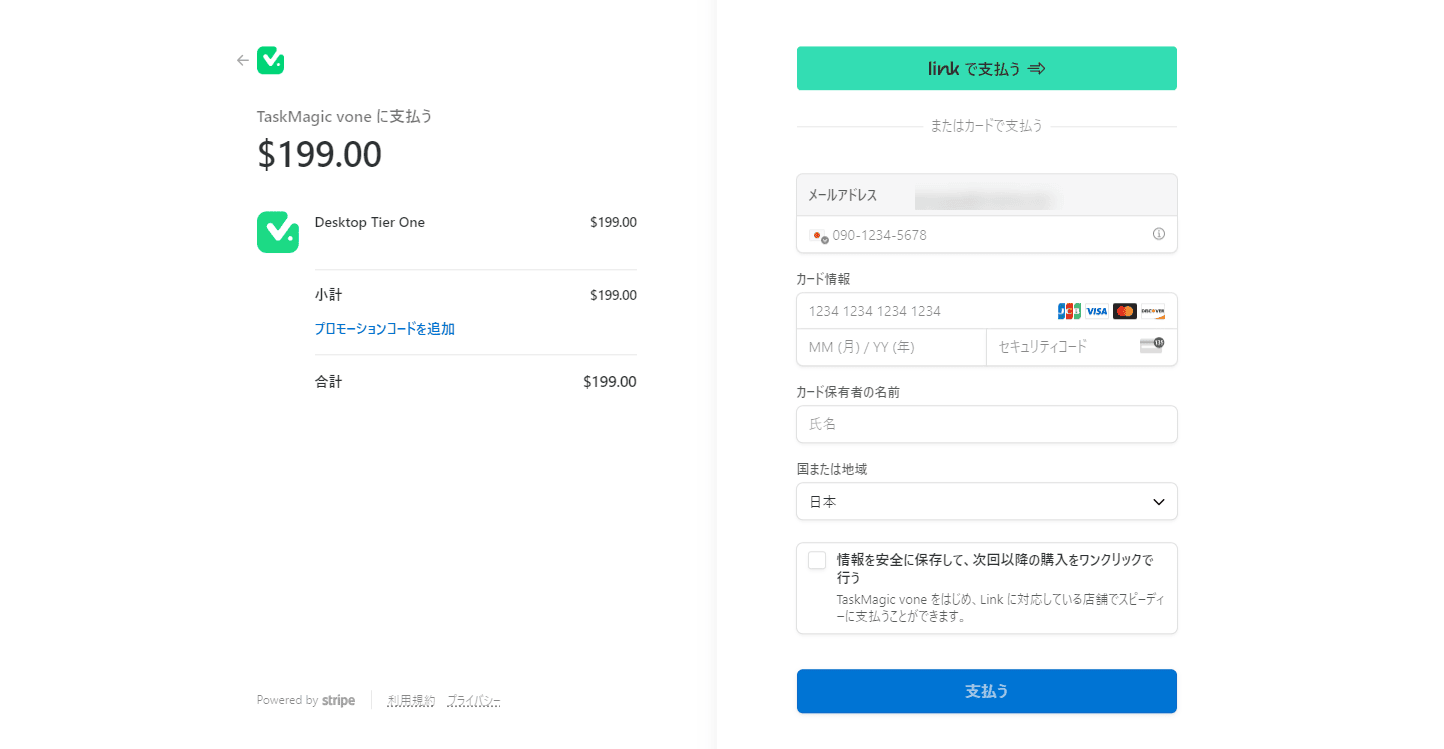
It's scary to enter your credit card number on an overseas site. TaskMagic purchases are made through Stripe.
What is Stripe? How safe is it?
Stripe is a payment payment service trusted by many startups and large companies around the world. Stripe doesn't handle receipt card information directly, but instead uses secure tokens. This process of tokenization allowsYour important credit card information is not stored.
The risk of credit card information being compromised is significantly reduced.
If you run into any issues, Stripe has 24/365 customer support.
In this way, your payments are safe and secure with TaskMagic.
It's a one-time purchase!
If you compare it with general RPA, you can get it at about 1/20 the price. There are also no additional monthly costs. It's a one-time purchase.
Let's take this opportunity to get it.
Disadvantages of TaskMagic
There is a bug
I first used TaskMagic in early August. There were really a lot of bugs at that time.
SimplyMost of the bugs have been resolved within a month.It seems that small bugs are being fixed sequentially on the TaskMagic side.
You may still encounter minor bugs. Even in that case, if you report it to TaskMagic, it should be resolved quickly.
There is a bit of a learning curve
It may take some time to get to the level where you can use TaskMagic.
When I first used TaskMagic,"Oh, maybe it's impossible."I almost refunded it.
I have used various automation tools, but I honestly feel confused because the usability is too different from before.
Now you can use TaskMagic without any worries.
The trick is"Don't rush and get used to it."is. I will also be uploading videos on my YouTube explaining how to use TaskMagic in the future. Let's use it together.
TaskMagic FAQs
What is RPA?
RPA stands for Robotic Process Automation. In simple terms:"Technology that can automate work"is.
Software can be used to automatically perform repetitive, routine tasks that were previously performed by humans.
For example, it can automate tasks such as data entry, information extraction, file transfer, and copy-and-paste operations.
Why is RPA useful for business?
RPA can reduce manual time, human error, and increase productivity.
As I was repeatedly copying and pasting, I thought, "Huh? Problems such as this will occur.
ButEliminate all this human error by automating with robotsIt is possible.
TaskMagic can automate tasks with intuitive controls.
Is TaskMagic safe?
Regarding security, there was an official TaskMagic answer.
First, sensitive information such as passwords is automatically encrypted with AES256 by default, so they are never stored with your passwords visible.
You can also fully encrypt any other sensitive information you want to encrypt by clicking the three dots next to the TaskMagic input step.


With this setting, the stored content is immediately encrypted.
Summary: TaskMagic is cheaper and easier to use than other RPAs
In this article, we explained how to use the AI-powered task automation tool "TaskMagic". This tool has no information in Japan,You can automate your work in Japan without any problems.
RPA and automation apps... It seems difficult. I understand why you think so. If you think that you will need programming knowledge or special expertise, you will not feel like getting your hands on it.
Just don't worry.TaskMagic automates tasks intuitively.The difference from other RPAs is that you can intuitively set up the flow of automation.
Still, there will be things you don't understand at first. I will support you as far as I know. Please feel free to contact us.






![[Black Friday] Summary of software and app discount sale information! What's in store for 2024?](https://sp-ao.shortpixel.ai/client/to_webp,q_lossy,ret_img,w_485,h_273/https://takeofujii.net/wp-content/uploads/2022/11/black-friday-485x273.png "[Black Friday] Summary of software and app discount sale information! What's in store for 2024?")















Nice to meet you.
I always enjoy watching Mr. Fujii's videos.
In addition, I am studying with very meaningful content.
And I have purchased the tools and software introduced by Mr. Fujii from AppSumo via Mr. Fujii's website.
(I still haven't mastered the tools I bought, but lol.)
In particular, I have purchased Katteb and Voila, and I hope to be able to use Academy LMS to create a seminar site in the near future.
Of course, I'm also thinking of buying TaskMagic.
I am weak against buying out. Laugh, laugh.
I would be very happy if you could continue to produce variation videos of these various ways to use them in the future.
I would like to try each one more and more to suit my specifications and use them well.
Also, what do you not understand, what should I do in this case, etc.
We would appreciate your question and support.
Thank you for your continued support.
Mr. Murayama
This is Fujii. Thank you for your very nice comment.
We are disseminating information so that you can enjoy it just like Mr. Murayama, so
I am very happy with those words.
Now, I think it's a smart choice to get TaskMagic now.
I myself get the top-tier plan of TaskMagic on AppSumo.
https://takeofujii.net/wp-content/uploads/2023/09/taskmagic-tier4-plan.png
To be honest, I think there is a learning curve before you get used to it.
I think there are times when you regret that you bought this and failed.
However, as you get used to it, you will be able to do more and more, so you should be able to use it widely in Mr. Murayama's business as time goes by.
I understand the how-to video.
We will publish ideas and videos on various ways to use it in the future.
Thank you for your continued support.
I am always studying.
Thank you for the information at TaskMagic. I was excited by the very useful information.
Let me ask you a question about TaskMagic.
I am currently thinking of purchasing it and am unsure whether to make it Tier 3 or 4 with the following points:
As far as I can see from Appsumo, the difference seems to be with or without webhooks and with add-ons, but I don't see the difference between what you can and cannot do with or without webhooks.
Mr. Fujii said that he purchased 4, so is it possible to tell us some specific examples of what 4 can do but 3 cannot?
Also, is askMagic a complete alternative to Hexomatic or Hexofy?
I am very sorry, but I would appreciate it if you could answer when you have time.
Thank you very much.
Mr. Tamura
This is Fujii. Thank you for your great question.
Watch the video to explain in detail what Webhooks can do and the benefits of Tier 4.
There are only 6 days left in the sales period, so I will try to create and publish it as soon as possible.
I myself have purchased and used Hexomatic and Hexofy.
I feel that there are advantages and disadvantages. Hexomatic, in particular, is useful, but it also has its drawbacks.
It will be a little maniacal, but I will also publish this comparison video.
As a guideline, both videos will be released by Sunday evening.
We apologize for the wait, but thank you very much.
Nice to meet you.
Thank you for your reply.
I didn't expect you to make an explanatory video for both questions.
Thank you very much for taking it seriously. Thank you from the bottom of my heart.
We look forward to the video distribution.
Thank you very much.
Thank you for waiting. This is Fujii.
We explained the differences between TaskMagic, Hexomatic, and Hexofy in this 👇 video
https://youtu.be/gN6Q7yYNM5s
Webhooks will be released tomorrow.
You can automate quite a lot of tasks, so please look forward to it.
If you have any additional questions, please feel free to ask.
I will contact you again.
This is Fujii.
Just now, I will show you how to use a combination of Webhook and TaskMagic
Uploaded 👇 on YouTube
https://youtu.be/MMYcB0hHfnE?si=hoBOeSv0hbhdC_jH
I think there are some parts that are a little difficult when you see it for the first time,
Once you get used to it, you can easily fully automate any task.
I hope it will be helpful.
Nice to meet you.
Thank you for the always informative videos.
When I bought Dubverse ai, I entered AppSumo Plus and bought TaskMagic, Activepieces together.
If you seem to be using Activepieces, I would be very happy if you could upload the explanation video on YouTube.
I would like to do my best to use Dubverse ai, TaskMagic, and Activepieces.
Thank you.
Mr. Yamamoto
Thank you for your request. This is Fujii.
I am aware of the Activepieces case. There are many parts that have not been explained, including Zapier, so
I'm thinking of explaining it next week if possible.
There are many things you can do, so I will continue to explain 💪 how to use TaskMagic
Thank you very much.
I'm looking forward to it.
Nice to meet you. This is Fujii.
We have a video explaining how to use TaskMagic and Activepieces.
It's a bit complicated, so I'm trying to explain it as easily as possible.
There is one thing to know. I'll tell you first.
If Mr. Yamamoto purchased Tier 4, he doesn't need Activepieces.
You don't need to buy it. I think you can get a refund.
I will tell you about this point first.
This imageis a comment on a YouTube video explaining how to use TaskMagic.
"Do I need both TaskMagic and Activepieces accounts?"
"No, you don't need to, if you buy Tier 4, you will get Activepieces for free."
It is answered.
Why does Activepieces come with free for free?
The reason is simple. Activepieces is open source.
That's why it's built into TaskMagic.
I also bought Activepieces together with TaskMagic and made a mistake.
By the way, I would like to introduce several variations of how to combine TaskMagic and Activepieces.
It will take a while. The original plan was to release it on October 2nd.
It's difficult to explain in an easy-to-understand manner.
First of all, let's talk about Activepieces.
Thank you for your reply.
You want to get customer information like customer names, phone numbers, and email addresses in Google Forms, and reflect them in custom fields for WordPress users.
So I was wondering if I should buy Activepieces.
I also bought Tier 4, so I don't think I need it.
However, I immediately thought about canceling Activepieces, but just in case, I decided to check if I needed Activepieces before doing so.
If this is the reason, is there anything that says that you should keep it without canceling it?
Also, if you have time, I would appreciate it if you could tell me the flow of reflecting it from the form to the Wordpress user item.
Best regards.
This is Fujii. Thanks for the confirmation.
First, we'll take a closer look at how you can get customer information in Google Forms and how you want it to be reflected in custom fields for WordPress users.
When it comes to Activepieces functionality, I think it's hard to fully automate that task.
In particular, the ability to add information obtained in Google Forms directly to WordPress users
It is not supported in the current version of Activepieces.
https://takeofujii.net/wp-content/uploads/2023/10/form-to-wordpress-Activepieces.pngAutomation on the WordPress side is
- Add a new post page
- Add a new page
It seems that you can only automate this task.
However, it may be possible to automate some tasks by using the webhooks feature.
This is also uncertain.
On the other hand, with TaskMagic, you can automate this task.
I'm going to try it out tomorrow, Saturday, so I'll let you know the results.
About Activepieces cancellation,
・If you are dependent on TaskMagic and go out of business, you will not be able to use Activepieces either.
- TaskMagic will discontinue the use of Activepieces
- Activepieces will change the current method → it will no longer be available in TaskMagic
It's too pessimistic to think, but there may be these.
If you only look at the current situation, one is to cancel the contract.
The function is the same.
I'm also at a loss for what to do.
I was thinking about whether I could cancel the contract personally, but I'm a little hesitant.
It could be a complete alternative to ZapierI think.
Activepieces is used by global large companies such as Walmart, Samsung, Spotify, and startups
It seems to be quite trusted and used, so
I'll wait and see for a while.
Currently, Pabbly Connect offers more flexibility in automation than Activepieces.
However, it is a product that can be quite promising in the future.
If you are thinking about future value, it may be better to keep it.
Also, for the specific flow of reflecting the form into WordPress user fields,
We will guide you through the detailed steps separately.
If this automation seems difficult to do with Activepieces, you can use the
Let us guide you through automation with TaskMagic.
Thank you very much.
Based on Google Forms answers, we tried automating the process of adding them as WordPress users.
Watch the video below.
https://youtu.be/aN2GO0KWUfc
*Supplement to this video.
For some reason, when adding a username in WordPress, it was failing. When I looked into the cause, when I added the spreadsheet data as a username, for some reason, a half-width space was automatically added before the username. So, after adding a username in TaskMagic, we are adding JavaScript that automatically removes the half-width space in front of the username.
The JavaScript is here.
If you want to do this automation, please use this JavaScript code.
———————————————
Perhaps, from the question you asked this time, you want to add the user's information received from Google Forms as a WordPress user, and above all, you want to do it fully automatically. Even if your computer is shut down, you want to ensure that the respondent's information is added as a WordPress user the moment they automatically answer Google Forms 24 hours a day, 365 days a year. I'm sorry if it's different.
However, I don't think Activepieces alone can do the current situation.
Because Activepieces automation is quite limited at the moment. There are still no actions that can automate the task of adding users in WordPress.
On the other hand, with TaskMagic, you can add them as WordPress users in bulk when you already have answers from Google Forms. But that also requires the computer to be running. Note that this work will not be done when the computer is closed.
Also, TaskMagic has Google Sheet Trigger. This is one of those features that allows you to launch certain automations in TaskMagic when new data is added to Google Sheets. However, this also works when the computer is running. It does not work when the computer is closed. Please be careful about that.
The "Cloud" function, which allows automation to be launched on the cloud even if the computer is closed, will also be sold separately.
With this, you can automate the process of adding the respondent's information as a WordPress user if they have a response from Google Forms, even if their computer is shut down. However, this feature is still in the development stage and we cannot use it yet.
It's been a bit long, but I hope you found this information helpful.
Thank you for the information that is always helpful.
I bought Taskmagic.
I would like you to tell me a video on how to work with copy and paste.
What I personally want to do is
Describe the spreadsheet with
I would like to print it to a certain site and write it in a new spreadsheet.
Excuse me. About what you want to do
I didn't go into too much detail
It was written that it could be used for copy and paste work, but I am in trouble because I can't use it at all. We apologize for the inconvenience.
Mr. Yoshida
This is Fujii. Thank you for your question.
Load a spreadsheet where the data exists
Paste the contents of that spreadsheet on a specific site
Convert the output
Display the converted results in a new spreadsheet
You want to do this work. Don't worry 💪
It was conveyed firmly.
The method itself is not difficult.
We will publish a video explaining the procedure within one week.
We are receiving other requests, so it may take some time.
If possible, I would like to release the video within this week.
It is a very useful tool if you can use it well.
Let's use it together.
Sorry to keep you waiting. This is Fujii.
In the video below, we explained how to automate copy and paste tasks using Google Sheets information.
https://www.youtube.com/watch?v=cMd_1OpQcuY
This video also explains the process of exporting the processed data to a separate sheet.
This time, we used DeepL to automate. Other platforms can do the same and automate it.
I hope it will be helpful.
Nice to meet you!
I would like to ask you two things.
1 Using Task Magic
When you enter a short Japanese sentence into a site,
The sentence is long and cannot be printed.
I don't need the sentences I made there.
A fixed short sentence is incorporated.
Is there a way to delete a fixed sentence?
2 Current Task Magic Tier 1
I am using a Mac
I want to use it on the new Windows.
What should I do?
Answer your questions.
First of all, I will answer your question from the first one.
Watch the video below.
https://www.youtube.com/watch?v=Ppiyn6ndphQ
We have automated the task of removing certain words from WordPress post pages.
I have deleted the word "it's over" in JavaScript.
Here is the JavaScript code I actually used.
Results:
– The word "It's over" disappears from the page.
You can also use JavaScript to automate certain tasks in this way.
And regarding the second question,
If you want to download and install a new one on Windows, you may be able to download it from the page below.
https://make.taskmagic.com/download
For detailsThis articlePlease see. Although it is in English, you can read it in Japanese using Google Translate.
Excuse me! Thank you for the video!
Sorry I didn't check the post comment
I replied.
I will check the video!
Hello, this is Fujii.
It is possible to automate what Mr. Yoshida wants to automate with TaskMagic.
If you put this video into practice, automation will work.
However, there is only one supplement.
"I'm doing it according to the video, but the automation doesn't work."
"I'm telling you to click, but TaskMagic doesn't click."
"I want to extract information from the page, but for some reason I can't."
There should be such cases. Watch the video below.
I recorded a video 👇 with a supplement
https://youtu.be/HhmlsvHKarU
Sorry for your busy schedule.
I tried it now, but the last spreadsheet cannot be reflected.
Even if you let Task Magic recognize what you want to copy in the single list,
It is not reflected in the spreadsheet
That's why I think this extraction is worth it.
I thought that the page of what I wanted to copy might not be reflected.
Is there a button called copy instead of extraction in Task Magic?
This is Fujii.
Thank you for your question about TaskMagic spreadsheet reflection.
Thank you for telling us more about the situation you are experiencing.
I also tried it,
As you may have pointed out, with a recent update, we have observed that there is a temporary issue with TaskMagic's scraping function and its integration with spreadsheets.
It seems that this problem has been confirmed by other users now▼
This pagePlease check
As a response at this time, we apologize for the inconvenience, but please wait a little longer.
We encourage you to check back regularly for updates to TaskMagic.
This feature is an important feature, so I think the problem will be solved soon.
If you have any other questions or concerns, please feel free to contact us.
I will do my best.
Thank you for sharing the information right away!
I wasn't the only one!
Certainly!
Mr. Fujii said that there are many bugs.
It was like this
I'll be waiting for you!
Thank you for contacting me.
I hope this issue will be resolved soon.
Please feel free to ask us again at any time 💪
Thank you!
Nice to meet you. Since then, I have been urging Gielemy to update on YouTube. Finally, I got an update today, but the user interface has changed a little, and I don't know how to start it or how to link it in a spreadsheet. Could you please teach me again about how to copy and paste? I'm afraid.
I also checked earlier.
The usage has also changed significantly in this update, so we will 💪 create a video again and deliver it to you
Postscript:
The way Google Sheets is integrated has changed.
With the changes, I don't know how to export outside of Apps.
I'll try a little more.
Thank you very much!
There are two details that I want to do.
1 * Sergoto sentence by sentence on a spreadsheet
There is a short sentence in English in the horizontal column.
Paste it on Deep L (there is a way)
If you do, paste dozens of short sentences at once)
Spread English short sentences into Japanese short sentences
Paste it on the
The second thing I want to do is
I will omit a little detail, but I achieved it in the first
I want to make the finished English short sentence → Japanese short sentence into a long sentence.
There is a site that turns short sentences into long sentences, so enter a short Japanese sentence and output it.
I want to summarize long Japanese sentences in a spreadsheet.
The first spreadsheet Japanese short sentence
If you paste an item from a site and press the output button,
As a result, you can convert it into long-form Japanese.
*Also, it's troublesome from here.
Only one sentence in long Japanese
The sentence will appear at the end, so delete it
(I have contacted the site developer, and they plan to make a specification that will not be released someday.) )
I want to copy and paste a long Japanese text into a spreadsheet.
We apologize for the inconvenience.
How do you do. Thank you for introducing TaskMagic. I saw it on YouTube and was busy with my main job, so I checked appsumo again and it was sold-out. Will I be able to purchase it in the future?
It's hard to say, but sales ended a few days ago.
On the official TaskMagic website, there is still a one-time purchase plan.
If you are considering it, you can purchase it via the official website.
If you're lucky, at the Black Friday event at the end of November 2023
TaskMagic may be coming back to AppSumo.
Of course, it may not always come back, but if there is a possibility, it will be the end of November.
It is a separate tool from TaskMagic, but
The tool explained in the video I uploaded earlier will also be sold out in 4 days.
https://youtu.be/oxU7XChfUAg?si=MB1Sv_ZTRCoxnXld
If you are considering it, we recommend that you get one.
Let's take a look at the Black Friday event at the end of November 2023. If you are lucky enough to make a purchase, is there a recommended purchase plan? If possible, I would like to use ChatGPT to automatically create YouTube and disseminate information to overseas.
We understand that you are considering purchasing at the Black Friday event.
In addition, we sent you detailed information in another email earlier, so please check that as well.
If you have any further information or other questions, please feel free to contact us.
Thank you very much.
Thank you for the video commentary that is always very helpful.
Can I use TaskMagic to keep an eye on my page on the platform and send a boilerplate to the trigger "When a notification is attached"?
I would like to reply immediately to the inquiry with "~~~~ Please wait."
This is Fujii.
I confirmed the introduction. This is not possible with the original functionality of TaskMagic.
But with a little extra effort, you can do it.
Regarding the "part of monitoring my page on the platform",
・Use an app that monitors separately
・Create your own script and introduce it
This is the way to go.
This allows you to monitor changes to specific web pages and send notifications when changes are detected.
I can also introduce and support it.
You need to customize it according to your app and environment.
Depending on the scope of customization and your requirements, the difficulty of implementation varies greatly.
Depending on the mechanism, it may be very cheap to do,
On the other hand, depending on the mechanism, it can be quite costly.
We are sorry that we cannot provide a perfect solution, but we believe that the above method is the most appropriate response.
If you have any other questions or concerns regarding the above content, please do not hesitate to contact us. We will do our best to support you.
Thank you for your continued support.
I have a question about TaskMagic.
The schedule is categorized into hours and days, but it works every hour from 6 p.m. to 3 p.m.
I don't know how to set it up. Is it not possible to set up a compound?
Thank you for your question.
I will answer two questions.
■About scheduling
We will explain how to schedule it to work every hour from 6 p.m. to 3 p.m.
Please see this image.
https://takeofujii.net/wp-content/uploads/2023/10/hour-taskmmagic-sc.png
As in this imageTurn on time constraints.
By setting this setting, you can set the time to automate every hour from ◯ o'clock ~ ◯ o'clock.
For this image,
It is set to "Start every hour from 9:00 a.m. ~ 10:00 p.m.".
*You can set the time zone with "Select TimeZone". I live in Japan, so I choose asia/tokyo.
This will work in the time zone of Tokyo, Japan.
If you have any questions about this, please feel free to contact us.
■ Monitor specific pages and immediately send canned text to inquiries when notifications are displayed
I now understand the automation that Mr. Toma wants to do.
I think it is difficult in the part of keeping an eye on your page.
However, depending on the app you're using, you can do something similar.
By using webhooks, app A informs app B of information ⇒ ◯◯ occurs⇒ app B performs specific tasks
You can combine apps and apps and so on.
Example 1: When a new response arrives in Google Forms, immediately send a canned email to the respondent.
Example 2: When an inquiry is sent from your website, immediately send an email to the requester.
It is possible.
In this case, I think it will be important whether or not the webhook can be used.
Regarding this second question, I will try to see if I can do the smooth automation that Mr. Toma wants.
If possible, we plan to explain it again in a video.
The answer is a little long, but I hope it helps.
If you have any further questions, please feel free to ask them additionally.
Thank you very much.
Thank you for taking the image and explaining it carefully.
There was a setting there! It looks like it can be used for a variety of things!
As for webhooks, I can't use them because they are not my website.
I'm thinking of monitoring with the URL of my page.
TaskMagic doesn't seem to be able to do an if (if ~~), so I'm trying to figure out if I can create that part with Activepieces.
We will report back if we get good results.
Also, if there are any features that I am not aware of, I would appreciate it if you could share them.
Thank you for your reply.
We've received quite a lot of questions about the Activepiece and TaskMagic integration.
Therefore, I will verify it so that I can deliver useful information.
We will also release it as a video, so please look forward to it at that time 💪.
Thank you for your valuable information.
I'm thinking of using Tier 4 on a slightly older Mac, but I couldn't confirm on the official website which version of Mac OS or later it supports. If you know where I can check it, I would like to know it. I'm very sorry that I should have looked for it myself, but if possible, I would appreciate it.
Thank you for receiving the information.
It's a compatible Mac version. I'll check it out.
Please wait for me to reply in this comment section.
(I think I can answer tomorrow at the earliest.) )
Now that we have an answer from the official, we will report it.
"It should be compatible with any version of Mac or PC, please let me know if you have any other details."
Original: it should be compatible with any version of Mac or PC. Let us know any other details if you have them and we’ll try and help
Thank you very quickly for your response.
I just bought it. I am excited to feel that it is a tool with infinite possibilities.
Question from Mr. Muku
・Scraping detailed pages
I immediately watched the video of the answer to the question, and it was helpful for what I wanted to do.
Thank you for your continued support.
I couldn't seem to leave a comment on Mr. Fujii's comment at the end of this tree, so I will write a comment on my previous comment.
First of all, it worked without any problems even on the very old OS of MacOS 11.7.7!
And based on the explanations and videos on this page, we are trying to automate the troublesome manual work.
There are about 170,000 SPAM accumulated in an unused email account on a certain rental server, and we are trying to delete them because it is a webmail that can only be deleted 100 at a time. (It seems that you can access IMAP with a separate mailer and delete it, but for TaskMagic practice.) )
For the time being, it took about an hour to delete (10,000 letters) 100 times, so next time I will spend the night and run 1000 times. You have to set your PC so that it doesn't go to sleep.
The following are the notes I felt during trial and error.
・The pop-up window that you just have to press OK will be pushed by TaskMagic on its own.
・If you minimize the Chromium window, it will not be active every time and will run in the background.
・Scraping to make you wait until the processing is finished (Mr. Fujii was doing it with "Regenerate" in a ChatGPT video.) is quite convenient!
I only tried one thing, but it's different when I make it myself. There were many realizations that I couldn't understand just by watching videos or the web, and I came up with a lot of ideas on how to use TaskMagic.
I'm worried that if I post these impressions here, valuable information will be buried.
I hope there is a place where I can share how to use TaskMagic with everyone.
Thank you for introducing us to such a great tool!
Suzuki
Thank you for sharing your thoughts.
In fact, I also used TaskMagic to automate the task of deleting a large number of emails from my webmail inbox a few days ago.
There are many things that can be automated with TaskMagic, but it is important to automate them one by one.
Even if you don't do it yourself, you can free up time by automating tedious tasks.
You can use that time for work that generates profits in your business and time for hobbies.
As for places where I can share how I use TaskMagic, I'm thinking of creating one place like that.
Actually, I decided to launch an explanation site yesterday.
https://takeofujii.net/wp-content/uploads/2023/11/website-taskmagic-japanese-commnuty-test-site.png
We will consider introducing a community feature on this site.
I haven't made it overall yet, so I haven't released it.
I will definitely let you know after it is published (I think I will let you know on my blog or YouTube).
There are many functions that I haven't fully explained, so I'll 💪 tell you about one from now on
Thank you for your report.
> Question from Mr. Muku
> ・Scraping detail pages
I immediately watched the video of the answer to >, and it was helpful for what I wanted to do.
I am very happy that the video I created seems to have been helpful.
I myself use TaskMagic, and I think the future has a lot of potential.
There are some bugs that need to be fixed, but TaskMagic is updating one after another.
In six months or one year, we will be able to automate more than we can think of now.
Below is a video uploaded a year ago on the official YouTube channel of Jeremy, the founder of TaskMagic.
https://youtu.be/vMh4DzW6bN4?si=IvRtn6QmdDSSGz2L
I think you can see that it has evolved quite a lot in the past year.
In the past few days, many people have shared their ideas for automation with TaskMagic.
You can really automate a variety of tasks.
I also bought Tier 4,
I think what Suzuki got this time is the right answer.
We will continue to share various automation ideas, so please continue to do so.
If you have any questions, please 💪 feel free to ask.
I watched YouTube. Thank you for the informative information.
If you know how to do the following, could you please teach me?
・Scraping detailed pages
There is information in a listing destination, how to scrape that information
- Organize the format of unstructured data
How to use ChatGPT or other tools to ensure that data is entered into prescribed spreadsheet labels when scraped information is not structured
・How to enter the information prepared in advance in a formatted manner
For example, you can have information such as address, company name, department, etc., read the structure of a specific site, and enter pre-prepared information in the appropriate place. I think there is also how to set the trigger.
I'm sorry for the lot, but I would appreciate it if you could answer as much as you can understand when you have time.
Best regards.
Muku-san
This is Fujii.
After receiving this comment, I realized something that I didn't explain.
Thank you very much.
・Scraping detailed pages
・How to enter according to the information format prepared in advance
I will release a video explaining these two as early as tomorrow.
- Organize the format of unstructured data
Can you tell us more about this automation?
It may be difficult to give specific examples, but thank you very much.
I'm looking forward to explaining these three.
We'll be sharing more automation ideas soon, so let's 💪 use them together
Thank you for your quick reply!
I'm looking forward to the video.
I would like to add the following.
- Organize the format of unstructured data
Let's say you want to scrape information from a site, such as addresses, company names, business numbers, and sales, and organize them into a spreadsheet.
However, the scraped page does not have sales or corporate numbers, and the information exists in a format close to free format, such as having a different order of each.
In that case, can I read the information roughly, classify the information read by ChatGPT and other devices, and enter it into the specified spreadsheet columns?
If this can be done, I think it would be possible to convert photos of receipts into data using OCR or other means, and then automatically classify them.
I would appreciate it if you could check it out.
Best regards.
Thanks for the supplementary explanation.
If possible, we will 💪 take a video and deliver it to you within the day
We will prepare easy-to-understand explanation videos so that you can achieve automation close to your needs.
Please wait for the video to be delivered next Monday at the latest.
This is Fujii.
I will explain the following two points.
・Scraping detailed pages
・How to enter the information prepared in advance according to the format
1. Scraping detail pages
Based on the list information containing page links (this time using a CSV file), we explained how to scrape pages in the video below.
https://youtu.be/HO7-SfK8b3w?si=xCvO_irThx9qQf-J
- Import the contents of the file into Google Sheets.
- Setup trigger > Loop > Add in Google Sheets Data to load spreadsheet data
This allows you to automate based on the list file.
Once you import CSV and Excel files into Google Sheets, you can easily automate them.
Please feel free to watch the video and let us know if you have any questions. We will make a video as a supplement and deliver it.
———————————————
2. How to enter the information prepared in advance in a formatted manner
We will also explain how to do this.
(1) Import the information prepared in advance into Google Sheets
First, import the data that you have prepared in advance into Google Sheets.
The import method isVideo aboveWe explained how to import a CSV file into Google Sheets and scrape it with TaskMagic based on the data. I hope you will refer to the video.
(2) Enter information in the right place
Watch the video below to learn how to enter spreadsheet data into a specific web page.
https://youtu.be/aN2GO0KWUfc?si=kNjzPo3OAi5xbKe9
In this video, the Google Form response information (name and email address)Tasks to enter and save to a specific location in WordPressWe are automating it.
You can also enter address, company name, and department data in any place in the same way.
The video is a little long, so we recommend that you watch it at double speed.
———————————————
- Organize the format of unstructured data
We will record a separate video for this and deliver it.
– Read data with ChatGPT & classify data
– Output that data to Google Sheets
I will try to automate the work.
When I was checking earlier,
OCR automationhave discovered plans to be introduced to TaskMagic in the future.
I'm looking forward to this too.
It's very late.
(1) Scrape links from the list page with TaskMagic
(2) Scrape detailed data with TaskMagic
(3) Export the scraped data to Google Sheets
(4) Classify Google Sheets with ChatGPT←
I'm currently worried about this fourth one.
Please take a look at the video below for details.
https://www.youtube.com/watch?v=dilaDBZxZ7s
If you have any good ideas, it would be very helpful if you could let me know.
I will also try trial and error in my spare time from today's work.
I am indebted to you.
I'm really looking forward to the TaskMagic commentary site!
Earlier, I had a hard time picking up the link text because I couldn't scrape the link URL on the page. When scraping multiple lists, you can change the target to be picked up on the spot, but when scraping only one, you can't change it on the spot, and it seems that you need to edit the Step (change step type to Scrape Link) after completing the settings. If there is any other way, I would like to know it.
Also, is it possible to have the same spreadsheet for input that I use when looping and the sheet that I use to write out the scraped results? For example, you can scrape a sheet with only 100 URLs and add page titles one by one with TaskMagic. (I feel that it is difficult at the moment.) )
I would appreciate it if you could tell me the above at your convenience.
I am always indebted to you.
And thank you for the two questions.
I will record a video and answer these two questions.
We are currently working on the second issue.
As you said, I also tried it, but I think it's difficult.
I am working on it with the hope that I can tell you some way to avoid it.
If I get results, I will tell you in this comment section soon.
I'll have to wait a little longer,
I will try it out this Friday, so thank you very much.
- Change the target picked up on the spot when scraping in "Single".
・Write out scrape results directly to a spreadsheet for input
I tried these two points.
First of all, as you pointed out, "Single" needs to be changed after setting it once.
https://takeofujii.net/wp-content/uploads/2023/11/single-scrape-taskmagic-limit.jpg
If you scrape multiple elements, you will see a three-point reader, but if you are single, you will not see that three-point reader, so you will have to go back and change it once.
The quickest way to change this is to change it with "change step type" when creating an automation.
And the second one, "Write the scrape results directly to the spreadsheet for input".
I tried this on Friday.
・ I dare to leave the first column blank in "List (type of scrape to get multiple elements)" and scrape the second column and later. Added in this format
(It is difficult to explain in writing,Format like thisis)
・Try adding notes in the settings to export in "connect Google sheets".
- TaskMagic and Activepieces are linked. Add scrape results to Google Sheets in new rows
I tried these, but they all didn't work.
YouTube video of Jeremy, founder of TaskMagic.I'll look again for any hints.
Thank you!
First, it seems that this method is the only way to get by at present. If you understand this specification, it is not a problem. Thank you very much.
The second point seems difficult as well. Based on the information of a in sheet A, I will try to make what I want to do in a way that I can somehow realize what I want to do by filling in a and b on sheet B.
I feel that I can create what I dreamed of by having a tool like this, and I feel that there is great potential in it.
First, I will try to make my own high-performance version of the scraping tool that I asked an engineer I knew to make.
We look forward to disseminating valuable information in the future!
Suzuki
Thank you for checking right away.
I will also look for ways to do these two things well.
What I strongly feel when we exchange comments like this is that
After all, it is better to prepare a community site.
It's fun and interesting to interact with.
At first, I think it will be a community site with only two people, me and Suzuki, lol
> First, I will try to make my own high-performance version of the scraping tool that I asked an engineer I knew to make in the past.
You're starting to do something amazing.
To be honest, I can't imagine it, but it looks like it can be quite interesting.
Mr. Fujii
Community sites look fun, don't they? Thank you very much. I think there are many people who want to participate even if they haven't commented yet!
Scraping tools are not that large. It was for the sale (resale) of a certain genre, and it was like passing keywords to obtain the list price of the related product and the inventory of the real store, and matching it with Amazon's inventory and price.
With my current knowledge, it seems difficult to achieve it all at once, but I feel that if I divide it into two or three, I can create something similar with TaskMagic.
Above all, TaskMagic is good because you can make small changes yourself. If you ask someone to make it, even a slight modification will cost you money、、、
I am indebted to you.
I would like to ask you how to set up TaskMagic.
1. Entering two-factor authentication
When you log in to a service, there is two-factor authentication, and you have to enter the number you received via SMS.
To do it manually in the middle of the automation, I put a 30-second delay and check and enter the SMS during that time, but is there a smarter way?
2. About URL output to sheet
There is a list of product page URLs on spreadsheet A, and we have created an automation that accesses them in order, obtains detailed information about each product page, and outputs it to spreadsheet B.
I want to put not only the scraped information but also the URL of the product page (the URL passed from A) on spreadsheet B, but I can't output it well. As a desperate measure, we are surviving by typing the URL into the search form on the product page and scraping it, but I think there must be a better way. I would appreciate any hints.
We are considering introducing Pabbly to make even more effective use of TaskMagic. It seems that the price has increased a lot to $249 now, but it is still quite a bargain. Please let me know if you have a purchase link via Mr. Fujii.
I am always indebted to you.
I will answer you right away.
1.About entering two-step verification
In conclusion, I think there is no choice but to put a delay in Delay to do it manually.
When receiving SMS on a smartphone or other device,
・Access your smartphone with TaskMagic
・Check SMS,
・Enter the number
It stumbles, especially in terms of accessing smartphones.
It is possible to receive SMS on a computer, but it is difficult to receive SMS on a smartphone.
2. About URL output to sheet
I tried this a little.
I'm not sure if my answer is accurate about this question, so I'll contact TaskMagic support once.
I will receive a reply tomorrow or the day after tomorrow, and I will definitely share it, so please support me.
(I'm also off tomorrow, so I'll try to give a sure answer.)
3. About Pabby Connect
It works well with most typical apps, so it works well with TaskMagic.
I've been using Pabbly for two years, so it might be useful to some extent.
It is an alternative app to Zapier that is difficult to find information about in Japan, but if you have any questions, please feel free to contact us.
About purchase linksClick hereIt would be very helpful if you could help us from
Last night I sent Jeremy a question about URL output to the sheet.
I think there will be a reply again, so after confirming, I will explain it in the video next time.
Postscript: 2023-11-23 15:43
I completely understand how. We will make an explanation video and deliver it.
Suzuki
The reply was very slow.
Jeremy taught me how to do it, but it doesn't work well, probably because of my shallow understanding, so I'll just give you the information to Mr. Suzuki first.
First, watch the video below.
https://youtu.be/C6fHqdRyZgY?si=rbUplcH1X7usshq0
In the content explained in this video,
Suzuki wants to perform the "URL output to the sheet" without any problems
////この動画の内容////
———————————————
Combine API-based automation (like Zapier and Make) with browser-based automation
As an example, this video uses the "New Row" trigger in Google Sheets to set up automation.
When you activate this trigger, it searches for usernames on Instagram and scrapes the number of posts, bio, followers, and following to update the corresponding line in Google Sheets
———————————————
If you watch from 7:15 in this video,
I am adding Google Sheets to the step in "Apps".
And
Look for a specific line (Find),
Update the row with the scraped data and URL (Update Row).
I am adding a step.
It was explained that it was possible in this way.
But in my case, even if I press "Test App",
It seems that I am not receiving data from Google Sheets well.
I think that if you clear this place, the whole thing will work without any problems...
Maybe it will work in Suzuki's case.
I hope you will try it out by watching the video.
I'll try a little more
Thank you very much for your prompt response. It is very helpful.
I will watch the video on the weekend, try it out, and report back again!
It's Black Friday and I'm sure you're busy, so please don't bother me any more about this matter. Thank you very much.
I am indebted to you.
Can I create Instagram posts with ChatGPT GPTs and automate them with TaskMagic?
I would like to automate X posts that are not recommended if possible.
Best regards.
I think it is possible to automate the creation of Instagram posts and images with GPTs.
I rarely use Instagram, but it is not difficult to automate because ChatGPT can actually be operated with TaskMagic.
TaskMagic also explains Instagram automation, so you can automate a lot of work when combined.
As for X, this is something I've been trying recently, but the post itself can be automated.
However, we do not recommend automating following and unfollowing. The fear of freezing increases considerably.
I always watch YouTube and am indebted to you.
I am considering taskmagic's Monthly plan and would like to ask the following two questions:
1. Can taskmagic be used for Claude?
We also want to achieve the following automation: Is this possible?
1. Search for specific keywords on Google and copy and paste the top three of the top articles into a text file (.txt).
2. Copy and paste 8 keywords from the "Relevant Searches" displayed on the search page into a text file.
3. After that, open the eight search results one by one and copy and paste the top article in each search result into a text file.
I'm sorry to say that you are busy, but I would appreciate it if you could answer.
I'm not confident in Japanese, so I'm sorry if I couldn't convey it.
Thank you for your question.
I'm sorry if I didn't get it conveyed because I don't have confidence in >> Japanese.
No, no, thank you for the very easy-to-understand explanation.
I think it can be done depending on the ingenuity. I'll try to see if I can actually do it.
I'm currently experiencing a scraping glitch in TaskMagic, so as soon as this is fixed, I'll start working on it.
We will deliver the video, so please wait a little longer.
It's a very interesting automation.
Thank you!
To be honest, I thought I couldn't do it because it was a very complicated task, but I might be able to do it.
I am really grateful that you can post it as a video.
We apologize for any inconvenience this may cause and look forward to the video being posted.
Currently, some features are experiencing glitches that are being resolved by the TaskMagic team.
Once this issue is resolved by the TaskMagic team, we'll create a video that responds to your request.
Sorry to keep you waiting. Please be patient
Thank you for your reply.
I'm in a position to do this, so don't worry.
I'm looking forward to the video!
Mr. Nakamura
I haven't been able to answer for nearly a week, so
"Haven't you forgotten that question?"
You may be worried. We will keep you informed of the progress
https://youtu.be/N8AhvpH1DDI?si=WBRAE19su7F-5l81
Key points of the video
・This automation itself is surprisingly easy
・However, TaskMagic is still unstable, so it is better to run it after it is a little more stable
It's a very interesting automation, and I think it's an interesting idea.
I'll take another video when the bug is completely fixed. I think this is a very easy-to-use automation.
I watched the video.
Thank you very much.
Automation itself is easy to make, and I'm also curious about the new feature taskmagic AI that will be implemented in the future, so I'm going to take the plunge and buy the $499 one.
We apologize for the inconvenience despite the bug.
I think you are wondering whether you should buy it or not.
TaskMagic has been updated frequently, and the quality has improved significantly compared to last summer.
On the other hand, it is also true that there are bugs that cause frustration at present.
Personally, I would recommend it with confidence if only the bugs that exist now are fixed.
I myself check TaskMagic updates every hour except at night.
Also, when an update is made and the current bug is fixed, we will 💪 be the first to take a video to answer this request and deliver it
Thank you for your reply.
After all, does it take a few months for the bug to be resolved?
There are many updates, so if it is fixed eventually, I would like to buy it and get used to it, even if it takes into account the bugs.
I think it's a good idea to buy it now.
I also think that existing bugs will be fixed at an early stage.
Considering the frequency of updates, it is a product that grows at a tremendous rate.
Watch the video below.
https://takeofujii.net/wp-content/uploads/2024/01/taskmagic-update-daily.mp4
Even in 2024, bug fixes and feature additions are being made every other day.
I also compared the past year.
■TaskMagic in January 2023↓
https://takeofujii.net/wp-content/uploads/2024/01/taskmaagic-first.png
■TaskMagic as of January 2024↓
https://takeofujii.net/wp-content/uploads/2024/01/taskmagic-202401.png
In just one year, usability has changed significantly.
Considering that 2024 will continue to evolve, I think it is a good choice to make a purchase.
Sorry for the late reply.
I purchased Tier 4 from this overview link.
ttps://www.youtube.com/watch?v=X0Ts4CF42AY
Thank you for listening at length!
You made a decision...! But it might have been just the right timing.
Just the other day, a major update to TaskMagic was made.
I also have new information that I would like to share with Mr. Nakamura.
Just now, we set up an AI chat window β version on this blog.
https://takeofujii.net/wp-content/uploads/2024/01/chatbot-takeofujii.png
Currently, the information is still outdated, so even if you ask questions about TaskMagic, you won't get the answers you want.
We'll add the latest data during the month of February so that you can ask and get answers to anything you need about TaskMagic.
"Can I do this?" "What is this function?"
I think there are a lot of worries about using it at first. We will design it so that all these anxieties can be eliminated in their entirety.
Thank you!
Due to the appreciation of the yen, it was a very expensive purchase of 76,000 yen for $500, but I am glad that I immediately set up a simple automation and bought it.
For complex automation, I would like to ask questions about AI chat implemented by Mr. Fujii and do my best.
Thank you for answering your consultation!
I'm afraid. I tried using the updated task magic once, but I couldn't do it at all, so I went back to
Can you tell me how to do it?
I will stick the same sentence as before
I would like you to tell me a video on how to work with copy and paste.
What I personally want to do is
Describe the spreadsheet with
I would like to print it to a certain site and write it in a new spreadsheet.
Excuse me. About what you want to do
I didn't go into too much detail
It was written that it could be used for copy and paste work, but I am in trouble because I can't use it at all. We apologize for the inconvenience.
I'm sorry, PLEASE CONFIRM OR... I don't know what to do, and I don't know what to do, so I can't move forward at all. I'm sorry I'm busy, but thank you very much.
How about something like this▼
https://youtu.be/aSrUgCLKenQ
The process is as follows:
(1) Load Google Sheets data (trigger)
(2) Translate in DeepL
(3) Export the translated words to another worksheet in Google Sheets
This is the flow.
https://takeofujii.net/wp-content/uploads/2024/01/TaskMagic-deepl-automation-res.png
The video speed may be a little faster, but
If you have any questions, please feel free to contact us.
It has new features, so it's a little different to use it than before.
Let's take a video of the new TaskMagic and upload it.
By the way
What I personally want to do is
Describe the spreadsheet with
I would like to print it to a certain site and write it in a new spreadsheet.
Regarding this automation, we received an inquiry last year
Is it okay to paste the words from spreadsheet A into DeepL and write the translated words in a new spreadsheet B?
If so, I think I can probably do it right away, so I'll give it a try.
I'm very sorry, but may I ask you?
Sorry
How about something like this▼
https://youtu.be/aSrUgCLKenQ
The process is as follows:
(1) Load Google Sheets data (trigger)
(2) Translate in DeepL
(3) Export the translated words to another worksheet in Google Sheets
This is the flow.
https://takeofujii.net/wp-content/uploads/2024/01/TaskMagic-deepl-automation-res.png
The video speed may be a little faster, but
If you have any questions, please feel free to contact us.
By the way, I will explain the message displayed (Please confirm or).
First, please see this image.
https://takeofujii.net/wp-content/uploads/2024/01/taskmagic-auto-reccomend-step.png
As shown in this image, "Please confirm or decline suggested step tracking in dockbar"
This kind of message appeared. Translated into Japanese, it means "Check or deny the 'recommended steps' tracking in the dock bar."
■What does this message mean?
When you click on Selenium (window), "Recommended Steps" are automatically added to the dock bar.
https://takeofujii.net/wp-content/uploads/2024/01/dockbar.png
You need to choose between X or check.
Press the cross to automatically delete the recommended steps.
Press the check to automatically add the recommended steps to the dock bar.
*One thing to note is that when you press the window, the dock bar will automatically display the recommended steps
https://takeofujii.net/wp-content/uploads/2024/01/taskmagic-dockbar-and-suggest.mp4
If you don't choose to press X or check here, the message (Please confirm or) will not disappear.
I saw the scraping scene again.
I'm definitely clicking on where to scrape
The blue frame does not appear at the last scraping location, and it runs to the next loop immediately
There is no problem until you search for the characters you want to translate in DEEPL until the middle.
But the last scraping is no good, it doesn't reflect
No doubt spreadsheets are shared, even though
I ask you to scrape the sentence
Is it okay to be single?
I don't know what caused it, but the last scraping doesn't reflect well
Thank you for sharing the situation.
From what I've heard, the problem of entering the loop or not reflecting may be due to a glitch in TaskMagic.
Please contact the official TaskMagic support.
You can use TaskMagic support from the following pages:
https://help.taskmagic.com/contact
*Reference for filling in
https://takeofujii.net/wp-content/uploads/2024/01/taskmagic-support4.png
It is necessary to convey the current situation in English.
However, with ChatGPT and DeepL, you can create emails in English.
https://takeofujii.net/wp-content/uploads/2024/01/taskmagic-email-en.png
I'm sorry I just sent it.
I thought a little bit
RPA-related things that can be recommended in addition to Mr. Fujii
Do you have the tools?
I'm thinking of giving up on Task Magic.
I'm sorry for introducing you.
> I'm going to give up on Task Magic.
> sorry for introducing you.
Sure. However, it is easy to predict that it will be a more robust automation tool in the next year, so if you don't mind, I hope you will try TaskMagic again in six months or a year.
Regarding recommended RPA, it may be a good idea to try Power Automate, which has a free version.
However, I myself use other RPAs, and I have only touched a little about power automate, so I can't provide detailed support.
However, Power Automate is Japanese, so you may find it easier to use than TaskMagic.
My personal RPA and automation tools are Robomotion and ZeroWork.
However, both require more knowledge than TaskMagic. Because of that, I didn't recommend it much in this blog.
In fact, when I introduced it on this blog last year, it didn't seem to be very popular.
As for TaskMagic, I am also very distressed that I can't create automation as much as I want.
However, the functions have improved quite significantly over the past year, so I hope you will try it again when you remember.
In that case, it is thought that it will be a much more robust automation tool than it is now.
It's a consultation, but in the past, the data was reflected in a spreadsheet as a final result of scraping.
Is there a way to copy and paste other than scraping?
For example, within the range you want to scrape
With a system similar to the one translated by Deep L
There is a copy button.
Add this to the click field in Task Magic and
Paste it into a spreadsheet in a fixed form.
How to set it up?
Is copy and paste itself only a scraping function in the first place?
Thank you for the copy and paste
I'll try, but I have no knowledge of computers at all.
How to do it in order after copying and pasting
Do you want to send a paste run to a spreadsheet?
I think it is necessary to have a jabscript in some settings.
What do you think I should do? Sorry
One way is to copy and paste using Javascript.
https://youtu.be/57DetZTFZtc?si=8Xb4Q3eP_XnatSfU
However, there are security constraints, so there is a high possibility that this will not be possible.
I made a script to do so-called copy and paste and tried it.
I also remember that when I tried it last year, it didn't work.
Therefore, I think it is basically better to use the scraping function.
By the way, regarding the idea of physically copying by clicking the "copy button" with the click action,
I myself have never tried this. If you don't mind, I would appreciate it if you could try it once.
I'm sorry I'm busy, but it would be helpful if you could let me know.
Thank you for your good work. Thank you
I sent it in the YouTube comment section last night
Then a new update came in again by a misunderstanding.
When trying to create a new automation
ADD cookies...
Should I do this in my case?
In that case, did you create it in Google Sheets?
Do you need cookies for Google account chrome?
I'm sorry, I didn't understand at all
Since it has been newly updated, I would like to ask what kind of cookie information is required if it is an item that requires it.
Cookies in TaskMagic are used to omit login.
For example, it's not smart to enter your email address or password every time you log in to your Google account.
Therefore, you can skip the login process by using cookies.
https://takeofujii.net/wp-content/uploads/2024/01/taskmagic-cookie.png
If you need to log in to the automation you create, you may want to add cookies.