


In this article,ActivepiecesHere's an easy-to-understand introduction to how to use it. Use this tool that allows even first-time users to create automations with no code and dramatically streamline their work.
In addition, we will also examine how good it is compared to Zapier.
What is Activepieces?


Activepieces is a task automation tool that helps you streamline your daily work. By easily and automatically handling troublesome tasks, it will save you a lot of time.
Why is it necessary in the first place?
Why do you need Activepieces?Because your time is preciousis.
One day is 24 hours. In total, it is only 1440 minutes. Considering the time you can't cut off such as eating and sleeping, how much time can you use in a day?
Repetitive and unprofitable tasks, do you need to do?
No, there is none. Your time is valuable. Automate it all.
What kind of automation can be done?
What kind of automation can be done? For example:
- Reply to SMS with ChatGPT
- Create WordPress Posts with ChatGPT
- Translate Slack messages with ChatGPT
- Post your daily tweets with ChatGPT
- Reply to a new email with ChatGPT
- Send receipts to your customers' emails
- Add customer information to your newsletter list
- Copy new files from Google Drive to Dropbox
- Organize a large number of emails
- Generate regular reports
… I can't introduce it all here. So much of the work can be automated.
"I'm busy with customer support," "It's too much time and effort to get leads," "I can't handle SNS management," and if you're an entrepreneur, you'll face these problems.
Don't worry. 80% of the small tasks in daily life can be automated.
No coding knowledge, low cost, and efficiency, that is Activepieces.
Activepieces Features
We will explain the main functions of Activepieces and how to use them.
There are no difficult settings. Simple automation can be made in 3 minutes. Once you've set it up, let it go. Even if you are lying in bed, the task is automatically processed.
(1) Automate tasks easily
With Activepieces, you can easily automate tasks without any expertise.
Please see the image below.
To create automation, you just need to create a flow like this.


Automation is carried out automatically according to this flow.
For example, you can easily set up settings such as "Go to Google Sheets when you receive an email" or "Create and send a report every Friday".
(2) Flexible integration with over 200 apps
Activepieces can work with many apps, over 200.

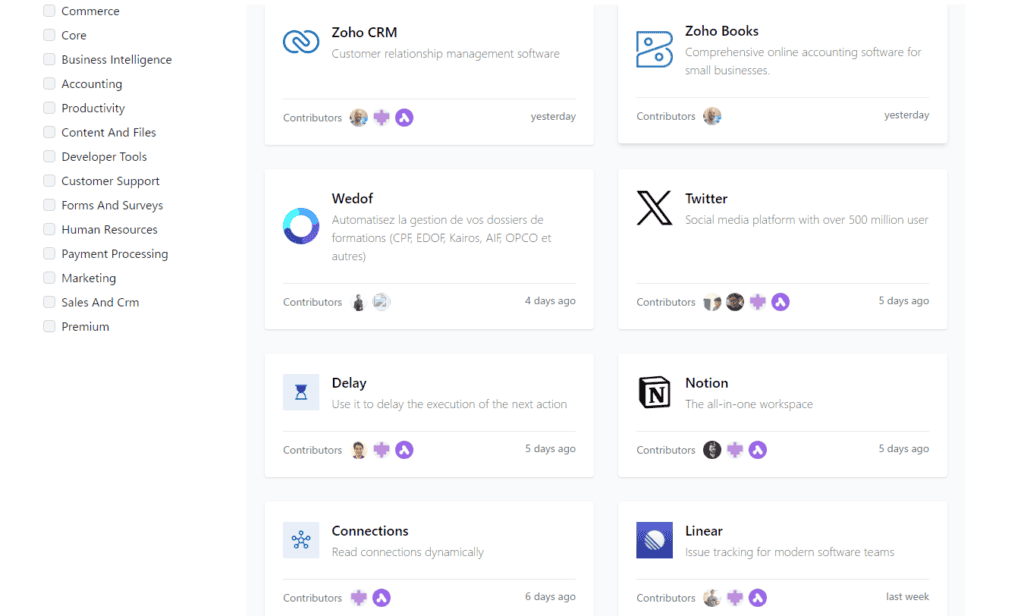
By integrating with tools you use on a daily basis, such as Google Drive and Slack, you can smoothly migrate data and send notifications.
Integration is easy. Just add an intuitive operation app. All that's left is to set the options.
The example I gave earlier is "move the received email to Google Sheets".
This automation can be created in minutes. 3 minutes at the latest. If you are used to it, it will take less than 60 seconds.
(3) Collaboration with ChatGPT
You can integrate Activepieces with ChatGPT.
Hmm? What exactly can you do?
Automatically create SEO-specific blog posts
You don't have to enter prompts with ChatGPT to create blog posts manually.
Receive information from other apps and automatically create blog posts based on the content... What can you do?
I actually tried it▼
Just enter your keywords in Google Sheets. The rest is fully automatic.
- Create a blog title
- Create a blog post
- Posting in WordPress
All of this is done automatically.
Automate customer support
In recent years, AI chatbots have also become a hot topic.
AI automatically responds to customer inquiries. It is such an era.
With Activepieces, you can create customer support that works 24 hours a day, 365 days a year. Automate dozens of email replies and message responses.
Create social media posts → automate posts
There are many services that can automate social media posting. You may also be using it.
However, with Activepieces, you can completely let go of "automatically creating SNS posts" and "automatically posting on any SNS".
Automatically post to Facebook and Twitter.
SNS operations can be streamlined.
This can improve operational efficiency and allow you to focus your time on more important tasks.
(4) Cloud version and self-hosted version
Activepieces is available in cloud and self-hosted versions.
The cloud version is convenient to access from anywhere.
The self-hosted version, on the other hand, is for businesses that want to manage their data on their own servers. You can choose according to your needs.
(5) High reliability
Activepieces is also introduced by teams from Rakuten, RedBull, and IE University. It is used by companies around the world.
Naturally, we have solid security measures in place so that you can use it with confidence.
First, your information is protected by very strong encryption technology and cannot be seen by anyone.
All credentials are 256-bit encrypted and access is revoked after processing.
Role-Based Access Control (RBAC)
When working with external tools, you don't have to worry because we use a secure method. Access rights are managed for each user, ensuring that only those who need it have access to the information they need.
OAuth2
When working with external tools, you don't have to worry because we use a secure method.
Single sign-on (SSO)
We have introduced single sign-on, which allows you to log in to everything with one password, so you don't have to remember multiple passwords.
These robust measures are provided. You can use it with confidence.
How to use Activepieces
Here's a quick explanation of how to use Activepieces.
First, there are two ways to create automation.
- Choose from templates
- Make it yourself from scratch
Although there are not many templates, there is automation using ChatGPT.


In this article, we'll use something called "Tweet a new WordPress article with ChatGPT."
The screen for actually creating automation is very simple and easy to see, as shown below.


Let's expand a little more. Please see the image below.


- New Posts in WordPress
- Writing with ChatGPT
- Tweet
This is the automation of this flow. This is very easy to use.
You can also add other apps to this automation flow.
Press the + icon to add more apps. You can freely add them by selecting from the right sidebar.

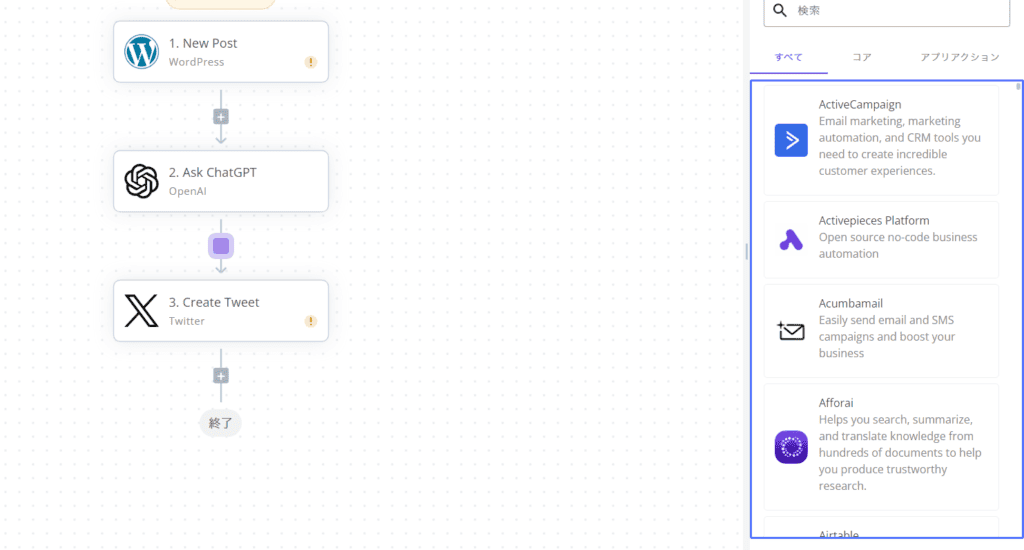
And each setting is done in the right sidebar.
Please see the image below. In this example, I'm entering my WordPress information.


By the way, the trigger above means "when you become 〇〇". In the example above, we set up a trigger for "When a new post happens in WordPress."
The apps in each of these flows can then use the information with each other.


For example, you can use the data from the "WordPress article URL" directly in apps such as ChatGPT and Twitter.
You can pass information to each other. Should I say that I can share it?
This is a simple example. You can also create automations as you wish.
Comparison with Zapier and IFTTT
Zapier and IFTTT are more well-known for their automation apps. So we will compare them with these apps.
Comparison of app support with IFTTT, Make, and Zapier
Comparing it with competing products such as IFTTT, Make, and Zapier,
- IFTTT: Compatible with over 900 apps
- Compatible with Make:1829 apps
- Zapier: 7323 app support
Activepieces supports about 200 apps.
When compared to other competitors, the number of supported apps is small.
What makes Activepieces great
Here's a demystifying explanation of the advantages of Activepieces. The following four points are distinctive.
- Ease of use: Activepieces is a simple operation screen. It's not as simple as Zapier or as complicated as Make. It is relatively easy to use, even for beginners.
- Flexible automation: Conditional branching, iteration, and code writing allow for complex automation. For example, you can easily set "If 〇〇, do △△".
- Cost-effective: It has a full free plan. There are also pay-as-you-go and simple flat-rate plans where you only pay for what you use as needed. It can be used effectively while keeping costs down.
- Scalability: Activepieces is open source, so anyone can see and modify the code of the software. If you don't have the features you need, you can add them yourself.
I also use Make, and while I can create complex automations, it's also complicated to use (especially beginners). I was also used to simplicity on Zapier at first, so when I used Make, I studied how to use it for a whole day.
The weakness is the number of supported apps, but most basic apps are supported.
Activepieces is easy to use, the screen is easy to see, and you can intuitively design the automation you want to create. Activepieces is well worth a try.
Is Activepieces translated into Japanese?
Yes, some Japanese translations have been made.
How to translate it into Japanese
First, log in.
Then press the icon in the upper right corner.


The current language is displayed.


Select "Japanese" and press it.


The page will switch to Japanese, so wait.


The Japanese translation is now complete.
Activepieces Pricing


Activepieces is available in cloud and self-hosted versions. Here is the difference.
Now, let's take a look at the pricing plans from the cloud version.
Cloud version
| Plan | Free | Enterprise | Embed |
|---|---|---|---|
| Price | Free | $99 per month (per user) | $1,200 per month |
| Number of tasks | 1,000 tasks per month | 1,000 tasks per month | 1,000 tasks per month |
| Number of users | Single User | Minimum of 5 users | 25 users |
| Features | 1 Project All Features Unlimited flows and steps $1/1,000 task surcharge | Unlimited Projects Environment and Git sync Advanced roles and permissions Audit Logs Custom Branding SSO 5 Private Pieces | Unlimited Projects Automatic User Settings Javascript SDK embedding Custom Branding Limit customization for each project 2 Private Pieces |
| Additional tasks | $1 / 1,000 tasks | $1 / 1,000 tasks | $1 / 1,000 tasks |
A free plan is also available.
It features 1,000 tasks that can be used for free. It's also very cheap to add tasks.
It's surprisingly affordable given the automation it can do.
Self-hosted version
| Plan | Free | Enterprise | Embed |
|---|---|---|---|
| Price | Free | $99 per month (per user) | $1,200 per month |
| Number of tasks | Unlimited | Unlimited | Unlimited |
| Number of users | Single User | Minimum of 5 users | 25 users ※ |
| Main features | – 1 project – All features – Unlimited flows and steps | – Unlimited projects – Environment and Git synchronization – Advanced roles and permissions – Audit Logs – Custom Branding – SSO – 5 private pieces | – Unlimited projects – Automatic user settings – Javascript SDK embedding – Custom Branding – Limit customization per project – Custom templates – 2 private pieces |
The self-hosted version of Activepieces is available as open source.
We offer a free plan that makes it easy for beginners to get started with automation, to a powerful Enterprise plan for businesses, and an Embed plan for SaaS integration.
4. Conclusion and Summary
Activepieces is a task automation tool that anyone can easily use.
It streamlines your operations and saves you a lot of time and effort. Even beginners can quickly master it, so please give it a try.
















![[2024] Thorough explanation of the features, reputation, and usability of thin rental servers](https://sp-ao.shortpixel.ai/client/to_webp,q_lossy,ret_img,w_485,h_273/https://takeofujii.net/wp-content/uploads/2021/10/wpxshin-review.png "[2024] Thorough explanation of the features, reputation, and usability of thin rental servers")

![PUP. Steps to remove Optional.Legacy completely [r.srvtrck.com]](https://sp-ao.shortpixel.ai/client/to_webp,q_lossy,ret_img,w_485,h_254/https://takeofujii.net/wp-content/uploads/2022/04/adware-remove-bye-485x254.png "PUP. Steps to remove Optional.Legacy completely [r.srvtrck.com]")




Latest Comments