


What if you could distribute your videos to the world?
However, it is very difficult to manually translate Japanese to English and dub the audio. Even experienced translators will find it difficult.
If you click a single button to download your video toAutomatically translate and dub into multiple languagesWhat if?
You can do it with the AI app introduced this time! Well in factDubverse AIis.
As of 2024-04-06, Dubverse AI cannot read kanji aloud when reading Japanese aloud. Therefore, it is deprecated. The support system is not very good. I myself use another dubbing app. You don't have to waste money.
What is Dubverse AI?


Dubverse AIis an AI app that can automatically dub videos into different languages. Moreover, there is no manual work. Just upload the video you want to dub and press the button.
All you have to do is wait and it will be automatically dubbed into another language.
You will see the video dubbed with Dubverse AI in action. Watch the video below.
You speak in English, don't you? In fact, this video is originally in Japanese.
The original video is below.
In this way, even 17-minute videos can be automatically dubbed without any complications using AI.
Features of Dubverse AI
What can you do with Dubverse AI? Here are some features available.
Automatically dubbing video content into another language
ubverse AI is a tool that allows you to automatically dub video content into different languages.
Over 60 languages
Dubverse AI supports over 60 languages. Until now, it was uploading YouTube videos for Japan and marketing to Japan, but now it will be on the world stage.
You can set up video marketing beyond the language barrier.
It also makes your approach to customers who speak different languages smoother.
Even if you receive comments in English, ChatGPT makes it easy to respond to comments and respond to customers. It's a good time.
Over 500 AI voices
Dubverse AI comes with over 500 AI voices. Male voices, female voices, unique accents, age, etc... You can choose the best voice that captures your audience's heart. You can deliver your message to a global audience with natural-sounding voices.
Add accurate subtitles to your videos
It also has a subtitle function. You can add subtitles to the dubbed video or download just the subtitles.
This is quite important.
When posting videos on Youtube, Dubverse AI's subtitle feature is a great advantage.
Not only can viewers understand the content when the audio is turned off, but it also has an SEO effect. Best of all, it makes it easier for viewers of different languages to understand the content of your video.
By the way, you can also download only the subtitle file in SRT format.
MP4, WAV format support
In addition, the video dubbed with Dubverse AI isYou can download it in MP4, WAV formats.


You can freely upload to YouTube, SNS, and websites.
You can offer dubbed videos in online courses or sell them as courses on Udemy for international audiences. It can also be used in presentations and exhibitions.
Sharing capabilities (you can work in the same place as your team and employees)
It has a sharing function.
The ability to collaborate within Dubverse AI ensures that employees, staff, and teams are all working in the same place, allowing you to work efficiently on projects.
How to Use Dubverse AI
Let's take a look at how to use Dubverse AI. You can easily dub your videos.
First, log in to the dashboard.
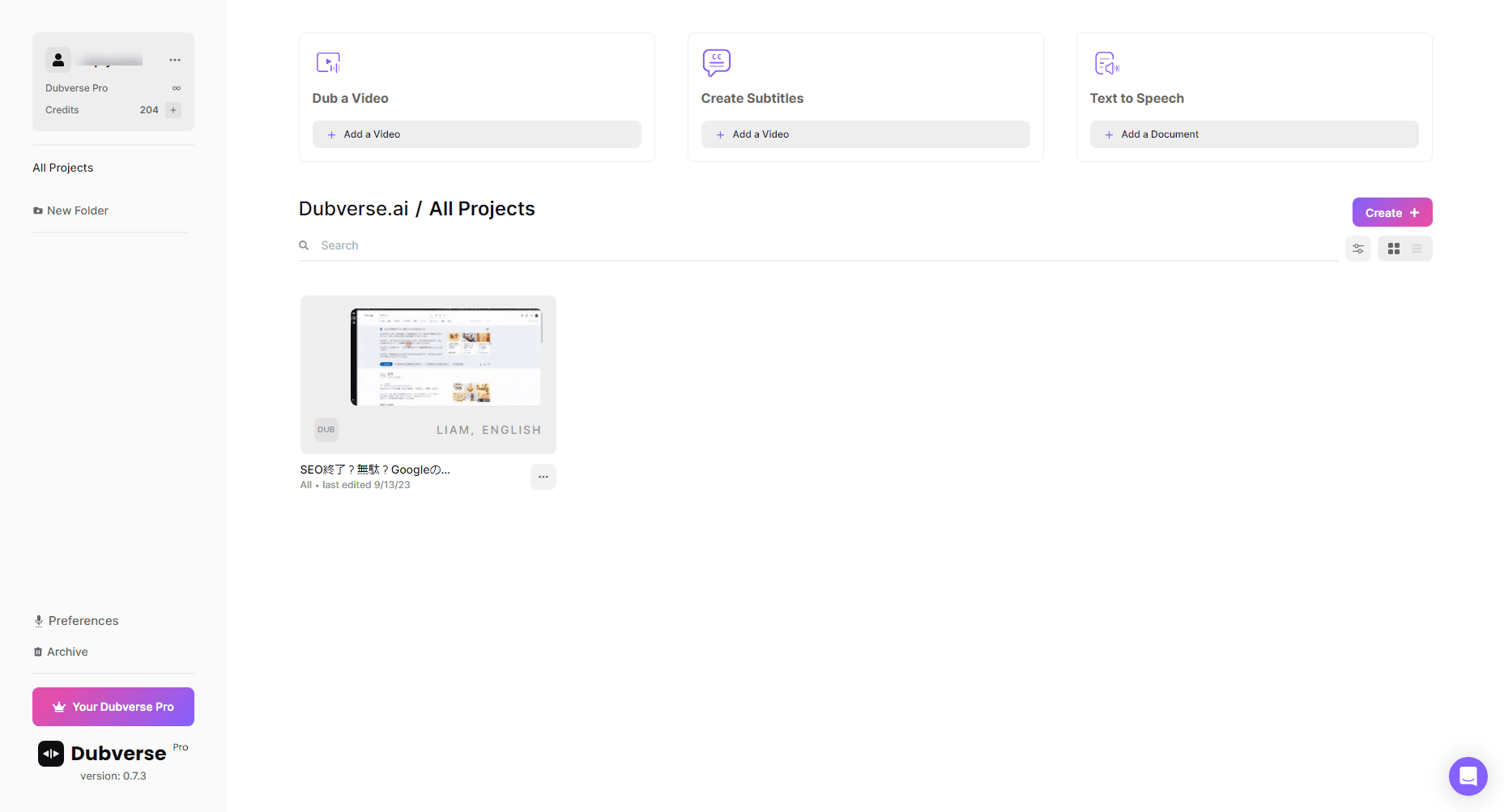
If you want to dub the video, click the "Create" button on the right. If you don't know the location, please see the image below.


Click on it to see three services.


- DUB: Dubbing Your Video
- SUB: Create subtitles in English for videos in any language
- SAY: Put human-like narration in your sentences
For example, if you want to dub a Japanese video into English, choose DUB.
When selected, the screen to upload the video will open.

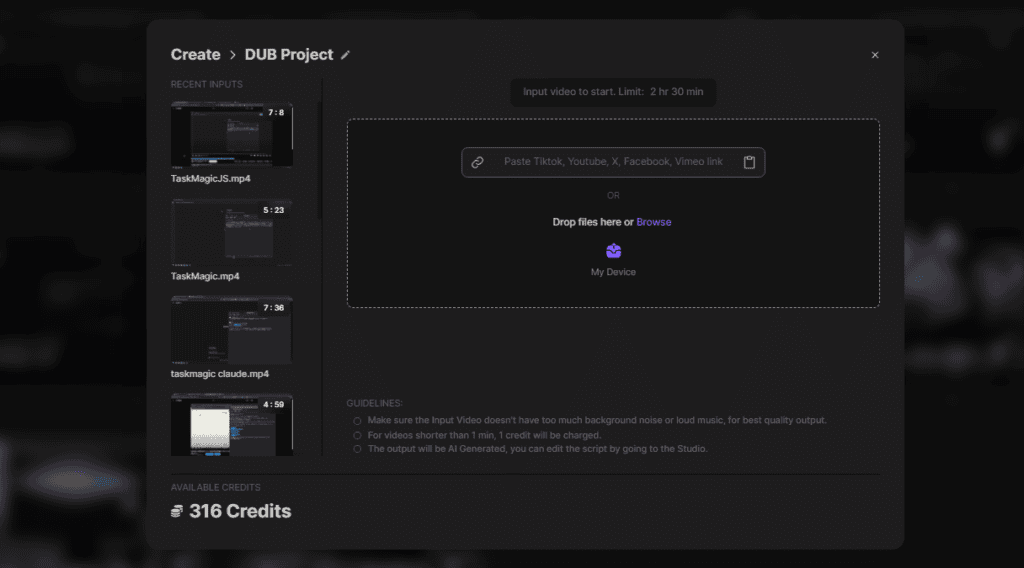
You can upload files from your device.
Alternatively, you can upload it via YouTube or Vimeo. This time, I will try to load the video from YouTube.


Once the video is loaded, click on the button that says "Next".
Then select the dubbed audio. It supports over 60 languages and has over 500 AI voices.
You can choose from men's and women's accents.
Select the audio in the language you want to dub.
Once selected, press the "+" button.


Finally, click "Let's Dub" to start processing the dubbing.


Dubbing can take some time. If the video is long, it may take up to 10 minutes.
For reference, when I automatically dubbed a 17-minute video into English → Japanese, it took about 20 minutes. Let's wait patiently.
Once the dubbing is complete, you can download it.


Click "Download" to freely download in MP4, WAV, and SRT file formats.
You can also edit the dubbed manuscript. Click the three-dot reader and select "Edit in Studio".


This will display the dubbed manuscript. You are free to modify the items you want to modify.
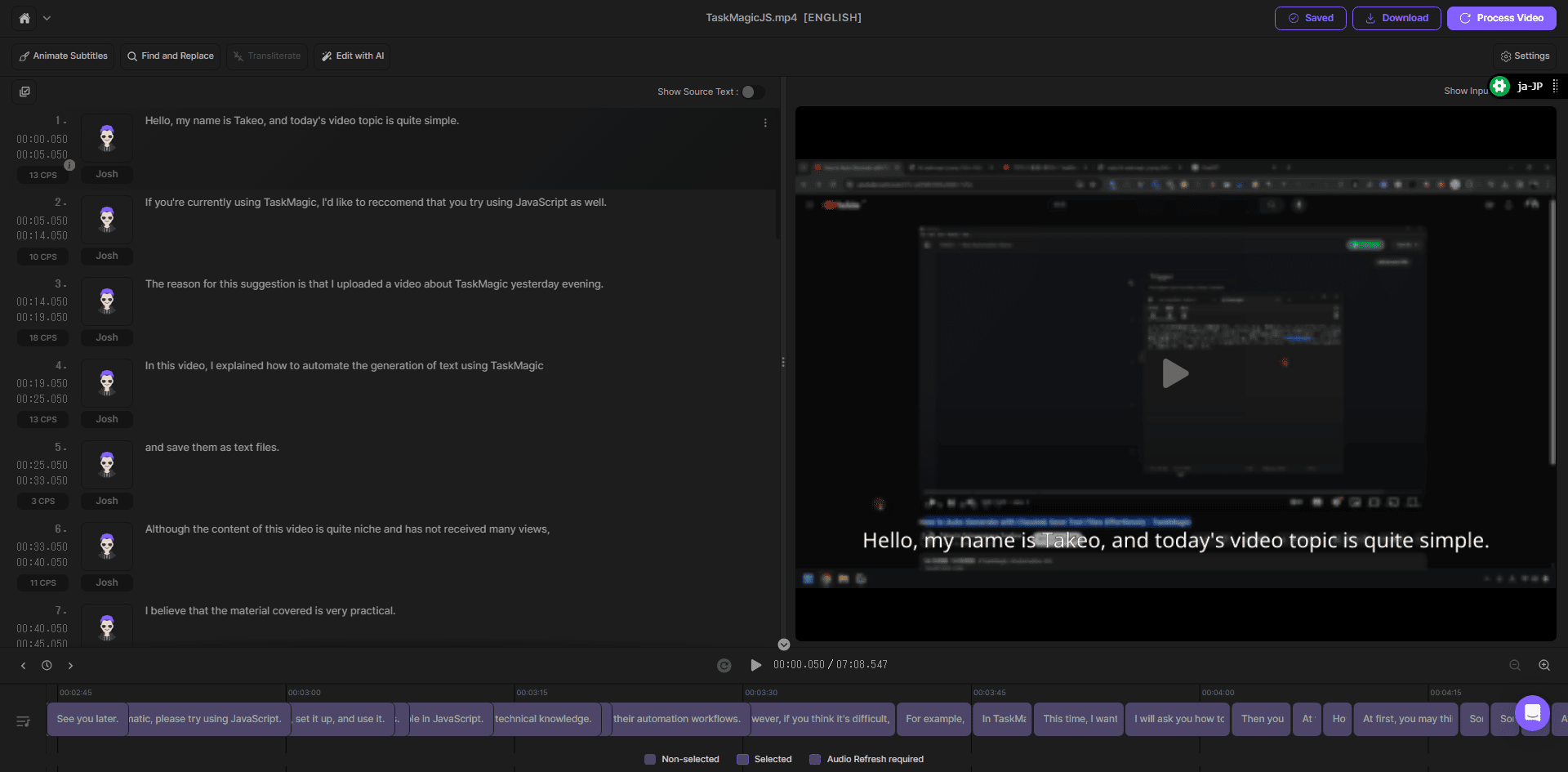
It is not difficult to use. You can intuitively operate and dub videos without a manual.
【2024 Latest Edition】Video explaining how to use Dubverse AI
Learn more here.
This video explains how to actually use Dubverse AI. You can dub Japanese videos to English in very simple steps.
Applications of Dubverse AI
Dubverse AIEntrepreneurs, managers, and YouTubers who are (and plan to do) distributing video content overseasRecommended for.
We respond to a variety of needs. For instance
- YouTube videos: Provide automatic dubbing and subtitles for foreign-speaking audiences.
- Online courses: Multilingual support makes learning more accessible to students around the world.
- Tutorial videos: Communicate product usage and features to users around the world.
- Product promotional videos: Provide product descriptions in different languages to reach global markets.
- How-to videos: Communicate DIY and other steps in multiple languages.
- In-house training videos: Conduct employee training in multiple languages. Understanding promotes.

For my use, I dub YouTube videos into English → Japanese.
By dubbing videos into English that have been delivered to Japan audiences, you can reach new English-speaking viewers.
Dubverse AI Pricing


First of all, there are two types of payments: MONTHLY (monthly) and HALF YEARLY.
If you are already thinking of using it for more than 6 months, please choose HALF YEARLY. The price will be lower.
And the pricing plans are as follows.
| Plan Name | Credits | For Monthly | For HALF YEARLY |
|---|---|---|---|
| Free | 20 credits/month | $0 | |
| Pro | 50 credits/month | $10/month | $9/month |
| Supreme | 500 credits/month | $13/month | $10/month |
A Free plan (free) is also available. Anyone can easily try it from Japan.
What is the difference between the Pro and Supreme plans?
Briefly: The Supreme plan is at the top and the Pro plan is at the bottom.
The differences are as follows.
| Features | Pro Plan | Supreme Plan |
|---|---|---|
| Premium Voice | Premium Voice | Premium Voice + Voice Clone |
| Processing speed | Fast processing | Ultra-fast processing |
| Translation Capabilities | Translate with GPT3.5 | Translate with GPT4 |
| Maximum video duration | Up to 60 minutes per video | Up to 150 minutes per video |
| Animated subtitles | Basic | Top |
To be honest, there is not a big difference in the price of the plan. If you are unsure, we recommend the Supreme plan.
The Supreme plan is a completely higher plan.
Dubverse AI Payment Methods
We will guide you through payment methods.
First, log in to Dubverse AI.
After logging in, press the button that says "Upgrade to Pro" in the bottom left corner of the dashboard page.


When you do so, you will see each pricing plan in USD.
Choose your plan here.
Next, choose as many credits as you need.


I will explain about credits.
Let's talk about the legit.


- DUB: 1 minute = 4 credits
- SUB: 1 minute = 1 credit
- SAY: 1 minute = 2 credits
The DUB feature requires 4 credits per 1-minute video.
For example, dubbing a 10 minute and 44 second video will consume 40 credits▼
It's much cheaper than hiring a translator or narrator.
Once you have selected the credits you need, press the "Buy Now" button.


This will take you to the credit card input area.
The card input area is displayed in Japanese. The reason is that Stripe processes payments.
Stripe is a widely used payment platform worldwide, and credit card payments through Stripe are highly secure due to its strict security measures.
The credit card information you send is protected by Stripe using advanced encryption technology. The risk of information being read by third parties is greatly reduced.
Therefore, if you are worried about paying on an overseas site, please don't worry.
[Summary] Revolutionize Video Marketing with Dubverse AI
With Dubverse AI, you can:Automatically dub one video into another language with AI.
It's also easy to use. Just upload your video and press the button. After that, just drink coffee and wait until the dubbing is over, and you're done.
In particular, ChatGPT has now appeared. No more language barriers. With AI, you can reach any country and any language.
And by being the first to create multilingual video content, you can stand out from the competition right now. I haven't done it yet.
Try it for free first.
If you want to know anything about Dubverse AI, don't hesitate to ask.
















How do you do.
I would like to ask, for example, if you apply for a one-time purchase plan for Tire3, you can use 1000 credits/month.
For example, even if I only use 900 credits this month, will the remaining 100 credits be carried over to the next month?
After all, the amount that was not used will not be carried forward and will be rounded down?
In the comment section of the video, it was written that you can change your plan while it is on sale, but you cannot change your plan once it is sold out.
I'm wondering if I should buy it all at once and apply for a higher plan from the beginning.
However, I still don't know how much I will use, so I wanted to ask if there is any carryover of the credits I didn't use.
Remon,
This is Fujii. Thank you for contacting us.
We will answer any questions you may have about the Tire3 one-time purchase plan. As you said, unused credits will not be carried over to the next month. Unused amounts will not be carried forward and will be rounded down.
Please note that you cannot change your plan after the sale ends.
Considering that the remaining sales period is short, if you are considering a higher plan, we recommend that you apply.
Furthermore, to give you peace of mind,
We have a 60-day money-back guarantee. If you feel that you bought a higher plan but didn't need it, you can get a refund within 60 days.
If you have any other questions or concerns,
Please feel free to contact us. We will do our best to support 💪 you
Thank you very much.
Can you tell me about a cost-effective Dubverse.ai plan? The higher plan seems good, but the budget is limited.
Dubbing a video consumes 4 credits per minute.
Tier 1: 300 credits = 75 minutes of video dubbing/month
Tier 2: 600 credits = 150 minutes of video dubbing/month
Tier 3: 1000 credits = 250 minutes of video dubbing/month
Therefore, we recommend that you decide based on the number of videos that Mr. Takahashi dubs in one month.
Nice to meet you.
Watching Mr. Fujii's YouTube
I signed up for Dubverse.ai (Tier 1) on APPSumo.
Currently, there is one thing I don't understand.
I would like to ask...
Tier 1 uses 300 credits per month
Is it okay to interpret that it can be used all the time every month?
I'm sorry to be busy, but I would appreciate it if you could tell me.
Best regards.
Mr. Ishikawa
Nice to meet you. Thank you for your question.
That interpretation is correct.
You will receive 300 credits per month.
If you run out, rest assured that it will be replenished the following month without any problems.
Also, please note that even if you do not use it up, the credit will not be carried forward.
Let's 💪 use it together
Thank you for your reply.
I will use it up to the point where I regret not making it Tier 2.
Yes. Let's 💪 use it all
Also, if you have any questions, please feel free to ask us at any time.
We will continue to provide you with useful information for Mr. Ishikawa, so thank you very much.