


If you're a blogger, you're wondering which one to use. Both note and WordPress are popular and have a reputation for ease of use.
However, since both are popular, it should be difficult to decide which one to use.
So, in this article, we'll compare WordPress and note. If you're just starting out, this article is for you.
What is note?
Note is a platform for content creators that started in 2014.
Note allows you to register for free and easily start a blog. No installation or configuration required. Therefore, the number of users in Japan is increasing year by year. These days, various celebrities have also used note.
As of 2022, it is a well-known platform only in Japan. Overseas, a similar platform called Medium is popular.
Next, let's talk about WordPress.
What is WordPress?
WordPress is a well-known CMS (Content Management System) that is a system for creating, editing, and publishing content online.
WordPress allows you to launch a blog or website without any expertise. By the way, this blog is also made with WordPress.
- You can do a lot of things (applicability)
- Easy to use
These two are the features of WordPress. First, WordPress allows you to launch different types of websites and blogs (e-commerce, blogs, membership sites, directory sites, affiliate sites, corporate sites, etc.).
You can also customize the design and functionality of your site as much as you want.
Despite being able to do so many things, it is also very easy to use. WordPress is easy for beginners to install and launch their website. It is also very easy to manage.
That's why WordPress is used all over the world because it can do a lot of things and is easy to use.W3TechsAccording to Wikipedia, 43% of websites on the internet are currently made with WordPress.
Benefits of note
First, I will explain the benefits of note.
Free
Note is free. Neither registration nor use costs anything.
Plus, even though Note is free, it has all the basic features for blogging.
This makes it a great platform for beginners who want to start a blog casually.
Easy-to-use editing screen
The editing screen of note is simple and easy to use. There is nothing superfluous in the editing screen. This allows you to concentrate on writing your blog.
The WordPress edit screen has more items that can be set up than note. While this is convenient, it may be a little difficult for blogging beginners to use.
Therefore, note is ideal for those who want to write on a simple screen when writing a blog.
You can easily sell paid articles
Note allows you to sell your blog posts for a fee. And it doesn't require any particularly complicated settings. You just have to choose whether the article you want to publish is free or paid.
If someone pays to read an article that you sold for a fee, you will receive money. 10% of the sales of paid articles will be subject to a commission.
In other words, if you sell a paid article for 10,000 yen and someone buys it, you will receive 9,000 yen.
The fee is not that high. Therefore, it is easy for bloggers who want to earn money by selling their articles. To be honest, it may be easier to make money by selling paid articles in note than by posting Google Adsense on your blog.
Active communication
Note exceeded 63 million monthly active users in May 2020. The number of members is also increasing, and the number of note users will continue to increase in the future.
Therefore, if you write an article in note, someone will read it. If you diligently update one article every day, you will almost certainly get "likes" on your note articles.
Even my notes get an average of 90 likes. In addition, I am happy to have 1000 followers now.
Even if you write articles at such a low frequency, many people will read your articles and send you comments and likes. It's really fun to use.
Access comes from the beginning
Note has a large number of users, so it is easy to access it if you write an article. Articles with topics that are too niche are difficult to get access...
However, even in a general diary, a certain number of people will read it.
If you write an article in WordPress, you must have been running a blog for more than a few months to access it. On the third day after launching a blog in WordPress, the first thing you do is have zero access.
Note is originally a platform where users gather, so it is easy to attract access when writing articles.
No need to set up SEO
In addition, there are no complicated SEO settings in note. Therefore, if you are not familiar with SEO, note will definitely find it easy to use.
WordPress has the advantage of being able to set up SEO measures firmly, but on the other hand, note is definitely easier to use than WordPress if you don't want to do something difficult about SEO measures.
So far, we have explained the advantages of note, but from now on, we will explain the disadvantages of note.
Disadvantages of note
The disadvantages of note are as follows.
Low (non-customizable)
The appeal of note is its ease of use. It's free to use, and the user interface is simple. No complicated deployment settings. In this way, it is a platform that anyone can easily use.
On the other hand, it is not customizable. For example, if you want to launch a full-fledged membership site, note lacks functionality. You can also start a blog, but it is not suitable for creating a website. Note is not a platform for launching a website in the first place.
This makes note a great way to start a personal blog, but it's also not suitable for anything else.
Your account may be deleted or suspended
To date, I don't hear (much) that my account has been deleted or suspended in note.
If you are just writing a blog, don't worry, you can't think of the risk of your account being frozen.
However, those who sell paid notes also have the risk of freezing or deletion.
Even in the search results, there are also voices such as "note account freeze" and "note dirt BAN".
I looked at these comprehensively, and it seems that most of the users sell paid notes. There are also some voices that the sales money was confiscated by note.
As you can see, there is always a risk that your account will be deleted, suspended, or restricted at the same time.
This is because note is not a platform operated by you, but a platform operated by note corporation.
In other words, as long as you are using someone else's platform, you cannot complain even if your account is deleted depending on the operator.
The point is not whether the note side will do it or not, but "I can do it".
The same can be said for SNS.
Basic SEO settings (you can't set the meta settings yourself)
Note does not allow in-depth SEO settings. For example, you can't use meta descriptions. Also, don't think that you can't set up SEO settings that you can set up in WordPress.
For example, Google Analytics, which is essential for blog access analysis, is not available for free.Note Pro (Paid)You need to apply for Note Pro costs 50,000 yen/month per month. We won't mention whether this fee is high or low, but at least it's not for individuals.
note is all about simplicity. Therefore, if you can use it basically, you can use it for free, but due to the lack of marketing features, WordPress is the best choice for business use.
Only basic design
Note also has a limited number of templates. Even if you write a blog, you can only choose the basic design. Therefore, there is a limit to how much you can differentiate yourself in your blog design (although you can differentiate yourself with your profile picture, header, and featured image).
For those who want to create a more personal feeling, notes that only have a basic design may not be satisfactory.
Affiliates are NG (Amazon Associates are OK)
In note, you can only attach Amazon Associates. You are not allowed to post any other affiliate links. In fact, if you put an affiliate code like A8, the link will not work.
While there is no "affiliate prohibited" rule, it can be said that only Amazon associates are actually allowed as long as links other than Amazon associates do not work.
Therefore, if you want to earn advertising income from your blog or earn affiliate revenue, you have no option to use note. (Amazon Associate itself has an extremely low unit price, so it is not suitable for monetization).
This mechanism is not good or bad, but "that kind of thing". The rules determined by note are absolute. You have no choice but to follow it when using it.
WordPress Benefits
Next, let's explain the benefits of WordPress.
Cheap
WordPress is actually very cheap. Therefore, it is the best way to run a website or blog.
For example, the amount of money it costs to operate this site is less than 1,000 yen per month.
Indeed, note is free. However, if you want to use your own domain or use your own logo, you will have to pay for Note Pro. It costs 50,000 yen per month.
There are other platforms like Wix and SquareSpace, but the free version is still quite limited. If you want to pay, WordPress is definitely cheaper.
You can manage it yourself
WordPress is easy to run on your own. You can easily navigate from the dashboard to write articles and manage comments.
And no one but you can break in on your own. In other words, you can start a website or blog that only you can manage.
Can be customized
WordPress is free to customize. You are free to create the site you want. One of them is that WordPress has its own theme. By changing this theme, you can change the design of your site in seconds.
WordPress has a wide selection of free themes. Therefore, you can choose from many themes and dress them up.
You can also change all the details in WordPress, such as text colors, fonts, and the background color of your website. Customization also requires no knowledge. Easy to operate.
You can create anything from membership sites to e-commerce sites
WordPress is not just used for blogging. It is possible to launch various websites and blogs.
Anyone can create various types of sites, such as membership sites, e-commerce sites (mail order), corporate websites, personal blogs, crowdfunding sites, evaluation sites, bulletin boards, etc.
For example, this blog is not "just a blog". It is a multilingual blog that supports not only Japanese, but also English and German. By launching such a multilingual blog, you can attract access from outside Japan.
It is possible to increase the number of customers from outside Japan and increase profits.
You can also easily make your blog multilingual. That's exactly what WordPress allows you to launch your website for any purpose.
You don't have to outsource your site production. You can quickly create your own with WordPress.
By the way, the website of the White House in the United States is also made with WordPress.
Easy to incorporate SEO settings
WordPress SEO is so popular that it is said that "SEO measures are done just by using WordPress".
Matt Katz also acknowledges the SEO effects of WordPress (from WordCamp San Francisco 2009). Matt Katz is a former team leader of Google's anti-spam team and a top expert on SEO for the Google search engine.
In addition, WordPress has many plugins that can help you improve your search rankings. On this site,
- ShortPixel - Lighten images on your site
- Rank Math - Basic SEO Setup
- WP-Optimize - Speed Up Your Entire Site
By including these plugins, we are improving the overall SEO effect of our website. With WordPress, you can do SEO without needing experts with just a free plugin.
Therefore, if you want to launch a website or blog to attract customers, WordPress is the best choice.
Disadvantages of WordPress
Finally, we will explain the disadvantages of WordPress.
Paid (server, domain fee)
Running a blog on WordPress costs money.
There are many benefits to using WordPress as a blogging platform, but the downside is that it's not free.
It costs about 1,000 yen per month for server and domain fees to maintain and manage a WordPress blog. If you are not willing to pay, you should look for other platforms.
At first, access does not come
Websites launched with WordPress don't get access at first.
The reason is that the site you have just launched is not recognized by anyone. It takes two or three months for the site to be recognized and access to it begins.
This is a major disadvantage if you want immediate results in marketing.
In the case of note, it is easy to gather access from the beginning. This is because note has a lot of users, so your posts are easy to see for them.
In this way, WordPress is a land island surrounded by the sea when it first starts. However, if you run it for a few months or a year, your site will have the ability to attract customers.
In the medium to long term, WordPress's ability to attract customers is amazing.
Who is recommended for note?
The characteristics of people who recommend note are as follows.
Personal diary
First of all, note is recommended for those who want to write their own diary. You don't have to bother using WordPress.
Note is free of charge. It doesn't cost anything. You don't have to pay a monthly fee to write a personal diary.
On top of that, there are many users, so your diary is easy to read. A diary that is difficult to continue alone will continue if there is someone to read it.
For those who want to keep a diary, note is the best option.
Non-commercial use
If you don't want to start a blog and do business, or if you want to use a blog as one of your content marketing measures, you can use note.
Note does not prohibit commercial use, but there are many features that are missing for marketing use. Detailed access analysis function (available in note pro), SEO settings, unique branding function (available in note pro), templates, etc.
It is also true that there are voices that have been confiscated from sales by selling paid notes so far.
By the way, it seems that sellers who sell "so-called information products" have their accounts frozen and their sales proceeds confiscated. This area is Mr. Fukatsu, the CXO of note.articlePlease take a look.
In this way, people who sell profitable know-how are caught in notes. Other content should sell without any problems in note.
However, note completely determines the rules of the platform, such as where to start out and what genres to ban from when.
In other words, if you are not in business, we recommend using note. If you want to do business, use the soil that you can run on your own (such as WordPress).
Who is WordPress Recommended For?
The characteristics of people who are recommended for WordPress are as follows.
Corporate Site
WordPress is a great option for businesses that want to increase their branding while still disseminating a lot of information.
Since you can operate and update your site in-house, you don't have to pay high maintenance fees to a website production company.
It's so easy to use that you can even complete your corporate website in less than 24 hours using WordPress.
WordPress also offers a wealth of features. These features allow you to change your website's design and add tools to help with marketing.
If you want to run a corporate website for your business, WordPress is the way to go.
I want to create an e-commerce site or a membership site.
WordPress allows you to create any type of website.
You can easily create an e-commerce site or a membership site at no additional cost. Therefore, there is no need to pay 300,000 yen to the production company for site production. There is no high cost for maintenance.
You can also create a rating site like Tabelog or a C-to-C sales site like Mercari.
You don't even need any site design expertise to create these sites.
You can create a website that you can't create with note, but you can use WordPress. It's easy too.
Affiliates
WordPress has all the features for writing a blog. One of them is "Gutenberg".
Gurtenberg is an editing feature that comes with WordPress. You can write a blog with intuitive controls.
That's why we recommend WordPress to affiliates who want to write blog posts stress-free.
There are also many plugins and themes that can increase your affiliate revenue. For example, another blog I run embeds the following indication in the article:

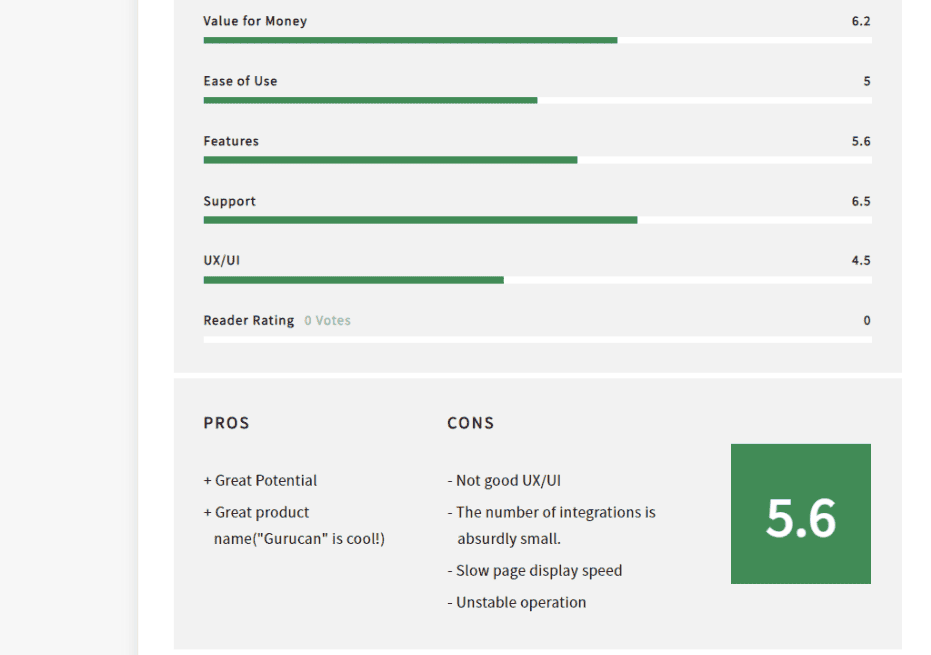
By displaying such "My Rating & Score" in the product review article, you can convey the good and bad parts of the product at once.
You can easily introduce features that increase the appeal of affiliates like this with WordPress.
I want to use it for full-fledged commercial use.
The benefit of WordPress is that you can own your own website. Your site won't be deleted or frozen all of a sudden.
As explained above, note is operated by note Co., Ltd. Therefore, you cannot complain if the article you wrote is hidden, or if your account is deleted or suspended. I'm borrowing the note platform.
Even if you don't intentionally write a sensitive article, it's the platform that determines whether it's sensitive. It depends on the platform where it starts to be NG and where it gets caught.
In this sense, running a website with WordPress reduces risk.
Conclusion
In this article, we compared note and WordPress with their pros and cons. Note, which is free to use, is attractive to beginner bloggers. If you want to write a diary, a note is enough.
On the other hand, WordPress is recommended for those who want to build a full-fledged website and monetize their blog. Note only has basic functions, so it is no match for WordPress, which has extensible functions. Even if you pay for it, you can launch many websites with WordPress for 10,000 yen a year, so it is not expensive overall.
In addition to what we've discussed, we share practical insights about running your site and blog. We post information on "content marketing" that is useful for entrepreneurs and managers, so if you are interested, please read our other articles.
See you soon.



















Latest Comments