


Hello, Fujii, I'm strong. I've used major WordPress page builders around the world so far.
From that experience, we know which WordPress plugins can effectively create landing pages.
In this article,WordPress page builder plugins that make it easy to build landing pagesWe will introduce five carefully selected ones.
If you want to create a landing page with a plugin without relying on a WordPress theme, then you should definitely read this article to consider.
Options for Creating a Landing Page in WordPress
I will explain first. You don't need to use a WordPress plugin to create a landing page. This is because you have three options for creating a landing page in WordPress.
- Use a WordPress theme
- Use WordPress Plugins
- Design, code, and design on your own on WordPress
You can create a landing page in a variety of ways.
I will explain each one by one.
Making with a WordPress theme
You can also create a landing page with a WordPress theme. One of the popular WordPress themes on the site Themeforest, which sells a lot of WordPress themes, is "X Theme".


X Theme comes with built-in customization features. You can easily create beautiful landing pages.
In Japan, the WordPress theme "colorful" dedicated to LP production is famous.
The benefit of creating a landing page with a WordPress theme is that you don't need to add extra plugins to your website.You can create a landing page with a WordPress theme aloneThat's why.
On the other hand, it can limit the design of the landing page you can create.
>> 7 WordPress Themes to Create Landing Pages (LPs)
Design and build it yourself
You can also design and create your own landing page. But it can take a lot of time.
To create your own landing page, use theRequires knowledge of coding and designis. It must be displayed firmly on each device of a computer, smartphone, and tablet.
Also, a landing page that is just beautiful will not do any good for business. You need to create a landing page that will attract customers.
To create a Matomo landing page on your own, you need knowledge and skills. Above all, it takes time.
If you can make it crispy yourself, it's fine, but basically,Create landing pages using WordPress themes and plugins created by good developersI recommend it.
With WordPress themes and plugins, you don't need any coding or design knowledge at all. Create professional-looking landing pages with ease.
Build with WordPress plugins
There are many page builder plugins available for creating landing pages.
With these page builder plugins, you can easily create beautiful landing pages by dragging and dropping them or simply applying words to the templates provided.
The advantages of creating a landing page with a plugin are:Not tied to a WordPress themeis. With the plugin, you can build landing pages on any theme.
So, in this article, I'm going to show you my top WordPress page builder and how easy it is to actually create a landing page.
Recommended WordPress page builder plugins for LP production
Now, let's take a look at some of the best WordPress page builder plugins for creating LPs.
We've handpicked 5 recommended WordPress plugins. All of them are easy to use, so if you read the description and find it interesting, please give it a try.
Elementor


Elementoris the most well-known WordPress page builder in the world.
You can intuitively create a landing page with drag and drop.All basic features are free.You can create a crisp landing page without complicated settings without reading the manual, so there are users all over the world.
As of this writing, it has been announced that 5% of websites are built with Elementor.
Brizy


Speaking of WordPress page builders that allow you to build pages intuitively,Brizyis one of them. You can also create a landing page freely. Personally, I use it more than Elementor. By the way, I am a user of the paid version of Brizy.
Brizy was released in April 2018 and has been updated regularly ever since. With each update, new features are added to make it easier to use, so I have a lot of confidence in Brizy.
I wrote a detailed explanationCommentary articlePlease see.
OptimizePress


OptimizePressis a WordPress page builder loved by marketers and e-commerce website professionals.
The crucial difference from the other WordPress page builders mentioned on this page is that OptimizePress is more than just a WordPress plugin for creating landing pages.
It's a powerful plugin that allows you to build sales funnels and even membership sites on WordPress.
Hmm? What does it mean? You may have doubts. Here are some of the main features of OptimizePress:
- Create sales pages and landing pages
- Drag-and-drop page building
- You can create a membership site (membership site)
- Responsive design (compatible with smartphones and tablets)
- High CVR LP Template
In a nutshell, it's a WordPress page builder plugin for marketers.
With OptimizePress, you can't compare to any other WordPress page builderYou can create high-close sales and opt-in pages.
Divi Builder


When it comes to WordPress page builders loved all over the world,Divi BuilderDon't forget too. You can build a professional-looking page in just a few minutes without writing any code.
Originally, Divi Builder was only available for the WordPress theme Divi from Elegant Themes. And as a result of continuous improvement and evolution, it now works with any WordPress theme.
At the time of writing this article, there are 1796 layouts available. You can use these layouts to quickly create a landing page that suits your needs. Another feature of Divi Builder is its ease of customization.
You can easily adjust the page. Even if you don't know how to write code or aren't good at complex operations, you can easily adjust and customize the design of rows and columns.
Qubely

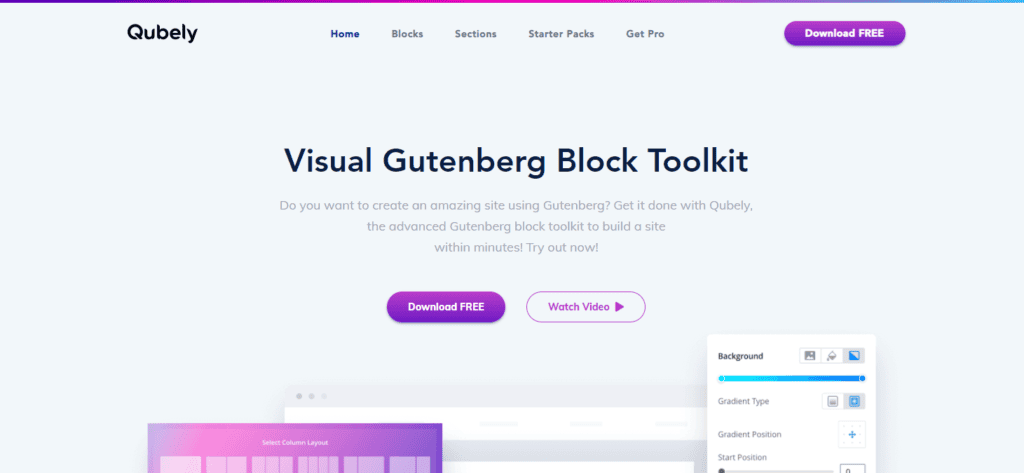
Before I explain Qubely, let's talk about Gutenberg. Understanding Gutenberg is essential in explaining Qubely.
First, Gutenberg is the name of a block editor that was released on December 6, 2018, and is now available in WordPress 5.0 and later. To put it simply, switching to Gutenberg has significantly changed the way you write on the WordPress post screen. With Gutenberg, I can now create pages more intuitively than before.
AndQubelyis Gutenberg's dedicated block editor for creating more versatile and customizable pages. In short, Qubely allows you to use templates, layouts, and blocks that you can't use with regular Gutenberg.
With Qubely, you can create customized pages on the editing screen that you wouldn't normally be able to create.
Why not use a domestic WordPress page builder
By the way, there are several page builder plugins in Japan that allow you to create landing pages.
I'm Japan, so I've tried any WordPress page builder in the country. But basically it's not as advanced as Elementor or Brizy, so I stopped using it.
Some Japan WordPress page builders are still on sale that haven't been updated for nearly two years. Therefore, IWe recommend Elementor and Brizy, which are regularly updated.I do.
I personally find it hard to criticize Japan-made WordPress page builders. However, if you are currently paying 10,000 yen for a domestic WordPress page builder, it is 10 times better to use the free Elementor. This is the truth.
What to Consider When Choosing a WordPress Page Builder
So far, I've introduced some of my recommended WordPress page builder plugins.
If you choose a WordPress page builder other than this, then there are 7 things to keep in mind.
Ease of use
One of the important things to consider when choosing a WordPress page builder. That is "ease of use".
It's a pain to keep using a difficult WordPress page builder, isn't it? It's better to choose a page builder that you feel good about using.
Some WordPress page builders claim to have a wide range of features, but even if they have a lot of features, they won't use all of them.
That's whyThat I don't feel stressed because I'm using itis much more important.
Reliability of the developer
No matter how good a WordPress page builder looks, don't jump right at it. This is advice from me.
The WordPress page builder I signed up for in 2018 hasn't been updated for over two years. However, it is still sold. There are no improvements or updates, so development is completely abandoned.
When choosing a WordPress page builder, be sure to check the developer as well. If you look at the plugin's changelog and see that it hasn't been updated for more than a few months, or that no features have been added at all, you should avoid it.
I can't say everything, but the WordPress page builderEven if it is developed by a team of only a few people (developed by one person), development tends to be abandoned.In particular, teams that have not been developed for many years are prone to going out of business.
It is also a point to determine how to respond when contacting the developer. You should also avoid not receiving a reply.
All of the WordPress page builders I've mentioned on this page confirm the reliability of their developers. Please rest assured that we have watched and introduced our activities from our founding to the present.
Display speed
To choose a WordPress page builder, also check the size (weight). The more feature-rich a WordPress page builder is, the larger it tends to be.
The large size of the WordPress page builder means thatWhen you put the plugin in, the display speed of your site will be slower.
This is because by adding a page builder, you will be adding new code such as HTML, CSS, JavaScript, and PHP. Adding new code will make it take longer for the page to load.
For example, even the Elementor and Brizy mentioned on this page will slow down page loading speeds.
If you search, there are also articles such as "Elementor does not slow down the display speed" and "Brizy is fast". However, the display speed will be reduced compared to not putting anything in. This is a fact.
However, you can reduce the slowdown of your site by making images lighter or adding plugins that compress CSS and JavaScript.
【Latest】 Causes of slow WordPress display speed and how to make it super fast in 15 minutes
We recommend choosing a WordPress page builder that is as low-load as possible.
Low prices
One of the most important factors is pricing.
WordPress page builders have different pricing.
When you choose a page builder, first look at "how much it costs in one year". The paid version of Elementor is the cheapest plan at $49. It's cheap. Brizy is also $49.
OptimizePress costs $99 per year. It's expensive. (I think it's worth buying if you look at the features.)
There is a difference in fees like this.
Can it be integrated with other apps?
Now, whether the WordPress page builder supports these integration services. This is important.
If so, you can easily connect your WordPress page builder with other third-party apps.
I will explain what exactly it will be. For example, the WordPress page builder Brizy integrates with Mailchimp. If you create an email sign-up form within your landing page, you can automatically add users who subscribed to your email from the form to your Mailchimp email list.
Also check if it can integrate with other marketing services.
Recommended WordPress plugins to create landing pages
Thank you for reading to the end.
We have shown you how to create a landing page with a WordPress plugin, but we hope you found it helpful.
If you want to create your own landing page using a WordPress theme, we recommend you check out the following article.
7 WordPress Themes to Create Landing Pages (LPs)
In this article, we have selected WordPress themes that allow you to create landing pages. Please take a look.
If you have any questions after reading this blog post, please let us know in your questions and comments. See you.













![How to use Genesis Framework and discount sale information [2024]](https://sp-ao.shortpixel.ai/client/to_webp,q_lossy,ret_img,w_485,h_273/https://takeofujii.net/wp-content/uploads/2022/11/genesis-framework-485x273.png "How to use Genesis Framework and discount sale information [2024]")




Latest Comments