



Want to turn your ideas into engaging videos in just a few minutes?
Hello, this is Fujii. In recent years, the evolution of AI technology has dramatically changed video production.
Among them, many bloggers and YouTubers have introduced it「Pollo AI」。
Pollo AI is an AI tool that allows anyone to easily create professional-looking videos by simply inputting text or images. It can be used in all kinds of situations, from marketing, education, to hobby creative activities.
In this article, we'll tell you about the features, user-friendliness, and revolution it can bring to video production from a hands-on perspective. Let's take a look together
*It has become troublesome to post an affiliation link to the official website, so please google it with "Pollo AI".
What is Pollo AI?


According to Wyzowl's statistics, about 90% of companies have adopted video marketing.
I'm sure you understand the importance of video marketing.
But
- I don't have time
- Not enough budget
- No expertise
… You must have such a problem. There are many modern AI tools, but which one is better?
Every day, I am busy with video production and cannot concentrate on my main work. I can't afford to hire an expensive production company. The videos I made also have no effect.
Poor cost performance... Are you feeling that dilemma?
So, let's try Pollo AI.
Easy to use, good quality
Pollo AI is the latest video creation tool that utilizes artificial intelligence (AI).
Just input your text or images, and like magic, you'll have the professional-quality video you want in minutes. No expensive software or expertise required.
In fact, this article will explain how to use it.
There are various video generation AI tools available, but if you need a handy tool, Pollo AI is the way to go.
What can you do with Pollo AI?
We'll discuss the details of Pollo AI later.
First, I will show you a real-life example.
Videos like this
Up to this video.
Text-to-video with Pollo AI
Easy to use.
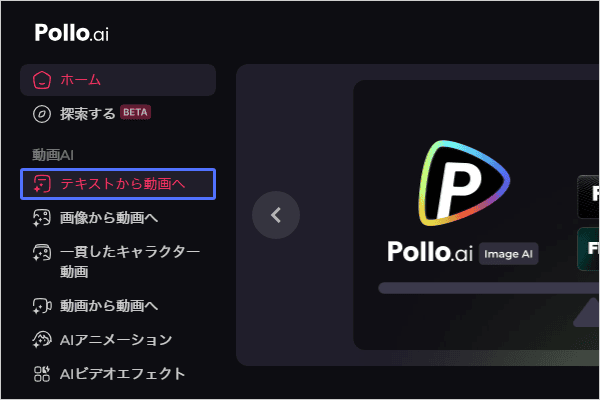
From the menu, press "Text to Video".

Next, choose a model for making videos with AI.

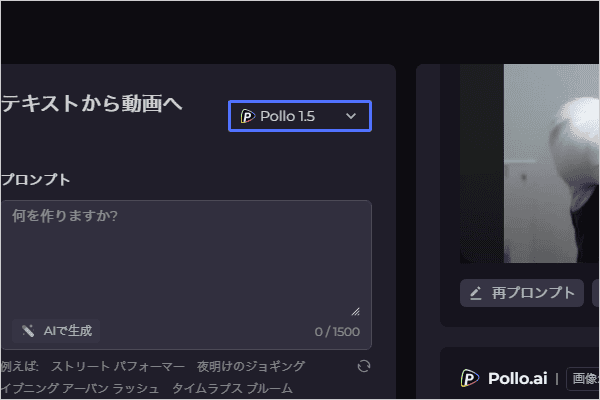
The more powerful the model, the better the quality of the video. On the other hand, the consumption of credit is large. This time I chose the right model.


Next, enter the video idea you want to make.

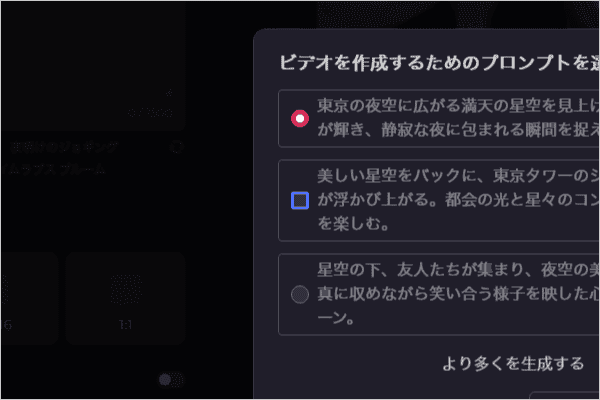
If you can't think of an idea (prompt) to enter, the AI will create it for you.
This time, I threw it at the AI and said, "The silhouette of Tokyo Tower emerges against the beautiful starry sky. I decided to have them make a romantic video.
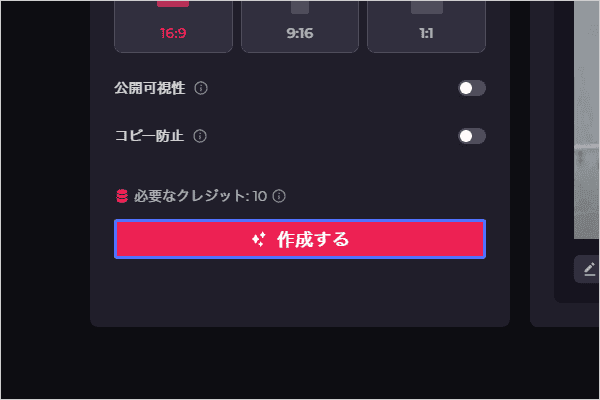
Next, choose the aspect ratio.

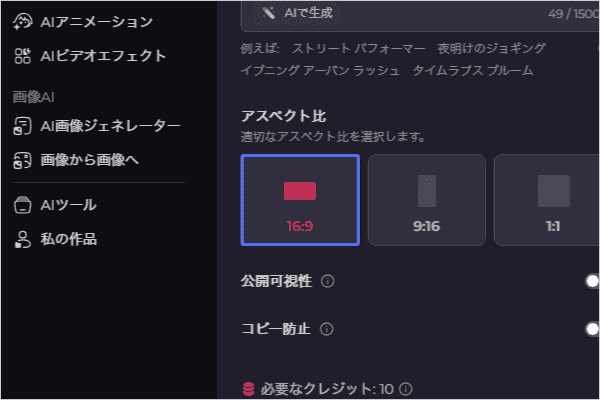
Finally, press the "Create" button and wait for a few minutes.

Here is the finished video.
Image to Video with Pollo AI
Next, let's turn the image into a video.
This is the image to try. This is an AI image of me holding a gun.


Let's move this image.
Now let's use the "Image to Video" function.
Please see here.
The video is complete.
The videos you make here are free to use. Commercial use is also available. You can use it with confidence in YouTube and video ads.
It can be used for both hobby and business.
- Text to Video
- Turn images into videos
And that's not all.
There are various other functions available. Let's continue looking at the other features.
Pollo AI Features

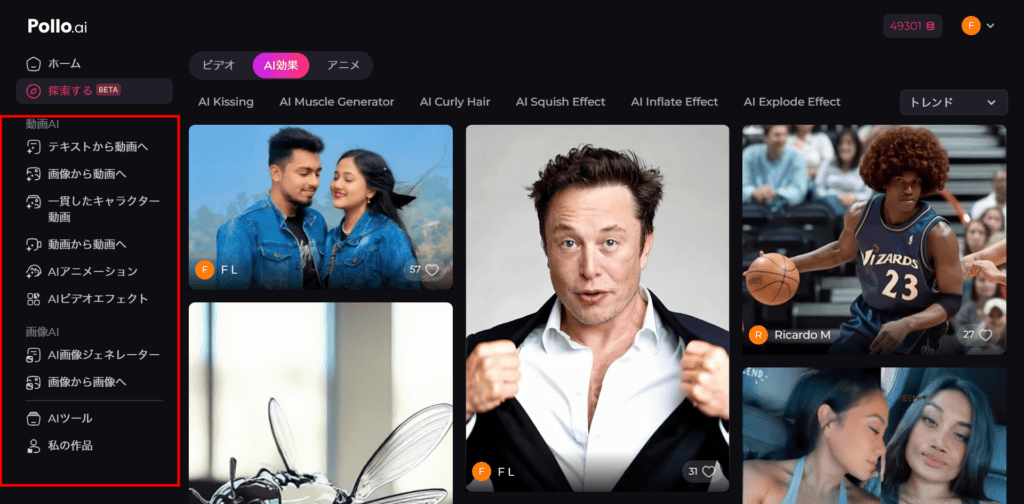
From hobby to business, Pollo AI allows you to create AI videos that can be used for a variety of purposes.
- Text to Video
- Image to Video
- Create consistent character videos
- Video to Video
- AI Anime
- AI Video Effects
- AI Image Generator
- Image to image
- Video quality enhancement
- AI Video Filters
- Face swap
- Video Denoise
etc.
If you add detailed functions, there are still many more. You can create anything from funny to practical video material.
How to Use Pollo AI
We have summarized the steps to convert an image into a video.
The same goes for other functions, just choose from the menu.
Pros and Cons of Pollo AI
Pros
The advantages of Pollo AI are "ease" and "ease of use". The interface is easy to see and simple. Above all, Japanese is also supported.
Therefore, you will not be confused about how to use it.
For these reasons, it can be said that it is easy to use when compared to other AI video creation tools.
You can also choose from a variety of AI models and menus. You can freely choose according to the video you want to make.
Pollo AI makes it easy to create funny videos to send to your friends and lovers.
It is also commercially available. You can also use it as a video material for your own YouTube videos, marketing, and business. The degree of freedom in this area can be said to be a big advantage.
Disadvantages
There are two disadvantages.
(1) Beware of depletion of credits
If you use Seaweed or Luma AI, you will run out of credits in no time.
For example, Seaweed has good quality of the videos it generates. However, the credits consumed are 80.

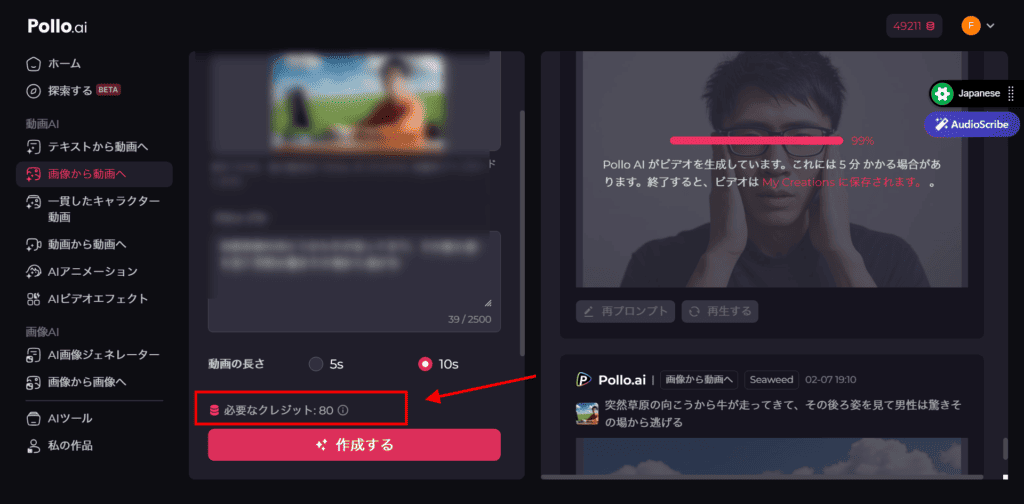
In other words, if you use it 10 times a month, you're done. Luma also costs 60 credits once, so you can use it 13 times and you're done.
Moreover, it takes every time you try again.
… This means that depending on the model, the cost performance is quite poor. It's not just about video generation.
You can also generate images with Pollo AI. But image generation also comes with credit.
The model with good value for money is the Flux Schnell. The required credits are 1. Therefore, if you only make images, you can make 800 images. … But if you're making images, other tools are much more cost-effective.
Of course, the models are limited, but Canva allows you to generate the images you need on the fly as you design, and you don't have to worry too much about credits. The same goes for ChatGPT.
There is a bit of a learning curve, but it's fal.ai cheaper if you want to try out video and image models. Therefore, you need to be careful only about the cost.
(2) Slow video generation
Model performance, video length, resolution, and all these reasons combine to slow down video generation considerably.

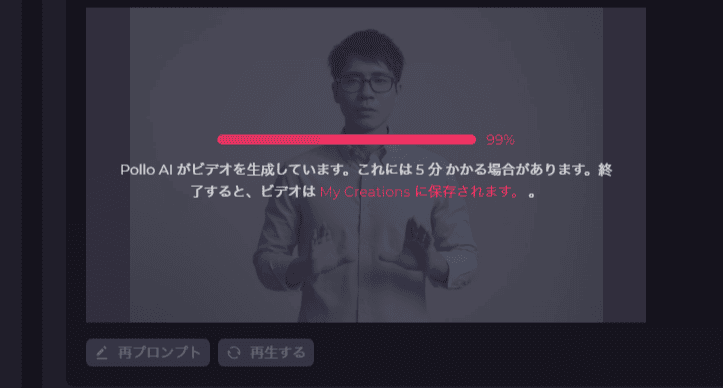
Please see the image above.
It says "It may take 5 minutes to generate the video." … But in reality, it takes more than 15 minutes.
Simply put, high credit consumption = high-quality video generation. This also increases the video generation time.
To see how long it actually takes, try the free trial once.
Pollo AI Pricing Plans

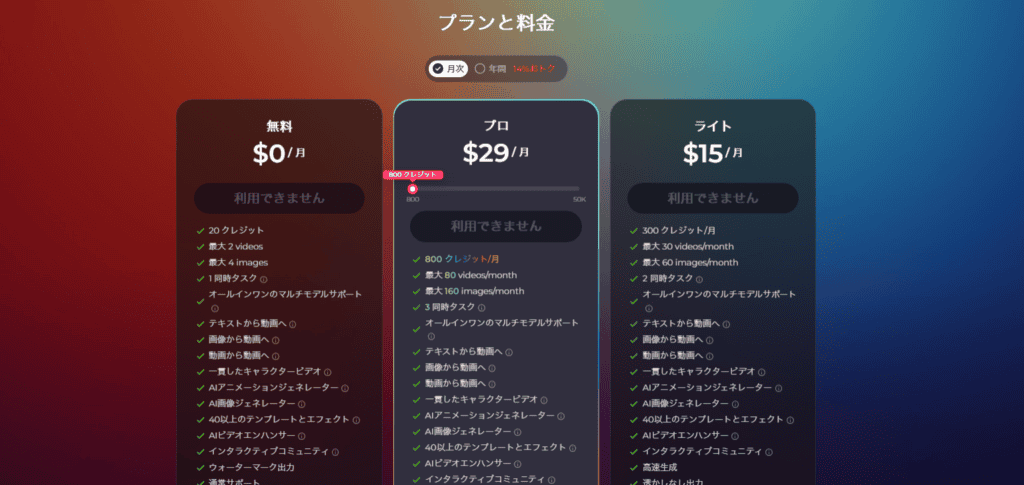
Pollo AI's pricing plans include:Free and paid plans (Lite and Pro)There are 3 types. You can choose between monthly and annual contracts for each.
When converted to Japan yen (as 1 dollar = 150 yen), it is as follows.
Free Plan
- Fee: Free
- Features: 20 credits per month, up to 2 videos, and up to 4 images. No more than one concurrent task. With a watermark, the support is usually a support. It's great for trial, but not for full-fledged use.
Lite Plan
- Monthly fee: 1,500 yen (10 USD× 150 yen)
- Annual fee: 18,000 yen ($120× 150 yen)
- Features: 300 credits per month, up to 30 videos, and up to 60 images. No more than 2 concurrent tasks. No watermark, fast generation, more camera movement options, private video visibility, copy protection, and priority support are available. Ideal for personal use or small businesses.
Pro Plan
- Monthly fee: 4,350 yen ($29×150 yen)
- Annual fee: 36,000 yen ($240×150 yen)
- Features: 800 credits per month, up to 80 videos, and up to 160 images. You can have no more than 3 concurrent tasks. You get all the features of the Lite plan, plus more credits and concurrent tasks. It's perfect for serious video production and large-scale businesses. An annual contract is more advantageous than a monthly contract.
Supplement: About Credits
The number of credits you need depends on the AI model you use and the number of videos and images you create. Choose a plan that suits your video production frequency and scale.
Try the free plan before making a payment.
You can make a decision based on that.
Who is Pollo AI recommended for?
It is recommended for those who want to make AI videos easily and beginners.
There are other options for professionals and intermediates and above.
From the perspective of ease of use,I think Pollo AI is worth using for beginners.It is characterized by being intuitive to use without any skills or knowledge.
You can also subscribe to a paid plan for commercial use.
You can freely use the videos and images you create with Pollo AI for advertising, promotions, product descriptions, and more.
Therefore, it is difficult to make an effective video even though the budget is limited... If you have such a problem, Pollo AI is the way to go.
How does Pollo AI support?
The reason I wrote this article was an email.
The person in charge of Pollo AI offered me to make a review article for my product, and I decided to publish this article.
Of course, I write it for free. I don't get paid for my reviews.
(Of course, I'm an afficus, so I've included the affiliate link in the article)
So I communicated with the person in charge of Pollo AI, and I felt that the response was solid.
"Write down the good and the bad."
That's why I was able to publish this article.
The rating doesn't seem bad when it comes to support.

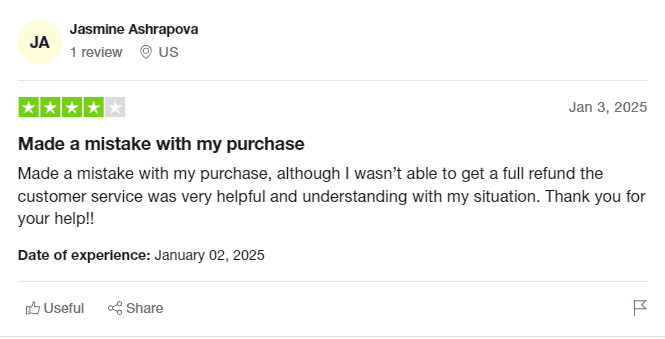
"I paid incorrectly, but I got a proper refund."
I didn't see any other bad reviews about support either.
That's why the person in charge of Pollo AI may look bitter, but let's also talk about our honest evaluation▼
How does Pollo AI rate?
I also looked at the ratings of other users. For example, the famous review site Trustpilot.

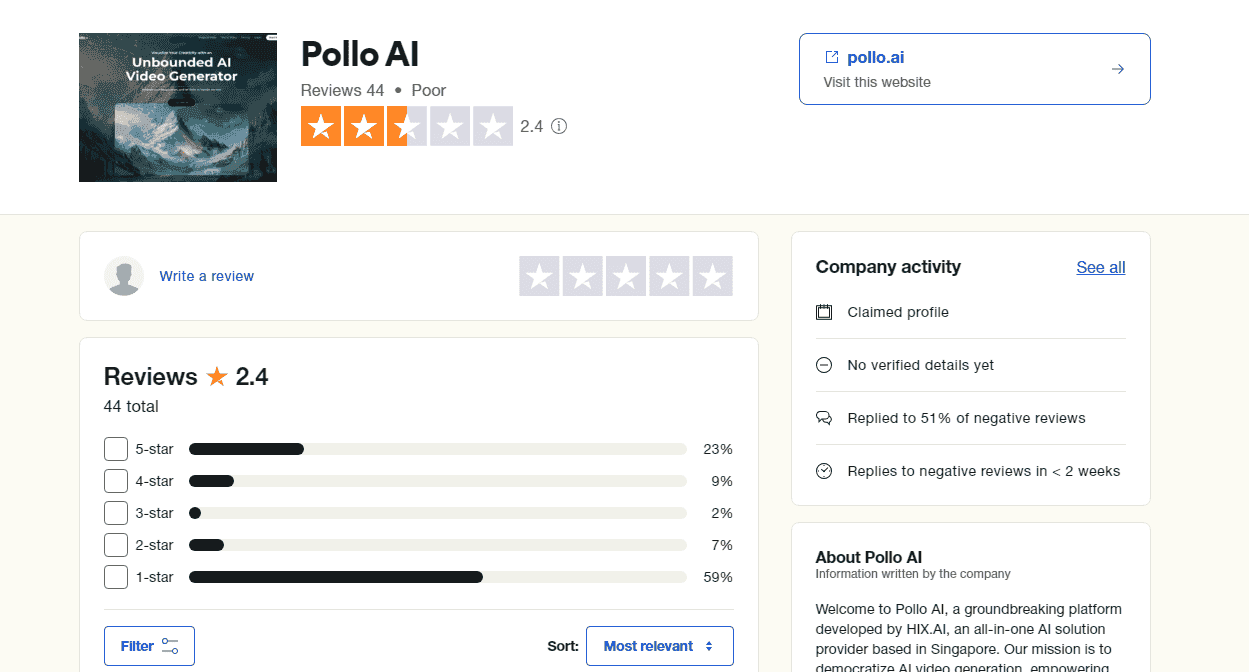
Rating is 2.4.
It's really bad.
I read all the reviews. For example, when a free user creates a video with Pollo AI, they cannot delete the video themselves. I have to upgrade to a paid plan to turn it off→ I haven't heard of that! So it seems that people who tried it for free are giving low ratings.
However, there was no evaluation that "the product itself is bad", and most of them were cries of free users.
So, if you are going to try it from now on, please do not upload images that should not be leaked.
If you pay attention to that, you can use it safely.
By the way, if you pay, you can delete images and videos yourself. Don't worry.
Summary: Frankly, Is Pollo AI recommended?
We explained how to use the AI video generation tool "Pollo AI".
I've also been using video generation AI since last year. Comparing these tools、、、 at the time of writing this articlePollo AI is a good choice for its cost-effectiveness.
For Pollo 1.5, it consumes 5 credits to make a 10-second video. For $29 per month (800 credits), you'll make 80 videos per month. I don't think it's that bad.
However, if you use a higher model such as Kling 1.6, it can cost 40 credits for a single video generation. … In that case, you will lose all your credits 20 times in one month.
I will tell you not to misunderstand.
I don't intend to rave about Pollo AI excessively, nor do I intend to fall into it the other way around.
As a fact that depending on the model,It will require a lot of credit.
Therefore, you need to think carefully about how to use it.
As my overall comment"It's easy to use, but be careful as the credits you consume will change depending on the function you use."is.
You can try it for free.
Please try it once. In the future, the cost of video generation will also decrease.
Therefore, please take it as an evaluation at the time of writing this article.










![Explanation of how to use Scalenut and how to automatically create articles with AI [User reviews]](https://sp-ao.shortpixel.ai/client/to_webp,q_lossy,ret_img,w_485,h_273/https://takeofujii.net/wp-content/uploads/2021/10/scalenut.jpg "Explanation of how to use Scalenut and how to automatically create articles with AI [User reviews]")


![[2024] Thorough explanation of the features, reputation, and usability of thin rental servers](https://sp-ao.shortpixel.ai/client/to_webp,q_lossy,ret_img,w_485,h_273/https://takeofujii.net/wp-content/uploads/2021/10/wpxshin-review.png "[2024] Thorough explanation of the features, reputation, and usability of thin rental servers")




Leave a Reply